
JMT FM225
FM225 Facial Recognition Module User Manual
Modelo: FM225
1. Introdução
The JMT FM225 Facial Recognition Module is an advanced 3D facial recognition camera designed for intelligent offline applications. Utilizing deep learning infrared facial recognition algorithms, this module provides highly accurate and reliable live detection capabilities, making it suitable for integration into smart homes, security monitoring systems, smart door locks, mobile vending machines, and various other fields requiring robust biometric authentication.
This manual provides comprehensive instructions for the setup, operation, maintenance, and troubleshooting of your FM225 module.
2. Informações de segurança
- Ensure the power supply meets the specified requirements (DC5.5V~9V@1A) to prevent damage to the module.
- Do not expose the module to extreme temperatures outside the working range (-20°C to +60°C) or storage range (-30°C to +70°C).
- Avoid environments with high humidity (above 93% without condensation) to prevent electrical short circuits.
- Handle the module with care to prevent physical damage. Avoid dropping or subjecting it to strong impacts.
- Do not attempt to disassemble or modify the module, as this will void the warranty and may cause malfunction.
- Mantenha o módulo longe de água e outros líquidos.
3. Package Contents (Kit A)
Ao abrir a embalagem, verifique se todos os seguintes componentes estão presentes:

Image: Contents of the FM225 Facial Recognition Module Kit A, including the module, a USB cable, and a set of connection wires.
- 1x FM225 Facial Recognition Module
- 1x USB Communication Cable
- 1x Set of Connection Wires (for UART/power)
4. Produto acabadoview
The FM225 module is a compact and powerful facial recognition solution. It features dual infrared cameras for 3D depth sensing and a central infrared illuminator for reliable performance in various lighting conditions. The module supports both UART and USB communication interfaces for flexible integration.

Imagem: Uma vista detalhada de cima para baixo view of the FM225 module, highlighting the two camera lenses and the central infrared illuminator.
Principais características:
- Deep Learning Infrared Facial Recognition: Advanced algorithms for high accuracy.
- Detecção ao vivo: Prevents spoofing attempts.
- Operação off-line: Capable of performing recognition without an internet connection.
- High Recognition Accuracy: 98.85% accuracy rate.
- Large Face Capacity: Stores up to 100 facial features.
- Flexible Communication: UART and USB interfaces.
5. Configuração
This section details the physical connection and initial setup of the FM225 module.
5.1 Diagrama de pinagem
Refer to the diagram below for the pin assignments for both UART and USB interfaces.
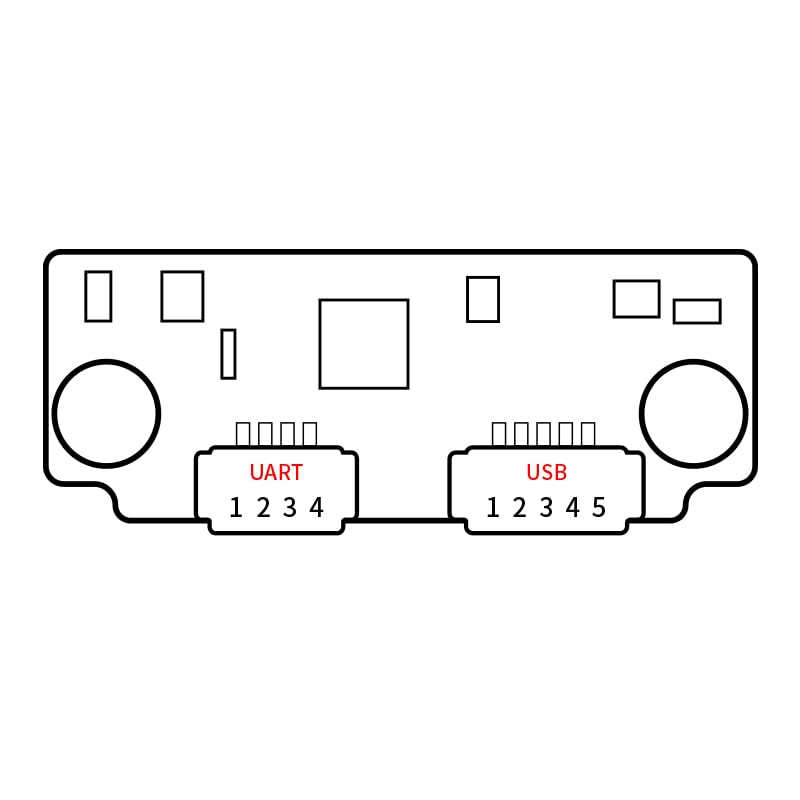
Image: Schematic diagram illustrating the UART (1-4) and USB (1-5) pin connections on the FM225 module's circuit board.
5.2 Conectando o Módulo
- Conexão de energia: Connect the module to a stable DC power supply within the range of 5.5V to 9V at 1A. Ensure correct polarity.
- Interface de comunicação:
- UART: Use the provided connection wires to interface with your host system via UART. Refer to the pinout diagram for TX/RX and GND connections.
- USB: Connect the module to your host system using the provided USB cable. This interface is typically used for data transfer and configuration.
- Montagem: Securely mount the module in its intended location, ensuring the camera lenses have a clear, unobstructed view of the area where facial recognition will occur. Consider the optimal recognition distance (0.3m to 1.1m) and height (1.35m to 2.20m).
6. Instruções de operação
The FM225 module operates primarily through commands sent via its communication interfaces. Specific software or SDKs provided by the manufacturer are typically required for full functionality, including face enrollment and recognition.
6.1 Face Enrollment
To enroll a new face into the module's memory:
- Ensure the module is powered on and connected to your host system.
- Use the manufacturer's provided software or send the appropriate UART/USB commands to initiate the enrollment process.
- Position the subject's face within the recognition distance (0.3m to 1.1m) and within the recognition angle (supports multi-angle input).
- Follow the on-screen prompts or command responses to complete the enrollment. The module can store up to 100 facial features.
6.2 Reconhecimento Facial
Once faces are enrolled, the module can perform recognition:
- The module continuously scans for faces within its field of view.
- When a face is detected, the module compares it against its stored facial features.
- If a match is found with sufficient accuracy (98.85%), the module will output a recognition result via the chosen communication interface.
- The module's live detection feature helps prevent recognition from photos or videos.
7. Manutenção
The FM225 module requires minimal maintenance to ensure optimal performance.
- Limpeza: Gently wipe the camera lenses with a soft, lint-free cloth. Do not use abrasive cleaners or solvents.
- Ambiente: Assegure-se de que o ambiente operacional permaneça dentro das faixas de temperatura e umidade especificadas.
- Atualizações de firmware: Verifique periodicamente as instruções do fabricante. website para quaisquer atualizações de firmware disponíveis para melhorar o desempenho ou adicionar novos recursos.
8. Solução De Problemas
This section addresses common issues you might encounter with the FM225 module.
| Problema | Possível causa | Solução |
|---|---|---|
| O módulo não liga. | Vol da fonte de alimentação incorretotage or current; reversed polarity; loose connection. | Verify power supply meets DC5.5V~9V@1A. Check power cable connections and polarity. |
| Facial recognition fails or is inaccurate. | Incorrect recognition distance/angle; poor lighting; dirty lenses; face not enrolled. | Ensure subject is within 0.3m-1.1m. Check lighting conditions. Clean camera lenses. Verify face is enrolled. |
| Communication issues (UART/USB). | Incorrect wiring; driver issues; incorrect baud rate/port settings. | Check pinout connections. Install necessary drivers on host system. Verify communication settings (baud rate, etc.). |
| O módulo deixa de responder. | Overheating; software error; power fluctuation. | Power cycle the module. Ensure adequate ventilation. Check power supply stability. |
9. Especificações
Detailed technical specifications for the FM225 Facial Recognition Module:
| Parâmetro | Valor |
|---|---|
| Modelo do produto | FM225 |
| Interface de comunicação | UART & USB |
| Facial Algorithm | Deep learning infrared facial recognition algorithms |
| Recognition Accuracy | 98.85% |
| Number of Faces | 100 facial features |
| Taxa de identificação incorreta | <0.0001% (parts per million) |
| FAR/FRR | <1% |
| Distância de Reconhecimento | 0.3 1.1m ~ |
| Height Recognition | 1.35 - 2.20m (@ 20°~23° tilt angle Left, right, up, down~20°) |
| Ângulo de reconhecimento | Supports multi-angle facial input, expanding recognition range |
| Requisitos da fonte de alimentação | DC5.5V ~ 9V@1A |
| Temperatura de trabalho | -20°C ~ +60°C |
| Temperatura de armazenamento | -30°C ~ +70°C |
| Humidade ambiental | 10% ~ 93% (sem condensação) |
| Main Board Size | 40 * 15 * 10.65mm (non-integral size) |
| Cenários aplicáveis | Smart homes, security monitoring, smart door locks, mobile vending machines, and other fields |
10. Garantia e Suporte
For warranty information, technical support, or further inquiries, please contact the manufacturer or your point of purchase. Keep your purchase receipt as proof of purchase for warranty claims.
Manufacturer: HI-LINK
Brand: JMT
For the latest documentation and software, please visit the official JMT store or HI-LINK support page.
Ask a question about this manual
Ask about setup, troubleshooting, compatibility, parts, safety, or missing instructions. Manuals+ will review the question and use this page’s manual context to help answer it.