
ELISWEEN WP006
ELISWEEN Wireless Presenter WP006 User Manual
Modelo: WP006
Introdução
This manual provides detailed instructions for the ELISWEEN Wireless Presenter Model WP006. It covers setup, operation, maintenance, and troubleshooting to ensure optimal performance and longevity of your device. Please read this manual thoroughly before using the product.
Conteúdo da embalagem
Verifique se todos os itens estão presentes no seu pacote:
- ELISWEEN Wireless Presenter (Model WP006)
- USB/Type-C Dual-Head Receiver
- Maleta protetora de transporte
- Manual do usuário (este documento)
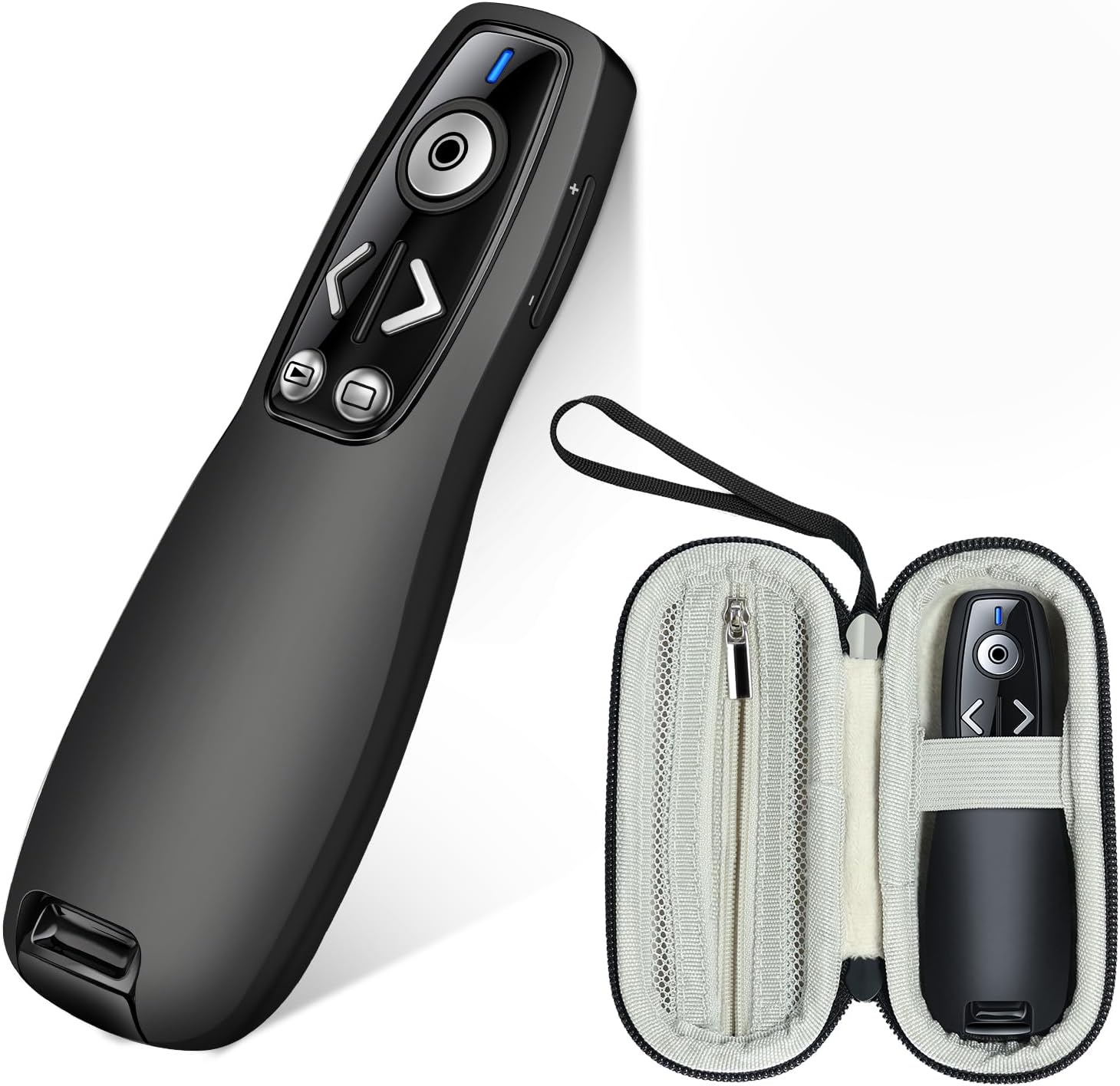
Image: The ELISWEEN Wireless Presenter and its included protective carry case.
Produto acimaview
The ELISWEEN Wireless Presenter WP006 is designed for seamless presentations. It features intuitive controls and a dual-head USB/Type-C receiver for broad compatibility.

Imagem: Um close-up view of the ELISWEEN Wireless Presenter, highlighting its control buttons including Page Up/Down, Slide Show/Black Screen, Laser Pointer, and the wireless receiver storage.
Principais características:
- Página para cima/para baixo: Navigate through slides.
- Slide Show & Black Screen: Start/end presentations and black out the screen.
- Ponteiro laser: Highlight specific content on the screen.
- Controle de volume: Ajuste a saída de áudio.
- Switch Windows: Toggle between open applications.
- Receptor de cabeça dupla: USB-A and USB-C compatibility.
- Integrated Receiver Storage: Securely store the receiver within the presenter.
Configurar
1. Instalação da bateria
The ELISWEEN Wireless Presenter requires 2 AAA batteries (not included).
- Locate the battery compartment on the back of the presenter.
- Abra a tampa da bateria.
- Insira duas pilhas AAA, certificando-se da polaridade correta (+/-).
- Feche a tampa da bateria com segurança.
2. Conectando o receptor
The presenter uses a dual-head USB/Type-C receiver for versatile connectivity.
- Remove the USB/Type-C receiver from its storage slot at the bottom of the presenter.
- Identify the appropriate port on your computer (USB-A or USB-C).
- Plug the receiver into the chosen USB port. The system will automatically detect and install the necessary drivers. No additional software installation is required.

Image: The wireless presenter with its USB receiver inserted into a laptop's USB port, illustrating the plug-and-play functionality.

Image: Two laptops demonstrating the dual compatibility of the receiver, showing both USB-A and USB-C connections.
3. Ligar / desligar
Locate the power switch on the side of the presenter. Slide it to the "ON" position to activate the device. Slide it to "OFF" when not in use to conserve battery life.
Instruções de operação
Once the receiver is connected and the presenter is powered on, you can begin your presentation.
- Página para cima/para baixo: Pressione o < (Page Up) or > (Page Down) buttons to navigate through your presentation slides.
- Slide Show & Black Screen: Pressione o botão com o play/pause icon to start or end a slide show. Press the button with the black screen icon to black out the screen during a presentation and press again to resume.
- Ponteiro laser: Pressione e segure o circular button in the center to activate the red laser pointer. Release to turn it off.
- Controle de volume: Use o + e - buttons on the side of the presenter to adjust the system volume.
- Switch Windows: Pressione o botão dedicado window icon button to switch between open applications on your computer.

Image: A presenter using the ELISWEEN Wireless Presenter to highlight content on a screen with its red laser pointer, demonstrating its long-range control.
Compatibilidade:
The ELISWEEN Wireless Presenter is compatible with a wide range of operating systems and presentation software:
- Sistemas operacionais: Windows, MacOS, Linux, Android
- Programas: PowerPoint, Excel, Word, Prezi, PDF, Keynote
Manutenção
Presenter Care:
- Clean the presenter with a soft, dry cloth. Avoid using harsh chemicals or abrasive materials.
- Do not expose the presenter to extreme temperatures, humidity, or direct sunlight.
- Remove batteries if the presenter will not be used for an extended period to prevent leakage.
Carry Case Care:
The included protective carry case is made from durable EVA material to shield your presenter from drops, scratches, bumps, and dust.
- Keep the case clean by wiping it with a damp pano.
- Utilize the internal mesh pocket for storing spare batteries or other small accessories.
- Always store the presenter in its case when transporting to ensure maximum protection.

Imagem: Várias views of the protective carry case, showcasing its zippered mesh pocket for accessories, comfortable hand strap, and the presenter securely stored inside.
Solução de problemas
| Problema | Possível causa | Solução |
|---|---|---|
| O apresentador não responde. |
|
|
| O ponteiro laser não está funcionando. |
|
|
| Alcance limitado ou conexão intermitente. |
|
|
Especificações
| Número do modelo | WP006 |
| Conectividade | 2.4GHz Wireless (USB-A & USB-C dual-head receiver) |
| Faixa de operação | Até 100 pés (30 metros) |
| Tipo de laser | Red Laser (Class 2) |
| Fonte de energia | 2 x pilhas AAA (não incluídas) |
| SO compatível | Windows, MacOS, Linux, Android |
| Dimensions (Presenter) | Dimensões aproximadas da embalagem: 5.63 x 2.6 x 2.56 polegadas. |
| Weight (Presenter) | Aproximadamente 1.94 onças |
| Características especiais | Ergonomic design, Integrated receiver storage, Volume control, Window switch, Full/Black screen function |
Garantia e Suporte
For warranty information or technical support, please refer to the contact details provided with your purchase or visit the official ELISWEEN website. Guarde o recibo de compra como comprovante para solicitações de garantia.
Ask a question about this manual
Ask about setup, troubleshooting, compatibility, parts, safety, or missing instructions. Manuals+ will review the question and use this page’s manual context to help answer it.