
Introdução
Welcome to the user manual for your new TECNO Spark 20 Pro 5G smartphone. This guide provides essential information to help you set up, operate, maintain, and troubleshoot your device. Please read through this manual carefully to ensure optimal performance and longevity of your smartphone.

Imagem: Frente e verso view of the TECNO Spark 20 Pro 5G smartphone, showcasinseu design e módulo de câmera.
1. Configuração
1.1 Conteúdo da embalagem
Antes de começar, verifique se todos os itens estão presentes na embalagem:
- TECNO Spark 20 Pro 5G Smartphone
- Cabo USB tipo C
- Adaptador de energia (33 W)
- Ferramenta Ejetora SIM
- Guia de Início Rápido (se aplicável)
- Cartão de garantia (se aplicável)
1.2 Inserindo o cartão SIM
- Localize a bandeja do cartão SIM na lateral do seu dispositivo.
- Insira a ferramenta de ejeção do SIM no pequeno orifício ao lado da bandeja e pressione suavemente até que a bandeja se solte.
- Place your Nano SIM card into the designated slot on the tray. Ensure the gold contacts face downwards.
- Empurre cuidadosamente a bandeja de volta para o telefone até que ela se encaixe no lugar.

Imagem: Lado view of the smartphone showing the SIM card tray and power/volume buttons.
1.3 Carregamento inicial e inicialização
Recomenda-se carregar totalmente o dispositivo antes da primeira utilização.
- Conecte o cabo USB tipo C à porta de carregamento do telefone e ao adaptador de energia.
- Conecte o adaptador de energia a uma tomada de parede.
- Once sufficiently charged, press and hold the Power button (located on the side) until the TECNO logo appears.
- Siga as instruções na tela para concluir a configuração inicial, incluindo a seleção do idioma, a conexão Wi-Fi e a configuração da conta do Google.
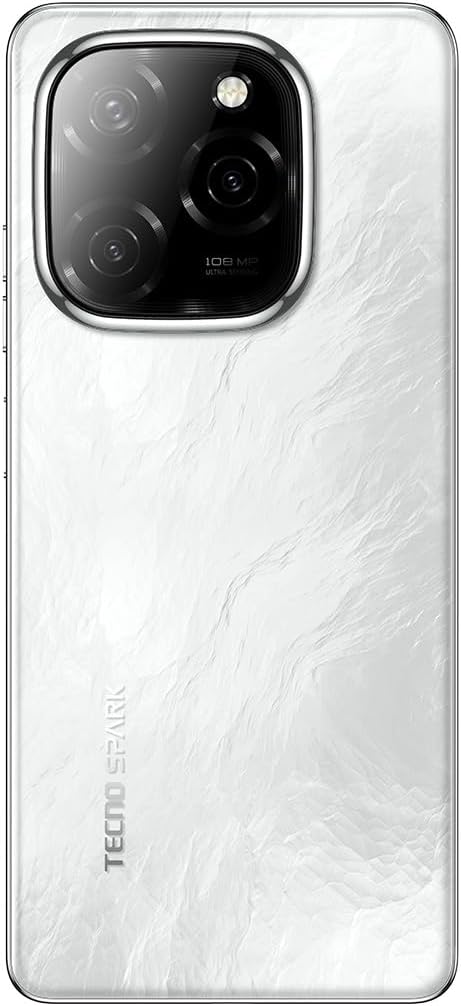
Imagem: Parte inferior view of the smartphone, highlighting the USB Type-C charging port and speaker grille.
2. Operando seu dispositivo
2.1 Navegação básica
Your TECNO Spark 20 Pro 5G runs on Android 14 with HiOS 14. Navigate using touch gestures:
- Tocar: Selecione um item ou abra um aplicativo.
- Deslize: Percorra as telas ou listas.
- Pitada: Aumente ou diminua o zoom nas imagens e web páginas.
- Pressão longa: Aceda aos menus contextuais ou mova os ícones.
2.2 Funções da câmera
The device features a 108MP Ultra Clear rear camera and an 8MP front camera with dual LED flash.
- Câmera traseira: Open the Camera app, select "Photo" for standard shots, "Pro" for advanced settings, or "Macro" for close-up photography.
- Câmera frontal: Switch to the front camera for selfies. The dual LED flash assists in low-light conditions.
- Gravação de vídeo: Select "Video" mode to record in up to 4K resolution.

Imagem: Traseira view of the smartphone, highlighting the 108MP camera system with its triple lens setup.
2.3 Conectividade 5G
Experience high-speed internet with 5G connectivity, supported by 10 5G bands, Linkbooming, and Smart 5G 3.0 technology for wider coverage and faster speeds.
- Ensure your SIM card supports 5G and your network provider offers 5G services in your area.
- Access network settings to manage 5G preferences.
2.4 Áudio e Tela
- Áudio: Enjoy immersive sound with Dolby Atmos and dual stereo speakers, featuring Hi-Res Audio certification.
- Mostrar: The 6.78-inch LTPS display offers a 120Hz adaptive refresh rate for smooth scrolling and gaming. The Dynamic Port 2.0 provides interactive notifications.
2.5 Recursos de Segurança
Unlock your device securely using the side-mounted fingerprint sensor.
- Vá para Settings > Security & Privacy > Fingerprint Unlock Para configurar sua impressão digital.
3. Manutenção
3.1 Limpando seu dispositivo
- Use um pano macio e sem fiapos para limpar a tela e o corpo do telefone.
- Evite usar produtos químicos agressivos ou materiais abrasivos.
- The device has an IP53 rating, meaning it is resistant to dust and splashing water, but it is not waterproof. Avoid submerging it in water.
3.2 Cuidados com a bateria
- Para prolongar a vida útil da bateria, evite expor o telefone a temperaturas extremas.
- Use the original 33W fast charger for optimal charging performance.
- Evite descarregar completamente a bateria com frequência.
3.3 Atualizações de Software
Verifique e instale regularmente as atualizações de software para garantir que seu dispositivo tenha os recursos e patches de segurança mais recentes.
- Vá para Configurações > Sistema > Atualização de software para verificar as atualizações disponíveis.
4. Solução De Problemas
| Problema | Solução possível |
|---|---|
| O dispositivo não liga. | Ensure the battery is charged. Connect to the charger for at least 10 minutes, then try powering on again. If it still doesn't work, perform a forced restart by holding the Power button for 10-15 seconds. |
| Não é possível conectar ao Wi-Fi. | Check if Wi-Fi is enabled in settings. Restart your router and phone. Forget the network and reconnect. |
| Sinal 5G fraco. | Ensure you are in a 5G coverage area. Check your SIM card is properly inserted. Contact your network provider for assistance. |
| A câmera não está funcionando. | Restart the phone. Clear the cache and data of the Camera app (Settings > Apps > Camera > Storage > Clear Cache/Data). |
| A bateria descarrega rapidamente. | Close background apps. Reduce screen brightness. Disable unnecessary features like GPS, Bluetooth, or Wi-Fi when not in use. Check battery usage in settings to identify power-hungry apps. |
5. Especificações
| Recurso | Detalhe |
|---|---|
| Marca | Tecno |
| Nome do modelo | Faísca 20 Pro |
| Sistema operacional | Android 14, HiOS 14 |
| Tamanho da RAM | 16 GB (8GB physical + 8GB memory fusion) |
| Capacidade de armazenamento | 256 GB (UFS 2.2) |
| Modelo do processador | MediaTek Dimensity 6080 5G (6nm) |
| Velocidade da CPU | 2.4 GHz |
| Tamanho da tela | 6.78 polegadas |
| Resolução de exibição | 3840 x 2160 (4K) |
| Taxa de atualização | 120 Hz Adaptive |
| Tipo de exibição | LCD (LTPS) |
| Resolução da câmera traseira | 108 megapixels |
| Resolução da câmera frontal | 8 megapixels |
| Recursos da câmera | Macro mode, Integrated Flash (Dual LED for front camera) |
| Resolução de captura de vídeo | 4K |
| Capacidade da bateria | 5000 mAh (Polímero de Lítio) |
| Carregando | Carregamento rápido de 33 W, carregamento reverso de 10 W. |
| Tecnologia Celular | 5G |
| Conectividade | 5G, Wi-Fi, USB Type-C, 3.5mm Headphone Jack |
| Slots de cartão SIM | Single SIM (Nano) |
| Segurança Biométrica | Reconhecimento de impressão digital |
| Nível de resistência à água | IP53 (Resistente a respingos) |
| Componentes incluídos | USB Cable, Power Adapter |
| Dimensões do produto | 16.9 x 7.6 x 0.9 cm |
| Peso do item | 199 gramas |
| Ano de fabricação | 2024 |
6. Informações de garantia
Your TECNO Spark 20 Pro 5G smartphone comes with a garantia limitada de um ano A garantia é válida a partir da data da compra. Esta garantia cobre defeitos de fabricação em condições normais de uso. Não cobre danos causados por uso indevido, acidentes, reparos não autorizados ou desgaste normal.
Please retain your proof of purchase for warranty claims. For detailed terms and conditions, refer to the warranty card included in your product package or visit the official Tecno website.
7. Suporte
For further assistance, technical support, or service inquiries, please contact Tecno customer support through one of the following channels:
- Oficial Website: Visite o Tecno official website Para perguntas frequentes, recursos de suporte e informações de contato.
- Suporte por e-mail: Consulte o seu cartão de garantia ou o manual oficial. website for specific email addresses.
- Centros de serviço: Locate authorized service centers in your region via the Tecno website.
When contacting support, please have your device model (Spark 20 Pro) and serial number ready.