
Introdução
Thank you for choosing the Hisense APC09QC Portable Air Conditioner. This manual provides essential information for the safe and efficient operation of your new appliance. Please read these instructions thoroughly before use and retain them for future reference. This portable air conditioner is designed to provide cooling for indoor spaces, featuring a compact design and convenient mobility.
Informações de segurança
Sempre siga as precauções básicas de segurança ao usar aparelhos elétricos para reduzir o risco de incêndio, choque elétrico e ferimentos.
- Certifique-se de que a fonte de alimentação corresponda ao voltage especificado na etiqueta de classificação da unidade.
- Não opere a unidade com um cabo ou plugue danificado.
- Não introduza os dedos ou objetos na entrada ou saída de ar.
- Mantenha o aparelho longe de materiais inflamáveis e chamas.
- Sempre desconecte a unidade antes de limpá-la ou fazer manutenção.
- Não utilize o aparelho em ambientes úmidos, como banheiros ou lavanderias.
- Este aparelho não se destina ao uso por pessoas (incluindo crianças) com capacidades físicas, sensoriais ou mentais reduzidas, ou com falta de experiência e conhecimento, a menos que tenham recebido supervisão ou instruções sobre o uso do aparelho de uma pessoa responsável pela sua segurança.
Conteúdo da embalagem
Carefully unpack your portable air conditioner and check that all items are present.
- Hisense APC09QC Portable Air Conditioner Unit
- Mangueira de exaustão de ar
- Window Sealing Kit (components may vary, refer to specific kit instructions)
- Controle remoto (se incluído)
- Manual do usuário (este documento)
Produto acimaview
Familiarize yourself with the main components of your Hisense APC09QC Portable Air Conditioner.
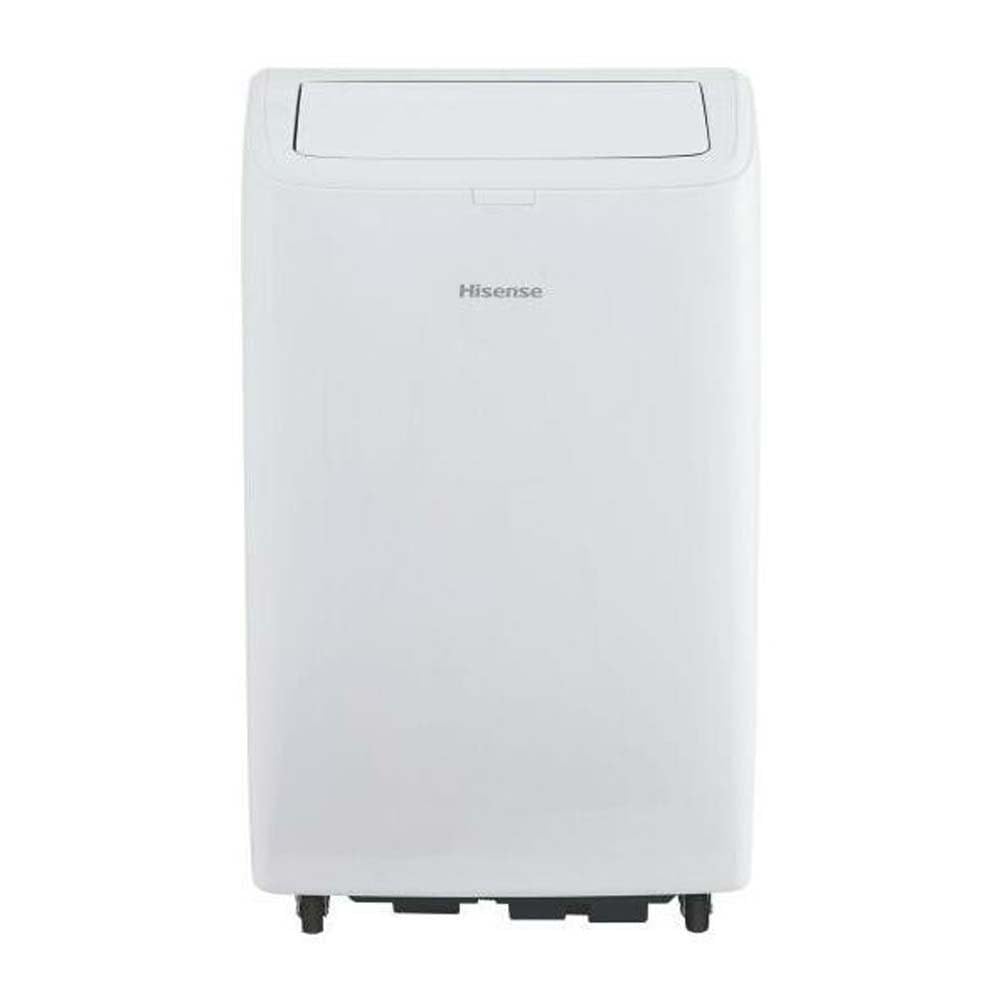
Figura 1: Frente view of the Hisense APC09QC Portable Air Conditioner. The unit is white with the Hisense logo on the front. The top air outlet flap is open, showing the internal louvers.

Figura 2: Lado view of the Hisense APC09QC Portable Air Conditioner. This image highlights the integrated side handle for easy transport and the caster wheels at the base, facilitating movement.

Figura 3: Principal view of the Hisense APC09QC Portable Air Conditioner. The air outlet flap is closed, showing the sleek top panel where the control interface is typically located.
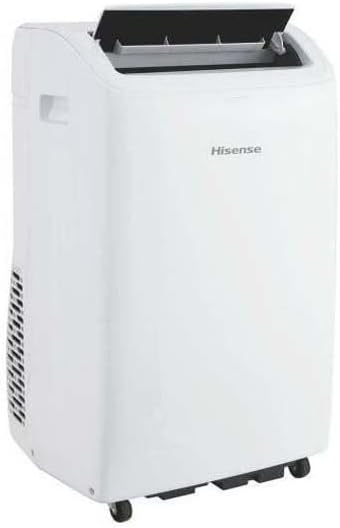
Figura 4: Lado traseiro view of the Hisense APC09QC Portable Air Conditioner. This angle shows the exhaust vent grille on the side, where the air exhaust hose connects.
Principais características:
- Painel de controle: Located on the top of the unit for easy access to settings.
- Saída de ar: Adjustable louvers to direct airflow.
- Rodas de rodízio: For convenient movement between rooms.
- Alças laterais: Para levantar e transportar a unidade.
- Filtro de ar: Removable for cleaning, located behind a grille (typically on the back or side).
- Saída de ar de exaustão: Connection point for the exhaust hose to vent hot air outside.
- Porta de drenagem: For manual drainage of condensed water.
Configurar
Uma configuração adequada é crucial para um desempenho e segurança ideais.
- Colocação: Place the air conditioner on a flat, stable surface near a window. Ensure there is at least 20 cm (8 inches) of space around the unit for proper airflow. Do not block the air inlets or outlets.
- Instalação da mangueira de exaustão:
- Attach one end of the air exhaust hose to the exhaust air outlet on the back of the unit. Twist or click into place securely.
- Extend the other end of the hose to the window.
- Install the window sealing kit according to its specific instructions. This typically involves fitting the adjustable window slider kit into the window opening and sealing any gaps to prevent hot air from re-entering the room.
- Connect the exhaust hose adapter to the window kit, ensuring a tight seal to expel hot air outdoors.
- Conexão de energia: Plug the power cord into a grounded electrical outlet. Ensure the outlet meets the electrical requirements of the unit (230 Volts).
- Initial Drainage Check: Before first use, ensure the drain plug is securely closed to prevent water leakage during operation.
Instruções de operação
Your Hisense APC09QC offers various modes and settings for personalized comfort.
Painel de controle e controle remoto:
The unit can be operated via the control panel on top of the unit or the included remote control. The functions are generally identical.
- Botão de energia: Liga ou desliga a unidade.
- Botão de modo: Cycles through available operating modes: Cool, Fan, Dehumidify.
- Botões para aumentar/diminuir a temperatura: Ajusta a temperatura desejada.
- Botão de velocidade do ventilador: Seleciona a velocidade do ventilador (Baixa, Média, Alta).
- Botão do temporizador: Define o temporizador de ativação ou desativação automática.
- Sleep/Silent Mode Button: Ativa um modo de funcionamento mais silencioso para uso noturno.
Modos de operação:
- Modo legal: Provides cooling. Set your desired temperature using the Up/Down buttons. The unit will cool until the room reaches the set temperature.
- Modo fã: Circulates air without cooling. You can adjust the fan speed.
- Modo de desumidificação: Removes moisture from the air. The fan speed is typically fixed in this mode.
WiFi Connectivity and App Control:
The Hisense APC09QC is WiFi enabled and can be controlled via a smartphone application, such as ConnectLife. Refer to the app's instructions for pairing and remote operation. This allows for control through Google Assistant and Alexa.
- Download the ConnectLife app from your device's app store.
- Follow the in-app instructions to create an account and add your Hisense APC09QC unit.
- Uma vez conectado, você pode controlar os modos, a temperatura, a velocidade do ventilador e definir programações remotamente.
Manutenção
A manutenção regular garante o funcionamento eficiente e prolonga a vida útil do seu ar condicionado.
- Limpeza do filtro de ar:
- O filtro de ar deve ser limpo a cada duas semanas ou com maior frequência, dependendo do uso e da qualidade do ar.
- Desligue a unidade.
- Remove the filter from its housing (refer to the unit's diagram for exact location).
- Lave o filtro com água morna e sabão. Enxágue bem e deixe secar completamente ao ar livre antes de reinstalar.
- Drenagem de água condensada:
- During cooling and dehumidifying, water condenses inside the unit. The unit has an internal reservoir.
- When the reservoir is full, the unit may stop operating and display an indicator.
- Unplug the unit. Place a shallow pan or tray under the drain port.
- Remove the drain plug to allow water to flow out. Re-insert the plug once drainage is complete.
- Limpeza do Exterior:
- Limpe o exterior com um pano macio e seco.amp pano. Não use produtos químicos agressivos ou produtos de limpeza abrasivos.
- Certifique-se de que não entre água no painel de controle ou em outros componentes elétricos.
- Armazenar:
- Before long-term storage, drain all condensed water completely.
- Clean the air filter and ensure the unit is dry.
- Store the unit in an upright position in a cool, dry place, away from direct sunlight.
Solução de problemas
Antes de entrar em contato com o serviço de atendimento ao cliente, consulte os problemas e soluções mais comuns a seguir.
| Problema | Possível causa | Solução |
|---|---|---|
| A unidade não liga. | Sem energia, cabo de alimentação desconectado, disjuntor desarmado, reservatório de água cheio. | Verifique a ligação elétrica, reinicie o disjuntor e esvazie o reservatório de água. |
| A unidade não está refrigerando de forma eficaz. | Dirty air filter, blocked air intake/outlet, exhaust hose not properly installed/sealed, room too large, windows/doors open. | Clean air filter, ensure clear airflow, properly install and seal exhaust hose, close windows/doors. |
| Vazamento de água. | Drain plug loose or open, unit not level, internal reservoir full. | Ensure drain plug is secure, place unit on a level surface, drain water tank. |
| A unidade é barulhenta. | A unidade não está em uma superfície nivelada, a ventoinha está obstruída, e há ruídos normais de funcionamento. | Ensure unit is level, check for obstructions, some noise is normal during operation. |
| Problemas de conexão Wi-Fi. | Incorrect network password, unit too far from router, app issues. | Verify WiFi password, move unit closer to router, restart app/unit, consult app's troubleshooting guide. |
Especificações
Technical details for the Hisense APC09QC Portable Air Conditioner.
| Número do modelo | APC09QC |
| Dimensões (D x L x A) | 49 cm x 31 cm x 88 cm (19.3 pol x 12.2 pol x 34.6 pol) |
| Peso | 25.5 kg (56.2 libras) |
| Capacidade de resfriamento | 9000 BTU/h (2.6 kW / 2236 fg/h) |
| Classe de Eficiência Energética | A |
| Índice de Eficiência Energética Sazonal (SEER) | 37.4 |
| Nível de ruído | 63 decibéis |
| Refrigerante | R-290 |
| Volumetage | 230 Volts |
| Consumo de energia (refrigeração) | 2.6 kW |
| Área do piso aplicável | Até 60 metros quadrados |
| Características especiais | Silent Mode, WiFi Enabled (App Control) |
| Método de controle | Control Panel, Remote Control, Application |
| Número de níveis de potência | 3 (Velocidades do ventilador) |
| Minimum Window Opening Height | 70.8 cm (27.9 pol.) |
| Minimum Window Opening Width | 32 cm (12.6 pol.) |
Garantia e Suporte
Your Hisense APC09QC Portable Air Conditioner comes with a manufacturer's warranty.
- Período de garantia: This product is covered by a two-year manufacturer's warranty from the date of purchase. This warranty covers defects in materials and workmanship under normal use.
- Reivindicações de garantia: For warranty service, please retain your proof of purchase. Contact Hisense customer support or the retailer where the product was purchased. Do not attempt to repair the unit yourself, as this may void the warranty.
- Suporte ao cliente: For technical assistance, troubleshooting beyond this manual, or to inquire about parts and service, please visit the official Hisense website or contact their customer service department. Contact information can typically be found on the Hisense website ou nos materiais de registro do seu produto.