
Introdução
The Beghelli Salvalavita SLV20 Plus is a mobile phone specifically designed for seniors, prioritizing ease of use, safety, and clear communication. It features large backlit keys, a high-volume speaker, a bright 2.8-inch color display, and a dedicated SOS button for emergencies. This manual provides detailed instructions to help you set up, operate, and maintain your device.
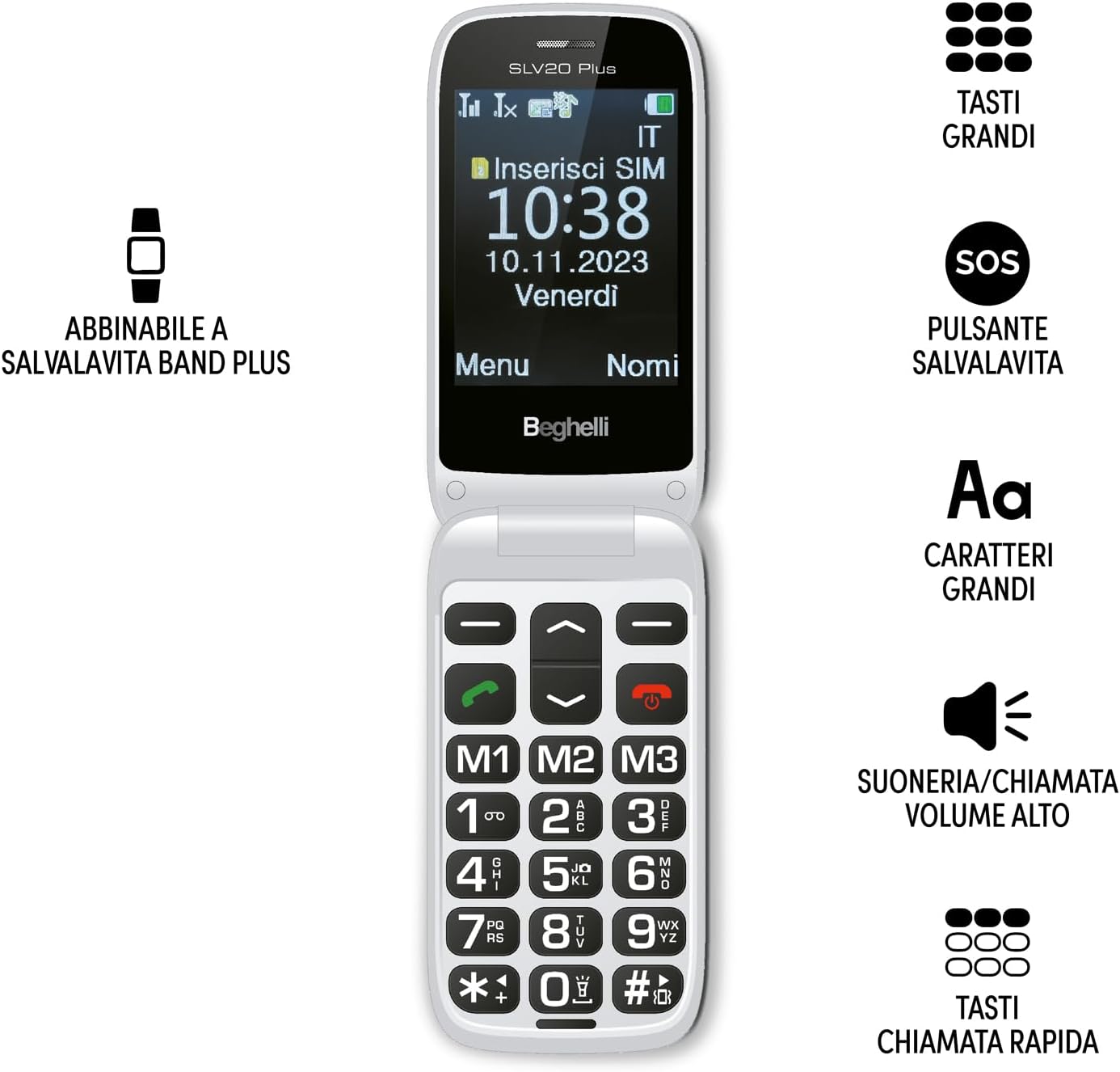
Image: The Beghelli Salvalavita SLV20 Plus, shown open to highlight its large, easy-to-read keys and clear display, designed for user convenience.
Configurar
1. Desembalagem e componentes
Antes de começar, certifique-se de que todos os componentes estejam presentes no pacote:
- Beghelli Salvalavita SLV20 Plus Mobile Phone
- Bateria recarregável de íons de lítio
- Base de carregamento
- Adaptador de energia
- Manual do usuário (este documento)

Image: The included charging base and power adapter for the Beghelli Salvalavita SLV20 Plus, facilitating easy and convenient recharging.
2. Instalação do cartão SIM
- Turn off the phone and remove the back cover.
- Localize o slot do cartão SIM.
- Insert your activated SIM card into the slot, ensuring the gold contacts face downwards and the cut corner aligns correctly.
- Pressione suavemente o cartão SIM até ouvir um clique e ele se encaixar no lugar.
- Substitua a tampa traseira.
3. Instalação e carregamento da bateria
- With the back cover removed, insert the rechargeable Lithium-ion battery into its compartment, aligning the contacts.
- Substitua a tampa traseira.
- Conecte o adaptador de energia à base de carregamento.
- Place the phone into the charging base. Ensure the phone is correctly seated and the charging indicator appears on the screen.
- For first use, charge the phone for at least 4 hours to ensure optimal battery performance.
4. Ligação inicial
Press and hold the Power/End Call button (usually marked with a red phone icon) until the screen lights up and the Beghelli logo appears. The phone will then guide you through any initial setup steps, such as setting the language or time.
Instruções de operação
1. Funções básicas do telefone
- Fazer uma chamada: Dial the desired number using the large keypad and press the Green Call button.
- Recebendo uma chamada: Quando o telefone tocar, pressione o botão verde "Chamar" para atender.
- Finalizando uma chamada: Pressione o botão vermelho "Encerrar chamada".
- Ajustando o volume: Use the dedicated volume keys on the side of the phone during a call or to adjust ringtone volume. The phone features high volume for clear audio.
- Envio de SMS: Navigate to the 'Messages' menu, select 'New Message', type your text using the keypad, and select the recipient from your contacts or enter a number.
2. SOS Button Functionality
The SOS button is a critical safety feature. In an emergency, press and hold the SOS button located on the back of the phone for a few seconds. The phone will automatically:
- Initiate calls to up to 5 pre-programmed emergency numbers in sequence until one is answered.
- Send a pre-set emergency SMS message to these same 5 numbers.
Programação de números SOS: Refer to the phone's settings menu under 'SOS Settings' to add or modify emergency contact numbers and the emergency SMS message.
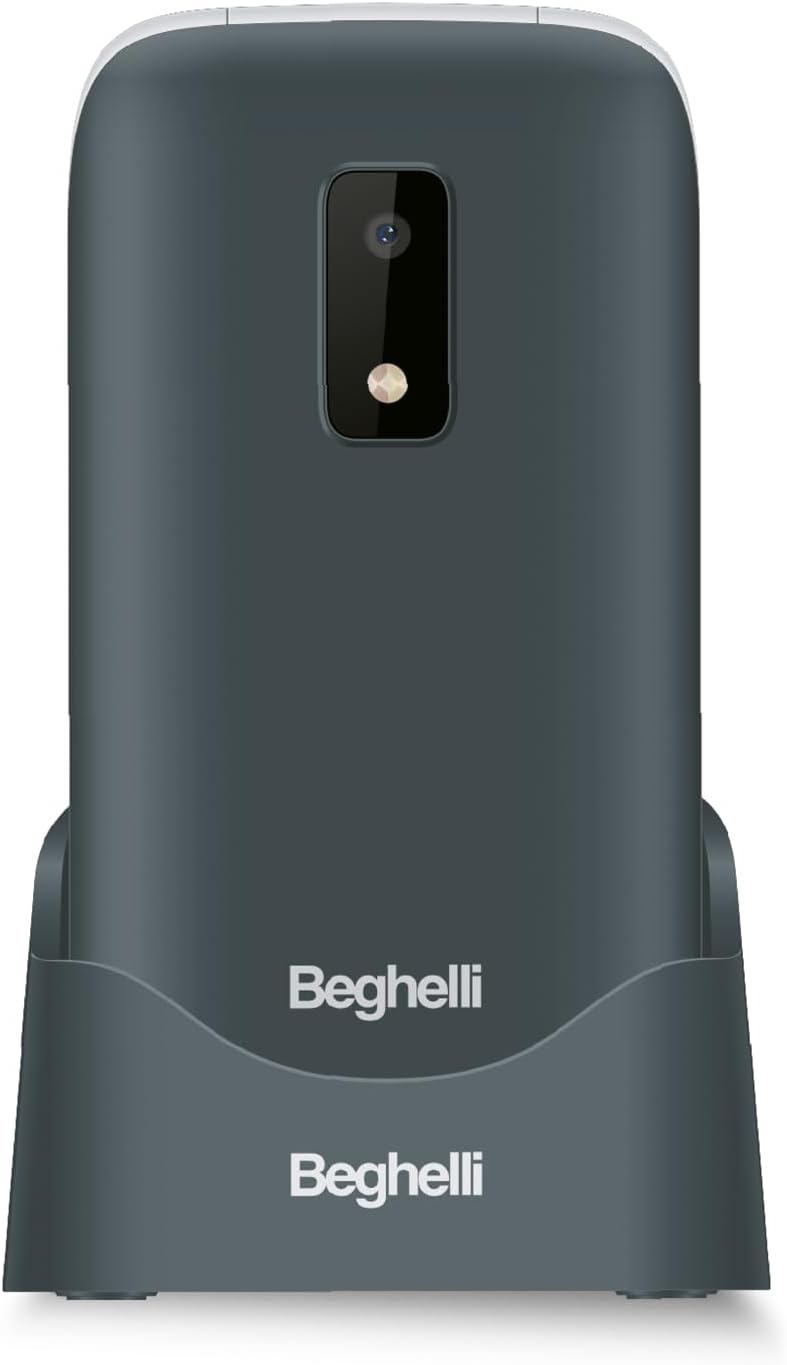
Imagem: A parte traseira view of the Beghelli Salvalavita SLV20 Plus, highlighting the prominent SOS button and integrated camera, designed for quick access to emergency features.
3. Quick Dial Keys (M1, M2, M3)
The M1, M2, and M3 keys allow for quick dialing of frequently contacted numbers. To program these keys:
- Go to the 'Settings' menu.
- Select 'Speed Dial' or 'Quick Dial Settings'.
- Choose M1, M2, or M3 and assign a contact from your phonebook or enter a new number.
- Once programmed, simply press and hold the M1, M2, or M3 key to dial the assigned number.
4. Recursos adicionais
- Câmera: Access the camera from the main menu to take photos. Photos are saved to the phone's memory or an inserted SD card (if applicable).
- Lanterna: Activate the built-in flashlight via a dedicated button or menu option for convenience in low-light conditions.
- Rádio FM: Tune into your favorite FM radio stations. Headphones may be required to act as an antenna.
5. Optional Salvalavita 24/7 Service
The Beghelli Salvalavita SLV20 Plus can be connected to the optional Salvalavita 24/7 Center service. This service provides constant support and protection by connecting your SOS button directly to a monitoring center. For more information on subscribing to this service, please refer to the documentation provided with the service or visit the official Beghelli website.
Manutenção
- Limpeza: Use um pano macio e seco para limpar a parte externa do telefone. Evite usar produtos de limpeza líquidos ou materiais abrasivos.
- Cuidados com a bateria: Para prolongar a vida útil da bateria, evite temperaturas extremas. Não deixe o telefone completamente descarregado por longos períodos.
- Armazenar: Se for guardar o telefone por um longo período, carregue a bateria até cerca de 50% e guarde-o em local fresco e seco.
Solução de problemas
| Problema | Solução possível |
|---|---|
| O telefone não liga. | Ensure the battery is correctly inserted and charged. Connect the phone to the charger and try again. |
| Sem sinal de rede. | Check if the SIM card is properly inserted. Ensure you are in an area with network coverage. Contact your service provider if the issue persists. |
| Cannot hear calls clearly. | Adjust the call volume using the side keys. Ensure the speaker is not obstructed. |
| O botão SOS não está funcionando. | Verify that emergency numbers are correctly programmed in the SOS settings. Ensure the phone has network signal. |
If you encounter issues not listed here or if the suggested solutions do not resolve the problem, please contact Beghelli customer support for assistance.
Especificações
| Recurso | Detalhe |
|---|---|
| Número do modelo | SLV20 Plus |
| Dimensões (C x L x A) | 10.9 x 5.5 x 1.9 cm |
| Peso | 100 gramas |
| Tipo de Bateria | 1 bateria de íon-lítio (incluída) |
| Tamanho da tela | 2.8 polegadas |
| Principais características | Large Backlit Keys, SOS Button, High Volume, Flashlight, FM Radio, Camera, Quick Dial Keys |
Garantia e Suporte
The Beghelli Salvalavita SLV20 Plus typically comes with a manufacturer's warranty. Please refer to the warranty card included in your product packaging for specific terms and conditions. Generally, spare parts availability is indicated for 2 years from the date of purchase.
In case of product defects or issues, a refund or replacement policy is usually available for 30 days from the purchase date, subject to retailer terms.
For technical support, service, or warranty claims, please contact Beghelli customer service through their official website or the contact information provided in your product documentation. Always have your model number (SLV20 Plus) and proof of purchase ready when contacting support.