
1. Introdução
This manual provides detailed instructions for the installation, operation, and maintenance of your Denash X79SE Plus LGA 2011 Motherboard. This motherboard is designed to support Xeon E5 V1 V2 series processors and DDR3 memory, offering robust performance for various computing needs. Please read this manual thoroughly before installation and use to ensure proper setup and functionality.
2. Principais características
- NVME M.2 Interface: Equipped with an NVME M.2 hard drive interface, providing theoretical bandwidth up to 4 Gbit/s for high-speed storage.
- Soquete LGA 2011: Supports Xeon E5 V1 V2 series processors.
- Slot PCIe 3.0 x16: Features a dedicated slot for graphics cards, ensuring high-performance visual output.
- Gigabit Ethernet: Integrated RTL8111H Gigabit LAN for stable and fast network connectivity.
- Suporte de memória DDR3: Four DDR3 memory slots supporting up to 128GB (1066/1333/1600 MHz).
- 8-Layer PCB Design: Constructed with an 8-layer printed circuit board for enhanced stability and reliability.
- High-Capacity Power Supply: Utilizes a robust 1x8 and 1x24 pin power supply design for stable performance.
- Portas USB 2.0: Includes six USB 2.0 ports for peripheral connectivity.

Figure 2.1: M.2 NVME/NGFF Slot for high-speed storage.

Figure 2.2: Gigabit Ethernet port for reliable network connection.

Figure 2.3: Solid capacitors ensuring stable power delivery and extended motherboard life.

Figure 2.4: Illustration of the durable 8-layer PCB material.
3. Configuração e instalação
3.1 Conteúdo da embalagem
Verifique se todos os itens estão presentes no seu pacote:
- 1 x Denash X79SE Plus Motherboard
- 1 x I/O Backplate
- 1 x cabo de dados SATA

Figure 3.1: Motherboard, I/O backplate, and SATA cable included in the package.
3.2 Layout da placa-mãe
Familiarize-se com os diversos componentes e conectores da placa-mãe.
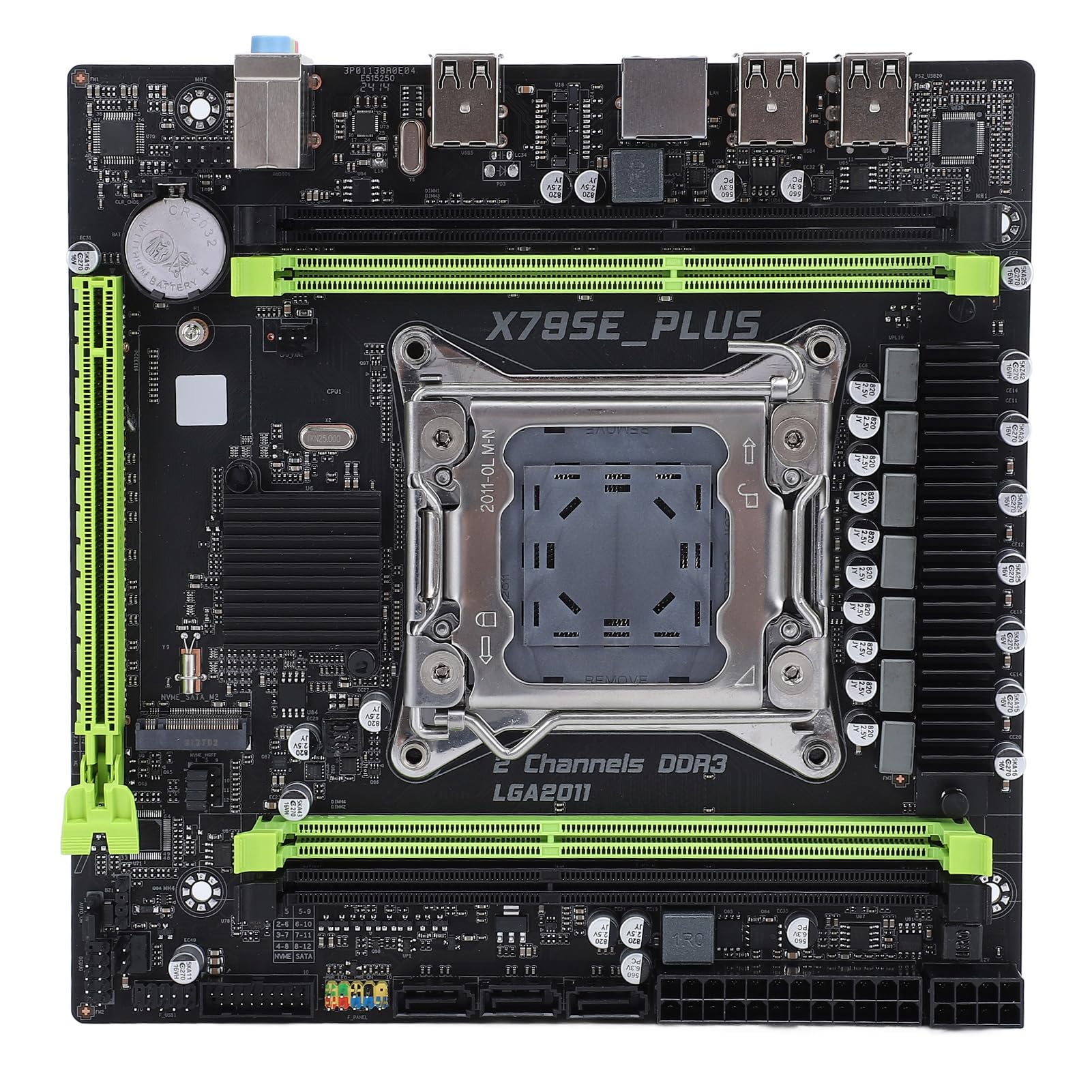
Figura 3.2: Overview of the Denash X79SE Plus motherboard.
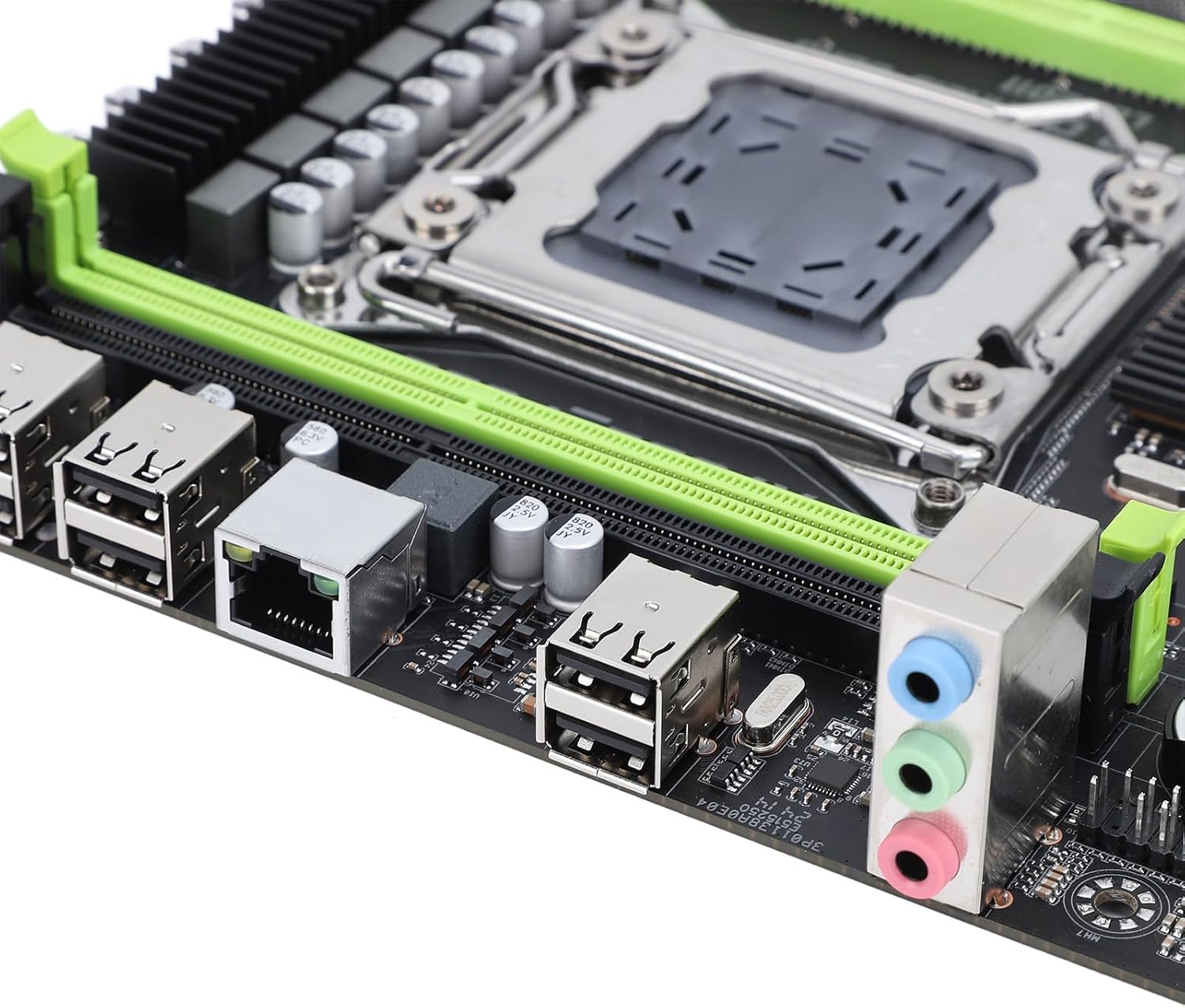
Figure 3.3: Rear I/O panel with USB, Ethernet, and audio ports.

Figure 3.4: SATA 2.0 ports and DDR3 memory slots.
3.3 Component Installation Guide
Follow these steps to install essential components onto your motherboard:
- Instalação da CPU:
- Abra cuidadosamente a alavanca do soquete LGA 2011 da CPU.
- Align the CPU (Xeon E5 V1/V2 series) with the socket, ensuring the triangular mark on the CPU matches the mark on the socket.
- Coloque o processador no soquete com cuidado, sem forçar.
- Feche a alavanca do soquete para fixar a CPU.
- Aplique pasta térmica e instale o cooler da CPU.
- Memory (DDR3) Installation:
- Abra as travas em ambas as extremidades dos slots de memória DDR3.
- Align the memory module's notch with the slot's key.
- Pressione firmemente ambas as extremidades do módulo de memória até que as presilhas se encaixem no lugar.
- Instalação do dispositivo de armazenamento:
- SSD M.2 NVMe: Insert the M.2 SSD into the M.2 slot at an angle, then push it down and secure it with a screw.
- Unidades SATA: Connect SATA data cables from your storage drives (HDD/SSD) to the SATA 2.0 ports on the motherboard. Connect SATA power cables from your power supply to the drives.
- Graphics Card (PCIe 3.0 x16) Installation:
- Abra a trava de retenção no slot PCIe 3.0 x16.
- Alinhe a placa gráfica com o slot e pressione firmemente até que esteja totalmente encaixada e a trava de retenção se fixe.
- Fixe a placa gráfica à caixa do seu PC com um parafuso.
- Conexão da fonte de alimentação:
- Conecte o conector de alimentação ATX de 24 pinos da sua fonte de alimentação ao conector de alimentação principal da placa-mãe.
- Connect the 8-pin CPU power connector to the corresponding socket near the CPU.
- Connect any additional power cables required for your graphics card or other components.
- Conectores do painel frontal:
- Connect the front panel headers (power button, reset button, HDD LED, power LED, USB 2.0, audio) from your PC case to the corresponding pins on the motherboard. Refer to your PC case manual for specific pin assignments.
4. Instruções de operação
4.1 Primeira ligação
After assembling all components and connecting power, press the power button on your PC case. The system should power on, and you should see a display on your monitor.
4.2 Configuração do BIOS
To enter the BIOS/UEFI setup utility, press the designated key (usually DEL or F2) during the initial boot sequence. In the BIOS, you can configure boot order, system time, CPU settings, and other hardware parameters.
4.3 Instalação do Sistema Operacional
Once the BIOS is configured, you can proceed with installing your preferred operating system (e.g., Windows, Linux). Boot from your OS installation media (USB drive or DVD) and follow the on-screen instructions.
5. Manutenção
5.1 Limpeza
Regularly clean your computer's interior to prevent dust buildup, which can lead to overheating and reduced performance. Use compressed air to remove dust from fans, heatsinks, and other components. Ensure the system is powered off and unplugged before cleaning.
5.2 Atualizações do BIOS
BIOS updates can provide improved compatibility, stability, and new features. Check the manufacturer's website for the latest BIOS versions and follow their instructions carefully. Incorrect BIOS updates can damage your motherboard.
6. Solução De Problemas
6.1 Problemas comuns
- Sem energia:
- Verifique todas as conexões de energia (ATX de 24 pinos, CPU de 8 pinos, GPU).
- Certifique-se de que o interruptor da fonte de alimentação esteja na posição 'LIGADO'.
- Verifique a conexão do botão liga/desliga do painel frontal com a placa-mãe.
- Nenhuma exibição:
- Ensure the monitor is connected to the graphics card (not the motherboard's integrated graphics, if applicable).
- Reinstale a placa gráfica e os módulos de memória.
- Faça o teste com um monitor ou cabo de vídeo diferente.
- Instabilidade/travamentos do sistema:
- Verifique as temperaturas da CPU e da GPU.
- Ensure all components are properly seated.
- Execute ferramentas de diagnóstico de memória.
- Update drivers for all components.
- Dispositivo de inicialização não encontrado:
- Check SATA/M.2 cable connections to storage drives.
- Verify boot order in BIOS.
- Ensure the operating system is correctly installed on the drive.
7. Especificações técnicas
| Recurso | Especificação |
|---|---|
| Marca | Denash |
| Nome do modelo | X79SE Plus |
| Número do modelo | Denashsh8g1qz45g |
| Soquete da CPU | LGA 2011 (Supports Xeon E5 26XXV1/V2) |
| Slots de memória | 4 x DDR3 (Max 128GB, 1066/1333/1600 MHz) |
| Interface SATA | 3 x SATA 2.0 |
| Slots M.2 | 1 x M.2 2280 NVMe 3.0x4, 1 x M.2 2280 NGFF SATA 2.0 Protocol Port SSD |
| Slot para placa gráfica | 1 x PCIe 3.0 x16 |
| Chip de áudio | HD 5.1 Channel Sound Chip |
| Placa de rede | 1 x Gigabit Ethernet (RTL8111H) |
| Portas USB | 6 x USB 2.0 |
| Fator de forma | Micro ATX |
| Bateria Integrada | CR2032x1 240 mAh |
| Garantia | 2 anos de experiência do fabricante |
8. Garantia e Suporte
The Denash X79SE Plus LGA 2011 Motherboard is covered by a Garantia do fabricante de 2 anos from the date of purchase. This warranty covers defects in materials and workmanship under normal use. For warranty claims or technical support, please contact your retailer or the manufacturer directly. Keep your proof of purchase for warranty validation.