
Hasaller TOWSPE-D20
Hasaller Household Surge Protector User Manual
Marca: Hasaller | Modelo: TOWSPE-D20 (KF6F3T8S4DH2B864S5B3)
1. Introdução
This user manual provides essential information for the safe and effective installation, operation, and maintenance of your Hasaller Household Surge Protector. This device is designed to protect your electrical systems and connected equipment from transient overvoltages (surges) caused by lightning strikes or switching operations. Please read this manual thoroughly before installation and keep it for future reference.
2. Informações de segurança
AVISO: Electrical installation should only be performed by qualified and licensed electricians in accordance with all local and national electrical codes and regulations. Failure to do so may result in electric shock, fire, serious injury, or death.
- Always disconnect power to the circuit before installing or servicing the surge protector.
- Não instale este dispositivo em locais úmidos ou molhados.amp localizações.
- Ensure proper grounding connections are made.
- Verifique se o voltage and current ratings of the surge protector match your electrical system requirements.
- Não tente abrir ou reparar o dispositivo. Encaminhe a manutenção para pessoal qualificado.
3. Produto acabadoview
3.1 Características
- Core components are metal oxide varistor (MOV) components with high discharge capacity.
- Offers low residual voltage and fast response time for effective protection.
- Equipped with Thermo Dynamic Control disconnection for enhanced reliability and safety.
- Includes remote signaling contact for external monitoring and notification.
- Clear fault indication via a red mark in the inspection window.
- Protection modes: Line-to-Neutral (L-N) and Neutral-to-Protective Earth (N-PE).
3.2 Componentes
The Hasaller Household Surge Protector is a compact DIN rail mountable device. Key components include:
- L/N Terminals: Input/output terminals for Line and Neutral connections.
- PE Terminal: Terminal for Protective Earth (Ground) connection.
- Inspection Window: Displays the operational status (Green: Normal, Red: Malfunction/Needs Replacement).
- Clipe para trilho DIN: For secure mounting on a standard DIN rail.
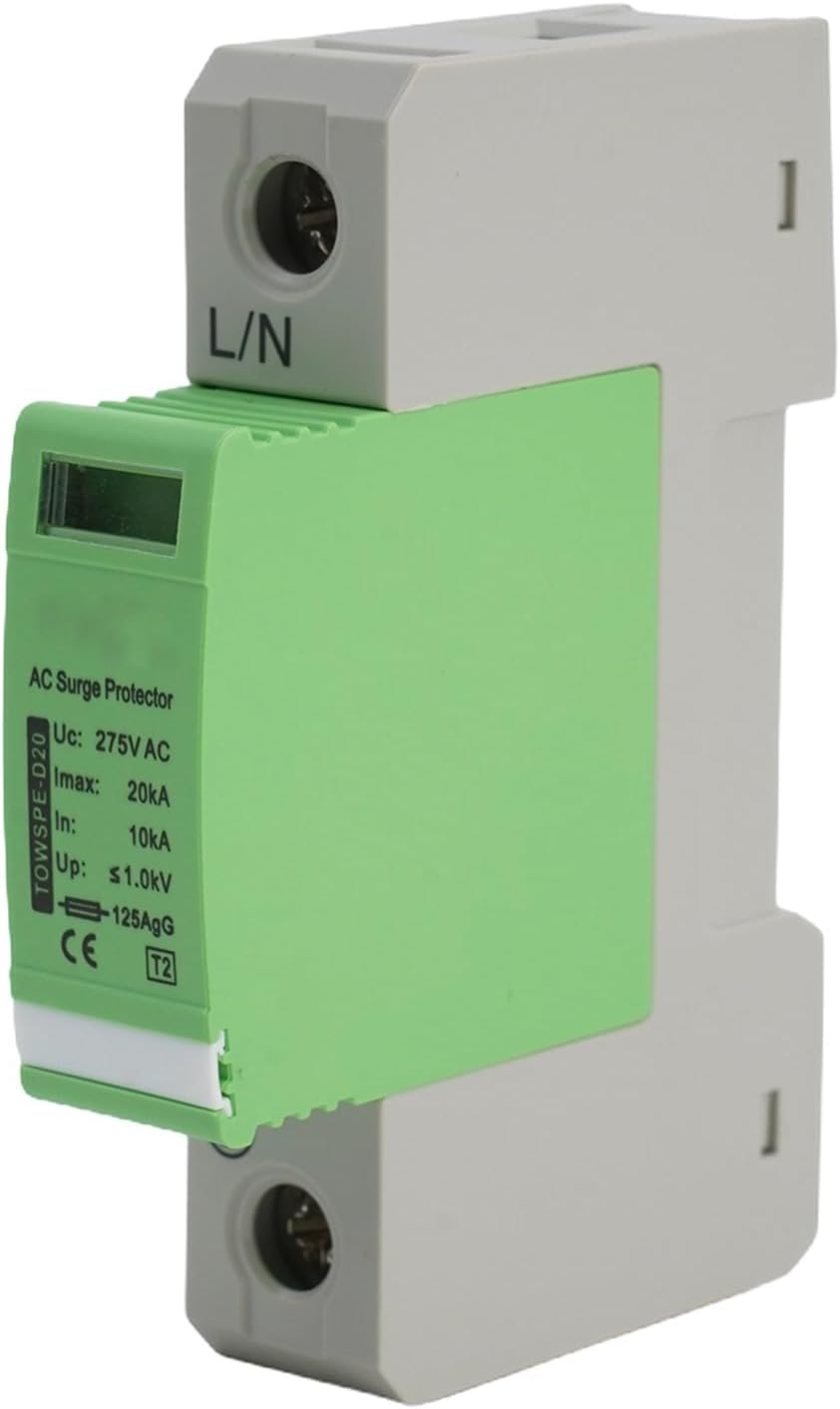
Figura 3.2.1: Frente view of the Hasaller Household Surge Protector, showing the L/N terminals, inspection window, and product specifications printed on the side.
3.3 Especificações
| Parâmetro | Valor |
|---|---|
| Modelo | TOWSPE-D20 |
| Classe de proteção | D |
| Máx. Vol operacional contínuotage (uc) | 275 V CA |
| Nominal Discharge Current (In, 8/20 µs) | 10 kA |
| Max. Discharge Current (Imax, 8/20 µs) | 20 kA |
| Volumetage Nível de proteção (para cima) | ≤1 KV |
| Tempo de resposta | <25 ns |
| Temperatura do ambiente de trabalho | -40°C a +80°C |
| Working Environment Relative Humidity | <95% |
| Indication of Deterioration | Green (Normal), Red (Malfunction) |
| Dimensões do produto | 90 mm (A) x 50 mm (P) x 18 mm (L) |

Figure 3.3.1: Dimensional drawing of the surge protector, indicating its height, depth, and width for installation planning.
4. Configuração e instalação
The Hasaller Household Surge Protector is designed for easy installation on a standard 35mm DIN rail within an electrical distribution board or control cabinet. Ensure all power is disconnected before proceeding.
- Desconexão de energia: Turn off the main circuit breaker to completely de-energize the electrical panel where the surge protector will be installed. Verify with a voltage tester que não há energia presente.
- Montagem: Clip the surge protector onto the DIN rail. Ensure it is securely fastened and does not wobble.
- Conexões de fiação:
- Connect the Line (L) conductor to the L terminal of the surge protector.
- Connect the Neutral (N) conductor to the N terminal of the surge protector.
- Connect the Protective Earth (PE) conductor to the PE terminal of the surge protector. Ensure this connection is robust and provides a low-impedance path to ground.

Figura 4.1: parte superior view illustrating the ground connection terminal for the surge protector.
- Verificação: Verifique novamente se todas as conexões da fiação estão firmes e corretas. Certifique-se de que nenhum fio desencapado esteja exposto.
- Restauração de energia: Once installation is complete and verified, restore power to the circuit by turning on the main circuit breaker. The inspection window should display "Green" indicating normal operation.
For optimal protection, install the surge protector as close as possible to the incoming power supply or the equipment it is protecting.
5. Instruções de operação
The Hasaller Household Surge Protector operates passively, continuously monitoring the electrical system for overvoltage events. It requires no user interaction during normal operation.
- Operação normal: When the electrical system is operating within normal voltage parameters, the inspection window on the surge protector will display a VERDE indication. This signifies that the device is functioning correctly and providing protection.
- Sobrevoltage Event: No caso de um voltage surge, the surge protector will divert the excess energy to ground, protecting your connected equipment. This process is instantaneous and automatic.
- Indicação de falha: If the surge protector has absorbed a significant surge or has reached its end-of-life, the inspection window will change from VERDE para VERMELHO. A red indication signifies that the device is no longer providing protection and requires replacement.
6. Manutenção
The Hasaller Household Surge Protector is designed for minimal maintenance. Regular visual inspection is recommended to ensure continued protection.
- Inspeção visual: Periodically check the inspection window on the front of the device. Ensure it remains VERDE.
- Substituição: If the inspection window displays VERMELHO, the surge protector has performed its function and is no longer active. It must be replaced immediately to restore protection to your electrical system. Refer to Section 4 for replacement procedures, ensuring power is disconnected first.
- Limpeza: Se necessário, limpe delicadamente a parte externa do dispositivo com um pano seco e macio. Não utilize produtos de limpeza líquidos ou solventes.
7. Solução De Problemas
| Problema | Possível causa | Solução |
|---|---|---|
| Inspection window shows VERMELHO. | The surge protector has absorbed a significant overvoltage event or has reached its end-of-life. | The device is no longer providing protection. It must be replaced. Disconnect power and replace the unit following installation instructions. |
| No indication (blank or dark window). | No power to the device, or internal fault. | Verify power supply to the circuit. If power is present and the window is still dark, the device may be faulty and requires replacement. |
| Frequent tripping of circuit breakers after surge protector installation. | Incorrect wiring, faulty device, or persistent overvoltage questões. | Immediately disconnect power. Re-check all wiring connections. If wiring is correct, the device may be faulty and needs replacement. Consult a qualified electrician to assess the electrical system for persistent overvoltage problemas. |
If you encounter issues not listed here or are unsure about any troubleshooting steps, please contact a qualified electrician or the manufacturer's support.
8. Garantia e Suporte
For information regarding warranty coverage, technical support, or replacement parts for your Hasaller Household Surge Protector, please refer to the purchase documentation or contact your retailer/seller directly. Keep your proof of purchase for warranty claims.
Fabricante: Hasaller
Número do modelo: KF6F3T8S4DH2B864S5B3
ASIN: B0D6YNXJSZ
Ask a question about this manual
Ask about setup, troubleshooting, compatibility, parts, safety, or missing instructions. Manuals+ will review the question and use this page’s manual context to help answer it.