
GN HEARING TV Streamer +
Resound TV Streamer+ User Manual
Model: TV Streamer +
1. Introdução
The Resound TV Streamer+ is an innovative device designed to enhance your television viewing experience by wirelessly transmitting audio directly to your compatible Resound Nexia hearing aids. This allows for exceptional voice clarity and personalized volume control, ensuring you can fully enjoy your favorite programs and movies.
Os principais recursos incluem:
- Only compatible with Resound Nexia hearing aids.
- Instant voice clarity for better understanding.
- Auracast compatibility for improved sound quality.
- Audio streaming up to 7 meters away.
- Wireless audio streaming from TV to compatible hearing aids.
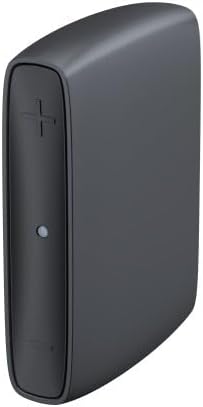
Image 1: The Resound TV Streamer+ device, a compact black unit with a plus sign button and an indicator light on the front.

Image 2: The Resound TV Streamer+ packaging, showing the device on a white background with "TV-Streamer+" text.
2. Configuração
Follow these steps to set up your Resound TV Streamer+:
- Desembale o dispositivo: Carefully remove the TV Streamer+ and all accessories from its packaging.
- Conectar à energia: Plug the power adapter into the TV Streamer+ and then into a wall outlet. The indicator light on the device should illuminate.
- Connect to TV Audio Output:
- Optical Cable (Recommended): Connect one end of the optical cable to the optical audio output port on your TV and the other end to the optical input port on the TV Streamer+.
- RCA Cables (if optical is not available): Connect the red and white RCA cables to the corresponding audio output ports on your TV and the other ends to the RCA input ports on the TV Streamer+.
- Compatível com aparelhos auditivos:
- Ensure your Resound Nexia hearing aids are turned on and within range (within 7 meters) of the TV Streamer+.
- Press and hold the pairing button on the TV Streamer+ (refer to the device diagram for exact location, usually a small button on the back or side) until the indicator light starts blinking rapidly.
- Open and close the battery doors of your hearing aids (or turn them off and on if rechargeable) to put them into pairing mode.
- The hearing aids should automatically connect to the TV Streamer+. The indicator light on the streamer will turn solid blue or green when connected.
- Conexão de teste: Play audio on your TV and confirm that the sound is streaming to your hearing aids. Adjust the TV volume as needed.
3. Instruções de operação
Once connected, the Resound TV Streamer+ provides a seamless audio experience:
- Automatic Streaming: When the TV Streamer+ is on and connected to your TV, and your hearing aids are within range, audio will automatically stream to your hearing aids.
- Controle de volume: You can adjust the volume of the streamed audio directly through your hearing aid controls or via the Resound Smart 3D app on your smartphone. The TV's volume control will typically not affect the streamed audio volume to your hearing aids.
- Switching Programs: If you wish to switch between streamed audio and your hearing aids' regular microphone input, you can usually do so via your hearing aid program button or the Resound Smart 3D app.
- Auracast Compatibility: The device leverages Auracast technology for enhanced sound quality and a stable wireless connection, allowing for a richer audio experience.
4. Manutenção
To ensure the longevity and optimal performance of your Resound TV Streamer+, follow these maintenance guidelines:
- Limpeza: Wipe the device regularly with a soft, dry cloth. Do not use liquid cleaners, sprays, or abrasive materials.
- Armazenar: Guarde o dispositivo em local fresco e seco, longe da luz solar direta e de temperaturas extremas.
- Evite umidade: Mantenha o dispositivo longe de água e alta umidade.
- Manuseie com cuidado: Evite deixar cair o dispositivo ou submetê-lo a impactos fortes.
5. Solução De Problemas
If you encounter issues with your Resound TV Streamer+, try the following solutions:
| Problema | Possível causa | Solução |
|---|---|---|
| No audio streaming to hearing aids. |
|
|
| Qualidade de áudio ruim. |
|
|
| Cannot pair hearing aids. |
|
|
Se o problema persistir, entre em contato com o suporte ao cliente.
6. Especificações
| Recurso | Detalhe |
|---|---|
| Marca | GN HEARING |
| Fabricante | GN HEARING |
| Nome do modelo | TV Streamer + |
| Número da peça | 22926500 |
| Tecnologia de Conectividade | Bluetooth |
| Fator de forma | Bastão de TV |
| Cor | Cinza carvão |
| Codec de vídeo | H.264, H.265/HEVC |
| Número global de item comercial (GTIN) | 05708296321216 |
| Primeira data disponível | 2 de julho de 2024 |
7. Garantia e Suporte
For warranty information, please refer to the documentation included with your purchase or contact your point of sale. GN HEARING provides support for its products.
If you require technical assistance, have questions about your device, or need to report a problem, please contact GN HEARING customer support through their official website ou as informações de contato fornecidas com o seu produto.
Please have your model name (TV Streamer +) and part number (22926500) ready when contacting support.
Ask a question about this manual
Ask about setup, troubleshooting, compatibility, parts, safety, or missing instructions. Manuals+ will review the question and use this page’s manual context to help answer it.