
1. Introdução
Thank you for choosing the Hama DR2002BT Digital Radio. This device offers a comprehensive audio experience with FM, DAB/DAB+ digital radio reception, and Bluetooth connectivity. Its user-friendly design, featuring large buttons and a clear 4.3-inch TFT color display, makes it suitable for all users. This manual will guide you through the setup, operation, and maintenance of your new digital radio.
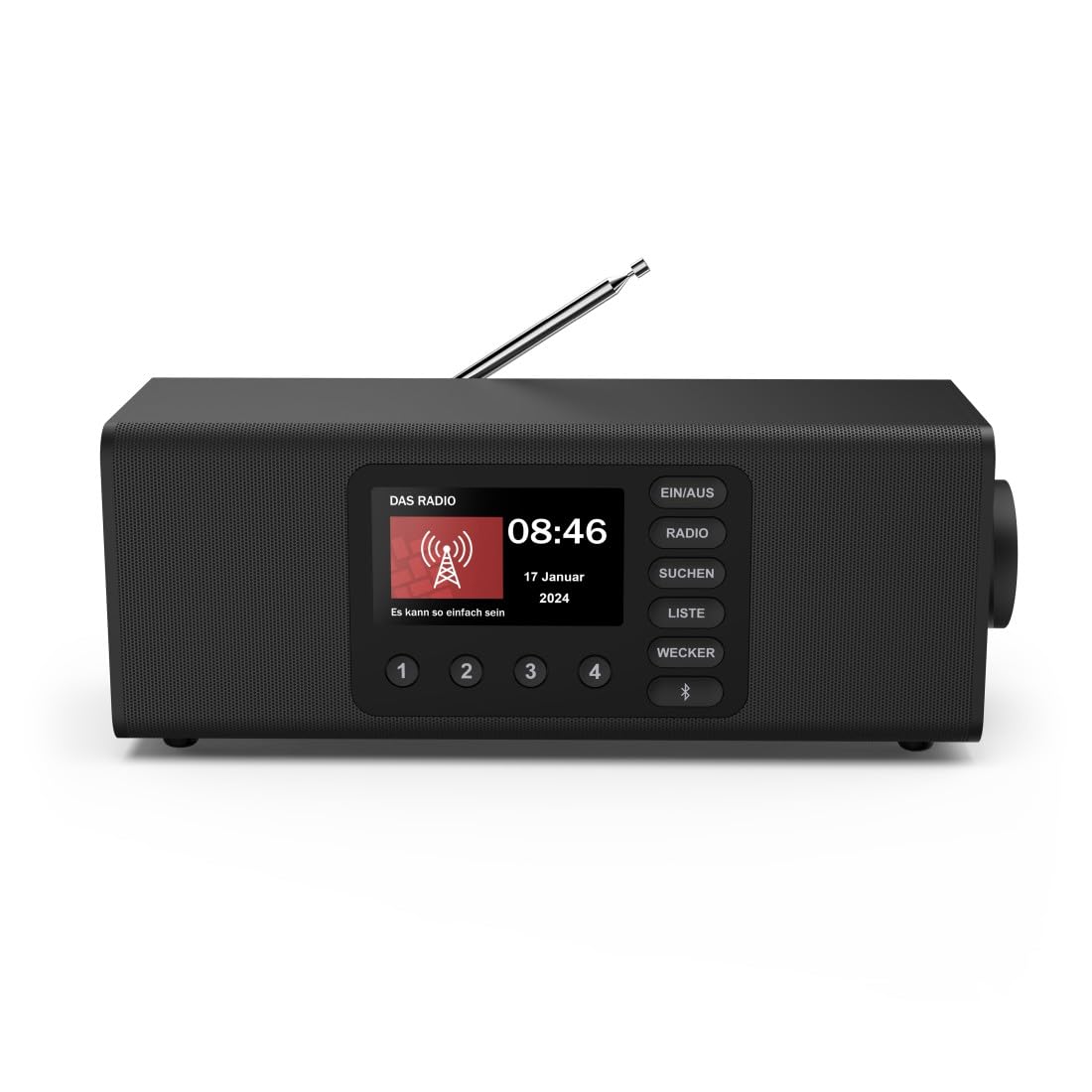
Imagem: Frente view of the Hama DR2002BT Digital Radio, showcasing seus botões de exibição e controle.
2. Informações de segurança
Leia atentamente estas instruções de segurança antes de usar o dispositivo. Guarde este manual para futuras consultas.
- Não exponha o dispositivo à umidade, chuva ou temperaturas extremas.
- Evite colocar o dispositivo perto de fontes de calor ou sob luz solar direta.
- Não abra o dispositivo casing. Repairs should only be performed by qualified personnel.
- Utilize somente o adaptador de energia fornecido.
- Garanta ventilação adequada ao redor do dispositivo.
3. Conteúdo da embalagem
Ao desembalar, verifique se todos os itens estão presentes:
- Hama DR2002BT Digital Radio
- Adaptador de energia
- Manual do usuário
4. Produto acabadoview
4.1 Controles e exibição do painel frontal

Image: Front panel of the radio highlighting the display and control buttons, with icons for Bluetooth, DAB+, and Alarm functions.
The front panel features a 4.3-inch TFT color display, large control buttons, and a rotary knob for easy navigation and selection. Key buttons include:
- EIN/AUS (ON/OFF): Liga ou desliga o dispositivo.
- RÁDIO: Switches between FM and DAB/DAB+ modes.
- SUCHEN (SEARCH): Initiates station scanning.
- LISTE (LIST): Accesses the list of available stations.
- WECKER (ALARM): Configures alarm settings.
- Botão Bluetooth: Ativa o modo de emparelhamento Bluetooth.
- Botões predefinidos (1-4): Quick access to stored favorite stations.
- Rotary Knob (LAUTSTÄRKE/NAVIGIEREN): Controls volume and navigates menus.
4.2 Conexões do Painel Traseiro
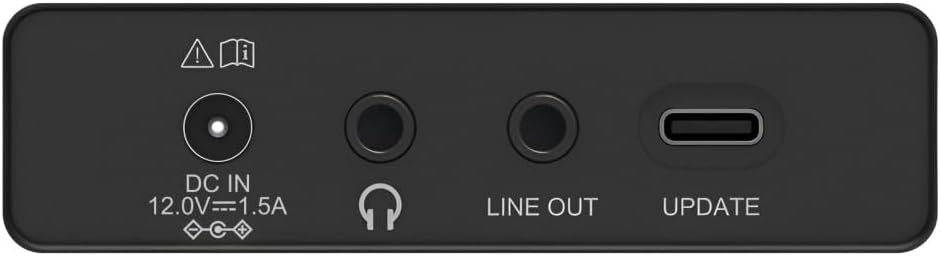
Image: Close-up of the rear panel showing the DC IN, Headphone, Line Out, and UPDATE (USB-C) ports.
The rear panel provides essential connectivity options:
- DC IN 12.0V --- 1.5A: Power input for the external adapter.
- Entrada para fone de ouvido (3.5mm): Para audição privada.
- SAÍDA DE LINHA: Audio output for connecting to external amplificadores ou alto-falantes.
- UPDATE (USB-C): Para atualizações de firmware.
- Antena Telescópica: For FM and DAB/DAB+ reception.

Imagem: Traseira view of the Hama DR2002BT Digital Radio with its telescopic antenna extended for optimal signal reception.
5. Configuração
5.1 Conexão de Energia
- Conecte o adaptador de energia fornecido ao Entrada CC port on the rear of the radio.
- Conecte o adaptador de alimentação a uma tomada adequada.
- O rádio ligará automaticamente ou entrará em modo de espera.
5.2 Posicionamento da Antena
For optimal FM and DAB/DAB+ reception, fully extend the telescopic antenna. Position the radio near a window if reception is poor.
5.3 Configuração inicial (primeiro uso)
Upon first power-on, the radio may guide you through an initial setup process, including language selection and an automatic DAB station scan. Follow the on-screen prompts.
6. Instruções de operação
6.1 Ligar/Desligar
Pressione o EIN / AUS botão para ligar ou desligar o rádio.
6.2 Modo de rádio DAB/DAB+
- Pressione o RÁDIO botão para selecionar o modo DAB.
- If this is the first time in DAB mode or if you want to rescan, press SUCHEN to perform a full scan for available stations.
- Use the rotary knob to navigate through the station list. Press the knob to select a station.
- Para view the station list, press the LISTA botão.
6.3 Modo Rádio FM
- Pressione o RÁDIO botão para selecionar o modo FM.
- Imprensa SUCHEN to automatically scan for the next available FM station.
- Alternatively, use the rotary knob to manually tune to a frequency.
6.4 Armazenando e Recuperando Predefinições
The radio allows you to store up to 4 favorite stations using the dedicated preset buttons (1-4).
- Sintonize a estação desejada (DAB ou FM).
- Press and hold one of the preset buttons (1-4) until the display confirms the station has been saved.
- To recall a preset station, simply press the corresponding preset button (1-4).
6.5 Operação Bluetooth

Imagem: Frente view of the radio with Bluetooth and stereo speaker icons, indicating its wireless audio streaming capability.
The Hama DR2002BT can stream audio from your smartphone, tablet, or laptop via Bluetooth 5.0.
- Press the Bluetooth button on the front panel to enter Bluetooth pairing mode. The display will show a pairing indicator.
- No seu dispositivo externo (smartphone, tablet), ative o Bluetooth e procure por dispositivos disponíveis.
- Select "Hama DR2002BT" from the list of devices to pair.
- Once paired, you can play audio from your device, and it will be output through the radio's speakers.
6.6 Função de despertador

Image: A person waking up with the Hama DR2002BT Digital Radio placed on a bedside table, illustrating its alarm clock functionality.
The radio features two independent alarm settings.
- Pressione o WECKER button to access alarm settings.
- Use the rotary knob to select Alarm 1 or Alarm 2.
- Configure the alarm time, source (buzzer or radio station), and repetition (once, daily, weekdays, weekends, or specific days).
- Press the rotary knob to confirm each setting.
- To quickly activate/deactivate an alarm, press the WECKER button and use the rotary knob to toggle the alarm status.

Image: A person interacting with the Hama DR2002BT Digital Radio, demonstrating its ease of use for setting functions like alarms or tuning stations.
7. Manutenção
To ensure the longevity and optimal performance of your Hama DR2002BT Digital Radio, follow these maintenance guidelines:
- Limpeza: Use um pano macio, seco e sem fiapos para limpar a parte externa do rádio. Não use produtos de limpeza abrasivos, ceras ou solventes.
- Pó: Regularly dust the device to prevent accumulation in vents and ports.
- Armazenar: Se for guardar o rádio por um longo período, desconecte-o da fonte de alimentação e guarde-o em local fresco e seco.
- Antena: Manuseie a antena telescópica com cuidado para evitar que ela se dobre ou quebre.
8. Solução De Problemas
Se você tiver problemas com seu rádio, consulte os problemas e soluções comuns a seguir:
| Problema | Possível causa | Solução |
|---|---|---|
| Sem energia | Adaptador de energia não conectado; tomada elétrica com defeito. | Check power adapter connection; Try a different power outlet. |
| Recepção de rádio deficiente (DAB/FM) | Antena não estendida; Área de sinal fraco; Interferência | Fully extend the telescopic antenna; Reposition the radio (e.g., near a window); Perform a new station scan. |
| Falha no pareamento Bluetooth | Bluetooth not enabled on external device; Radio not in pairing mode; Device too far | Ensure Bluetooth is on and visible on your device; Press the Bluetooth button on the radio; Move devices closer (within 10m). |
| Sem som | Volume muito baixo; Silenciamento ativado; Fonte incorreta selecionada | Increase volume using the rotary knob; Check if mute is active; Ensure the correct mode (DAB, FM, Bluetooth) is selected. |
| O alarme não soa | Alarm not activated; Incorrect alarm time/day set | Verify alarm is enabled in settings; Check alarm time and repetition settings. |
9. Especificações

Image: Diagram showing the dimensions of the Hama DR2002BT Digital Radio: 35 cm (width), 12.5 cm (depth), and 13 cm (height).
| Recurso | Detalhe |
|---|---|
| Número do modelo | DR2002BT (00054298) |
| Recepção | DAB, DAB+, FM |
| Versão Bluetooth | 5.0 |
| Potência de saída (RMS) | 10 W (Estéreo) |
| Mostrar | Tela colorida TFT de 4.3" |
| Conexões | 3.5mm Jack (Headphone), USB-C (Update), Line Out, DC IN |
| Fonte de energia | Adaptador de energia externo |
| Dimensões (L x P x A) | 35 x 12.5 x 13 cm |
| Peso | 1788 gramas |
| Material | Plástico |
| Cor | Preto |
| Características adicionais | Alarm Function (2 alarms), Direct Selection Keys |
10. Garantia e Suporte
Hama GmbH & Co KG provides a warranty for this product. Please refer to the warranty card included in your package or visit the official Hama website para obter termos e condições detalhados da garantia.
For technical support, troubleshooting assistance, or spare parts, please contact Hama customer service or visit their website. The availability of spare parts in the EU is guaranteed for 7 years.
- Fabricante: Hama GmbH & Co. KG
- País de origem: Alemanha
- EU Spare Parts Availability: 7 anos