
1. Introdução
Thank you for choosing the AIRHOT 2-in-1 Under Desk Treadmill. This manual provides essential information for the safe and efficient use of your new fitness equipment. Please read this manual thoroughly before operation and retain it for future reference.

Image: The AIRHOT 2-in-1 Under Desk Treadmill in a home setting, demonstrating its compact design and usability.
2. Informações de segurança
Para garantir sua segurança e prolongar a vida útil da sua esteira, observe as seguintes precauções:
- Consulte sempre um profissional de saúde antes de iniciar qualquer novo programa de exercícios.
- Place the treadmill on a flat, stable surface. Ensure there is adequate clear space around the treadmill for safe operation.
- Do not place any mats or objects directly under the front motor area of the treadmill during operation. This can obstruct heat dissipation, potentially causing motor damage and shortening the product's lifespan.
- Mantenha crianças e animais de estimação longe da esteira durante a operação.
- Wear appropriate athletic footwear while using the treadmill.
- Do not use the treadmill if you feel dizzy, faint, or experience any pain. Stop exercising immediately.
- Verifique se o cabo de alimentação não está danificado e se está devidamente conectado a uma tomada aterrada.
- The maximum user weight capacity for this treadmill is 120 kg (264 lbs). Do not exceed this limit.
3. Recursos do Produto
The AIRHOT 2-in-1 Under Desk Treadmill is designed for convenience and effective home fitness. Key features include:
- Design compacto e com economia de espaço: With a thickness of only 12 cm, this treadmill is easy to store under desks, beds, or sofas. Integrated casters allow for effortless movement.
- Motor potente e silencioso: Equipped with a 2.5 HP motor, it supports users up to 120 kg. The noise level is below 45 dB, ensuring a quiet workout environment suitable for offices or homes.
- Sistema avançado de absorção de impactos: Features a dual-structure belt with 10 shock absorbers and 4 rubber cushions to effectively reduce impact on joints and protect knees.
- Durable Running Belt: A 5-layer anti-slip, turf-textured running belt provides excellent grip and wear resistance, enhancing safety and extending the treadmill's lifespan. The running surface measures 94.5 cm x 39 cm.
- Accurate Fitness Data Tracking: A digital monitor and smart remote control allow easy tracking of calories burned, speed, time, and distance.

Image: An illustration highlighting the 2.5 HP quiet motor, capable of speeds from 1-6 km/h and supporting up to 120 kg.

Image: A cross-section diagram illustrating the five layers of the running belt, designed for anti-slip, shock absorption, and noise reduction.

Imagem: Uma imagem transparente view of the treadmill base, showing the 14 shock absorption points designed to protect joints.
4. Configuração
The AIRHOT treadmill is designed for easy setup. Follow these steps to prepare your treadmill for use:
- Desembalagem: Retire cuidadosamente a esteira e todos os componentes da embalagem.
- Colocação: Coloque a esteira em uma superfície firme e nivelada. Certifique-se de que haja pelo menos 0.6 metros (2 pés) de espaço livre atrás da esteira e 0.3 metros (1 pé) em cada lado.
- Conexão de energia: Ligue o cabo de alimentação a uma tomada elétrica padrão com aterramento.
- Controle remoto: Insert the included battery (CR2032) into the smart remote control.
- Lubrificação: Apply a small amount of the provided lubricant under the running belt as instructed in the maintenance section before first use.

Image: The package contents including the treadmill, remote control, wrench, button battery, user manual, and lubricant.
5. Instruções de operação
Your AIRHOT treadmill offers various modes and speed adjustments for a customized workout.
5.1 Ligar/Desligar
- To power on, ensure the treadmill is plugged in and press the power button on the remote control or the treadmill's display.
- To power off, press the power button again. The treadmill will gradually slow down and stop.
Ajuste de Velocidade 5.2
- Use the '+' and '-' buttons on the remote control to adjust the speed.
- Speed can be adjusted from 1 km/h to 6 km/h in 0.1 km/h increments.
- This range supports various activities from walking to light jogging.
5.3 Monitor Digital
O visor LED integrado exibe dados de treino em tempo real:
- Tempo: Duração do seu treino.
- Velocidade: Current speed in km/h.
- Distância: Distância total percorrida.
- Calorias: Calorias estimadas queimadas.

Image: The LED multifunction display clearly showing speed, calories, distance, and time metrics.
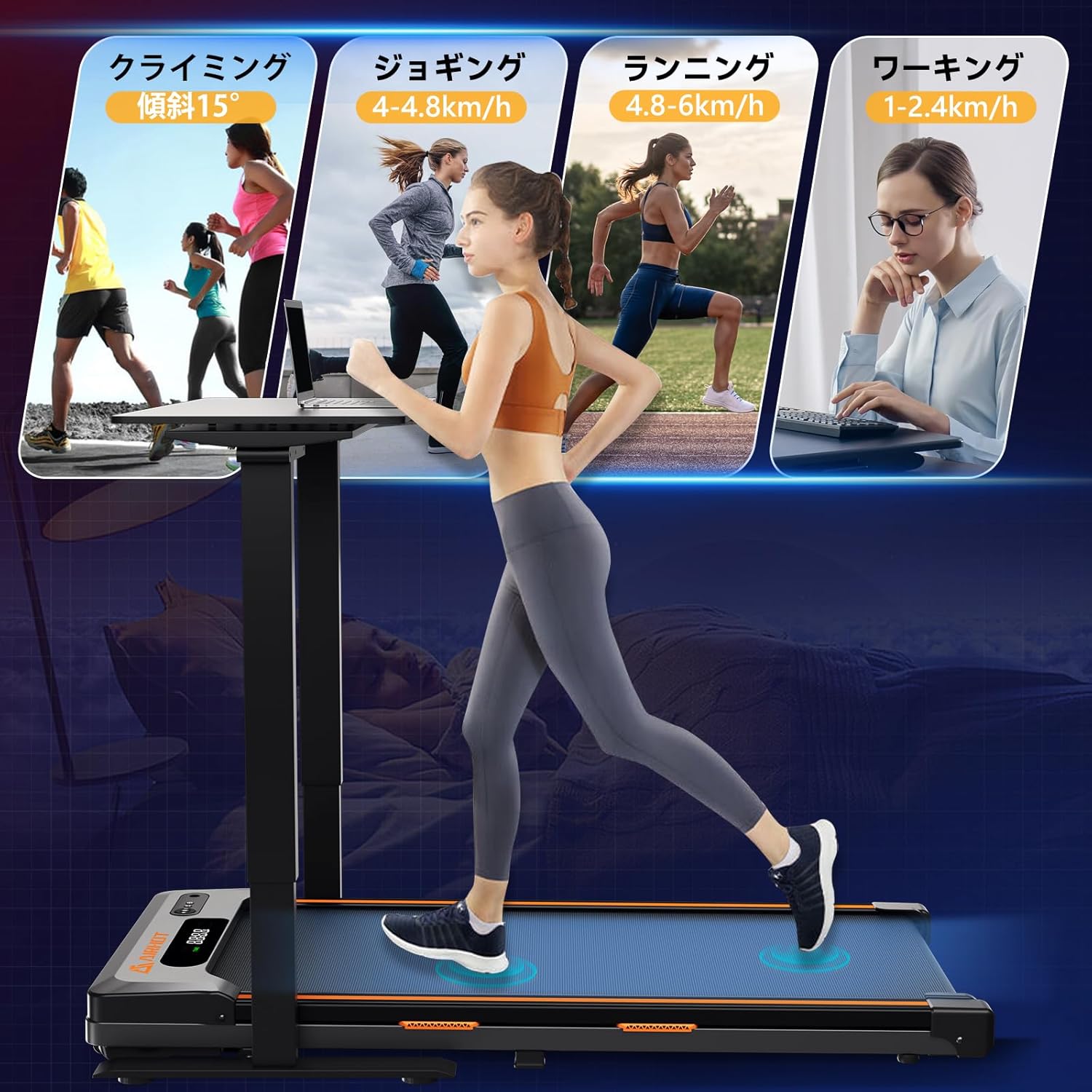
Image: Visual representation of various exercise modes supported by the treadmill, including walking (1-2.4 km/h), jogging (4-4.8 km/h), and running (4.8-6 km/h).
6. Manutenção
A manutenção regular garante o desempenho ideal e prolonga a vida útil da sua esteira.
6.1 Limpeza
- Desligue sempre a esteira da tomada antes de limpá-la.
- Limpe a superfície da esteira com um pano úmido.amp pano após cada uso para remover suor e poeira.
- Evite usar produtos de limpeza abrasivos ou solventes que possam danificar o acabamento.
6.2 Lubrificação
The running belt requires periodic lubrication to reduce friction and wear. Use the provided silicone oil.
- Desconecte a esteira.
- Loosen the belt tension by turning the rear roller bolts counter-clockwise with the included wrench.
- Lift the edge of the running belt and apply a small amount of silicone oil evenly onto the center of the running deck.
- Aperte a correia girando os parafusos do rolete traseiro no sentido horário até que a correia fique firme, mas não excessivamente apertada.
- Ligue a esteira na tomada e deixe-a funcionar em velocidade baixa (por exemplo, 1 km/h) durante 5 minutos para distribuir o lubrificante.
Freqüência: Lubrifique a cada 3 meses ou após 50 horas de uso, o que ocorrer primeiro.
6.3 Ajuste da Correia
If the running belt shifts to one side or feels loose, adjust it using the rear roller bolts and the included wrench. Refer to the lubrication steps for adjusting belt tension.
7. Solução De Problemas
Se você tiver problemas com sua esteira, consulte os problemas comuns e suas soluções a seguir:
| Problema | Possível causa | Solução |
|---|---|---|
| A esteira não liga. | Cabo de alimentação desconectado; interruptor desligado; disjuntor desarmado. | Check power connection; ensure power switch is on; reset circuit breaker. |
| A esteira escorrega ou para. | Correia muito frouxa; lubrificação insuficiente; sobrecarga do motor. | Adjust belt tension; lubricate the belt; reduce user weight or speed. |
| Ruído incomum durante a operação. | Peças soltas; desalinhamento da correia; problema no motor. | Check for loose screws and tighten; adjust belt alignment; contact customer support if motor noise persists. |
| A tela não está funcionando corretamente. | Loose connection; remote control battery low. | Check connections; replace remote control battery. |
If the problem persists after attempting these solutions, please contact AIRHOT customer support for assistance.
8. Especificações
| Recurso | Detalhe |
|---|---|
| Número do modelo | TM400 |
| Marca | AR QUENTE |
| Cor | Preto |
| Material | ABS+Q915 |
| Potência do motor | 2.5 HP |
| Faixa de velocidade | 1 - 6 km/h |
| Capacidade Máxima de Carga | 120 kg (264 libras) |
| Nível de ruído | < 45 dB |
| Dimensões da superfície de corrida | 94.5 cm x 39 cm |
| Dimensões do produto (C x L x A) | 120 cm x 50 cm x 6 cm |
| Peso do produto | 17.5 kg |
| Bateria (Controle Remoto) | CR2032 (incluído) |
9. Garantia e Suporte
For warranty information and customer support, please refer to the documentation included with your purchase or contact AIRHOT directly through their official website or the retailer where the product was purchased. Please have your model number (TM400) and purchase date available when contacting support.