
1. Introdução
This manual provides detailed instructions for the proper use and maintenance of your HTC TWS9 True Wireless Bluetooth Earbuds 9. Please read this manual thoroughly before using the product to ensure optimal performance and longevity.
2. O que está na caixa
- HTC TWS9 True Wireless Bluetooth Earbuds (Left and Right)
- Estojo de carregamento
- Cabo de carregamento USB
- Manual do usuário
3. Produto acabadoview
The HTC TWS9 earbuds feature a compact, in-ear design with a transparent charging case. They are equipped with Bluetooth 5.3 for stable connectivity and offer touch controls for various functions.

Image: HTC TWS9 True Wireless Bluetooth Earbuds 9 in purple, shown with their transparent charging case. The earbuds are visible inside the open case, and also separately above it.

Image: A person holding the HTC TWS9 charging case, highlighting its transparent lid design. The earbuds are visible inside the case.
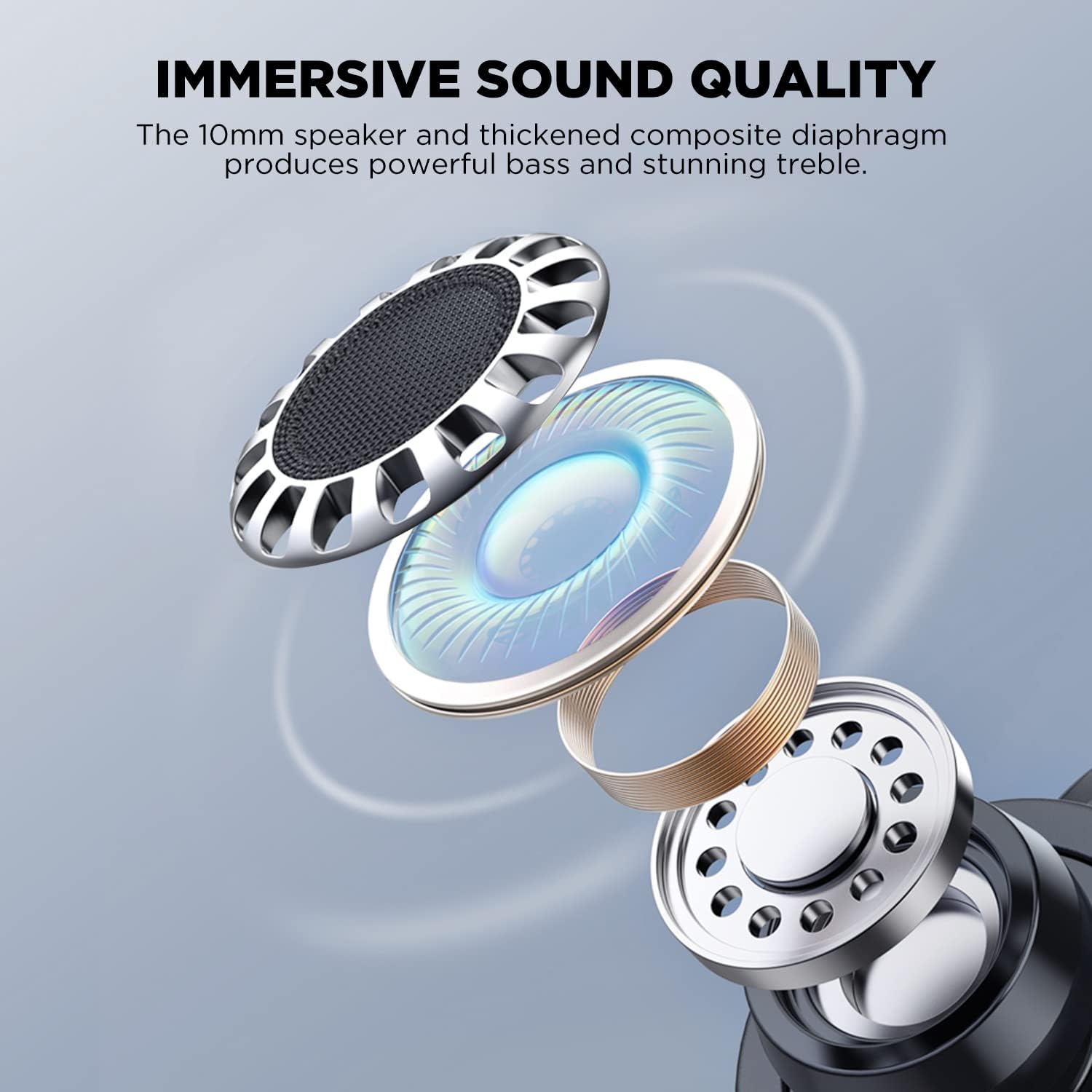
Image: An exploded diagram illustrating the internal components of an HTC TWS9 earbud, including the 10mm speaker and composite diaphragm, designed for sound quality.
4. Configuração
4.1. Carregando os fones de ouvido e o estojo
Before first use, fully charge the earbuds and charging case. The case supports both wired (USB-C) and wireless charging.
- Coloque os fones de ouvido no estojo de carregamento. Certifique-se de que estejam encaixados corretamente.
- Carregamento com fio: Connect the provided USB charging cable to the charging port on the case and to a power source.
- Carregamento sem fio: Place the charging case on a compatible wireless charging pad. The charging indicator light on the case will illuminate.
- Charging typically takes approximately 43 minutes for a fast charge.

Image: The HTC TWS9 charging case placed on a wireless charging pad, indicating its wireless charging capability.
4.2. Emparelhamento com um dispositivo
The HTC TWS9 earbuds utilize Bluetooth 5.3 for a fast and stable connection.
- Certifique-se de que o Bluetooth do seu dispositivo esteja ativado.
- Abra o estojo de carregamento e retire os fones de ouvido. Eles entrarão automaticamente no modo de emparelhamento.
- On your device, search for Bluetooth devices and select "HTC TWS9" from the list.
- Once connected, the earbuds will automatically pair with your device upon removal from the case for subsequent uses.

Image: A smartphone screen displaying the Bluetooth settings, showing "HTC TWS9" as a connected device, illustrating the one-step pairing process.
5. Instruções de operação
5.1. Controles de toque
The HTC TWS9 earbuds feature intuitive touch controls on each earbud for managing audio playback and calls.
- Reproduzir/Pausar: Toque em qualquer um dos fones de ouvido uma vez.
- Próxima faixa: Toque e segure o fone de ouvido direito por 2 segundos.
- Faixa anterior: Toque e segure o fone de ouvido esquerdo por 2 segundos.
- Atender chamada: Toque em qualquer um dos fones de ouvido uma vez.
- Encerrar chamada: Toque em qualquer um dos fones de ouvido uma vez.
- Recusar chamada: Toque e segure um fone de ouvido por 2 segundos.
- Modo de jogo: Tap and hold either earbud for 2 seconds (to toggle).
- Assistente de voz: Toque três vezes em qualquer fone de ouvido.

Image: A visual guide to the smart touch controls on the HTC TWS9 earbuds, detailing actions for game mode, voice assistant, music playback, and call management.
5.2. Modo de jogo
Activate Game Mode for an ultra-low latency experience (40ms), ideal for gaming. Toggle Game Mode using the touch controls as described above.

Image: A smartphone displaying a mobile game, with the HTC TWS9 earbuds and their open charging case nearby, illustrating the use of Game Mode for low-latency audio.
5.3. Usando os fones de ouvido
The earbuds are designed for an ergonomic fit. Insert them gently into your ear canal and rotate slightly until they feel secure and comfortable.

Image: A person wearing an HTC TWS9 earbud, demonstrating its ergonomic design and how it fits in the ear.
6. Bateria e carregamento
The HTC TWS9 earbuds offer extended playtime and convenient charging options.
- Tempo de reprodução do fone de ouvido: Up to 6.5 hours on a single charge (at 50% volume).
- Tempo de reprodução total com estojo de carregamento: 18 a 24 horas.
- Carregamento rápido: Aproximadamente 43 minutos para uma carga completa.
- Carregamento sem fio: The charging case is compatible with most wireless charging pads.

Image: An infographic detailing the battery performance of the HTC TWS9 earbuds, including 43 minutes for fast charging, 6.5 hours of playtime, and 18 hours with the charging case.
7. Manutenção
A manutenção adequada garante a longevidade e o bom desempenho dos seus fones de ouvido.
- Limpeza: Limpe regularmente os fones de ouvido e o estojo de carregamento com um pano macio e seco. Evite usar produtos químicos agressivos ou materiais abrasivos.
- Armazenar: Quando não estiverem em uso, guarde os fones de ouvido no estojo de carregamento para protegê-los e mantê-los carregados.
- Resistência à água: The earbuds are water-resistant, making them suitable for sports and gym use. However, they are not waterproof; avoid submerging them in water.
8. Solução De Problemas
Caso encontre algum problema, consulte as seguintes soluções comuns:
- Os fones de ouvido não estão emparelhando: Ensure Bluetooth is enabled on your device and the earbuds are in pairing mode. Try resetting the earbuds by placing them back in the case and then removing them again.
- Sem som: Verifique o nível de volume no seu dispositivo e certifique-se de que os fones de ouvido estejam conectados corretamente.
- Problemas de carregamento: Verify that the charging cable is securely connected or that the wireless charging pad is functioning correctly. Ensure the earbuds are properly seated in the case.
- Controles de toque não respondem: Ensure your fingers are clean and dry. A quick tap or firm press may be required depending on the function.
9. Especificações
| Recurso | Detalhe |
|---|---|
| Nome do modelo | TWS9 |
| Tecnologia de Conectividade | Sem fio (Bluetooth 5.3) |
| Versão Bluetooth | 5.3 |
| Latência de Áudio | 40ms (Modo Jogo) |
| Tempo de reprodução do fone de ouvido | Até 6.5 horas |
| Tempo total de jogo (com estojo) | 18-24 horas |
| Carregando | Wireless Charging Supported, Fast Charging (43 mins) |
| Tipo de controle | Controle de toque |
| Controle de Ruído | Isolamento Acústico |
| Nível de resistência à água | Resistente à água |
| Material | Plástico transparente |
| Peso do item | 0.09 quilogramas (3.2 onças) |
| UPC | 768649987303 |
10. Vídeo oficial do produto
Video: An official product video from HTC-TECH showcasing the HTC True Wireless Bluetooth Earbuds 9, highlighting various features and design aspects.
11. Garantia e Suporte
For warranty information and customer support, please refer to the documentation included with your product or visit the official HTC support website. Contact information for customer service is typically provided in the Quick Start Guide or on the product packaging.