
1. Introdução
The IDUINO PC1080 is a high-performance dual-channel 6S LiPo charger specifically designed for industrial application drones. It offers reliable, safe, and user-friendly operation with a comprehensive set of functionalities. These include a battery voltage meter, internal resistance meter, LiHV charging mode, and a time-saving synchronization mode. Its robust design ensures stable performance in various environments.
2. Conteúdo da embalagem
Por favor, verifique se todos os itens listados abaixo estão presentes em sua embalagem:
- 1 x PC1080 Dual Channel LiPo Charger
- 1 x cabo de alimentação CA
- 1 x Synchronous data connectors
- 1 x Manual em inglês (este documento)
3. Principais características
The IDUINO PC1080 charger incorporates several advanced features for efficient and safe battery management:
- High-Frequency Capacitor: Utilizes high-specification large capacitors to ensure prolonged and stable operation.
- Active PFC: Features Active Power Factor Correction circuitry for optimal power draw, achieving high efficiency (93%) and reducing interference to the power grid.
- Switched-mode Power Supply: Designed to accept power from mains supplies globally.
- Revestimento conforme: Electronic components are protected with a conformal coating, enhancing resistance to moisture, dust, chemicals, corrosion, and temperature extremes, ensuring stable field performance.
- Automatic Sequential Charging: When paired with G630 charging hubs, the PC1080 can automatically charge up to 12 LiPo battery packs in sequence, prioritizing batteries with the highest remaining capacity.
- Início com um único toque: Simplifies the charging process with a single button press (default 20A current).
- Unique Synchronization Function: Allows one charger to control multiple other chargers for streamlined operation.
- Monitoramento do status da bateria: Provides real-time battery voltage and internal resistance detection.
- Proteções abrangentes: Includes short circuit maintenance, reverse polarity protection, over-temperature protection, and a built-in anti-fire protection circuit to prevent sparking during battery connection.
4. Especificações
| Parâmetro | Valor |
|---|---|
| Marca | IDUINO |
| Fabricante | SKYRC |
| Modelo | SKYRC PC1080 |
| Vol de entradatage | 100-240 V AC |
| Potência de saída | 1080 W (540 W x 2) |
| Poder de descarga | 100 W (50 W x 2) |
| Corrente de carga | 1.0-20.0 A x 2 |
| Saldo Atual | 1.2 UMA |
| Tipo de Bateria | LiPo/LiHV |
| Contagem de células da bateria | 6S x 2 |
| Modos de carregamento | Balance Charge Mode / Storage Mode / Charge Mode |
| Dimensões do produto | 5 x 3 x 4 cm |
| Peso do item | 1 kg |
| País de origem | China |
5. Produto acabadoview
5.1 frente View
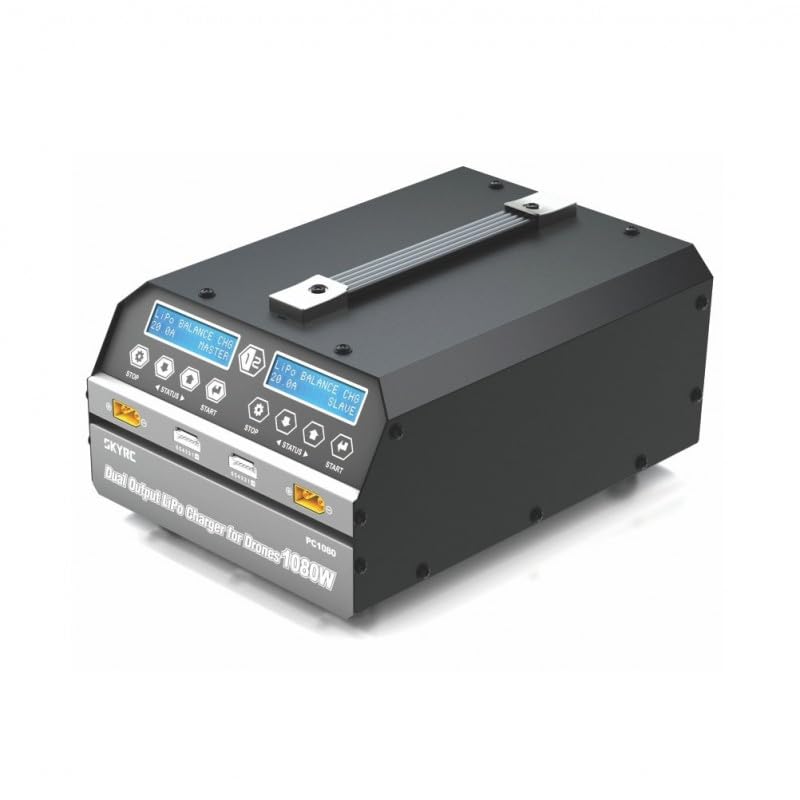
This image displays the front of the IDUINO PC1080 charger, highlighting its dual charging channels, each with its own display screen, control buttons (STOP, STATUS, START), and battery connection ports. The robust handle for portability is also visible.
5.2 Traseira View
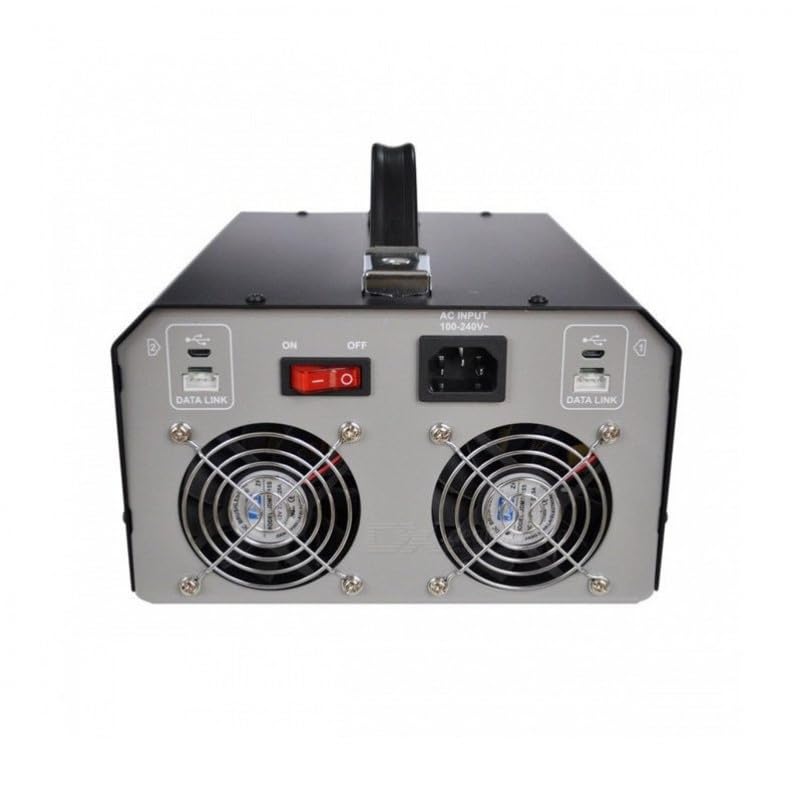
The rear panel of the charger features the AC input port (100-240V), the main ON/OFF power switch, and two cooling fans to dissipate heat during operation. Data Link ports are also present for synchronization with other units.
5.3 Charger in Operation
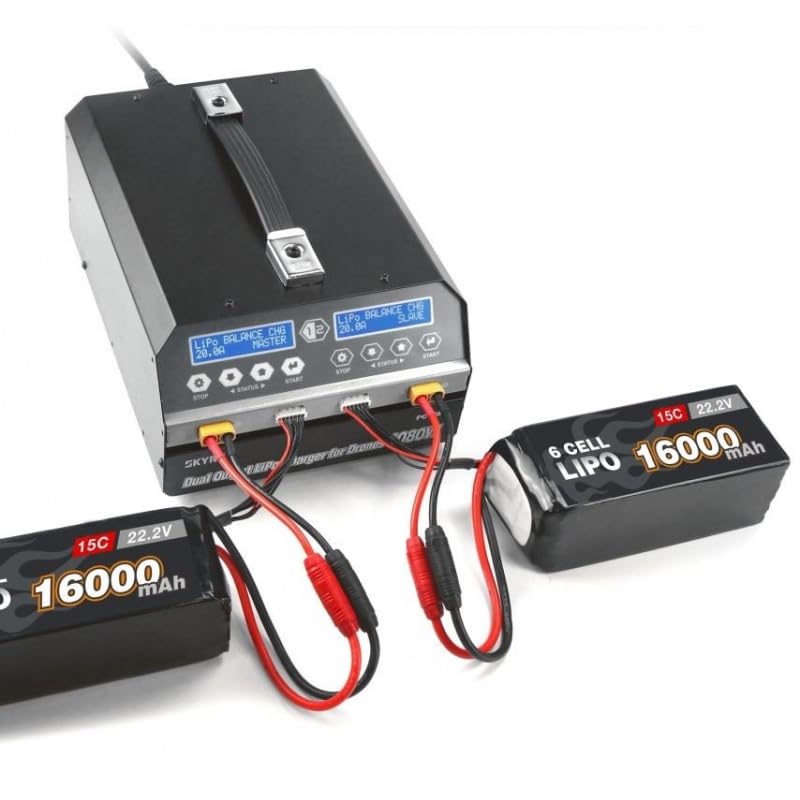
This image shows the IDUINO PC1080 charger actively charging two 6S 16000mAh LiPo batteries. The display screens indicate the charging status, demonstrating the dual-channel capability of the device.
6. Configuração
Follow these steps for initial setup of your PC1080 charger:
- Desembale o carregador: Retire cuidadosamente o carregador e todos os acessórios da embalagem.
- Conecte a alimentação CA: Plug the supplied AC power cord into the AC input port on the rear of the charger. Connect the other end to a suitable 100-240V AC power outlet.
- Ligar: Flip the main ON/OFF switch on the rear panel to the 'ON' position. The display screens on the front will illuminate.
- Prepare as baterias: Ensure your LiPo/LiHV batteries are in good condition and within their safe operating temperature range.
- Conecte as baterias: Connect your battery's main discharge lead to the corresponding output port on one of the charger channels. Then, connect the battery's balance lead to the balance port. Ensure correct polarity for all connections.
7. Instruções de operação
7.1 Carregamento básico
To initiate a basic charge cycle:
- Selecione o canal: Identify the channel (Master or Slave) you wish to use.
- Conecte a bateria: As described in the Setup section, connect your battery to the chosen channel.
- Início com um único toque: Press the 'START' button on the desired channel. The charger will automatically begin charging with a default current of 20A.
- Monitorar o progresso: The display screen will show real-time charging parameters such as voltage, current, and charged capacity.
- Parar de carregar: To stop charging at any time, press the 'STOP' button on the active channel.
7.2 Advanced Charging Modes
The PC1080 supports various charging modes:
- Balance Charge Mode: Recommended for LiPo/LiHV batteries to ensure all cells are charged to the same voltage, prolonging battery life.
- Modo de armazenamento: Carrega ou descarrega a bateria até um volume específico.tage level suitable for long-term storage, preventing degradation.
- Modo de carga: Standard charging without balancing. Use with caution and only when balancing is not required.
To select a specific mode, navigate through the menu using the 'STATUS' button before pressing 'START'.
7.3 Função de Sincronização
The unique synchronization function allows you to control multiple PC1080 chargers from a single master unit. Connect the synchronous data connectors between the chargers as per the diagram in the full manual (not provided here). Once connected, operations initiated on the master charger will be replicated on the slave chargers.
7.4 Battery Status Monitoring
During charging or when a battery is connected, you can press the 'STATUS' button to cycle through various battery parameters displayed on the screen, including:
- Vol total da bateriatage
- Volume de célula individualtages
- Internal resistance of each cell
- Charging current and capacity
8. Manutenção
A manutenção adequada garante a longevidade e o funcionamento seguro do seu carregador:
- Limpeza: Regularly wipe the charger's exterior with a soft, dry cloth. Do not use solvents or abrasive cleaners. Ensure ventilation openings are free from dust and debris.
- Armazenar: Store the charger in a cool, dry place away from direct sunlight, moisture, and extreme temperatures.
- Inspeção de cabos: Periodically inspect all cables and connectors for signs of wear, damage, or corrosion. Replace damaged cables immediately.
- Ventilação: Ensure adequate airflow around the charger during operation. Do not block the cooling fans.
9. Solução De Problemas
If you encounter issues with your PC1080 charger, refer to the table below for common problems and their solutions:
| Problema | Possível causa | Solução |
|---|---|---|
| O carregador não liga | No AC power; Power switch off; Faulty power cord | Check AC outlet; Ensure power switch is ON; Try a different power cord |
| O carregamento não inicia | Battery not connected properly; Incorrect battery type selected; Safety error triggered | Reconnect battery (main and balance leads); Verify battery type and cell count; Check display for error messages (e.g., 'Connection Break', 'Cell Error') |
| Charger displays 'Over Temperature' | Poor ventilation; Ambient temperature too high; Internal fault | Ensure clear ventilation around charger; Move to a cooler environment; If problem persists, contact support |
| Battery not balancing correctly | Balance lead not connected; Damaged balance lead; Faulty battery cell | Ensure balance lead is fully inserted; Inspect balance lead for damage; Test battery with another device if possible |
| Synchronization not working | Data link cables not connected; Incorrect master/slave setup | Verify data link cable connections; Ensure one unit is set as master and others as slaves |
Se o problema persistir após tentar essas soluções, entre em contato com o suporte ao cliente.
10. Informações de segurança
Always observe the following safety precautions when operating the IDUINO PC1080 charger:
- Never leave the charger unattended while in operation, especially when charging LiPo/LiHV batteries.
- Always charge batteries on a non-flammable surface, away from flammable materials.
- Garanta ventilação adequada para evitar superaquecimento.
- Do not attempt to charge damaged, swollen, or leaking batteries.
- Always connect the battery to the charger before connecting the charger to AC power. Disconnect AC power before disconnecting the battery.
- Keep the charger away from water, moisture, and high humidity.
- Não desmonte nem modifique o carregador. Encaminhe todos os serviços de manutenção a pessoal qualificado.
- Mantenha fora do alcance de crianças.
11. Garantia e Suporte
The IDUINO PC1080 Dual Channel LiPo Battery Charger comes with a standard manufacturer's warranty. For specific warranty terms and conditions, please refer to the warranty card included with your product or visit the official IDUINO website. For technical support, troubleshooting assistance, or warranty claims, please contact IDUINO customer service through the contact information provided on their official website ou seu recibo de compra.