1. Introdução
This manual provides essential information for the installation, operation, maintenance, and troubleshooting of your PNY RTX 4000 Ada Generation 20GB DDR6 Quadro Graphics Card. This professional graphics card is designed for demanding applications such as 3D rendering, CAD/CAM, scientific simulations, and AI workflows, leveraging the NVIDIA Ada Lovelace architecture.
Key features include 6,144 CUDA cores, 48 RT Cores, 192 Tensor Cores, and 20GB of GDDR6 ECC memory, all within a single-slot, 130W design. It supports up to four 4K monitors or two 8K monitors via DisplayPort 1.4a.

Figure 1: PNY RTX 4000 Ada Generation Graphics Card overview, showing the single-slot design and an illustrative power connector icon.
2. Informações de segurança
Please read and follow all safety instructions carefully to prevent damage to the product or personal injury.
- Desligue sempre a alimentação do computador antes de instalar ou remover qualquer componente.
- Wear an anti-static wrist strap or frequently touch a grounded metal object to discharge static electricity before handling the graphics card.
- Garanta uma ventilação adequada dentro do gabinete do seu computador para evitar o superaquecimento.
- Não exponha a placa gráfica à umidade ou a temperaturas extremas.
- Handle the card by its edges; avoid touching the gold-plated connectors or components on the PCB.
3. Conteúdo da embalagem
Verifique se todos os itens estão presentes na embalagem do seu produto:
- PNY RTX 4000 Ada Generation Graphics Card (VCNRTX4000ADA-PB)
- Documentation (this manual, quick start guide, etc.)
Note: Additional accessories such as display adapters or power cables may be sold separately or included depending on your region/retailer.
4. Configuração
4.1. Instalação Física
- Prepare seu sistema: Power off your computer and disconnect the power cable from the wall outlet. Open your computer case.
- Locate a PCIe Slot: Identify an available PCI Express x16 slot on your motherboard. The RTX 4000 Ada Generation is a single-slot card.
- Remova as tampas dos slots: Remova a(s) tampa(s) metálica(s) do slot na parte traseira do gabinete do computador, correspondente(s) ao slot PCIe escolhido.
- Insira a placa gráfica: Alinhe cuidadosamente a placa gráfica com o slot PCIe e pressione firmemente até que esteja encaixada com segurança. Certifique-se de que a trava de retenção do slot PCIe esteja travada no lugar.
- Conecte a energia: The RTX 4000 Ada Generation requires an 8-pin PCIe power connector from your power supply. Connect this cable to the power connector on the top edge of the graphics card. Ensure a secure connection.
- Proteja o cartão: Use a screw to fasten the graphics card's mounting bracket to the computer case.
- Close Case and Connect Displays: Close your computer case. Connect your display monitor(s) to the DisplayPort outputs on the graphics card.
4.2. Instalação do driver
- Ligar: Reconnect the power cable to your computer and power it on. Your system may boot with a basic display driver.
- Baixar drivers: Navigate to the official PNY or NVIDIA website to download the latest drivers for the RTX 4000 Ada Generation. It is recommended to download drivers directly from the manufacturer's weblocal para desempenho e estabilidade ideais.
- Suporte PNY: www.pny.com/support
- Drivers NVIDIA: www.nvidia.com/drivers
- Instale os drivers: Execute o instalador do driver baixado e siga as instruções na tela. Pode ser necessário reiniciar o sistema após a instalação.
- Verificar instalação: After restarting, open the NVIDIA Control Panel or NVIDIA Settings to confirm that the graphics card is recognized and operating correctly.

Figure 2: Display output section of the PNY RTX 4000 Ada Generation, showing four DisplayPort 1.4a connectors.
5. Operando a placa gráfica
5.1. Operação básica
Once installed and drivers are updated, your PNY RTX 4000 Ada Generation graphics card will automatically handle graphics processing for your system. Applications that benefit from GPU acceleration will utilize the card's capabilities.
- Painel de controle da NVIDIA: Use the NVIDIA Control Panel (Windows) or NVIDIA Settings (Linux) to adjust display settings, manage 3D application profiles, and monitor GPU status.
- Compatibilidade de Software: Ensure your professional applications (e.g., CAD, rendering software) are updated to versions that support NVIDIA Ada Lovelace architecture for optimal performance.
5.2. Configuração com vários monitores
The RTX 4000 Ada Generation supports up to four DisplayPort 1.4a outputs, allowing for flexible multi-monitor configurations.
- Connect your monitors to the available DisplayPort outputs on the graphics card.
- Access your operating system's display settings (e.g., Windows Display Settings) or the NVIDIA Control Panel to configure display arrangement, resolution, and refresh rates.
- The card supports resolutions up to 4K on four monitors simultaneously, or two 8K monitors.
6. Manutenção
6.1. Limpeza
A limpeza regular ajuda a manter o desempenho ideal e prolonga a vida útil da sua placa gráfica.
- Desligar: Sempre desligue o computador e desconecte-o da tomada antes de limpá-lo.
- Remoção de poeira: Use compressed air to gently blow dust from the heatsink fins and fan blades. Hold the fan blades in place while blowing to prevent over-spinning and potential damage to the fan bearings.
- Limpeza externa: Wipe the exterior of the card with a soft, dry, lint-free cloth. Do not use liquid cleaners directly on the card.
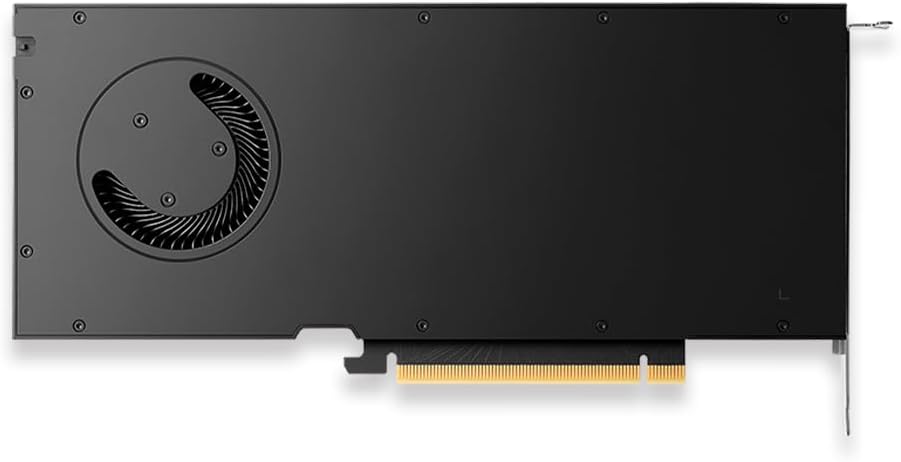
Figura 3: Traseira view of the PNY RTX 4000 Ada Generation, highlighting the cooling fan for maintenance reference.
6.2. Armazenamento
If storing the graphics card, place it in an anti-static bag and store it in a cool, dry environment away from direct sunlight and extreme temperatures.
7. Solução De Problemas
Esta seção aborda problemas comuns que você pode encontrar.
- Sem saída de vídeo:
- Ensure the monitor is powered on and connected to the graphics card, not the motherboard's integrated graphics.
- Verify the graphics card is fully seated in the PCIe slot and the power cable is securely connected.
- Experimente um cabo de vídeo ou um monitor diferente.
- Check your BIOS/UEFI settings to ensure the primary display output is set to PCIe graphics.
- Problemas na instalação do driver:
- Uninstall any previous graphics drivers using a utility like Display Driver Uninstaller (DDU) in Safe Mode, then attempt a fresh installation of the latest drivers.
- Ensure you downloaded the correct drivers for your operating system and graphics card model.
- Instabilidade ou travamentos do sistema:
- Certifique-se de que sua fonte de alimentação (PSU) atenda aos requisitos mínimos de potência.tage os requisitos para o seu sistema, incluindo a placa gráfica.
- Monitor GPU temperatures using software utilities. Excessive heat can cause instability. Ensure proper case airflow.
- Verify that your operating system and motherboard BIOS are up to date.
8. Especificações
| Recurso | Detalhe |
|---|---|
| Marca | PNY |
| Número do modelo | VCNRTX4000ADA-PB |
| Coprocessador gráfico | NVIDIA Quadro RTX 4000 Ada Generation |
| Arquitetura | NVIDIA Ada Lovelace |
| Núcleos CUDA | 6,144 |
| Núcleos RT | 48 (3rd Generation) |
| Núcleos Tensores | 192 (4th Generation) |
| Tamanho da RAM gráfica | 20 GB GDDR6 ECC |
| Interface de memória | 160 bits |
| Largura de banda de memória | 360 GB/s |
| Velocidade do clock da GPU | 2220 MHz (Boost) |
| Velocidade da memória | 2250 MHz |
| Desempenho FP32 | Up to 26.7 TFLOPS |
| Ray Tracing Performance | 61.8 TFLOP |
| AI Performance (FP8) | 327.6 TFLOP |
| Interface de saída de vídeo | 4x DisplayPort 1.4a |
| Resolução máxima da tela | 3840x2160 (4K) per display, up to 4 displays; 8K on 2 displays |
| Consumo de energia | 130 W |
| Fator de forma | Slot único |
| Dimensões do produto (CxLxA) | 14.65 x 8.55 x 0.1 polegadas |
| Peso do item | 1.85 libras |
9. Informações de garantia
PNY products are covered by a manufacturer's warranty. The specific terms and duration of the warranty may vary by region and product type. Please refer to the official PNY website or your product's packaging for detailed warranty information.
For warranty claims or to register your product, visit: www.pny.com/support/warranty
10. Suporte Técnico
If you encounter issues that cannot be resolved using the troubleshooting steps in this manual, or require further assistance, please contact PNY Technical Support.
- Suporte PNY Website: www.pny.com/support
- O apoio website provides FAQs, driver downloads, and contact information for technical assistance.