
leapwell CD201W
Manual do usuário do leitor de CD portátil Leapwell
Model: CD201W
Introdução
Thank you for choosing the Leapwell Portable CD Player. This device is designed to provide a versatile and high-quality audio experience, supporting multiple playback modes and featuring a classic design. Please read this manual thoroughly to understand the product's functions and ensure proper operation and maintenance.
O que está na caixa
Por favor, verifique o conteúdo da sua encomenda. Se algum item estiver faltando ou danificado, entre em contato com o suporte ao cliente.
- Leapwell Portable CD Player
- Controle remoto
- Fones de ouvido
- Cabo AUX 3.5mm
- Cabo de carregamento USB-C
- Manual do usuário

Image: The Leapwell Portable CD Player shown with its remote control, earphones, AUX cable, USB-C charging cable, and user manual, all neatly arranged next to its packaging box.
Produto acimaview
The Leapwell Portable CD Player combines classic design with modern functionality. It features a top-loading CD mechanism with a translucent dust cover, integrated speakers, and a control panel with a rotary knob for volume and various buttons for mode selection and playback control.

Image: A white Leapwell Portable CD Player with its top lid open, revealing a CD. The front speakers are illuminated with a blue glow, and control buttons are visible on the right side.
Principais características:
- Multi-Functional Playback: Supports CD Play, Bluetooth, FM Radio, USB, AUX, AB Repeat, and Optical Mode.
- HiFi Speaker System: Features independent sound cavity design and inner magnetic speaker unit for enhanced sound detail and bass.
- Bateria recarregável: Built-in USB-C fast rechargeable battery provides 4-5 hours of playback.
- Design Clássico: Retro square design with an elegant volume knob and translucent CD dust cover.
- Conectividade versátil: Includes 3.5mm audio, USB, and optical interfaces for external connections.
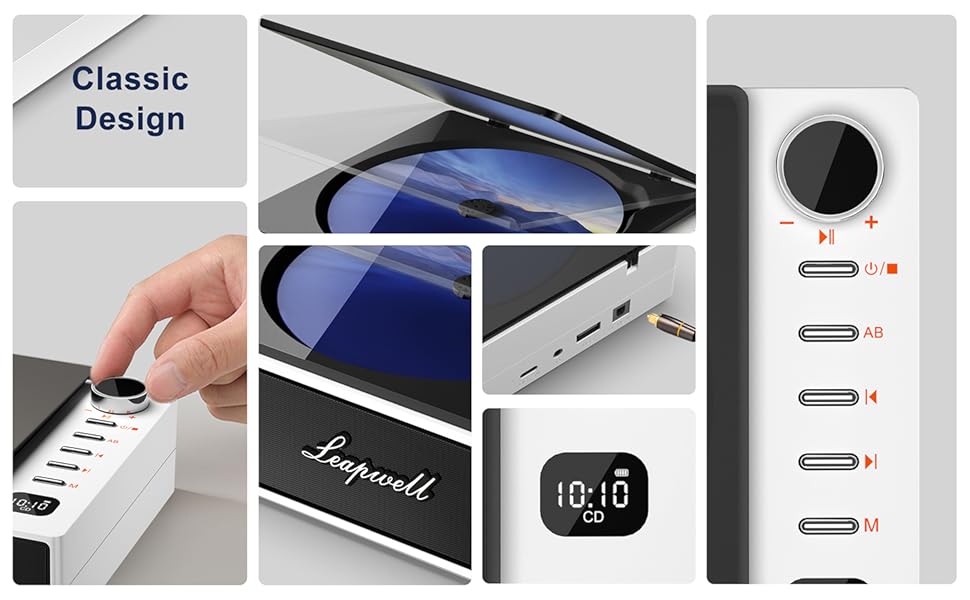
Imagem: Uma colagem mostrandoasing various design elements and features of the CD player, including the volume knob, the open CD lid, the USB-C and optical ports, and the digital display.
Configurar
1. Carregando o dispositivo
Before first use, fully charge the CD player. Connect the provided USB-C charging cable to the USB-C port on the device and the other end to a 5V-2A power adapter (not included) or a computer's USB port. A blinking white light indicates charging. The light will become solid when fully charged. Charging typically takes 3.5 hours for 4-5 hours of playback.

Image: The portable CD player is shown outdoors, emphasizing its built-in rechargeable battery and portability, with icons indicating 4.5 hours playback and 3.5 hours charging time.
2. Ligar / desligar
Press and hold the power button (usually indicated by a power symbol) to turn the device on or off.
Modos de operação
The Leapwell CD Player supports multiple audio sources. Use the 'M' (Mode) button on the device or remote control to switch between modes.

Image: A circular diagram illustrating the six different operating modes of the CD player: CD Mode, BT Mode (Bluetooth), FM Mode, USB Mode, AB Repeat, and Optical Mode.
1. CD Play Mode
- Open the translucent dust cover on top of the player.
- Carefully place a CD onto the spindle, ensuring it is seated correctly.
- Feche a tampa de poeira.
- Select "CD" mode using the 'M' button. The CD will begin playing automatically.
- Use the play/pause, skip forward/backward buttons, and volume knob to control playback.

Image: The Leapwell Portable CD Player with its top lid open, ready for a CD to be inserted. The internal mechanism is visible.
2. Modo Bluetooth
The CD player can connect to Bluetooth headphones or a mobile phone to play music.
- Switch the player to "BT" (Bluetooth) mode. The display will show "BT" and an indicator will blink, signifying pairing mode.
- On your Bluetooth device (e.g., smartphone, headphones), enable Bluetooth and search for "Leapwell CD Player".
- Select the device to pair. Once connected, the Bluetooth indicator on the CD player will stop blinking.
- You can now play audio from your connected device through the CD player's speakers or connected Bluetooth headphones.

Image: A person's hands are shown interacting with a smartphone and the CD player, illustrating the Bluetooth connection process. Bluetooth icons float between the devices.
3. Modo de rádio FM
- Switch the player to "FM" mode.
- Use the skip forward/backward buttons to scan for radio stations.
- Adjust the volume using the rotary knob.
4. Modo USB
- Insira uma unidade flash USB contendo áudio files na porta USB.
- Switch the player to "USB" mode.
- O reprodutor detectará e começará a reproduzir o áudio automaticamente. files da unidade USB.
5. Modo AUX
Connect external audio devices (e.g., smartphone, MP3 player) using the provided 3.5mm AUX cable.
- Connect one end of the 3.5mm AUX cable to the AUX-in port on the CD player.
- Conecte a outra extremidade à entrada de fone de ouvido ou à saída de áudio do seu dispositivo externo.
- Switch the player to "AUX" mode.
- Reproduza áudio do seu dispositivo externo. O som será reproduzido pelos alto-falantes do leitor de CD.
6. Modo óptico
For high-fidelity audio output, connect the CD player to an external decoder or speaker system via an optical cable (not included).
- Connect an optical cable to the optical output port on the CD player.
- Connect the other end to the optical input of your compatible audio system.
- Switch the player to "Optical" mode.
- Audio from the CD player will now be transmitted digitally to your external system.
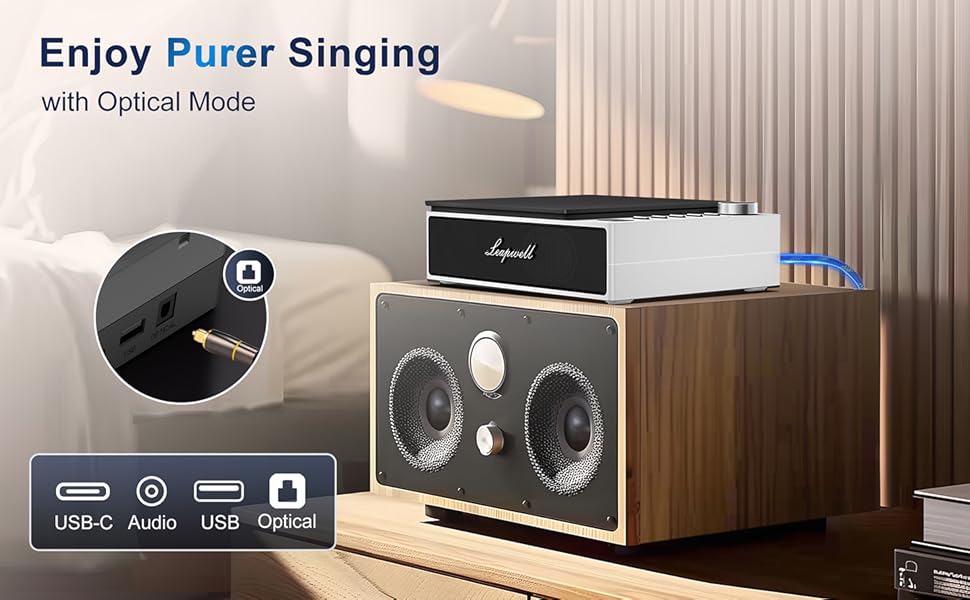
Image: The CD player is shown connected to a larger external speaker system using an optical cable, highlighting its capability for high-quality audio output.
7. AB Repeat Mode
This mode allows you to repeat a specific section of an audio track (CD or USB).
- During playback, press the "AB" button once to set the starting point (A).
- Press the "AB" button again to set the ending point (B). The section between A and B will now repeat.
- Press the "AB" button a third time to cancel the repeat function.
Manutenção
- Limpeza: Use a soft, dry cloth to clean the exterior of the player. For the CD lens, use a specialized CD lens cleaner. Do not use abrasive cleaners or solvents.
- Capa de proteção contra poeira: Keep the translucent dust cover closed when not in use to protect the optical drive from dust and debris.
- Armazenar: Guarde o aparelho em local fresco e seco, longe da luz solar direta e de temperaturas extremas.
- Cuidados com a bateria: Para prolongar a vida útil da bateria, evite descarregá-la completamente com frequência. Carregue o dispositivo regularmente, mesmo que não o esteja utilizando constantemente.
Solução de problemas
| Problema | Possível causa/solução |
|---|---|
| O dispositivo não liga. | Battery might be depleted. Connect to power adapter and charge. Ensure the power button is pressed and held sufficiently. |
| O CD não toca ou pula faixas. | CD might be dirty or scratched. Clean the CD. Ensure the CD is properly seated. The player has anti-shake protection, but excessive movement can still cause skips. |
| Nenhum som dos alto-falantes. | Volume might be too low. Increase volume using the knob. Ensure correct mode is selected. Check if external headphones or speakers are connected and functioning. |
| Problemas de conexão Bluetooth. | Ensure the player is in Bluetooth pairing mode. Make sure the external Bluetooth device is discoverable and within range. Try unpairing and re-pairing the devices. |
| O controle remoto não funciona. | Check if the remote control's battery needs replacement. Ensure there are no obstructions between the remote and the player's IR receiver. |
| Slow charging via computer USB. | Charging via a computer's USB port will be slower. It is recommended to use a 5V-2A adapter for faster charging. |
Especificações
| Recurso | Detalhe |
|---|---|
| Dimensões do produto | 7.3 x 5.8 x 2.2 polegadas (18.5 x 14.7 x 5.6 cm) |
| Peso do item | 1.4 libras (0.63 kg) |
| Número do modelo | CD201W |
| Tipo de Bateria | 1 bateria de íon de lítio (incluída) |
| Modos de reprodução | CD, Bluetooth, FM Radio, USB, AUX, AB Repeat, Optical |
| Tecnologia de Conectividade | Auxiliary, Bluetooth, Optical, USB, USB-C |
| Características especiais | Anti-Skip Protection, Built-In Speaker, Portable, Rechargeable |
| Tecnologia de sintonizador | FM |
| Fonte de energia | Alimentado por bateria |
Garantia e Suporte
Leapwell CD Players come with lifelong technical support and 24/7 professional customer service. For any inquiries, issues, or warranty claims, please contact Leapwell customer support through the retailer's platform or the contact information provided in your product packaging.