
1. Introdução
Welcome to the WONNIE DC105P Digital Camera user manual. This guide provides essential information for setting up, operating, and maintaining your new camera. Designed for ease of use, this camera captures vivid 56MP photos and Full HD 1080P videos, making it perfect for young photographers to explore their creativity.
2. Informações de segurança
- Não exponha a câmera à água ou temperaturas extremas.
- Mantenha a câmera longe de campos magnéticos fortes.
- Utilize apenas as pilhas e o cabo de carregamento especificados.
- Evite deixar a câmera cair ou submetê-la a impactos fortes.
- Limpe a lente com um pano macio e seco.
3. O que está na caixa
Upon unboxing your WONNIE DC105P Digital Camera, please ensure all the following items are present:
- WONNIE DC105P Digital Camera
- 32GB TF Card
- Pilhas recarregáveis (x2)
- Cabo USB Tipo-C
- Cordão
- Bolsa de armazenamento
- Manual do Usuário (este documento)
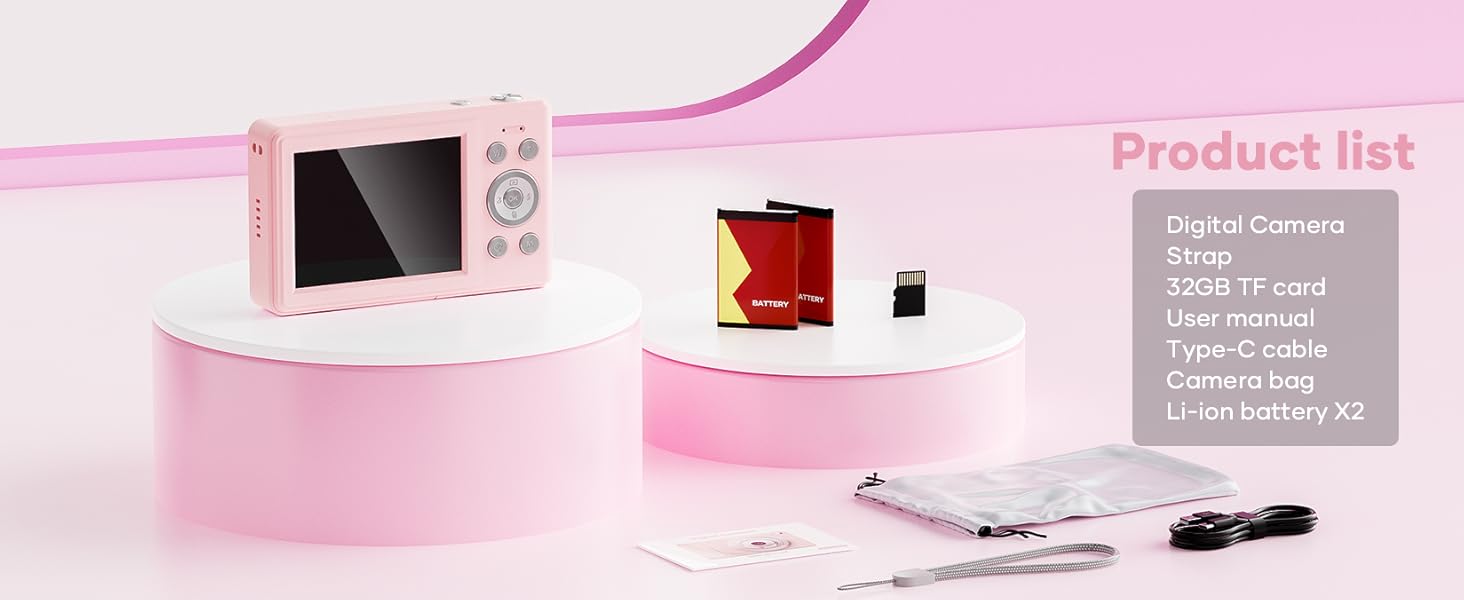
This image displays the WONNIE DC105P Digital Camera alongside its accessories: two rechargeable batteries, a 32GB TF card, a Type-C USB cable, a lanyard, and a soft storage bag, all neatly arranged.
4. Produto acabadoview
Familiarize-se com os componentes e controles da câmera.
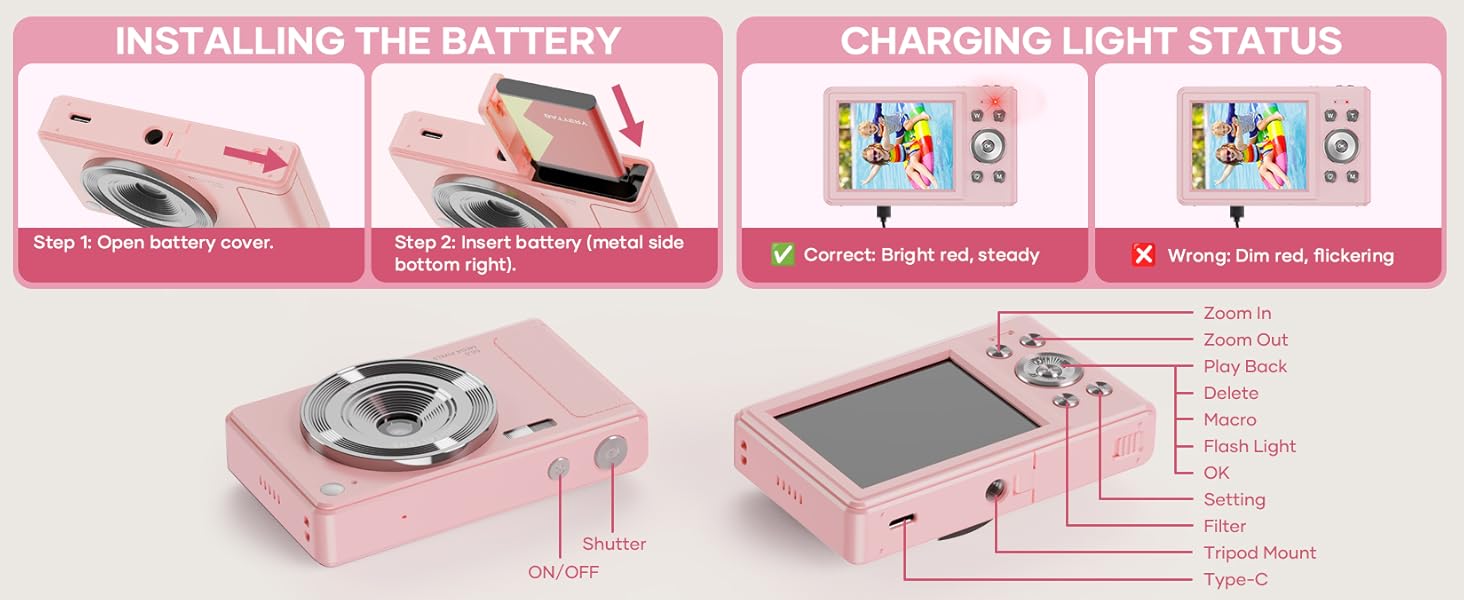
This diagram highlights the various buttons and ports on the WONNIE DC105P Digital Camera, including the power button, shutter button, zoom controls, playback button, menu button, OK button, flash light, tripod mount, and Type-C port.
Componentes principais:
- Lente: Captura imagens e vídeos.
- Clarão: Proporciona iluminação em condições de pouca luz.
- Botão do obturador: Press to take a photo or start/stop video recording.
- Botão de energia: Liga ou desliga a câmera.
- Tela LCD: Exibe ao vivo view, menus e reprodução.
- Botões de navegação (Cima/Baixo/Esquerda/Direita/OK): Utilizado para navegação em menus e seleção de opções.
- Botões de zoom (W/T): Ajusta o zoom digital.
- Botão de reprodução: Entra no modo de reprodução para view captured media.
- Botão de menu: Acessa as configurações da câmera.
- Porta Type-C: Para carregamento e transferência de dados.
- Montagem em tripé: Para fixar a câmera a um tripé.
5. Configuração
5.1 Instalação da bateria
- Open the battery compartment cover located on the side of the camera.
- Insert the rechargeable battery with the metal contacts facing down and to the right, ensuring it clicks into place.
- Feche bem a tampa do compartimento da bateria.
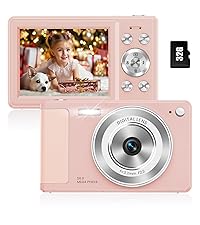
This image illustrates the two steps for battery installation: first, opening the battery cover, and second, inserting the battery with the metal side facing down and to the right.
5.2 Instalação do cartão SD
The camera supports a 32GB TF (Micro SD) card. Insert the TF card into the designated slot in the battery compartment until it clicks.
5.3 Carregando a bateria
- Connect the camera to a power source using the provided Type-C USB cable.
- The charging indicator light will show the charging status. A bright red, steady light indicates correct charging. A dim, flickering light indicates an issue.
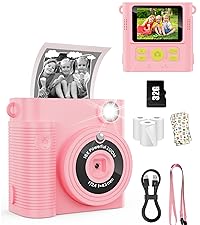
This image displays the camera's charging light status: a bright red, steady light for correct charging, and a dim, flickering light indicating an incorrect status.
5.4 Fixação do cordão
Thread the lanyard through the designated loop on the camera body to prevent accidental drops.
6. Operando a câmera
6.1 Ligar/Desligar
Press and hold the Power button (labeled ON/OFF) on the top of the camera to turn it on or off.
6.2 Tirando fotos
In photo mode, frame your shot using the LCD screen and press the Shutter button to capture an image. The camera features 56MP resolution for clear photos.

This image shows a child holding the pink WONNIE DC105P Digital Camera, with the screen displaying a photo of children. Other children are in the foreground, emphasizing the camera's ease of use for capturing vibrant 56MP photos and smooth FHD 1080P videos.
Special Photo Features:
- Zoom digital 16x: Use the 'W' and 'T' buttons to zoom in or out.
- 20 Fun Filters: Apply various creative filters to your photos via the menu.
- Temporizador: Set a delay (2s, 5s, 10s) before taking a photo, ideal for group shots.
- Continuous Shooting (Burst Mode): Capture a rapid sequence of 3 photos.
- Anti-vibração: A estabilização digital de imagem ajuda a reduzir o desfoque causado pelo movimento da câmera.
- Luz de preenchimento: Activate the built-in fill light for brighter photos in dim environments. (Note: Fill light won't activate in macro mode or when battery is too low.)
- Smile Recognition: Captura automaticamente uma foto quando um sorriso é detectado.

This image showcases three key features: Self Timer for perfect selfies, Continuous Shooting to capture every moment, and Anti Shake for steady shots.

This image illustrates the camera's 16x digital zoom capability with examples at 4x, 8x, and 16x, alongside a selection of 20 fun filters like Normal, Cold Filter, Warm Filter, and more, for endless creativity.
6.3 Gravação de vídeos
Switch to video mode (usually indicated by a camcorder icon in the menu) and press the Shutter button to start recording. Press again to stop. Videos are recorded in FHD 1080P with a built-in microphone.
6.4 Playback/Viewmídia
Press the Playback button to enter playback mode. Use the navigation buttons to scroll through your photos and videos. Press the OK button to play videos.
6.5 Transferindo Files
You have several options to transfer your media:
- USB para PC: Connect the camera to your computer using the Type-C cable. The camera will appear as a removable disk.
- OTG to Phone: Use a compatible OTG cable adapter (sold separately) to connect the camera to your smartphone (e.g., iPhone 15, Samsung).
- Leitor de cartão: Remove the TF card and insert it into a card reader to transfer files to a computer or phone.

This image illustrates three convenient ways to view and transfer media: directly connecting the camera via USB to a PC, using an OTG adapter to connect to a smartphone, or using a card reader with a smartphone.
6.6 WebFuncionalidade da câmera
Connect the camera to a computer via the Type-C USB cable. Select 'Webcam' mode on the camera (if prompted) to use it for video calls or live streaming.

This image demonstrates the WONNIE DC105P Digital Camera's capability to function as a webcam, showing it mounted on a laptop for a video call and for live streaming.
7. Demonstração em vídeo
Este vídeo oferece uma visão geral.view of the WONNIE Digital Camera, highlighting its features and suitability for kids and teens.
This video offers an introduction to the digital camera, demonstrating its basic functions and design.
8. Manutenção
- Limpeza: Use a soft, lint-free cloth to clean the camera body and screen. For the lens, use a specialized lens cleaning cloth and solution.
- Armazenar: Store the camera in its provided storage bag in a cool, dry place away from direct sunlight and humidity. Remove the battery if the camera will not be used for an extended period.
- Cuidados com a bateria: Fully charge batteries before first use. Avoid completely draining the battery frequently to prolong its lifespan.
9. Solução De Problemas
| Problema | Solução possível |
|---|---|
| A câmera não liga. | Certifique-se de que a bateria esteja inserida corretamente e totalmente carregada. |
| Não é possível tirar fotos/gravar vídeos. | Check if the SD card is inserted correctly and has sufficient free space. Ensure the battery is not critically low. |
| As imagens estão desfocadas. | Ensure the lens is clean. Use the anti-shake feature. Hold the camera steady while shooting. |
| Não é possível transferir files to computer/phone. | Verify the USB cable connection. Ensure the camera is in the correct mode for data transfer (if prompted). Try a different USB port or cable. For phones, ensure OTG compatibility and adapter. |
| Charging indicator is flickering. | Refer to Figure 5.2 for correct charging status. Re-insert the cable or try a different power source. |
10. Especificações
| Recurso | Detalhe |
|---|---|
| Resolução do sensor fotográfico | 56 MP |
| Resolução de vídeo | 1080p Full HD |
| Zoom óptico | Zoom digital 16x |
| Tamanho da tela | LCD de 2.8 polegadas |
| Estabilização de Imagem | Digital |
| Mídia de armazenamento | 32GB TF Card (included), Max 32GB supported |
| Conectividade | OTG, USB Type-C |
| Características especiais | Hora Stamp, Anti-shake, Time-lapse, Continuous Shoot, Face Detection, Self-timer, Webcam, Filter Effect, Fill light, Selfie mirror, Auto Shut-off, Built-in Microphone |
| Peso do item | 0.22 quilos (aprox. 0.48 libras) |
| Dimensões | Approx. 3.8 x 0.78 x 2.4 inches (based on image) |
| Tipo de Bateria | Lithium Ion (1000mAh, 3.8V) |
11. Garantia e Suporte
Your WONNIE DC105P Digital Camera comes with a Garantia de 1 ano. We are committed to providing excellent customer service and offer a hassle-free replacement policy. For any inquiries, missing accessories, or support needs, please contact our customer service team. We aim to respond within 24 hours.
For further assistance, please visit the official WONNIE Store on Amazon: WONNIE Store