
1. Produto acabadoview
The VICHTOP A40 is a portable AI-powered language translator device designed for instant two-way communication. It supports a wide range of online and offline languages for voice and photo translation, making it suitable for business, travel, and language learning. Its compact design and multiple translation modes enhance communication efficiency in various scenarios.

Imagem 1.1: Frente e verso view of the VICHTOP A40 translator device, showcasingraças ao seu design compacto e interface de usuário.

Image 1.2: The VICHTOP AI Language Translator highlighting its connectivity options: Bluetooth, WiFi, Mobile Hotspot, and Offline capabilities.
2. O que está na caixa
Verifique se todos os itens estão presentes na embalagem:
- 1 x VICHTOP A40 Intelligent Translator Device
- 1 x cabo de carregamento
- 1 x Manual de Instruções
- 1 x caixa de embalagem
- 1 x Pingente

Image 2.1: Contents of the VICHTOP A40 translator package, including the device, charging cable, manual, box, and pendant.
3. Configuração
3.1 Carregamento Inicial
Before first use, fully charge the device using the provided charging cable and a compatible USB power adapter. The charging indicator will typically show progress and turn off or change color when fully charged.
3.2 Ligar/Desligar
- Para ligar: Press and hold the power button (usually located on the side) until the screen illuminates.
- Para desligar: Press and hold the power button until a power-off option appears on the screen, then select 'Power Off'.
3.3 Conexão de rede
Para utilizar as funcionalidades de tradução online, o dispositivo requer uma ligação à Internet.
- Conexão Wi-Fi: Navigate to 'Settings' > 'Wi-Fi', select your desired network, and enter the password.
- Hotspot móvel: The device can connect to a mobile hotspot from your smartphone. Ensure your phone's hotspot is active and connect via the Wi-Fi settings on the translator.
3.4 Downloading Offline Language Packs
To use offline translation, download the necessary language packs:
- Certifique-se de que o dispositivo esteja conectado ao Wi-Fi.
- Go to 'Offline Package Management' or a similar setting.
- Select the languages you wish to download for offline use.
4. Modos de operação
4.1 Voice Translation (Online & Offline)
The device supports instant two-way voice translation.
- Select 'Online Translation' or 'Offline Translation' from the main menu.
- Selecione os idiomas de origem e de destino.
- Press and hold the corresponding language button (e.g., left button for language A, right button for language B) and speak clearly into the microphone.
- Release the button, and the device will translate and speak the output.

Image 4.1: Display of 17 languages supported for offline voice translation, including Traditional Chinese, Simplified Chinese, Arabic, English, Russian, Korean, Japanese, Thai, German, Italian, Portuguese, Dutch, Spanish, Vietnamese, Indonesian, and Hindi.

Image 4.2: The device screen showing a real-time translation in progress, displaying both the spoken input and its translated text.
4.2 Tradução de fotos
Traduza textos de imagens usando a câmera integrada.
- Select 'Photo Translation' from the main menu.
- Point the camera at the text you wish to translate. Ensure good lighting.
- Toque na tela para capturar a imagem.
- O dispositivo processará a imagem e exibirá o texto traduzido.
4.3 Smart Recording
Record audio and convert it to text, with translation options.
- Select 'Smart Recording'.
- Toque no botão de gravação para iniciar a gravação.
- Tap again to stop. The recording can then be transcribed and translated.

Image 4.3: The smart recording feature in use, showing the device placed on a table during a meeting, capturing audio for transcription and translation.
4.4 Group Translation
Facilitate multi-person conversations across different languages.
- Select 'Group Translation'.
- Siga as instruções na tela para criar ou participar de um grupo.
- Participants can speak in their native language, and the device will translate for others in the group.

Image 4.4: A group of people engaged in a video conference, illustrating the application of the group translation feature for multi-language communication.
4.5 AI Voice Assistant / ChatGPT
Access an intelligent assistant for various queries and tasks.
- Select the 'ChatGPT' or 'AI Voice Assistant' option.
- Speak your query or command (e.g., "Check weather," "Make travel plans," "Introduce attractions").
- The assistant will provide information or perform the requested task.
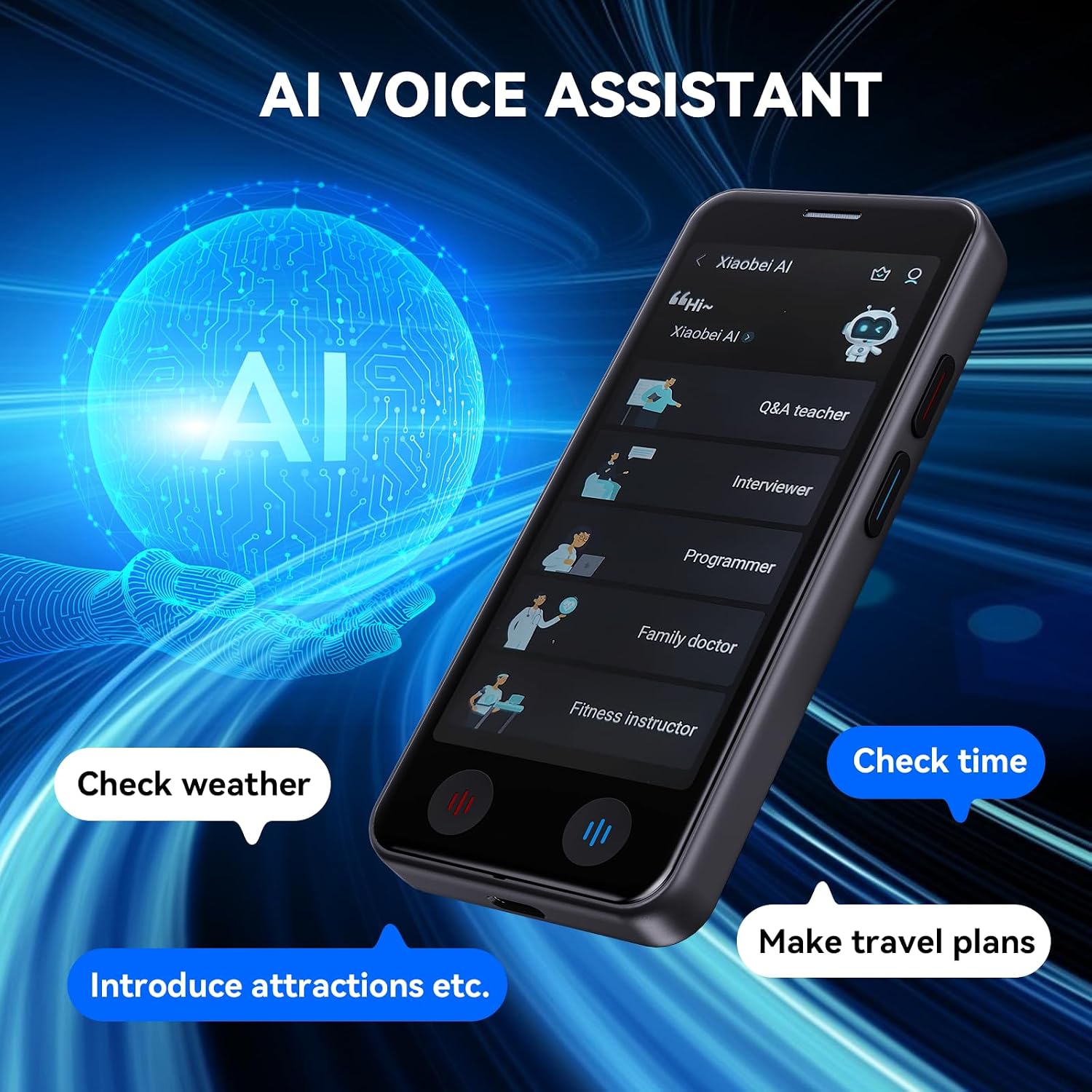
Image 4.5: The AI Voice Assistant interface on the VICHTOP A40, showing options like Q&A teacher, interviewer, programmer, family doctor, and fitness instructor, along with examples of commands like 'Check weather' and 'Make travel plans'.

Image 4.6: A visual representation of the intelligent assistant feature, symbolized by an 'AI' icon within a futuristic digital sphere.
4.6 funções adicionais
The device includes utilities such as:
- Exchange Rate: Check current currency exchange rates.
- Relógio mundial: View horários em diferentes cidades globais.
- Conversão de unidades: Convert various units of measurement.
5. Principais características
- High Accuracy & Speed: The device offers up to 98% real-time translation accuracy with an ultra-fast response time of 0.5 seconds for online translations.
- Amplo suporte linguístico: Supports 139 online languages for instant two-way voice translation and 17 offline languages (with downloaded packs). Photo translation is available for 75 online and 40 offline languages.
- Design portátil: Weighing only 100 grams, its compact size (5.0-inch HD touchscreen) and glass back cover make it comfortable to hold and easy to carry in a pocket or backpack.
- Bateria de longa duração: Equipped with a 1500mAh rechargeable lithium battery, providing 6-8 hours of continuous work and up to 15 days of standby time on a single charge.
- Áudio nítido: Advanced noise reduction technology and a unique speaker ensure accurate speech recognition even in noisy environments.
- Uso versátil: Ideal for business meetings, international travel, language learning, and daily communication, supporting various scenarios like shopping, reading menus, and understanding road signs.

Imagem 5.1: Terminadoview of the VICHTOP A40's translation capabilities, including 139 online voice, 17 offline voice, 75 online photo, and 40 offline photo languages.

Image 5.2: Highlighting the 98% accuracy of the VICHTOP A40 for online translation, supporting 139 languages with two-way translation.

Image 5.3: Illustrating the device's offline translation capabilities, supporting 17 languages for voice and 40 for photo translation without Wi-Fi.

Image 5.4: A user interacting with the device for language learning, emphasizing accurate pronunciation simulation and the ability to learn multiple languages.

Image 5.5: Dimensions of the VICHTOP A40, showing its 5.0-inch HD touchscreen and compact size (12.2cm height, 5.5cm width, 1.1cm thickness).

Image 5.6: A person placing the VICHTOP A40 into a pocket, demonstrating its mini and easy-to-carry design.

Image 5.7: A visual representation of the device's long battery life, indicated by a speedometer-like gauge showing extended usage time.

Image 5.8: A collage illustrating various scenarios where the VICHTOP A40 can be used, including shopping, business meetings, travel, learning, reading menus, and understanding road signs.
6. Especificações
| Recurso | Detalhe |
|---|---|
| Número do modelo | A40 |
| Dimensões | 5.67 x 5.55 x 1.65 polegadas (Embalagem) |
| Peso do item | 7 onças |
| Bateria | Bateria de íon de lítio de 1500 mAh (incluída) |
| Tempo de trabalho contínuo | 6-8 horas |
| Tempo de espera | Até 15 dias |
| Online Voice Translation | 139 idiomas |
| Offline Voice Translation | 17 idiomas |
| Online Photo Translation | 75 idiomas |
| Offline Photo Translation | 40 idiomas |
| Fabricante | VICHTOP |
7. Manutenção
7.1 Limpando o Dispositivo
Para manter a aparência e a funcionalidade do dispositivo:
- Use a soft, dry, lint-free cloth to wipe the screen and body.
- Evite usar produtos de limpeza abrasivos, solventes ou sprays aerossóis.
- Não exponha o aparelho a humidade excessiva.
7.2 Cuidados com a bateria
Para prolongar a vida da bateria:
- Evite temperaturas extremas.
- Não deixe o dispositivo totalmente descarregado por períodos prolongados.
- Use o cabo de carregamento fornecido.
7.3 Atualizações de Software
Periodically check for software updates in the device settings to ensure optimal performance and access to new features or language packs. Connect to Wi-Fi for updates.
8. Solução De Problemas
If you encounter issues with your VICHTOP A40 translator, refer to the following common problems and solutions:
- Dispositivo não liga: Ensure the battery is charged. Connect the device to the charger for at least 30 minutes before attempting to power on again.
- Translation Not Accurate:
- Check your internet connection for online translation.
- Fale de forma clara e em ritmo moderado.
- Certifique-se de que os idiomas de origem e de destino selecionados estejam corretos.
- For photo translation, ensure good lighting and clear text.
- Não é possível conectar-se ao Wi-Fi:
- Verifique a senha do Wi-Fi.
- Ensure the device is within range of the Wi-Fi router.
- Restart the device and the Wi-Fi router.
- Offline Translation Not Working: Ensure that the required language packs have been successfully downloaded and installed.
- Bateria de curta duração: Reduce screen brightness, close unused applications, or ensure the device is fully charged before use.
Caso o problema persista, entre em contato com o suporte ao cliente para obter mais assistência.
9. Garantia e suporte
9.1 Garantia do Produto
The VICHTOP A40 translator device comes with a standard manufacturer's warranty. Please refer to the warranty card included in your packaging or visit the official VICHTOP website para obter termos e condições detalhados da garantia.
9.2 Suporte ao cliente
For technical support, service inquiries, or any questions regarding your device, please contact VICHTOP customer service through the contact information provided on the official website or your purchase platform. Have your model number (A40) and purchase details ready when contacting support.