Introdução
Welcome to your new Nontaus D15 Wooden Multimedia 2.0 Channel Speaker. This manual provides detailed instructions for setup, operation, maintenance, and troubleshooting to ensure optimal performance and longevity of your speakers. Please read this manual thoroughly before using the product.
Produto acimaview
Conteúdo da embalagem
- Speaker Unit (2 speakers)
- Cabo de áudio de 3.5 mm
- Cabo de alimentação USB
Recursos do alto-falante
- 2.0 Channel Stereo Sound
- 6 Watt Deep Stereo Audio (3W x 2 RMS)
- Wooden Enclosure for enhanced acoustics
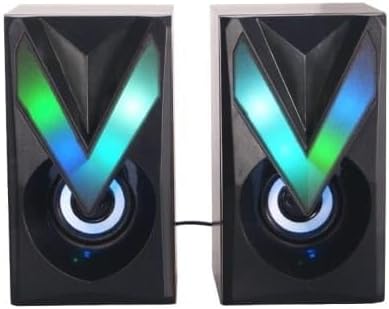
- Vibrant RGB LED lighting
- powered USB
- 3.5mm Audio Jack Connectivity
- Controle de toque
Componentes do alto-falante

The Nontaus D15 speaker system consists of two units. Each unit features a main speaker driver and an integrated RGB LED lighting panel. The primary control unit (one of the speakers) houses the volume control and input connections.

The rear of the speakers may include a bass port for enhanced low-frequency response and the fixed cable for connecting the two speaker units.
Configurar
Conectando seus alto-falantes
- Posicionamento: Place the two speaker units on a stable, flat surface, ideally equidistant from your listening position for optimal stereo separation.
- Connect Speaker Units: Ensure the cable connecting the two speaker units is securely plugged in. This cable is usually fixed to one speaker and plugs into the other.
- Conexão de áudio: Plug the 3.5mm audio jack into the audio output port of your device (computer, laptop, smartphone, MP3 player, tablet).
- Conexão de energia: Insert the USB power cable into an available USB port on your computer, laptop, or a compatible USB power adapter (5V/1A recommended).
- Ligar: Once connected, the speakers should power on automatically, and the RGB LED lights will illuminate.

Ensure all connections are firm to prevent audio interruptions or power issues.
Instruções de operação
Controle de volume
The Nontaus D15 speakers feature touch controls. Locate the touch-sensitive area, typically on the front or top of one of the speaker units.
- Aumentar o volume: Tap or slide your finger on the designated area to increase the volume.
- Diminuir o volume: Tap or slide your finger on the designated area to decrease the volume.
- Silenciar/Ativar som: A quick tap might mute or unmute the audio. Refer to the specific touch control interface on your speaker.
RGB LED Lighting Control
The RGB LED lighting is designed to be vibrant. Control options may vary:
- Ciclo Automático: The lights may cycle through colors automatically.
- Controle de toque: Some models allow changing light modes or turning lights on/off via a dedicated touch area.
Manutenção
Limpeza
To clean your speakers:
- Disconnect the speakers from power before cleaning.
- Use a soft, dry cloth to wipe down the speaker surfaces.
- Não utilize produtos de limpeza líquidos, aerossóis ou materiais abrasivos, pois estes podem danificar o acabamento ou os componentes internos.
Armazenar
Quando não estiverem em uso por longos períodos, guarde as caixas de som em local fresco e seco, longe da luz solar direta e de temperaturas extremas.
Solução de problemas
| Problema | Possível causa | Solução |
|---|---|---|
| Sem som |
|
|
| Som distorcido |
|
|
| As luzes RGB não estão funcionando. |
|
|
Especificações
| Recurso | Detalhe |
|---|---|
| Nome do modelo | Nontaus D15 |
| Marca | Genérico |
| Tipo de alto-falante | Multimídia |
| Tecnologia de Conectividade | Wired (3.5mm audio, USB power) |
| Modo de saída de áudio | Estéreo |
| Configuração do canal de som surround | 2.0 |
| Potência máxima de saída do alto-falante | 6 Watts (3W x 2 RMS) |
| Fonte de energia | Elétrica com fio (USB) |
| Método de controle | Tocar |
| Material | Madeira |
| Cor | Brown (Wooden finish) |
| Dimensões do produto (P x L x A) | 8 cm x 15 cm x 17 cm |
| Peso do item | 350 gramas |
| Dispositivos compatíveis | Tablet, Laptop, Computer, MP3 Player, Smartphone |
| Tipo de garantia | Limitado |
Garantia e Suporte
Informações de garantia
This product comes with a limited warranty. Please refer to the warranty card included in your package for specific terms and conditions, or contact your retailer for details.
Suporte ao cliente
For technical assistance or customer service inquiries, please contact your point of purchase or visit the manufacturer's website.


