
Introdução
This manual provides comprehensive instructions for the setup, operation, maintenance, and troubleshooting of your HUAYU RM-DS909 Replacement TV Remote Control. Designed for seamless compatibility with DSTV LCD/LED televisions, this remote offers intuitive control and reliable performance. Please read this manual carefully to ensure optimal use of your new remote control.
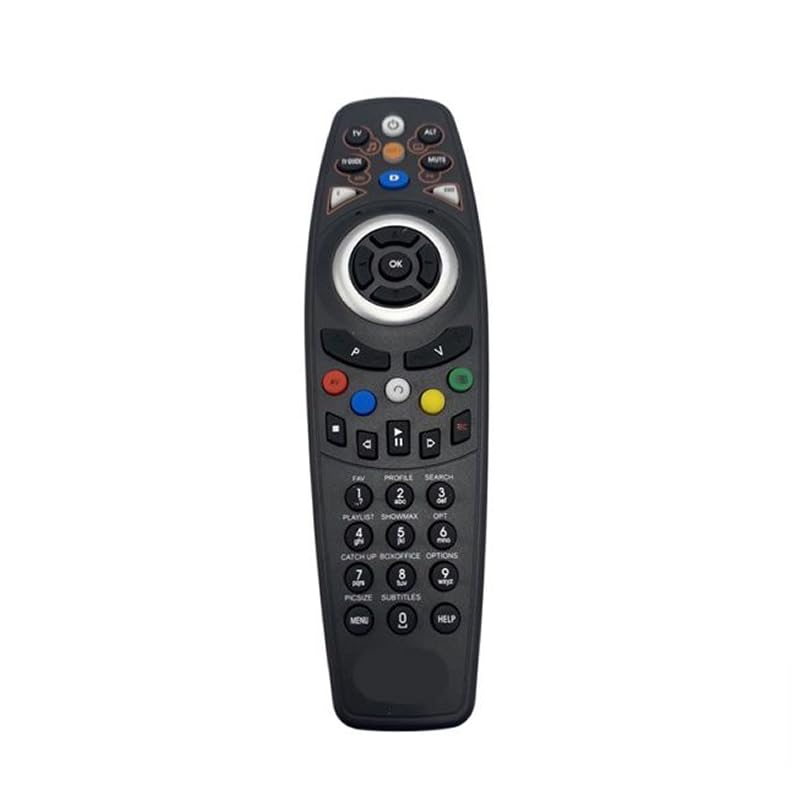
Imagem: Frente view of the HUAYU RM-DS909 Replacement TV Remote Control.
Configurar
1. Instalação da bateria
- Localize o compartimento da bateria na parte traseira do controle remoto.
- Deslize a tampa do compartimento da bateria para baixo e remova-a.
- Insert two (2) AAA batteries (not included) into the compartment, ensuring the positive (+) and negative (-) terminals align correctly with the indicators inside.
- Recoloque a tampa do compartimento da bateria deslizando-a de volta para o lugar até ouvir um clique.

Image: Battery compartment with cover removed, showing AAA battery slots.
2. Uso inicial
The HUAYU RM-DS909 remote control is designed for direct use with compatible DSTV LCD/LED televisions. No complex programming or pairing is required. Once batteries are installed, the remote is ready to operate your television.
Instruções de operação
This remote control provides access to all standard functions of your DSTV LCD/LED television. Below is a general guide to common button functions:
- Botão de energia: Liga ou desliga a TV.
- Canal para cima/para baixo: Muda o canal de televisão.
- Aumentar/diminuir volume: Ajusta o volume do áudio.
- Botão Mudo: Silences or restores the audio.
- Botões de navegação (setas) e OK: Utilizado para navegar pelos menus e confirmar as seleções.
- Botão Menu/Início: Accesses the TV's main menu or smart features.
- TV Guide Button: Exibe o guia eletrônico do programa.
- Botões coloridos (vermelho, verde, amarelo, azul): These buttons typically correspond to specific functions within menus or interactive services, as indicated on your TV screen.
- Controles de reprodução (Reproduzir, Pausar, Parar, Retroceder, Avançar, Gravar): Used for media playback functions, often with PVR or connected devices.
- Teclado Numérico (0-9): Para entrada direta de canal.
For specific functions related to your DSTV decoder or TV model, refer to your television's or decoder's user manual.
Manutenção
- Limpeza: Limpe o controle remoto com um pano macio e seco. Não utilize produtos de limpeza líquidos ou materiais abrasivos, pois podem danificar a superfície ou os componentes internos.
- Substituição da bateria: Substitua as pilhas quando o controle remoto ficar lento ou parar de funcionar. Sempre substitua as duas pilhas simultaneamente por pilhas AAA novas. Não misture pilhas novas com usadas, nem use pilhas de tipos diferentes.
- Armazenar: If the remote will not be used for an extended period, remove the batteries to prevent leakage and potential damage. Store the remote in a cool, dry place away from direct sunlight and extreme temperatures.
Solução de problemas
- O controle remoto não está respondendo:
- Certifique-se de que as pilhas estejam inseridas corretamente, respeitando a polaridade.
- Substitua as pilhas antigas por pilhas AAA novas.
- Verifique se há alguma obstrução entre o controle remoto e o sensor infravermelho da TV.
- Ensure you are within the effective operating range and pointing the remote towards the TV.
- Alcance operacional limitado:
- Weak batteries can reduce the remote's range. Replace them if necessary.
- Bright light sources (e.g., direct sunlight, fluorescent lights) can interfere with the infrared signal.
- Botões específicos não estão funcionando:
- Certifique-se de que o controle remoto esteja limpo e que não haja detritos obstruindo os botões.
- If only certain buttons fail, it might indicate internal damage. Consider replacing the remote.
Especificações
| Número do modelo | RM-DS909 (Internal Model: 930) |
| Marca | HUAYU |
| Tecnologia de Conectividade | Infravermelho (IV) |
| Dispositivos compatíveis | DSTV LCD/LED Televisions |
| Tipo de Bateria | 2 x AAA (não incluído) |
| Material | abdômen |
| Cor | Preto |
| Recurso especial | Funcionalidade inteligente |
| Número máximo de dispositivos compatíveis | 1 |
Garantia e Suporte
Garantia do fabricante
This HUAYU remote control comes with a Garantia do fabricante de 1 ano from the date of purchase. This warranty covers defects in materials and workmanship under normal use. It does not cover damage caused by misuse, accidents, unauthorized modifications, or battery leakage.
Suporte ao cliente
For further assistance, troubleshooting not covered in this manual, or warranty claims, please contact your retailer or the point of purchase. Please have your purchase receipt and product model number (RM-DS909) available when seeking support.