
1. Introdução
Welcome to the user manual for your Emerson CKSS7071 Sunrise Smartset Alarm Clock Radio. This device is designed to enhance your daily routine with its unique features, including a sunrise simulation, soothing sound options, Bluetooth connectivity, and an 8-color dimmable LED display. Please read this manual thoroughly to understand the full functionality and ensure proper use and care of your new alarm clock radio.
1 vídeo: Sobreview of the Emerson CKSS7071 Sunrise Smartset Alarm Clock Radio. This video demonstrates the key features and design of the product.
2. Informações importantes de segurança
- Leia todas as instruções antes de operar o aparelho.
- Guarde estas instruções para referência futura.
- Não utilize este aparelho perto de água.
- Limpe apenas com um pano seco.
- Não obstrua as aberturas de ventilação. Instale de acordo com as instruções do fabricante.
- Não instale perto de fontes de calor, como radiadores, registros de calor, fogões ou outros aparelhos (incluindo amplificadores) que produzem calor.
- Proteja o cabo de alimentação para que não seja pisado ou comprimido, principalmente nos plugues, nas tomadas de conveniência e no ponto de saída do aparelho.
- Utilize somente acessórios/anexos especificados pelo fabricante.
- Desligue este aparelho durante tempestades com raios ou quando não for utilizado por longos períodos de tempo.
- Entregue todos os serviços de manutenção a pessoal de serviço qualificado. O serviço é necessário quando o aparelho foi danificado de alguma forma, como cabo de alimentação ou plugue danificado, líquido foi derramado ou objetos caíram no aparelho, o aparelho foi exposto à chuva ou umidade, não opera normalmente ou foi derrubado.
3. Conteúdo da embalagem
Ao abrir a embalagem, verifique se todos os itens estão presentes:
- Emerson CKSS7071 Sunrise Smartset Alarm Clock Radio
- Adaptador de energia CA
- Manual do usuário
4. Produto acabadoview
4.1 frente View

Imagem 1: Frente view of the alarm clock, featuring the digital time display and the sunrise simulation light panel.
The front of the unit features the main 1.2-inch LED time display and the large circular light panel for sunrise simulation and ambient lighting. Indicators for AM/PM, Alarm 1/2, and Bluetooth status are also visible.
4.2 Lado View (Controles)
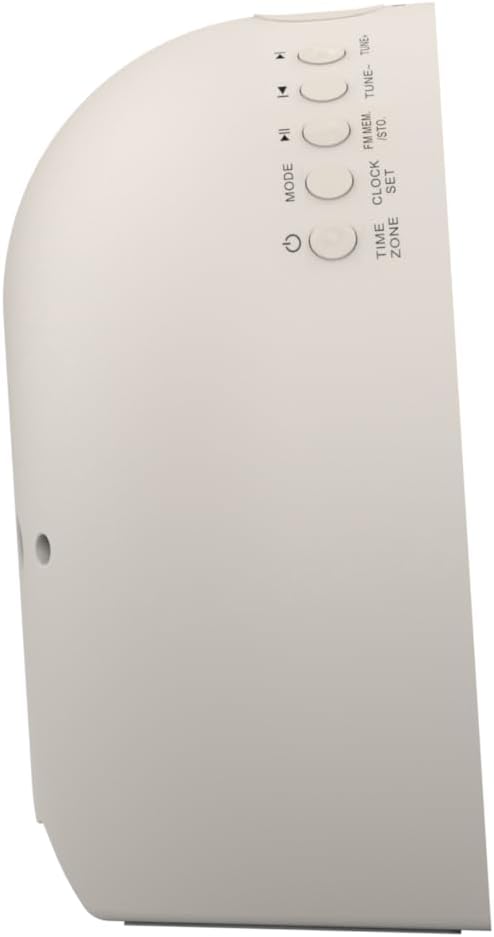
Imagem 2: Lado view of the alarm clock, highlighting the control buttons for various functions.
The side panel houses the primary control buttons, including Power, Mode, Clock Set, Time Zone, Tune/Skip, and Volume controls. These buttons are used for setting time, alarms, and navigating audio functions.
4.3 Traseira View

Imagem 3: Traseira view of the alarm clock, showing the speaker grille and power connection port.
The rear of the unit features the main speaker grille and the power input port for connecting the AC adapter.
5. Configuração
5.1 Conexão de Energia
- Plug the AC power adapter into the DC IN jack located on the back of the unit.
- Conecte a outra extremidade do adaptador a uma tomada de parede padrão (CA 100-240V, 50/60Hz).
- A unidade ligará automaticamente.
5.2 SmartSet Automatic Time Setting
The SmartSet system automatically sets the correct time and date as soon as you plug in the unit. It also maintains time and alarm settings during power disruptions or outages, provided the button cell battery is installed.
5.3 Instalação da bateria de reserva
A button cell battery (CR2032, included) is required for battery backup. This ensures that time and alarm settings are retained during a power outage.
- Localize o compartimento da bateria na parte inferior da unidade.
- Abra a tampa do compartimento da bateria.
- Insert one CR2032 button cell battery, ensuring the correct polarity (+/-).
- Feche bem a tampa do compartimento da bateria.
6. Instruções de operação
6.1 Setting the Clock Manually
- Pressione e segure o CONJUNTO DE RELÓGIO botão. Os dígitos das horas piscarão.
- Use o SINTONIZAR -/+ botões para ajustar a hora. Pressione CONJUNTO DE RELÓGIO para confirmar.
- Os dígitos dos minutos irão piscar. Use o SINTONIZAR -/+ botões para ajustar os minutos. Pressione CONJUNTO DE RELÓGIO para confirmar.
- Continue this process to set the year, month, and day.
- Imprensa CONJUNTO DE RELÓGIO novamente para sair do modo de configuração de hora.
6.2 Configurar alarmes (Alarme 1 e Alarme 2)
The unit features dual alarms. Follow these steps for each alarm:
- Pressione e segure o ALARME 1 or ALARME 2 botão. Os dígitos da hora do alarme piscarão.
- Use o SINTONIZAR -/+ Pressione os botões para ajustar a hora do alarme. ALARME botão para confirmar.
- Os dígitos dos minutos do alarme piscarão. Use o SINTONIZAR -/+ Pressione os botões para ajustar os minutos do alarme. ALARME botão para confirmar.
- Select the alarm source (Buzzer, FM Radio, or Soothing Sound). Press the respective ALARME botão para confirmar.
- Ajuste o volume do alarme usando o VOL - / + buttons. Press the respective ALARME botão para confirmar.
- The alarm is now set. The alarm indicator (AL1 or AL2) will appear on the display.
6.3 Simulação do nascer do sol
The sunrise simulation feature gradually brightens the light panel before your set alarm time, mimicking a natural sunrise to gently wake you.
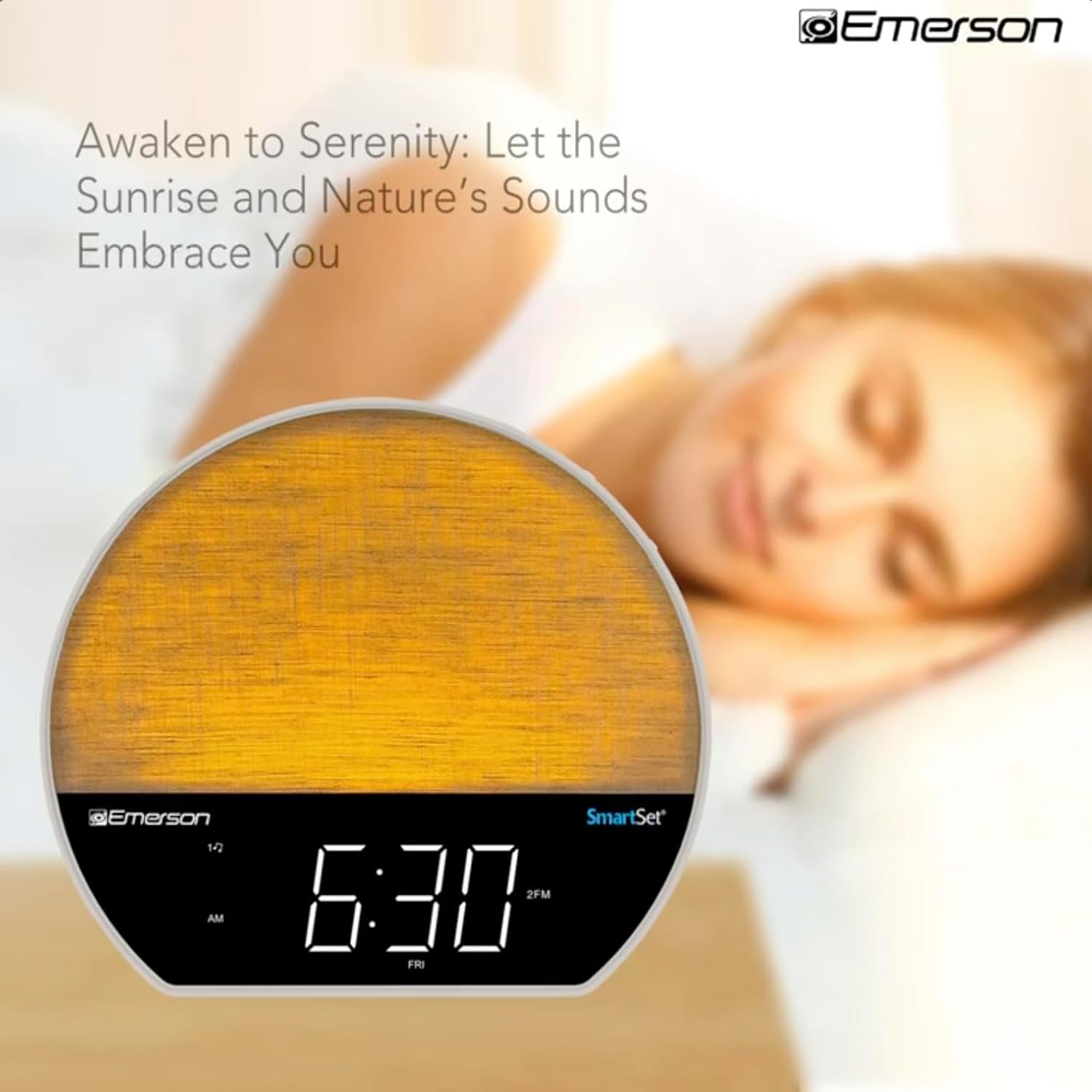
Imagem 4: The alarm clock simulating a sunrise with a warm, increasinintensidade da luz g.
To activate, ensure the sunrise option is selected during alarm setup. The light will begin to brighten 30 minutes before the alarm sounds.
6.4 Soothing Sounds and White Noise
The unit includes 6 soothing sounds and white noise to help with relaxation or waking up.
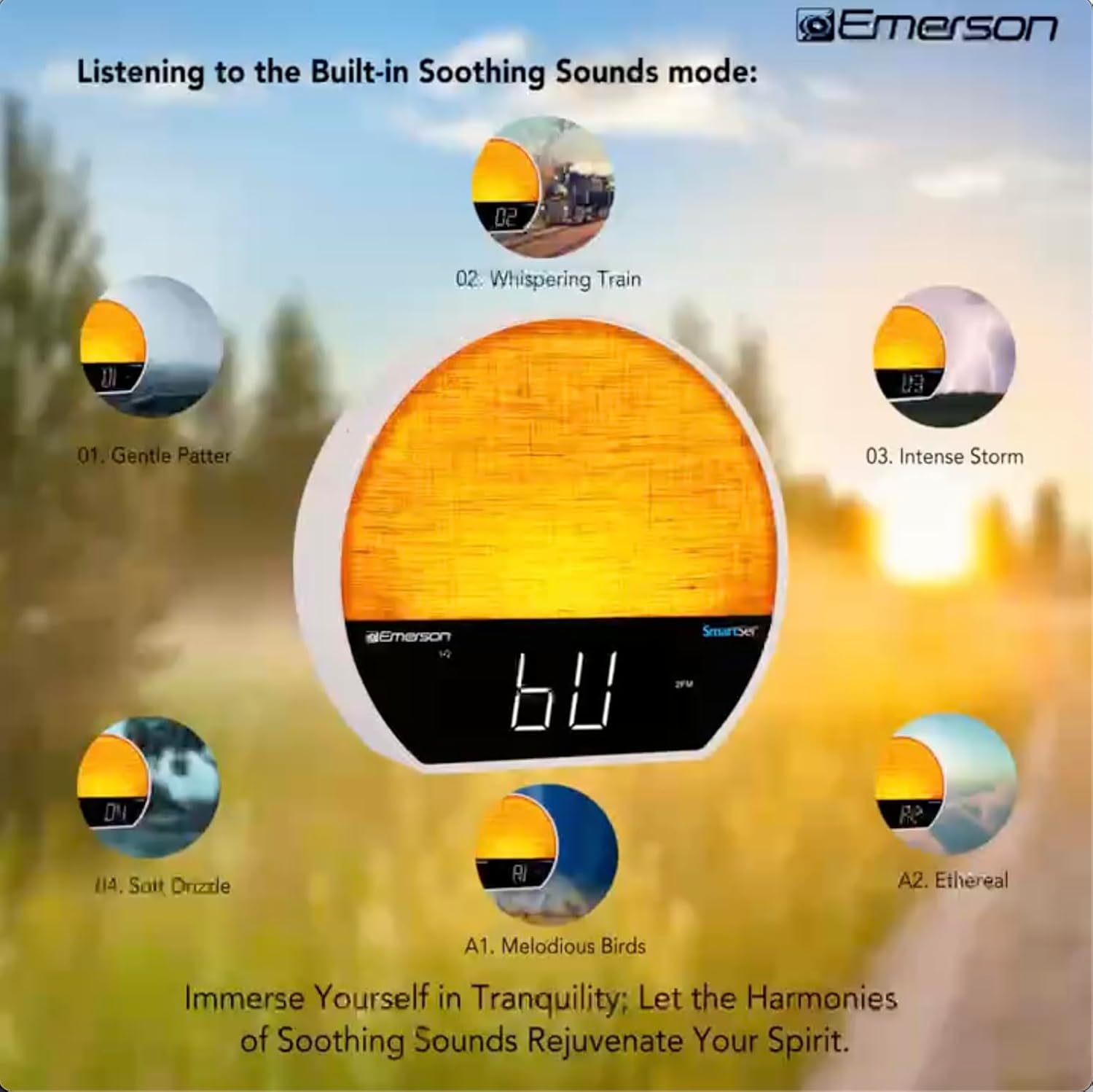
Imagem 5: Visual representation of the six soothing sound modes available on the alarm clock.
- Pressione o MODO button repeatedly until the Soothing Sound mode is selected.
- Use o SINTONIZAR -/+ buttons to cycle through the available sounds (e.g., Gentle Patter, Whispering Train, Intense Storm, Soft Drizzle, Melodious Birds, Ethereal, White Noise).
- Ajuste o volume usando o VOL - / + botões.
6.5 Função de alto-falante Bluetooth
Connect your smartphone or other Bluetooth-enabled device to stream audio wirelessly.

Imagem 6: The alarm clock in Bluetooth mode, paired with a mobile device for audio streaming.
- Pressione o MODO button until 'BT' appears on the display, indicating Bluetooth mode.
- On your device, enable Bluetooth and search for 'Emerson CKSS7071'.
- Select the device to pair. A confirmation tone will sound upon successful pairing.
- Agora você pode reproduzir áudio do seu dispositivo através do alto-falante do despertador.
6.6 Operação de rádio FM
Sintonize suas estações de rádio FM favoritas.
- Pressione o MODO Pressione o botão até que 'FM' apareça no visor.
- Pressione o SINTONIZAR -/+ buttons briefly to manually tune to a station.
- Pressione e segure o SINTONIZAR -/+ botões para buscar automaticamente a próxima estação disponível.
- Para salvar uma estação, pressione e segure o FM MEM Pressione o botão até que o número predefinido pisque. Use SINTONIZAR -/+ Para selecionar um número predefinido, pressione FM MEM novamente para salvar.
6.7 LED Decor and Dimmer Control
Customize the ambient light with 8 different colors and adjust the brightness.

Imagem 7: The alarm clock demonstrating its 8-color dimmable LED decor options.
- Pressione o LUZ button to cycle through the 8 available colors or turn the light off.
- To adjust the brightness of the LED decor light, press and hold the LUZ button. The brightness will cycle through 5 levels. Release the button at your desired brightness.
6.8 Controle de brilho do visor
Adjust the brightness of the 1.2-inch LED time display.

Imagem 8: The alarm clock illustrating the five distinct levels of display luminescence.
Pressione o OBSCURO button (often combined with another function, refer to button labels) to cycle through 4 levels of display brightness (Bright, Moderate, Dim, Faint).
6.9 Temporizador
Set a timer for the audio to automatically turn off after a specified duration.

Imagem 9: The alarm clock set for a sunset sleep timer, providing a harmonious end to the day.
- While audio is playing (FM or Soothing Sound), press the DORMIR botão.
- Pressione repetidamente o DORMIR button to cycle through available sleep timer durations (e.g., 15, 30, 60, 90 minutes, or OFF).
- The audio will automatically turn off after the selected time.
6.10 Função de soneca
Quando o alarme tocar, pressione o SONECA Botão (geralmente um botão grande na parte superior) para silenciar temporariamente o alarme por alguns minutos. O alarme tocará novamente após o período de soneca.
7. Manutenção
7.1 Limpeza
- Sempre desconecte a unidade da tomada antes de limpá-la.
- Use um pano macio e seco para limpar as superfícies externas.
- Não utilize produtos de limpeza líquidos, abrasivos ou em spray, pois estes podem danificar o acabamento.
7.2 Substituição da bateria
Se as configurações de hora e alarme não forem mantidas durante uma queda de energiatage, the button cell backup battery may need to be replaced. Follow the instructions in section 5.3 to replace the CR2032 battery.
8. Solução De Problemas
| Problema | Possível causa | Solução |
|---|---|---|
| A unidade não liga. | Adaptador de energia não está conectado ou está com defeito. | Certifique-se de que o adaptador CA esteja firmemente conectado à unidade e a uma tomada elétrica em funcionamento. |
| As configurações de hora/alarme são perdidas após uma queda de energia.tage. | Backup battery is dead or not installed. | Install or replace the CR2032 button cell battery (see section 5.3). |
| O alarme não dispara. | O alarme não está ativado ou o volume está muito baixo. | Ensure the alarm is set and activated (AL1/AL2 indicator on). Increase alarm volume. |
| O dispositivo Bluetooth não pôde ser emparelhado. | Unit not in Bluetooth mode or device too far. | Ensure the unit is in Bluetooth mode ('BT' displayed). Move your device closer to the unit. Try unpairing and re-pairing. |
| Recepção de rádio FM ruim. | Antena não estendida ou interferência. | Extend the FM wire antenna fully and reposition it for better reception. Avoid placing near other electronic devices. |
| A tela está muito brilhante/escura. | Display dimmer setting needs adjustment. | Pressione o OBSCURO button to cycle through brightness levels (see section 6.8). |
9. Especificações
| Recurso | Detalhe |
|---|---|
| Número do modelo | CKSS7071 |
| Fonte de energia | AC 100-240V, 50/60Hz (via AC adapter) |
| Bateria de reserva | 1 x CR2032 Button Cell Battery (included) |
| Tipo de exibição | 1.2-inch LED Display |
| Versão Bluetooth | V5.4 |
| Sons calmantes | 6 Nature Sounds + White Noise |
| LED Decor Colors | 8 Dimmable Colors |
| Dimensões do produto (L x P x A) | 7.09" x 3.15" x 6.37" |
| Peso | Não especificado |
10. Informações de garantia
Emerson products are manufactured to the highest quality standards. This product is covered by a limited warranty against defects in materials and workmanship for a period of one (1) year from the original date of purchase. This warranty does not cover damage caused by misuse, accident, unauthorized modification, or normal wear and tear. Proof of purchase is required for all warranty claims. Please retain your receipt.
11. Suporte ao cliente
If you have any questions, require assistance, or experience issues with your Emerson CKSS7071 Sunrise Smartset Alarm Clock Radio, please contact our customer support team.
- Website: Visit the official Emerson webSite com perguntas frequentes e recursos de suporte.
- E-mail: Consulte a embalagem do produto ou o manual oficial. webSite para contato por e-mail com o serviço de atendimento ao cliente.
- Telefone: Consulte a embalagem do produto ou o manual oficial. webSite com números de telefone de atendimento ao cliente.
Please have your model number (CKSS7071) and proof of purchase ready when contacting support.