
Introdução
The Kisonli S9 Portable Bluetooth Speaker delivers impressive sound quality in a compact design, suitable for various environments. Featuring a powerful 5W output and an internal magnetic horn, this speaker produces clear and dynamic audio. Its 1200mAh battery provides 3-6 hours of playback, making it ideal for outdoor activities, gatherings, or personal listening. The S9 supports multiple playback options, including Bluetooth, USB, TF card, and AUX, offering versatile listening choices. Simple controls allow for easy mode switching, track selection, and volume adjustment. Small and easy to carry, the S9 is a convenient option for music enthusiasts on the go.
Produto acimaview
Familiarize yourself with the Kisonli S9 speaker's components and controls.
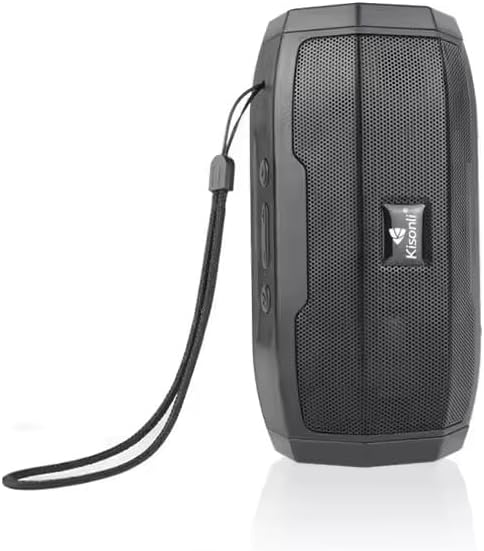
Figura 1: Frente view of the Kisonli S9 portable Bluetooth speaker, black color, with the Kisonli logo visible on the speaker grille. A wrist strap is attached to the side.
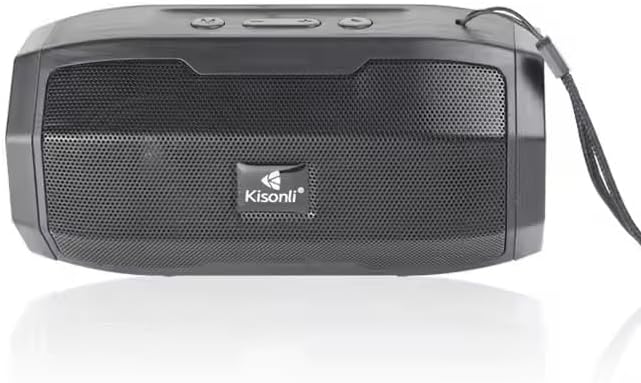
Figura 2: Careca view of the Kisonli S9 speaker's control panel and ports, with labels indicating functions such as power switch, charging port, USB port, TF card slot, AUX input, and control buttons for volume, track, and mode.
Funções de controle:
- Chave ON / OFF: Located at the back, slides to power the speaker on or off.
- Battery Charging DC-5V Port: Porta micro USB para carregar a caixa de som.
- U Disk Playback / Intelligent Mobile Charging Interface: USB-A port for playing music from a USB drive or potentially charging a mobile device (check product specifications for charging capability).
- Reprodução de cartão TF: Slot para reprodução de música diretamente de um cartão TF (MicroSD).
- AUX and Audio Antenna: 3.5mm audio input for connecting external devices via an AUX cable. This port may also function as an antenna for FM radio if supported.
- Botão Reproduzir/Pausar: Controla a reprodução de música.
- Next Song / Volume Up Button: Pressione rapidamente para a próxima faixa, pressione e segure para aumentar o volume.
- Last Song / Volume Down Button: Pressione rapidamente para a faixa anterior, pressione e segure para diminuir o volume.
- BT/USB/AUX Modes Switch: Button to cycle through different playback modes (Bluetooth, USB, AUX, TF card).
Configurar
1. Carregando o alto-falante
- Connect the provided USB charging cable to the DC-5V charging port on the speaker.
- Connect the other end of the USB cable to a standard USB power adapter (5V DC) or a computer's USB port.
- A luz indicadora de carregamento acenderá (a cor pode variar) para mostrar que o alto-falante está carregando.
- Once fully charged, the indicator light may change color or turn off. A full charge typically takes a few hours.
2. Ligar / desligar
- To power on, slide the ON/OFF switch to the 'ON' position. You will hear an audible prompt.
- Para desligar, deslize o interruptor ON/OFF para a posição 'OFF'.
Instruções de operação
1. Modo Bluetooth
- Power on the speaker. It will automatically enter Bluetooth pairing mode, indicated by a flashing LED light and an audible prompt.
- No seu dispositivo móvel (smartphone, tablet, computador), ative o Bluetooth e procure por dispositivos disponíveis.
- Select "S9" from the list of devices.
- Após o emparelhamento, a luz LED deixará de piscar e você ouvirá um som de confirmação.
- Agora você pode reproduzir áudio do seu dispositivo através do alto-falante.
2. Modo de reprodução USB
- Insira um pen drive USB contendo arquivos de áudio MP3. files na porta USB.
- Press the Mode Switch button (BT/USB/AUX) until the speaker enters USB mode. It should automatically start playing music.
3. TF Card Playback Mode
- Insert a TF (MicroSD) card containing MP3 audio fileestá no slot do cartão TF.
- Press the Mode Switch button (BT/USB/AUX) until the speaker enters TF card mode. It should automatically start playing music.
4. Modo de entrada AUX
- Conecte uma extremidade de um cabo de áudio de 3.5 mm (não incluído) à porta AUX da caixa de som.
- Conecte a outra extremidade do cabo de áudio à entrada de fone de ouvido ou à saída de áudio do seu dispositivo externo.
- Press the Mode Switch button (BT/USB/AUX) until the speaker enters AUX mode.
- Play audio from your external device. Volume control may need to be adjusted on both the speaker and the external device.
5. Controle de Volume e Faixa
- Aumentar o volume: Long press the 'Next Song / Volume Up' button.
- Volume baixo: Long press the 'Last Song / Volume Down' button.
- Próxima faixa: Short press the 'Next Song / Volume Up' button.
- Faixa anterior: Short press the 'Last Song / Volume Down' button.
- Reproduzir/Pausar: Short press the 'Play/Pause' button.
Manutenção
- Limpeza: Use um pano macio e seco para limpar a parte externa da caixa de som. Não use produtos de limpeza abrasivos ou solventes.
- Armazenar: Guarde a caixa de som em local fresco e seco, longe da luz solar direta e de temperaturas extremas.
- Cuidados com a bateria: Para prolongar a vida útil da bateria, evite descarregá-la completamente com frequência. Carregue o alto-falante regularmente, mesmo quando não estiver em uso, para manter a saúde da bateria.
- Resistência à água: Este alto-falante não é à prova d'água. Evite a exposição à água ou umidade excessiva.
Solução de problemas
| Problema | Possível causa | Solução |
|---|---|---|
| A caixa de som não liga. | A bateria está esgotada. | Charge the speaker for at least 2-3 hours. |
| Nenhum som. | O volume está muito baixo ou silenciado. Modo incorreto selecionado. | Increase volume on both speaker and connected device. Ensure correct playback mode (Bluetooth, USB, TF, AUX) is selected. |
| Não foi possível emparelhar via Bluetooth. | Speaker is not in pairing mode. Device Bluetooth is off. Too far from speaker. | Ensure speaker is in Bluetooth mode and flashing. Turn Bluetooth off and on again on your device. Move device closer to the speaker (within 10 meters). |
| O cartão USB/TF não está funcionando. | Incorreto file Formatação incorreta do cartão/unidade. | Garantir áudio files are in MP3 format. Reinsert the USB drive or TF card firmly. Ensure speaker is in the correct mode. |
Especificações
| Recurso | Especificação |
|---|---|
| Nome do modelo | S9 |
| Potência de saída | 5W |
| Capacidade da bateria | 1200mAh |
| Vol operacionaltage | Corrente contínua 5 V |
| Dimensões (C x L x A) | 153 x 75 x 75 mm |
| Opções de reprodução | Bluetooth, USB (U disk), TF card, AUX |
| Duração da bateria | 3-6 hours (depending on volume and usage) |
| Cor | Preto |
| Peso do item | 100 gramas |
| Componentes incluídos | Guia de início rápido |
| País de origem | China |
Garantia e Suporte
This product is provided without an explicit warranty as per the product specifications. For any operational issues or questions not covered in this manual, please refer to the retailer or point of purchase for further assistance.