
1. Introdução
Thank you for choosing the Titan Metal Gaming Keyboard. This wired keyboard is engineered for gamers, offering a robust design, responsive keys, and customizable RGB backlighting. Its 19-key anti-ghosting capability ensures precise command input during intense gaming sessions. This manual provides essential information on setting up, operating, maintaining, and troubleshooting your new gaming keyboard.
2. Conteúdo da embalagem
Por favor, verifique se todos os itens estão presentes em sua embalagem:
- Titan Metal Gaming Keyboard with Integrated USB Cable
- Manual do usuário (este documento)

Figura 2.1: Frente view of the Titan Metal Gaming Keyboard retail packaging.
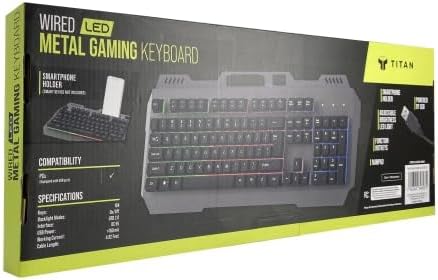
Figura 2.2: Lateral view of the Titan Metal Gaming Keyboard retail packaging, showing compatibility and features.
3. Instruções de configuração
Setting up your Titan Metal Gaming Keyboard is a simple plug-and-play process.
- Desembale o teclado: Retire cuidadosamente o teclado da embalagem.
- Conecte-se ao seu dispositivo: Locate an available USB-A port on your computer (PC, Laptop, or Gaming Console). Insert the integrated USB cable from the keyboard firmly into the USB port.
- Instalação do driver: The keyboard is plug-and-play and does not require additional driver installation for basic functionality on Windows 10/XP and Mac OS 10.6 or later. Your operating system will automatically detect and install the necessary drivers.
- Pronto para uso: Once the drivers are installed (which usually takes a few seconds), your keyboard is ready for use.

Figure 3.1: The Titan Metal Gaming Keyboard, ready for connection.
4. Instruções de operação
4.1 Key Functions and Anti-Ghosting
The Titan Metal Gaming Keyboard features a standard full-size layout with durable mechanical keys designed for precise and responsive typing. It supports 19-key anti-ghosting, meaning up to 19 simultaneous key presses will be registered accurately, preventing input conflicts during fast-paced gaming.
Retroiluminação LED RGB de 4.2 polegadas
The keyboard features 7-color RGB LED backlighting, enhancing visibility and gaming ambiance. The lighting is always active when the keyboard is connected. Specific controls for lighting modes or brightness are typically managed via dedicated function key combinations (e.g., Fn + Scroll Lock or Fn + specific F-keys, if available on your model).
4.3 teclas de atalho multimídia
The keyboard includes 12 dedicated multimedia hotkeys for quick access to common functions. These keys are usually located on the F1-F12 row and are activated by pressing the 'Fn' key simultaneously with the desired F-key. Functions typically include:
- Media Player control (Play/Pause, Stop, Previous, Next)
- Controle de volume (Silenciar, Diminuir volume, Aumentar volume)
- Web Navegador
- Calculadora
- Meu Computador
4.4 Bloqueio da tecla Windows
To prevent accidental interruptions during gaming, the keyboard may feature a Windows key lock function. This is typically activated or deactivated by pressing the 'Fn' key in combination with the Windows key. Refer to the keycap legends for specific icons indicating this function.
5. Manutenção e Cuidados
To ensure the longevity and optimal performance of your Titan Metal Gaming Keyboard, follow these care guidelines:
- Limpeza: Use um pano macio e seco para limpar a superfície do teclado. Para remover poeira e detritos entre as teclas, use ar comprimido. Evite usar produtos químicos agressivos ou materiais abrasivos.
- Derramamentos de líquidos: In case of a liquid spill, immediately disconnect the keyboard from your computer. Turn it upside down to drain excess liquid and allow it to dry completely before reconnecting. Do not use a hairdryer as excessive heat can damage components.
- Armazenar: Guarde o teclado em local fresco e seco, longe da luz solar direta e de temperaturas extremas.
- Manuseio: Avoid dropping the keyboard or subjecting it to strong impacts, as this can damage internal components or the metal frame.
6. Solução De Problemas
If you encounter issues with your Titan Metal Gaming Keyboard, please refer to the following common solutions:
- Teclado não responde:
- Certifique-se de que o cabo USB esteja conectado firmemente a uma porta USB funcional do seu computador.
- Tente conectar o teclado a uma porta USB diferente.
- Reinicie o seu computador.
- Teste o teclado em outro computador para determinar se o problema está no teclado ou no sistema.
- Teclas não registradas / Efeito fantasma:
- Certifique-se de que não haja detritos presos sob as teclas.
- While the keyboard has anti-ghosting, ensure you are not pressing more than 19 keys simultaneously.
- Atualize seu sistema operacional para a versão mais recente.
- Iluminação RGB não funciona:
- Verifique se o teclado está conectado corretamente e recebendo energia.
- Check if any lighting control key combinations (e.g., Fn + Scroll Lock) have been pressed to turn off or change the lighting mode.
- Teclas multimídia não funcionam:
- Ensure you are pressing the 'Fn' key simultaneously with the desired multimedia F-key.
- Some multimedia functions may require specific software or drivers for your operating system.
Se o problema persistir após seguir esses passos, entre em contato com o suporte ao cliente para obter mais assistência.
7. Especificações
| Recurso | Detalhe |
|---|---|
| Número do modelo | Titã 1 |
| Tecnologia de Conectividade | USB-A com fio |
| Anti-Ghosting | 19 chaves |
| Iluminação de fundo | 7-Color RGB LED |
| Teclas de atalho de multimídia | 12 |
| Dispositivos compatíveis | Laptop, PC, console de jogos |
| Compatibilidade do sistema operacional | Windows 10/XP, Mac OS 10.6 or later |
| Cor | Metal Black (keyboard body) |
| Peso do item | 1 libras |
| Dimensões da embalagem | 18 x 6 x 3 polegadas |
| País de origem | China |
8. Garantia e Suporte
For warranty information and customer support, please refer to the purchase documentation or contact the retailer/manufacturer directly. Keep your proof of purchase for any warranty claims.
If you require technical assistance or have questions not covered in this manual, please reach out to the customer support team of your point of purchase.