
Micool BT-X easy
Manual do Usuário dos Fones de Ouvido Micool BT-X Easy On-Ear
Model: BT-X easy
Introdução
Thank you for choosing the Micool BT-X Easy On-Ear Headphones. These headphones are designed to provide a comfortable listening experience with high-quality audio and extended battery life. Featuring Bluetooth 5.4 technology and a unique open-ear design, they are perfect for various activities, from sports to daily commutes.
O que está na caixa
- Micool BT-X Easy On-Ear Headphones (Left & Right)
- Estojo de carregamento sem fio
- Cabo de carregamento USB-C
- Manual do usuário
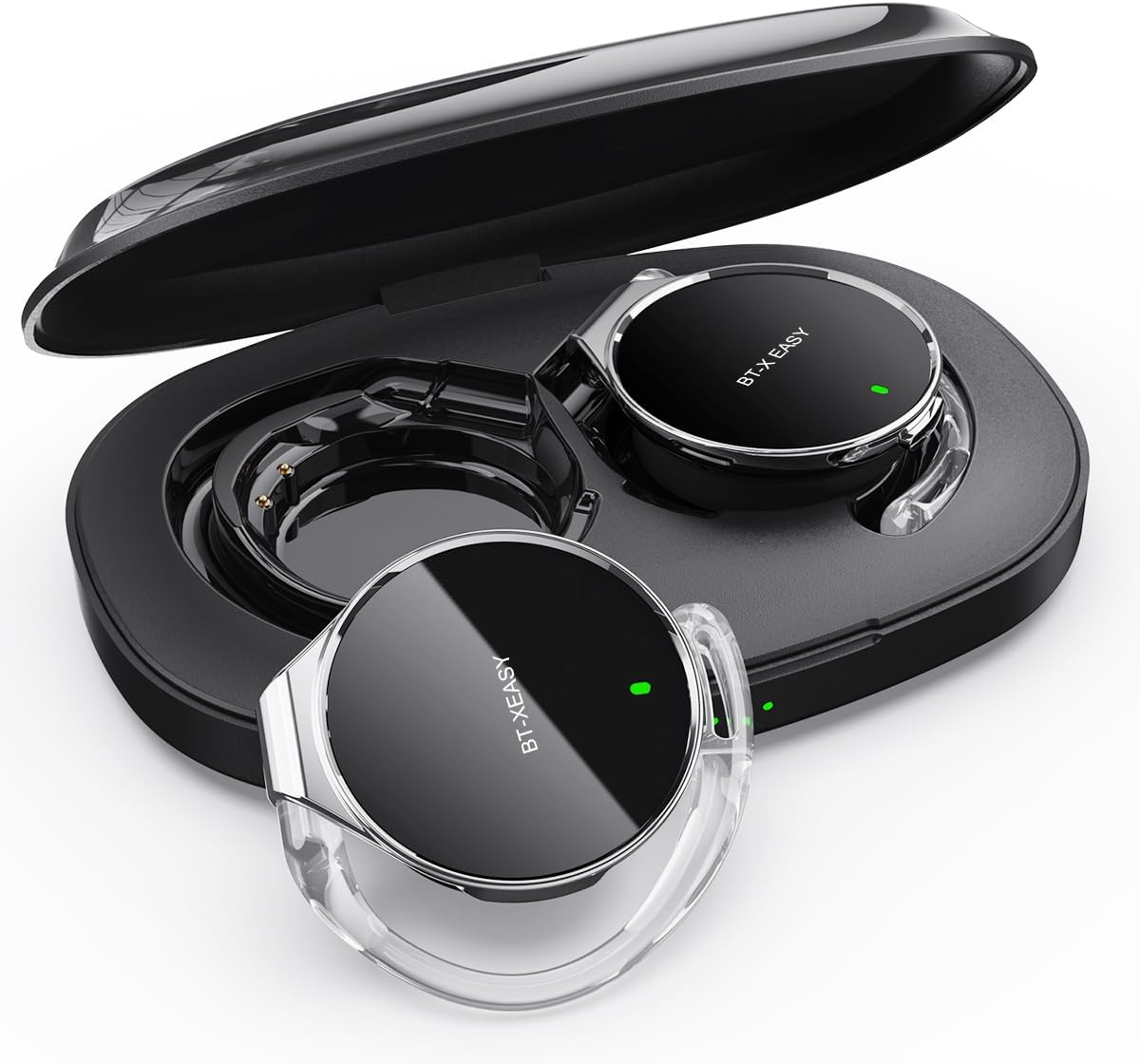
Image: Micool BT-X Easy On-Ear Headphones and their charging case, showing the headphones placed inside the open case.
Características do produto
- HD Stereo Audio: 28mm speakers for rich bass and clear sound.
- Bluetooth 5.4: Fast pairing, stable connection, and reliable use.
- Redução de ruído: ANC+ENC adaptive noise reduction for clearer calls with 4 microphones.
- Bateria de longa duração: Up to 18 hours of music playback on a single charge, and up to 52 hours total with the charging case.
- Ajuste confortável: Small, lightweight 36mm diameter with sponge earcup design for comfortable wear without ear compression.
- Conexão multiponto: Connect to two devices simultaneously (e.g., phone, laptop, tablet).
- Controles intuitivos: Easy control of music and calls via multifunction buttons.
- Resistente à água: Projetado para resistir a respingos e suor.

Imagem: Close-up view of the headphone highlighting its compact design and touch control area.
Configurar
1. Carregamento inicial
Before first use, fully charge the headphones and the charging case. Connect the provided USB-C cable to the charging case and a power source. The 4-stage power indicator lights on the case will show the charging progress (each light represents 25% battery capacity).

Image: The charging case displaying its 4-stage battery indicator lights.
2. Emparelhamento com um dispositivo
- Abra o estojo de carregamento. Os fones de ouvido entrarão automaticamente no modo de emparelhamento.
- No seu dispositivo (smartphone, tablet, laptop), ative o Bluetooth.
- Procurar "BT-XEASY" in the list of available Bluetooth devices and select it to connect.
- Após a conexão, um comando de voz confirmará o emparelhamento bem-sucedido.
3. Multi-point Connection (Optional)
To connect to a second device, disconnect the headphones from the first device's Bluetooth settings. Then, pair with the second device following the steps above. Reconnect to the first device from its Bluetooth settings. The headphones will now be connected to both devices simultaneously.
Instruções de operação
Usando os fones de ouvido
- Etapa 1: Open the ear-hook at a 30° angle.
- Etapa 2: Rotate the headphone around your ear to the bottom of the ear-hook.
- Etapa 3: Pressione os fones de ouvido e clamp them tightly to your ear.
- Etapa 4: Adjust the angle to make wearing more comfortable.

Image: Step-by-step visual guide on how to properly wear the on-ear headphones.
Controles de toque
The BT-X Easy headphones feature intuitive touch controls on each headset for easy management of audio and calls.
| Função | Ação |
|---|---|
| Tocar/Pausar Música | Clique em x1 |
| Atender/encerrar chamada | Clique em x1 |
| Rejeitar chamada | Pressão longa |
| Mute (in call) | Click x2 (prompt sound will confirm) |
| Próxima faixa | Click x2 (Right Headphone) |
| Faixa anterior | Click x2 (Left Headphone) |
| Aumentar o volume | Hold (Right Headphone) |
| Diminuir volume | Hold (Left Headphone) |

Image: Diagram illustrating the touch control functions on the headphone.
Vídeo oficial do produto
Video: An official product video from Micool demonstrating the features and usage of the BT-X Easy On-Ear Headphones. This video provides a visual guide to the product's design, comfort, and functionality, including how to wear them and use the touch controls.
Manutenção
- Limpeza: Use a soft, dry cloth to clean the headphones and charging case. Do not use abrasive cleaners or solvents.
- Armazenar: When not in use, store the headphones in their charging case to protect them and ensure they are charged for next use.
- Cuidados com a bateria: Para prolongar a vida útil da bateria, evite descarregar completamente os fones de ouvido com frequência. Recarregue-os regularmente, mesmo que não os utilize por longos períodos.
- Resistência à água: The headphones are water-resistant, but not waterproof. Avoid submerging them in water or exposing them to heavy rain. Dry them thoroughly if they get wet.
Solução de problemas
| Problema | Solução possível |
|---|---|
| Os fones de ouvido não estão emparelhando. | Ensure headphones are charged. Turn off and on Bluetooth on your device. Forget "BT-XEASY" from your device's Bluetooth list and re-pair. |
| Sem som ou volume baixo | Check device volume and headphone volume. Ensure headphones are properly connected. Try playing different audio sources. |
| Um fone de ouvido não está funcionando | Place both headphones back in the charging case, close the lid, wait a few seconds, then open and try again. Ensure both are charged. |
| O estojo de carregamento não carrega | Check USB-C cable and power adapter. Ensure proper connection. |
| Conexão instável | Move closer to your device. Avoid strong electromagnetic interference. Ensure no other devices are trying to connect simultaneously. |
Especificações
| Recurso | Detalhe |
|---|---|
| Nome do modelo | BT-X easy |
| Tecnologia de Conectividade | Sem fio (Bluetooth 5.4) |
| Tipo de driver de áudio | Driver dinâmico (alto-falantes de 28 mm) |
| Duração da bateria (fones de ouvido) | Até 18 horas |
| Duração total da bateria (com capa) | Até 52 horas |
| Controle de Ruído | Active Noise Cancellation (ANC+ENC for calls) |
| Microfones | Microfones 4 |
| Nível de resistência à água | Resistente à água |
| Material | Acrilonitrila Butadieno Estireno (ABS) |
| Peso do item | 5 onças |
| UPC | 775494925862 |
Garantia e Suporte
Micool provides 24-hour after-sales service for all purchased items. For any issues or inquiries, please contact Micool customer support through the official brand store or the platform where you purchased the product.
For detailed warranty information, please refer to the warranty card included in your product packaging or visit the official Micool website. Planos de proteção também podem estar disponíveis para cobertura estendida.
Micool Brand Store: Visit Micool Store on Amazon
Ask a question about this manual
Ask about setup, troubleshooting, compatibility, parts, safety, or missing instructions. Manuals+ will review the question and use this page’s manual context to help answer it.