
SIXWIN A4053
SIXWIN Single Din Car Stereo P2 Instruction Manual
Modelo: A4053
1. Produto acabadoview
The SIXWIN Single Din Car Stereo P2 is a versatile car multimedia player featuring a 7-inch full HD touchscreen. It integrates wireless CarPlay and Android Auto for seamless smartphone connectivity, Bluetooth for hands-free communication and audio streaming, FM radio, and steering wheel control compatibility. This unit is designed to enhance your in-car entertainment and navigation experience.

Imagem: Frente view of the SIXWIN Single Din Car Stereo P2 with its 7-inch touchscreen display.
2. O que está na caixa
Ao desembalar, verifique se todos os componentes estão presentes:
- SIXWIN Single Din Car Stereo P2 unit
- Cabo de energia
- Cabo da buzina
- Microfone (microfone)
- Manual do usuário
- Controle remoto
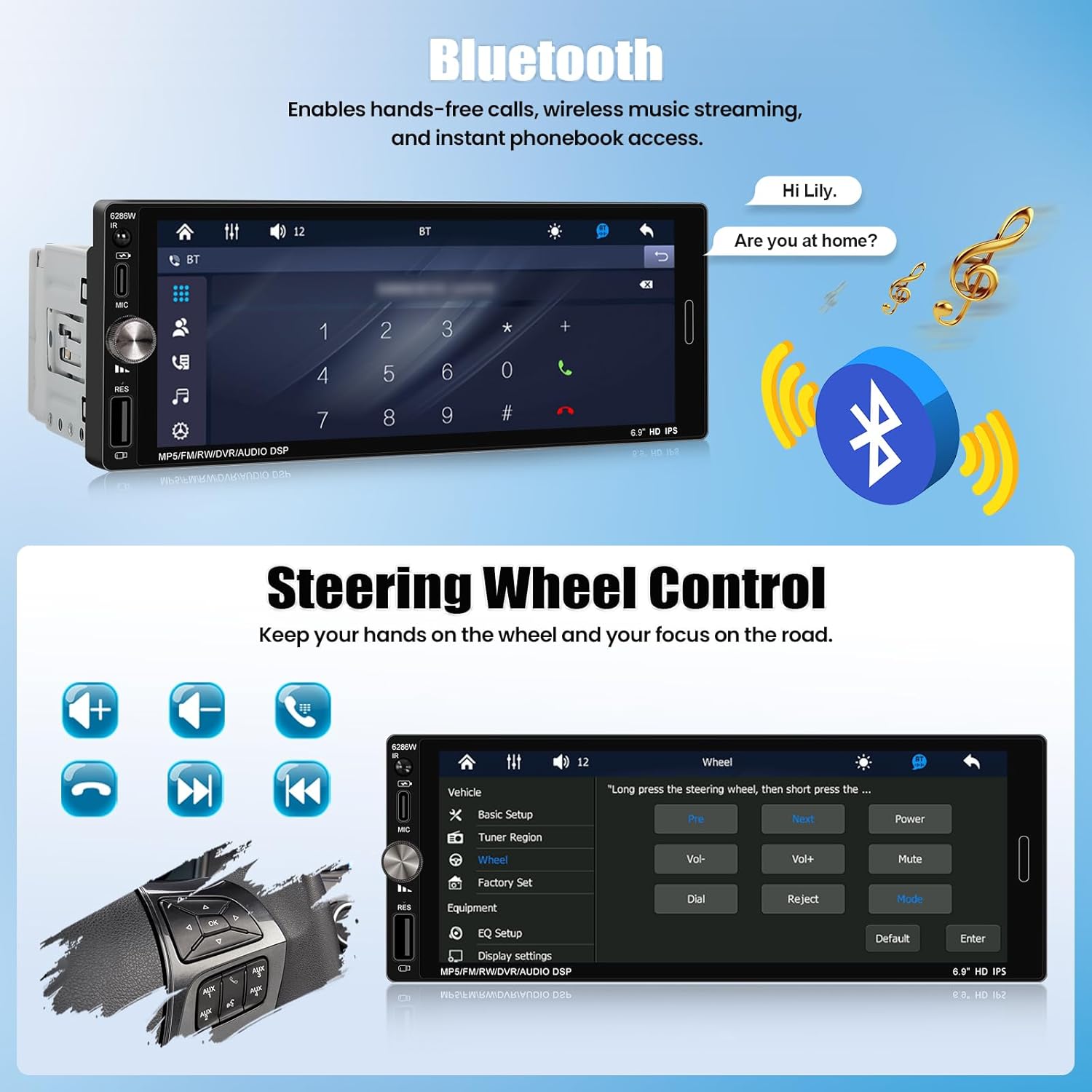
Image: Diagram showing the car stereo unit with its dimensions and a list of included accessories: horn cable, power cable, user manual, and remote control.
3. Guia de instalação
A instalação correta é crucial para um desempenho ideal. Se tiver dúvidas sobre algum passo, consulte um instalador profissional de som automotivo.
3.1 Diagrama de fiação
Refer to the detailed wiring diagram provided in the physical user manual for specific connections. Ensure all connections are secure to prevent malfunctions.
- Cabo de energia: Conecte à fonte de alimentação do veículo (ACC, B+, Terra).
- Cabo da buzina: Connect to the vehicle's speaker outputs.
- Antena de rádio: Connect the vehicle's antenna to the unit's radio antenna input.
- Interface USB: Para reprodução de mídia e carregamento.
- RCA Outputs (R-OUT, L-OUT): Para conectar externo amplificadores.
- Entrada de vídeo (CAMIN): Para conectar uma traseiraview câmera (se aplicável).
- Steering Wheel Control (SW): Conecte aos fios de controle do volante do seu veículo.
Imagem: Traseira view of the car stereo showing various input/output ports including D-BUS, L-OUT, CAMIN, Horn Cable, Power Cable, USB Interface, R-OUT, and CVBSIN.
3.2 Montagem da Unidade
Insert the single DIN unit into the vehicle's dashboard opening. Secure it using the provided mounting hardware. Ensure the unit is flush with the dashboard for a proper fit.

Image: A comparison showing a car dashboard with an old single DIN radio (Before) and the SIXWIN 7-inch touchscreen stereo installed (After).
4. Instruções de operação
4.1 CarPlay sem fio e Android Auto
This unit supports wireless CarPlay for iOS devices and wireless Android Auto for Android devices, allowing access to navigation, calls, messages, and music directly from the stereo's screen.
- Certifique-se de que o Bluetooth e o Wi-Fi estejam ativados em seu smartphone.
- On the car stereo, select the "CarPlay" or "Android Auto" icon.
- Siga as instruções na tela para emparelhar seu telefone via Bluetooth.
- Once paired, the system will automatically connect for wireless CarPlay or Android Auto functionality.

Image: The car stereo display showing a navigation map and music playback, with icons for CarPlay and Android Auto on the right, and illustrations of iPhone and Android phones connecting wirelessly.
4.2 Função Mirror Link
The Mirror Link feature allows you to mirror your smartphone's screen onto the car stereo display. This function supports one-way control for iOS and two-way control for Android devices. Note: This feature is not compatible with Samsung devices.
- Conecte seu smartphone ao aparelho de som através de um cabo USB.
- Selecione a opção "Mirror Link" no aparelho de som.
- Follow the instructions on the stereo screen and your phone to establish the connection.
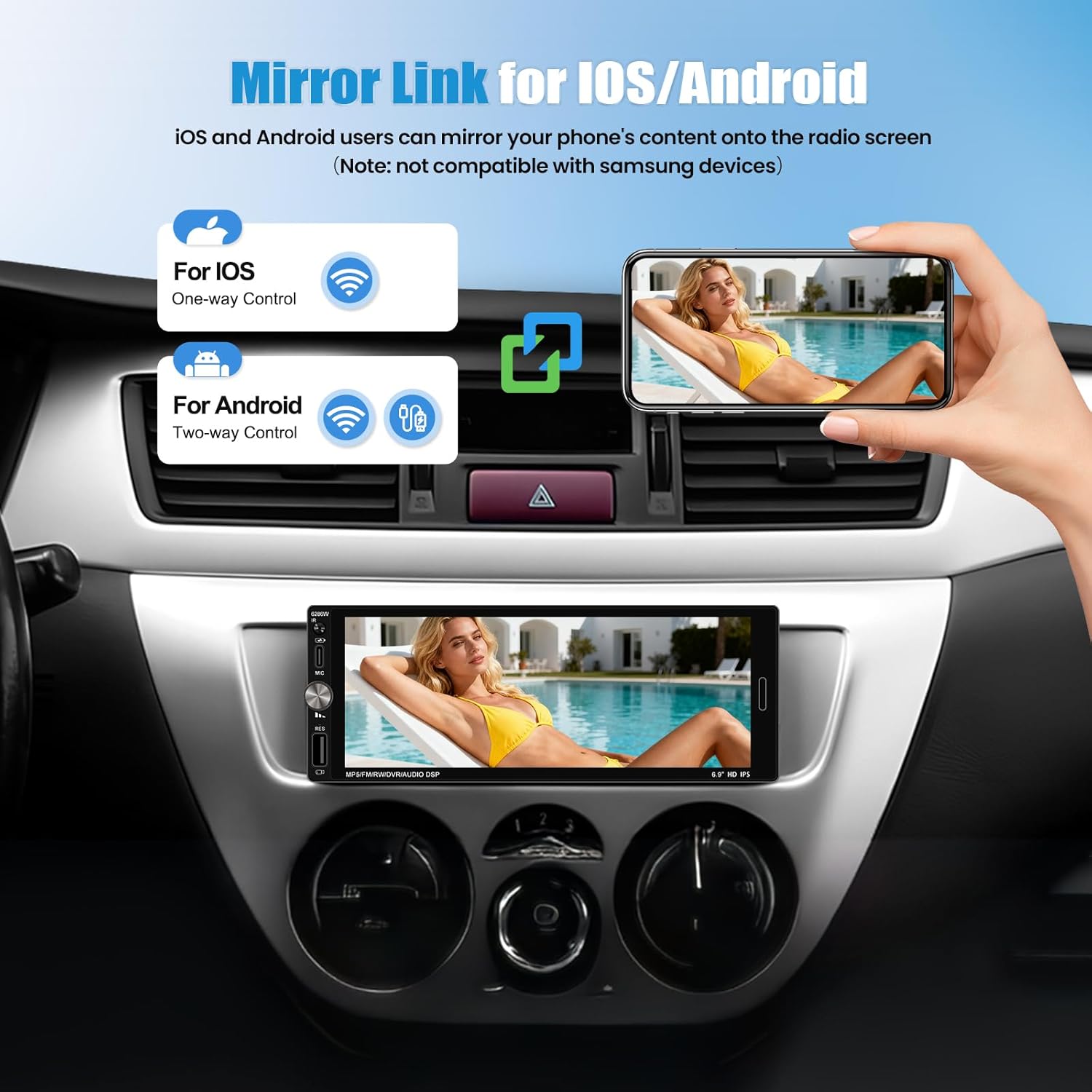
Image: A hand holding a smartphone mirroring its display onto the car stereo screen, illustrating the Mirror Link function for iOS (one-way control) and Android (two-way control).
4.3 Conectividade Bluetooth
Connect your phone via Bluetooth for hands-free calling, wireless music streaming, and access to your phonebook.
- On the stereo, navigate to the "Bluetooth" menu.
- Habilite o Bluetooth no seu smartphone e pesquise os dispositivos disponíveis.
- Select "SIXWIN P2" (or similar name) from the list on your phone and confirm pairing.
- Uma vez conectado, você pode fazer/receber chamadas e reproduzir áudio sem fio.

Image: The car stereo display showing the Bluetooth dialing interface, with a phone icon and a speech bubble indicating a hands-free call.
4.4 Operação de rádio FM
Access your favorite radio stations with clear signal reception.
- Selecione o ícone "Rádio FM" no menu principal.
- Use the on-screen controls to scan for stations, manually tune, or select from preset stations.
- A unidade suporta 18 estações predefinidas.
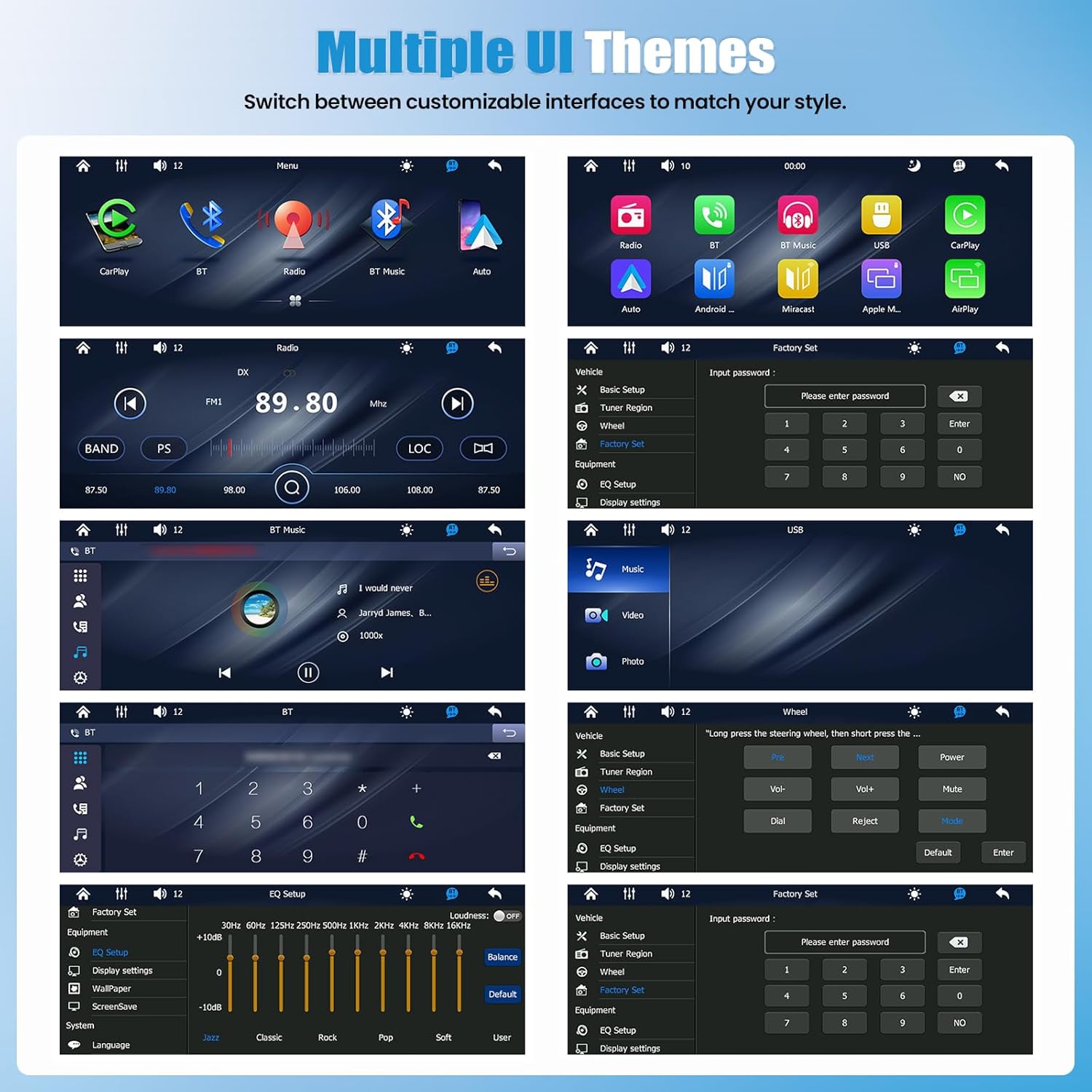
Image: The car stereo display showing the FM radio interface with frequency display (89.80 MHz) and controls for scanning and presets.
4.5 Controle do volante
If your vehicle supports steering wheel controls, you can configure them to operate the stereo, allowing you to manage audio and calls without taking your hands off the wheel.
- Acesse as configurações de "Controle do Volante" no menu do sistema.
- Follow the on-screen instructions to program each button on your steering wheel to the desired function (e.g., volume up/down, next/previous track, answer/end call).
Image: The car stereo display showing the "Steering Wheel Control" setup menu, with options to assign functions like volume, track skip, and call answer/reject to physical steering wheel buttons.
4.6 Configurações de EQ
Customize your audio output with the built-in equalizer settings to match your preferences.
- Navigate to the "EQ Settings" menu.
- Adjust frequency bands (e.g., 30Hz, 60Hz, 125Hz) to boost or cut specific audio ranges.
- Select from preset equalizer modes (e.g., Jazz, Classic, Rock, Pop, Soft) or create a custom profile.
Image: The car stereo display showing the "EQ Setup" menu with sliders for adjusting various frequency bands and options for preset sound modes like Jazz, Classic, Rock, Pop, and Soft.
4.7 Vários temas de interface do usuário
Personalize your stereo's appearance by switching between various customizable user interface themes.
- Access the "Display Settings" or "Theme" menu.
- Browse and select your preferred UI theme.
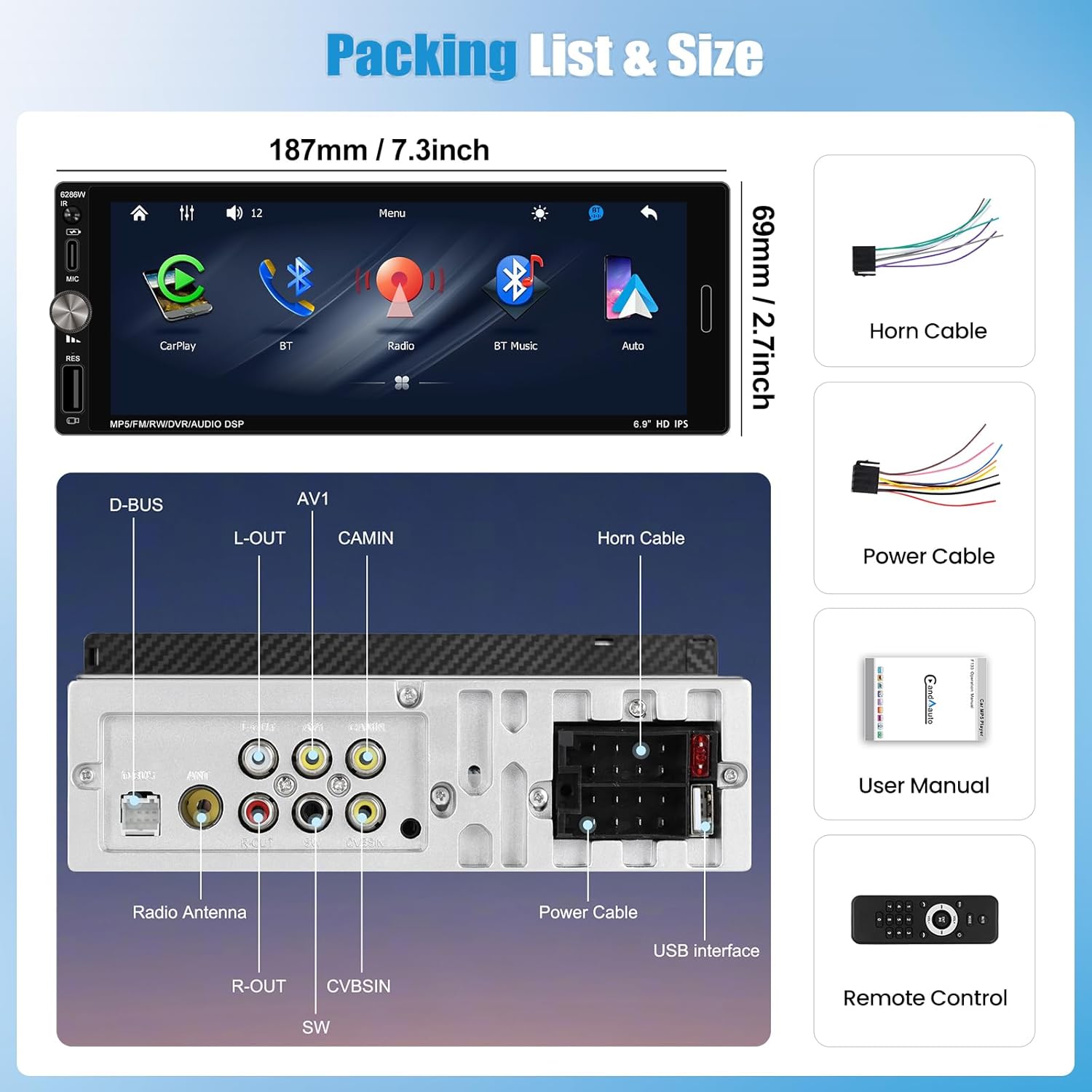
Image: A collage of several different user interface themes available on the SIXWIN car stereo, showing variations in icon styles, background colors, and layout for different functions like radio, Bluetooth, and media playback.
4.8 Multi-Port Playback & Charging
The unit features USB and Type-C inputs for direct media playback from storage devices and fast charging of compatible smartphones.
- Connect a USB drive or Type-C device to the corresponding port for media playback.
- Use the Type-C port to charge your smartphone while driving.

Image: The car stereo installed in a dashboard, with a smartphone connected via a Type-C cable for charging and a USB drive inserted into a USB port for data transmission.
5. Especificações
| Marca | SEIS GANHOS |
| Número do modelo | A4053 |
| Mostrar | 7-inch Full HD Touch Screen (1280*480 resolution) |
| Tecnologia de Conectividade | Wireless CarPlay, Wireless Android Auto, Bluetooth, FM Radio, Mirror Link |
| Tipo de controlador | Tela sensível ao toque |
| Dispositivos compatíveis | Smartphone (iOS, Android - excluding Samsung for Mirror Link) |
| Tipo de conector | Mini USB, Type-C |
| Modo de saída de áudio | Estéreo |
| Potência de saída | 4 Watts |
| O quetage | 45 Watts |
| Método de controle | Touch, Steering Wheel Control |
| Dimensões do produto (P x L x A) | 1"D x 1"W x 1"H (Unit dimensions: 187mm x 69mm) |
| Peso do item | 1 quilogramas |
6. Manutenção
To ensure the longevity and optimal performance of your SIXWIN Car Stereo, follow these maintenance guidelines:
- Limpando a tela: Use um pano macio e sem fiapos para limpar suavemente a tela sensível ao toque. Para manchas persistentes, pressione levemente o pano.ampLimpe o pano com água ou um produto de limpeza seguro para telas. Evite produtos químicos agressivos ou materiais abrasivos.
- Limpeza geral: Mantenha o aparelho livre de poeira e detritos. Use uma escova macia ou ar comprimido para limpar ao redor dos botões e portas.
- Temperatura: Evite expor o aparelho a temperaturas extremas, tanto quentes quanto frias, por períodos prolongados.
- Conexões: Verifique periodicamente todas as conexões de fiação para garantir que estejam seguras e livres de corrosão.
7. Solução De Problemas
Se você tiver problemas com o som do seu carro, consulte os problemas e soluções mais comuns a seguir:
| Problema | Possível causa | Solução |
|---|---|---|
| Sem energia | Loose power connection; Blown fuse. | Check power cables and connections. Inspect and replace any blown fuses in the vehicle or stereo wiring. |
| Sem som | Incorrect speaker wiring; Volume too low; Mute function active. | Verify speaker connections. Increase volume. Check if the mute function is enabled. |
| CarPlay/Android Auto sem fio não conecta | Bluetooth/Wi-Fi off; Phone not paired; Software glitch. | Ensure Bluetooth and Wi-Fi are active on your phone. Re-pair the device. Restart both the phone and the car stereo. |
| Mirror Link not working with Samsung phone | Incompatibilidade. | The Mirror Link feature is explicitly stated as not compatible with Samsung devices. No solution available for Samsung phones. |
| Steering Wheel Controls not responding | Incorrect wiring; Not programmed. | Check the steering wheel control wiring. Ensure the controls are properly programmed in the stereo's settings menu. |
| Screen not bright enough in direct sunlight | Environmental factor. | Adjust screen brightness settings if available. This can be a limitation of the display technology in very bright conditions. |
8. Garantia e Suporte
8.1 Informações de garantia
The SIXWIN Single Din Car Stereo P2 comes with a Garantia de 1 ano a partir da data da compra. Esta garantia cobre defeitos de fabricação e mau funcionamento sob condições normais de uso. Guarde o comprovante de compra para solicitações de garantia.
8.2 Suporte ao cliente
For online assistance, technical support, or further inquiries, please contact SIXWIN customer service:
- E-mail: sixwin_vip@163.com

Image: A customer service representative on the phone, with text indicating online help and user manual support via email: sixwin_vip@163.com.