
1. Introdução
Obrigado pela compra.asing the Urageuxy Wireless Indoor/Outdoor Thermometer with 3 Sensors. This device provides accurate, real-time temperature and humidity readings for up to four locations simultaneously (one indoor, three outdoor/remote). It features a clear LCD display with backlight, comfort indicators, and records of daily maximum and minimum values. This manual will guide you through the setup, operation, and maintenance of your new thermometer.
2. Informações de segurança
- Do not expose the main unit or sensors to extreme force, shock, dust, temperature, or humidity.
- Do not immerse the main unit in water. The remote sensors are splash-proof but should not be submerged.
- Do not attempt to open the main unit or sensors. This will void the warranty.
- Use only fresh batteries of the specified type. Do not mix old and new batteries.
- Descarte baterias usadas de forma responsável, seguindo as regulamentações locais.
- Mantenha fora do alcance de crianças.
3. Conteúdo da embalagem
Por favor, verifique o conteúdo da embalagem para garantir que todos os itens estejam presentes:
- 1 x Main Display Unit (Indoor Console)
- 3 sensores remotos sem fio
- 1 x Manual de Instruções
4. Produto acabadoview
Unidade de exibição principal
The main display unit shows indoor temperature and humidity, along with readings from up to three remote sensors. It features a large LCD screen with a backlight for easy viewindo.


Wireless Remote Sensors
Each remote sensor measures temperature and humidity and transmits data wirelessly to the main unit. They are designed for outdoor use but should be placed in a sheltered location to avoid direct rain or prolonged sun exposure.
5. Configuração
5.1 Instalação da bateria
Para a unidade de exibição principal:
- Abra a tampa do compartimento da bateria na parte traseira da unidade principal.
- Insira 3 pilhas AAA (não incluídas) respeitando a polaridade indicada (+ e -).
- Feche a tampa do compartimento da bateria.
For the Wireless Remote Sensors:
- Abra a tampa do compartimento da bateria na parte traseira de cada sensor.
- Insira 2 pilhas AAA (não incluídas) respeitando a polaridade indicada (+ e -).
- Feche a tampa do compartimento da bateria.

5.2 Emparelhamento de sensores
The main unit will automatically search for and connect to the remote sensors once batteries are installed. Ensure both the main unit and sensors are within range during initial setup.
- Place the main unit and sensors close to each other during the initial pairing process.
- The main unit will display readings for each connected sensor (CH1, CH2, CH3).
- If a sensor does not connect, press the 'CHANNEL' button on the main unit to cycle through channels or press the 'RESET' button on the sensor to re-initiate pairing.
5.3 Diretrizes para Posicionamento de Sensores
For optimal performance and accurate readings, consider the following:
- Alcance de transmissão: The wireless sensors have a transmission range of up to 328 feet (100 meters) in open areas. Walls, metal structures, and other electronic devices can reduce this range.
- Colocação ao ar livre: While splash-proof, place outdoor sensors under a roof or in a sheltered area to protect them from direct rain and prolonged direct sunlight.
- Evite fontes de calor: Do not place sensors near heat sources (e.g., vents, appliances) or in direct sunlight, as this can lead to inaccurate temperature readings.
- Vários locais: Utilize the three sensors to monitor different areas such as a greenhouse, baby room, wine cellar, kitchen, or garage.


6. Instruções de operação
6.1 Leituras do visor
A tela LCD exibe as seguintes informações:
- Temperatura e umidade internas: Shown at the top of the display.
- Remote Sensor Readings: Temperature and humidity for each connected sensor (CH1, CH2, CH3) are displayed below the indoor readings.
- Comfort Icons: Indicates the current humidity level (DRY, COMFORT, WET).
- Indicadores de tendência: Arrows next to temperature and humidity values show if they are rising, falling, or stable.
6.2 °C/°F Switcher
To switch between Celsius (°C) and Fahrenheit (°F), press the '°C/°F' button located on the back of the main unit.
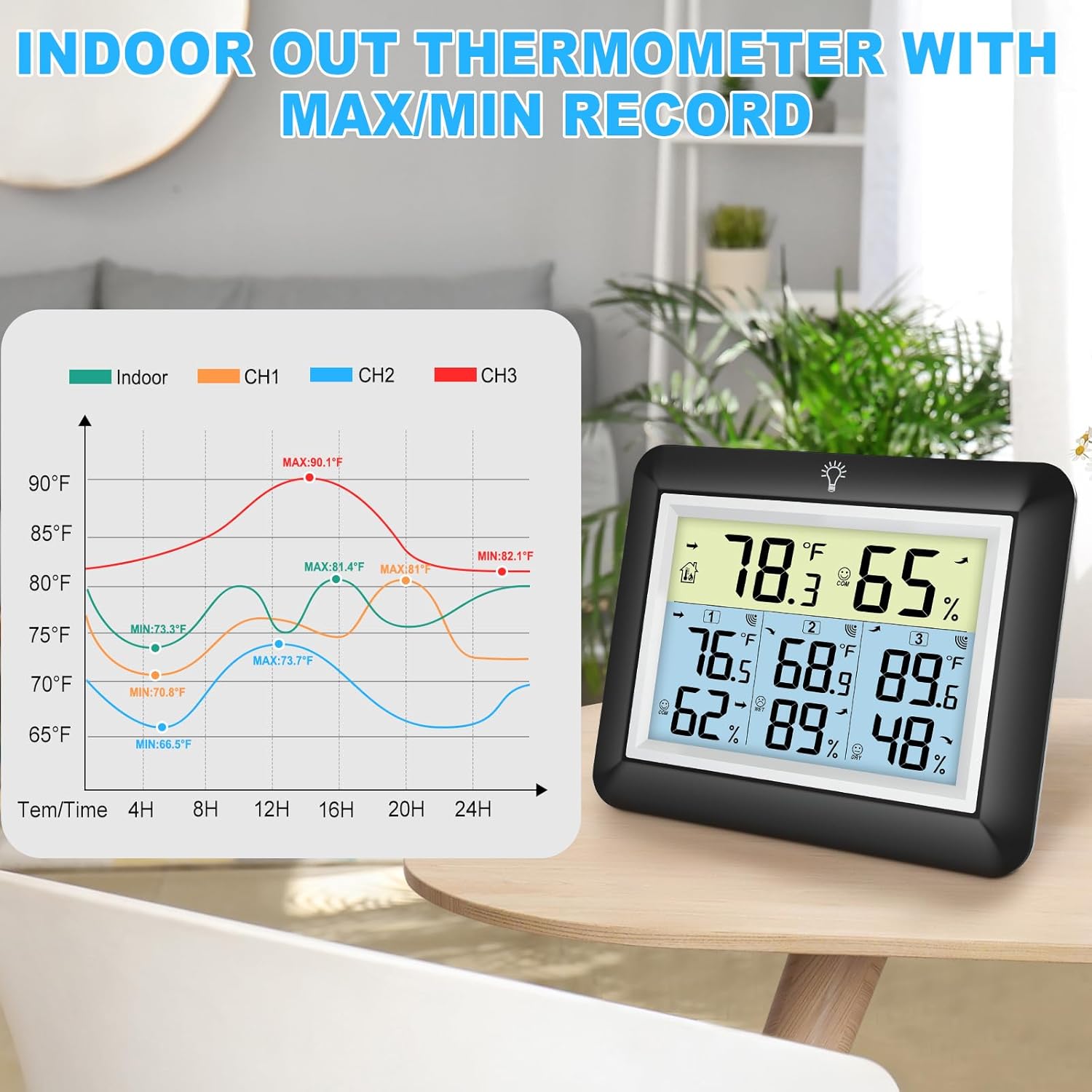
6.3 MAX/MIN Records
The device automatically records the daily maximum and minimum temperature and humidity values for both indoor and all remote sensors. These records reset every 24 hours.
- Press the 'MIN/MAX' button on the back of the main unit to view os valores máximos registrados.
- Press the 'MIN/MAX' button again to view os valores mínimos registrados.
- Pressione uma terceira vez para retornar às leituras atuais.

6.4 Operação de luz de fundo
The main unit features an adjustable backlight for improved visibility in low-light conditions.
- Touch the light bulb icon on the top of the main unit to activate the backlight for 5 seconds.
- Press and hold the light bulb icon for more than 5 seconds to keep the backlight on for 30 minutes.


6.5 Indicador de Conforto
The comfort indicator provides a quick visual reference for the current humidity level, helping you maintain an ideal environment.
- SECO: Humidade < 45%
- CONFORTO: 45% ≤ Umidade ≤ 65%
- MOLHADO: Umidade > 65%


7. Manutenção
7.1 Limpeza
Limpe a unidade principal e os sensores com um pano macio e seco.amp cloth. Do not use abrasive cleaners or solvents, as they may damage the plastic components and electronic circuits.
7.2 Substituição da bateria
Replace batteries when the low battery indicator appears on the display. Always replace all batteries in a unit at the same time with new ones of the same type.
7.3 Armazenamento
If the device will not be used for an extended period, remove the batteries from both the main unit and sensors to prevent leakage and damage.
8. Solução De Problemas
| Problema | Possível causa | Solução |
|---|---|---|
| Sem visor na unidade principal. | As pilhas estão descarregadas ou instaladas incorretamente. | Substitua as pilhas por novas, certificando-se de que a polaridade está correta. |
| Remote sensor not displaying readings or showing '---'. | 1. Sensor out of range. 2. Batteries are dead. 3. Interference. 4. Sensor not paired. | 1. Mova o sensor para mais perto da unidade principal. 2. Substitua as baterias do sensor. 3. Move away from other electronic devices. 4. Press the 'RESET' button on the sensor and then cycle channels on the main unit. |
| Leituras imprecisas. | 1. Sensor exposed to direct sunlight or heat source. 2. Poor ventilation around sensor. | 1. Relocate sensor to a shaded, well-ventilated area. 2. Ensure proper airflow around the sensor. |
| A luz de fundo não está funcionando. | Bateria fraca ou com defeito. | Replace main unit batteries. If issue persists, contact support. |
9. Especificações
- Marca: Urageuxy
- Modelo: WS0170BKY
- Faixa de temperatura interna: 32°F a 140°F (0°C a 60°C)
- Faixa de temperatura externa: -40°F a 140°F (-40°C a 60°C)
- Precisão da temperatura: ±2°F/±1°C
- Faixa de umidade: 10% a 99% UR
- Precisão de umidade: ±5% UR
- Faixa de transmissão sem fio: Até 100 metros (328 pés) em áreas abertas.
- Fonte de alimentação (unidade principal): 3 pilhas AAA (não incluídas)
- Fonte de alimentação (sensor remoto): 2 pilhas AAA (não incluídas)
- Características especiais: Backlit LCD, Comfort Indicator, Min/Max Record, Fast Refresh
- Material: Acrilonitrila Butadieno Estireno (ABS)
- Dimensões do produto (unidade principal): 0.78"D x 4.33"L x 0.78"A (aprox.)
- Peso do item: 9.9 onças (0.28 quilogramas)
10. Garantia e suporte
10.1 Informações de garantia
Urageuxy products are manufactured to high-quality standards. This product is covered by a limited warranty against defects in materials and workmanship for a period of one year from the original purchase date. This warranty does not cover damage caused by misuse, accident, unauthorized modification, or improper installation.
10.2 Suporte ao cliente
If you encounter any issues or have questions regarding your Urageuxy Wireless Indoor/Outdoor Thermometer, please contact our customer support team. For the quickest assistance, please refer to the contact information provided on the product packaging or the official Urageuxy website.
Suporte online: Visite o Urageuxy Store on Amazon Para perguntas frequentes e informações sobre o produto.
Este vídeo fornece uma visão geral sobreview of the Urageuxy Indoor Outdoor Thermometer with 3 Remote Sensors, demonstrating its features and functionality.