
1. Introdução
Obrigado pela compra.asing the KeeKit Astronaut Wake Up Light. This device combines a sunrise simulation alarm clock, a multi-color night light, a sleep sound machine, and a Bluetooth speaker into a single unit. It is designed to assist with natural waking and provide a calming environment for sleep. Please read this manual thoroughly before use to ensure proper operation and to maintain the product's longevity.

The KeeKit Astronaut Wake Up Light positioned on a bedside table, emitting a gentle, warm light from its helmet, with the digital clock display visible on its chest.
2. Conteúdo da embalagem
Verifique se todos os itens listados abaixo estão presentes em sua embalagem:
- 1 x KeeKit Astronaut Wake Up Light
- 1 x cabo de carregamento USB-A para USB-C
- 1 x Manual do Usuário

Image showing the KeeKit Astronaut Wake Up Light, its USB-C charging cable, and the user manual, alongside the product packaging.
3. Produto acabadoview
Familiarize yourself with the various components and controls of your Astronaut Wake Up Light:
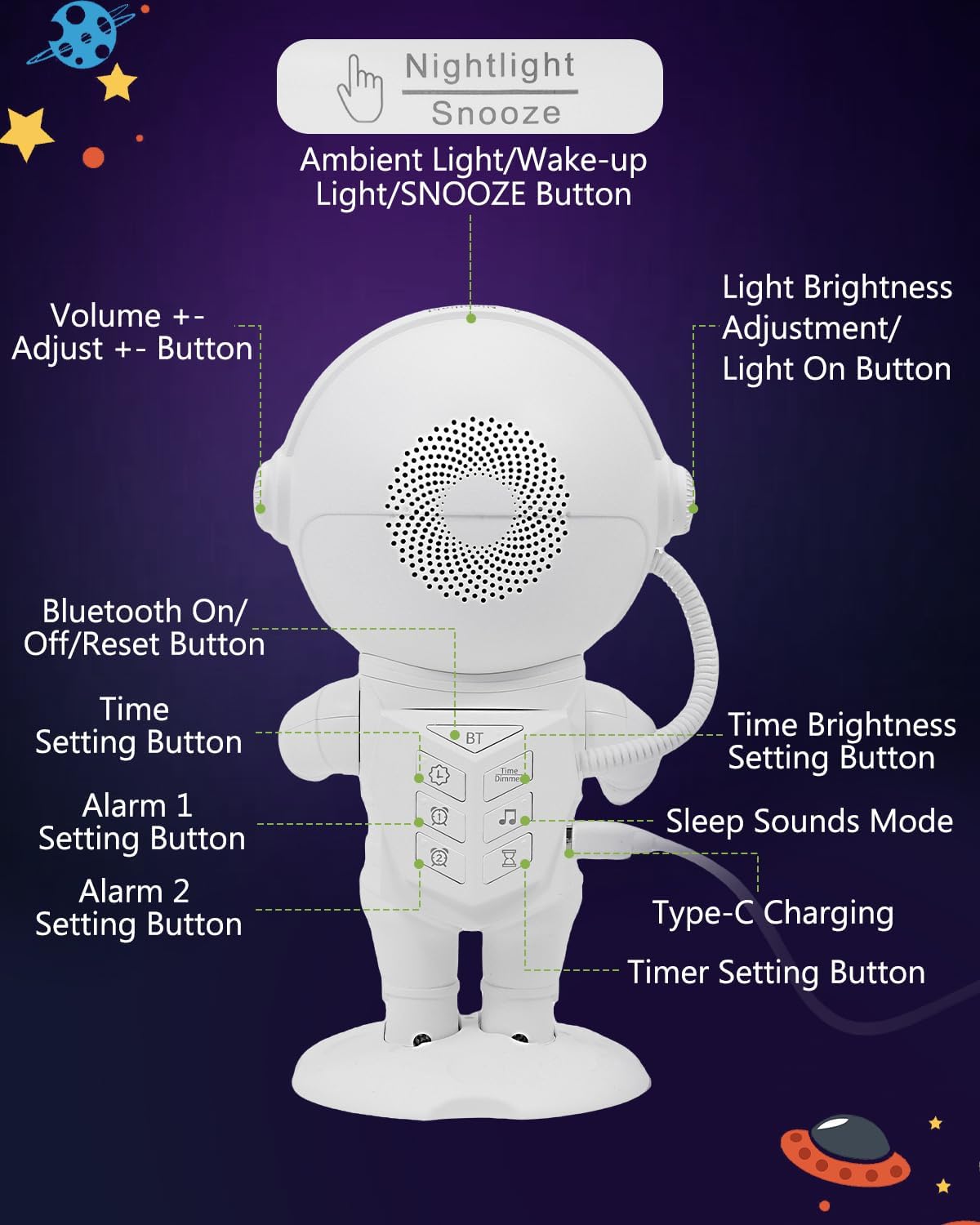
Detailed diagram illustrating the location and function of each button and port on the KeeKit Astronaut Wake Up Light.
- Nightlight / Snooze Button: Tap to activate snooze during an alarm, or to cycle through night light modes.
- Botões de volume +/-: Adjust the volume for alarms, sleep sounds, and Bluetooth audio.
- Bluetooth On/Off/Reset Button: Activates Bluetooth pairing mode or resets the device.
- Botão de configuração de hora: Used to enter and adjust time settings.
- Alarm 1 Setting Button: Configures the first alarm.
- Alarm 2 Setting Button: Configures the second alarm.
- Sleep Sounds Mode Button: Cycles through available sleep sounds.
- Light Brightness Adjustment / Light On Button: Adjusts the brightness of the light or turns it on/off.
- Time Brightness Setting Button: Adjusts the brightness of the digital time display.
- Tipo-C Porta de Carregamento: Connect the provided USB-C cable for power.
- Botão de configuração do temporizador: Sets the auto-off timer for sleep sounds and lights.
4. Configuração
4.1 Conexão de Energia
- Connect the provided USB-A to USB-C charging cable to the Type-C Charging Port on the back of the Astronaut Wake Up Light.
- Plug the USB-A end of the cable into a compatible USB power adapter (not included) or a powered USB port.
- The device requires continuous power to function.
4.2 Configuração inicial da hora
- Pressione e segure o Botão de ajuste de hora until the hour display flashes.
- Use o Botões de Volume +/- para ajustar a hora.
- Pressione o Botão de ajuste de hora Novamente, para alternar para o ajuste de minutos.
- Use o Botões de Volume +/- para ajustar os minutos.
- Pressione o Botão de ajuste de hora Confirme e saia da configuração de tempo mais uma vez.
5. Instruções de operação
5.1 Alarm Setting (Dual Alarms)
The device supports two independent alarms.
- Pressione e segure o Botão de configuração do alarme 1 or Botão de configuração do alarme 2 until the alarm hour display flashes.
- Use o Botões de Volume +/- para ajustar a hora.
- Pressione o respectivo Botão de configuração de alarme Novamente, para alternar para o ajuste de minutos.
- Use o Botões de Volume +/- para ajustar os minutos.
- Pressione o Botão de configuração de alarme to select the alarm sound (7 options available).
- Pressione o Botão de configuração de alarme to set the sunrise simulation duration (10-120 minutes).
- Pressione o Botão de configuração de alarme Para confirmar e ativar o alarme, um ícone de alarme aparecerá no visor.
- Para desativar um alarme, pressione o botão correspondente. Botão de configuração de alarme até que o ícone de alarme desapareça.

The image demonstrates the snooze function by tapping the top of the astronaut's helmet, highlighting the dual alarm capability and 9-minute snooze interval.
5.2 Simulação do nascer do sol
The sunrise simulation feature gradually increases light intensity before your set alarm time, mimicking a natural sunrise.
- During alarm setup, you can select a sunrise duration between 10 and 120 minutes.
- The light will gradually brighten from 1% to 100% intensity, transitioning from warm amber to daylight white.

This image depicts the sunrise simulation feature, showing the light gradually brightening to gently wake a sleeping child.
5.3 Dimmable Color-Changing Night Light
The device offers 22 lighting modes for use as a night light or mood light.
- Toque no Nightlight / Snooze Button to turn on the night light and cycle through 16 solid colors and 6 dynamic mood light modes.
- Use o Light Brightness Adjustment / Light On Button to adjust the brightness of the selected light mode.
- To turn off the night light, continue tapping the Nightlight / Snooze Button until the light turns off, or press and hold the Light Brightness Adjustment / Light On Button.
5.4 Sleep Sounds & Auto-off Timer
The device includes 21 relaxing audio options to aid sleep or focus.
- Pressione o Sleep Sounds Mode Button to cycle through the 21 available sleep sounds (e.g., white noise, fan, nature sounds, lullabies).
- Use o Botões de Volume +/- to adjust the sound volume (16 levels).
- Para definir um temporizador de desligamento automático, pressione o Botão de configuração do temporizador. Cycle through options: 15, 30, 45, 60, or 90 minutes. The sound and light will automatically turn off after the selected duration.
- To turn off sleep sounds manually, press the Sleep Sounds Mode Button until no sound is playing, or set the timer to 'OFF'.

This image displays the variety of 21 soothing sounds and the auto-off timer options (15-90 minutes) designed to assist with sleep.
5.5 Função de soneca
Quando o alarme toca:
- Toque no Nightlight / Snooze Button on the top of the device to activate the snooze function.
- The alarm will pause for 9 minutes and then sound again. This can be repeated indefinitely.
- If no action is taken, the alarm will automatically turn off after 30 minutes.
5.6 Bluetooth Speaker
The device can connect to your smartphone or other Bluetooth-enabled devices to play audio.
- Pressione o Bluetooth On/Off/Reset Button to activate Bluetooth pairing mode. The Bluetooth icon on the display will flash.
- On your device (e.g., smartphone), search for Bluetooth devices and select "KeeKit QML-0778H" to pair.
- Once paired, the Bluetooth icon will stop flashing, and you can play audio through the Astronaut Wake Up Light.
- Use o Botões de Volume +/- on the device or your connected device to adjust the volume.
- Pressione o Bluetooth On/Off/Reset Button again to disconnect Bluetooth.

The image illustrates the Bluetooth speaker functionality, showing the device connected and playing audio, along with the adjustable display brightness settings.
5.7 Smart Display Brightness
The digital time display brightness can be adjusted.
- Pressione o Time Brightness Setting Button to cycle through display brightness levels: Off, Low, High, and Auto.
- In Auto mode, the display will automatically dim between 10 PM and 6 AM.
6. Manutenção
- Limpeza: Limpe o dispositivo com um pano macio e seco. Não utilize produtos de limpeza abrasivos ou solventes.
- Armazenar: Guarde o dispositivo em local fresco e seco quando não estiver em uso por longos períodos.
- Poder: Ensure the device is unplugged before cleaning or moving.
7. Solução De Problemas
| Problema | Possível causa | Solução |
|---|---|---|
| O dispositivo não liga. | Conexão incorreta à fonte de alimentação. | Ensure the USB-C cable is securely connected and the power adapter is functional. |
| O alarme não dispara. | Alarme não ativado ou volume muito baixo. | Check if the alarm icon is displayed. Increase alarm volume using Botões de Volume +/-. |
| A simulação do nascer do sol não está funcionando. | Sunrise duration not set during alarm configuration. | Reconfigure the alarm and ensure a sunrise duration is selected. |
| O emparelhamento Bluetooth falha. | O dispositivo não está em modo de emparelhamento ou está muito longe da fonte. | Pressione o Bluetooth On/Off/Reset Button to enter pairing mode. Ensure devices are within range. |
| Display is too dim or off. | Display brightness set to 'Off' or 'Auto' during dim hours. | Pressione o Time Brightness Setting Button to adjust brightness or disable 'Auto' mode. |
8. Especificações
| Recurso | Detalhe |
|---|---|
| Número do modelo | QML-0778H |
| Dimensões do produto | 22.3 x 3.81 x 11 cm |
| Peso do item | 757.5 g |
| Tipo de fonte de luz | LIDERADO |
| O quetage | 10 watts |
| Material | Acrilonitrila Butadieno Estireno (Plástico) |
| Cor | Branco |
| Simulação do nascer do sol | Ajustável de 10 a 120 minutos |
| Cores da luz noturna | 22 modes (16 solid, 6 dynamic) |
| Sons para dormir | 21 options, 16 volume levels |
| Temporizador de desligamento automático | 15, 30, 45, 60, 90 minutos |
| Duração da soneca | 9 minutes (unlimited) |
| Escurecimento da tela | Adjustable (Off/Low/High/Auto) |
9. Garantia e suporte
9.1 Informações de garantia
KeeKit provides a Garantia de 1 anos for this product, ensuring peace of mind. This warranty covers manufacturing defects and issues arising from normal use.
9.2 Política de Devolução
The product is eligible for a return or replacement within 30 dias of purchase, in accordance with standard return policies.
9.3 Suporte ao cliente
For any questions, technical assistance, or warranty claims, please contact KeeKit customer support. Support is committed to responding within 24 horas. For further information, you may visit the official KeeKit store: