
1. Produto acabadoview
The Hisense 65E7Q QLED Smart TV offers a premium viewing experience with its 65-inch QLED display. This television integrates advanced technologies such as Dolby Vision and Dolby Atmos for immersive audio-visuals, AI Smooth Motion for fluid images, and dedicated modes for gaming and sports. Powered by the VIDAA operating system, it provides easy access to a wide range of streaming content and smart features, including voice control.

Frente view of the Hisense 65E7Q QLED Smart TV.
Principais características:
- QLED Colour: Experience rich, vibrant, and realistic colors.
- Movimento Suave com IA: Advanced MEMC and 3D Noise Reduction for fluid, blur-free images.
- Dolby Vision e Dolby Atmos: Cinematic picture and immersive sound for an enhanced entertainment experience.
- Modo de jogo mais: Reduces input lag to 16ms, with 60Hz VRR and ALLM for ultra-fluid gaming.
- Modo Esportivo com IA: Optimizes picture and sound for sports content, reducing motion blur and enhancing stadium-like audio.
- Upscaler 4K com IA: Enhances blurry images to near-4K quality.
- VIDAA Smart TV OS: Fast, secure, and intuitive operating system with access to popular streaming applications.
- Controle de voz: Integrated Alexa and VIDAA Voice for convenient operation.
2. Informações de segurança
Please read all safety instructions carefully before using your TV. Keep this manual for future reference. Always ensure the TV is placed on a stable surface to prevent tipping. Do not expose the TV to rain or moisture. Refer to the full safety guidelines in the included safety manual.
3. Conteúdo da embalagem
Verifique se todos os itens estão presentes na caixa:
- Hisense 65E7Q QLED Smart TV
- Cabo de energia
- Remote Control (with 1 AAAA battery included)
- Suporte para TV (2 peças)
- Parafusos para montagem do suporte
- Manual do usuário (este documento)
- Cartão de garantia
4. Configuração
4.1 Montagem do suporte
- Coloque a TV com cuidado, com a tela voltada para baixo, sobre uma superfície macia e plana para evitar danos.
- Alinhe as peças do suporte com os encaixes correspondentes na parte inferior da TV.
- Fixe as peças do suporte usando os parafusos fornecidos. Certifique-se de apertá-los firmemente.

Diagram illustrating TV dimensions and stand installation points.
4.2 Montagem na parede
If you plan to wall mount your TV, ensure you use a VESA-compatible wall mount kit (not included). The Hisense 65E7Q supports a VESA mounting standard of 600 x 400 mm. Follow the instructions provided with your wall mount kit for safe installation.
4.3 Conectando Periféricos
Connect your external devices to the TV's ports as needed. Refer to the port diagram below:

Traseira view showing available ports and connections.
- Portas HDMI (x3): Connect Blu-ray players, game consoles, and other HDMI devices. One port supports eARC for enhanced audio return.
- Portas USB (x2): Connect USB flash drives for media playback. (1x USB 3.0, 1x USB 2.0)
- Antenna Inputs (x2): Connect your terrestrial or cable antenna.
- Ethernet (LAN): Para conexão de rede com fio.
- Saída de áudio óptica: Conecte a uma barra de som ou receptor de áudio para obter áudio digital.
- Plug do fone de ouvido: Para audição privada.
- Entradas AV: Para conectar dispositivos mais antigos usando cabos de vídeo composto e áudio estéreo.
4.4 Inicialização Inicial
- Conecte o cabo de alimentação à TV e, em seguida, a uma tomada elétrica.
- Pressione o botão liga/desliga no controle remoto ou na TV.
- Siga as instruções na tela para concluir a configuração inicial, incluindo a seleção do idioma, a conexão de rede e a busca de canais.
5. Operando sua TV
5.1 Controle Remoto
The included remote control allows you to navigate the TV's features. Insert the provided AAAA battery into the remote. The remote supports voice control for convenient operation.
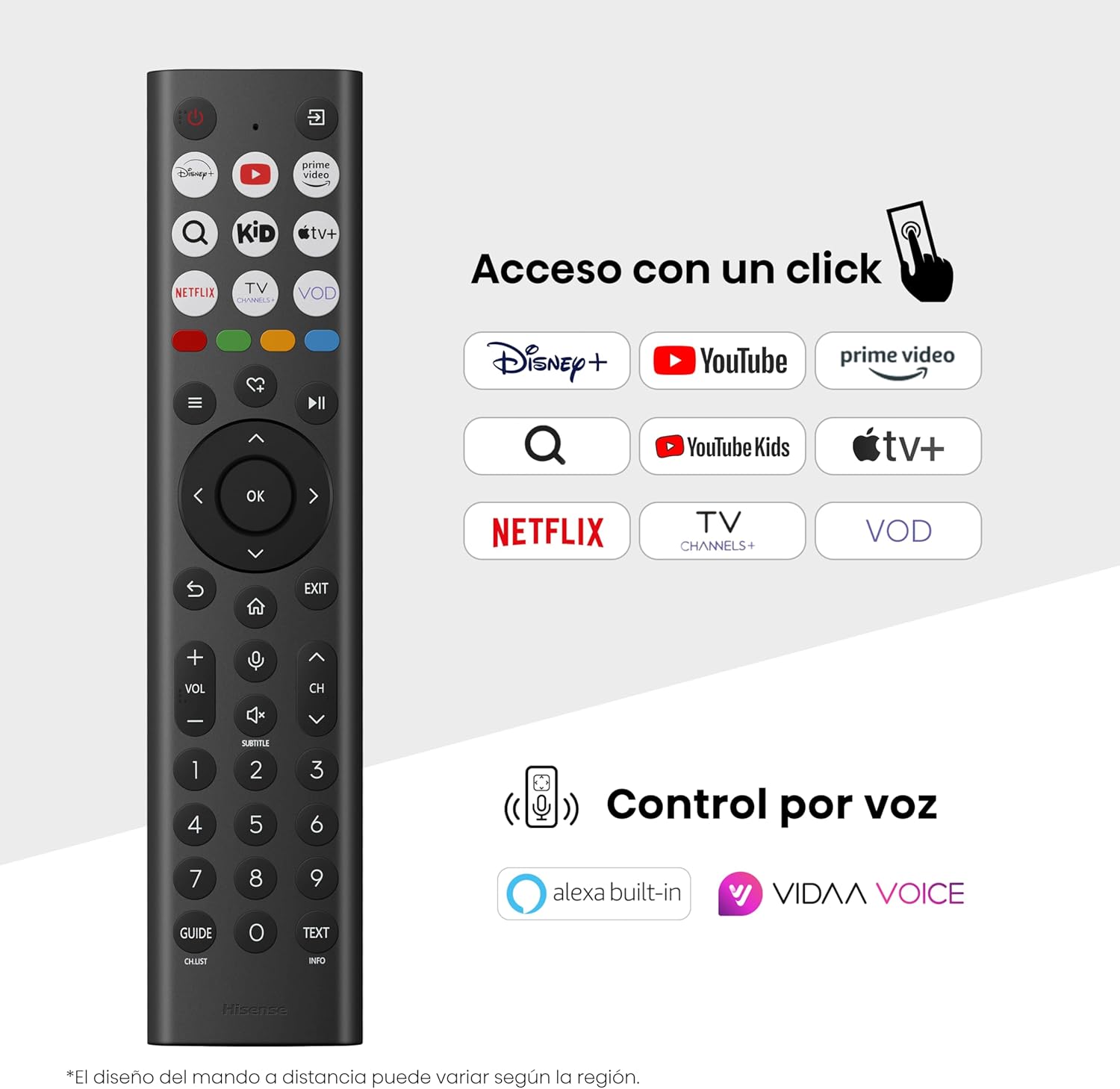
Hisense Smart TV remote control with dedicated app buttons and voice control.
5.2 Recursos da Smart TV (sistema operacional VIDAA)
Your Hisense TV runs on the VIDAA operating system, offering a user-friendly interface for accessing various applications and services.

The VIDAA Smart TV interface with popular streaming applications.
- Aplicações: Access pre-installed apps like Netflix, YouTube, Prime Video, and more.
- Controle de voz: Use the remote's voice function to search for content, adjust settings, or interact with Alexa built-in and VIDAA Voice.
- Screen Mirroring (AirPlay): Share content from your Apple devices directly to the TV.
- Compartilhar na TV: Easily send content from your mobile devices to the TV.
5.3 Configurações de imagem
Otimize seu viewing experience with various picture enhancement technologies:
- QLED Colour: Delivers over a billion shades of vibrant, lifelike colors.
- Upscaler 4K com IA: Automatically enhances lower-resolution content to near-4K quality.
- Movimento Suave com IA: Reduces motion blur in fast-paced scenes, ensuring clear and fluid visuals.
- Visão Dolby: Provides stunning brightness, contrast, and color for a dramatic visual experience.
- Modo Cineasta: Preserves the original aspect ratio, colors, and frame rates to display movies as intended by the director.
- AI Light Sensor: Intelligently adjusts screen brightness based on ambient light for optimal viewing and energy efficiency.
- Modo de proteção ocular: Reduz a emissão de luz azul para minimizar o cansaço visual.
- Modo de economia de energia: Optimizes power consumption without significantly compromising picture quality.

QLED technology delivers over a billion vibrant color tones.

AI 4K Upscaler enhances lower resolution content to near 4K clarity.

AI Smooth Motion ensures fluid images without blur, especially in fast-moving scenes.

Filmmaker Mode presents content exactly as the director intended.
5.4 Configurações de som
Enhance your audio experience with:
- Dolby Atmos: Immersive, multi-dimensional sound that fills your room.
- Alto-falante integrado: Built-in speakers with a maximum output of 1 Watt per channel.
- EzPlay: Seamlessly control compatible Hisense soundbars directly from your TV screen.

Dolby Vision and Dolby Atmos combine for a spectacular audio-visual experience.
5.5 Recursos de jogos
For gamers, the TV offers:
- Modo de jogo mais: Reduces input lag to 16ms, ensuring responsive gameplay.
- 60Hz VRR (Variable Refresh Rate): Synchronizes the TV's refresh rate with the game console's output to prevent screen tearing.
- ALLM (Modo Automático de Baixa Latência): Automatically switches the TV to low-latency mode when a game is detected.
- Barra de jogos: An integrated control center for quick access to game settings and real-time performance monitoring.

Game Mode Plus provides ultra-fluid, lag-free gaming.

The Game Bar offers centralized control for game settings.
5.6 Sports Features
- Modo Esportivo com IA: Automatically detects sports content and optimizes picture and sound settings for a stadium-like experience, enhancing clarity and audio effects.
6. Manutenção
6.1 Limpando a TV
- Desligue sempre a TV da tomada antes de limpá-la.
- Use um pano macio, seco e sem fiapos para limpar delicadamente a tela e a carcaça da TV.
- Para manchas persistentes, aplique levementeampLimpe o pano com água ou um produto de limpeza específico para telas (não borrife diretamente na tela).
- Evite usar produtos de limpeza abrasivos, álcool, benzeno ou solventes, pois estes podem danificar a superfície da TV.
6.2 Atualizações de Software
Sua TV pode receber atualizações de software periodicamente para melhorar o desempenho e adicionar novos recursos. Certifique-se de que sua TV esteja conectada à internet para receber essas atualizações. Normalmente, você pode verificar manualmente se há atualizações disponíveis no menu de configurações da TV.
7. Solução De Problemas
Se você tiver problemas com sua TV, consulte as seguintes soluções comuns:
- Sem energia: Check if the power cable is securely connected and the power outlet is working. Try a different outlet.
- Sem imagem/som: Certifique-se de que a fonte de entrada correta esteja selecionada. Verifique todas as conexões de cabo (HDMI, antena).
- Controle remoto não funciona: Check the battery (1 AAAA battery). Ensure there are no obstructions between the remote and the TV.
- Problemas de conexão de rede: Verifique a senha do seu Wi-Fi ou a conexão do cabo Ethernet. Reinicie o roteador.
- Qualidade de imagem ruim: Ajuste as configurações de imagem (brilho, contraste, nitidez). Certifique-se de que a fonte de entrada esteja fornecendo um sinal de alta qualidade.
- Distorção de som: Check audio settings. If using external speakers, ensure they are connected correctly.
For more detailed troubleshooting, consult the full electronic user manual or contact Hisense customer support.
8. Especificações
Detailed technical specifications for the Hisense 65E7Q QLED Smart TV:
| Recurso | Especificação |
|---|---|
| Número do modelo | 65E7Q |
| Tamanho da tela | 65 polegadas |
| Tecnologia de exibição | QLED |
| Resolução | 4K (3840 x 2160) |
| Taxa de atualização | 60 Hz |
| Suporte de formato HDR | Visão Dolby |
| Motion Enhancement Technology | Movimento suave de IA |
| Melhoria da qualidade da imagem | AI 4K Upscaler, AI Smooth Motion, QLED Colour |
| Tempo de resposta | 100 milissegundos |
| Configuração de luz de fundo | Direct Illumination, Dimming |
| Descrição do palestrante | Integrated speaker with Dolby Atmos |
| Potência máxima de saída do alto-falante | 1 watts |
| Canais de áudio | Multicanal |
| Surround Sound Format | Dolby Atmos |
| Sistema operacional | VIDA |
| Capacidade de armazenamento de memória | 1 GB |
| Método de controle | Voz |
| Tecnologia de Conectividade | Bluetooth, HDMI, Wi-Fi |
| Internet Applications | Netflix, YouTube, Prime Video, AirPlay 2 |
| Portas HDMI | 3 (including HDMI 2.1 with eARC) |
| Portas USB | 2 (1x USB 3.0, 1x USB 2.0) |
| Tecnologia sem fio | Wi-fi |
| Screen Mirroring Technology | AirPlay |
| Padrão de montagem VESA | 600 x 400 mm |
| Dimensões do produto (DxLxA) | 7.6 x 145.3 x 83.8 cm |
| Peso do produto | 15.2 kg (com suporte) |
| Classe de Eficiência Energética | E |
| Consumo anual de energia | 84 kWh/1000h (SDR), 160 kWh/1000h (HDR) |
| Poder | 1 Watt (standby) |
| Volumetage | 100-240 VCA 50-60 Hz |
| Componentes incluídos | Cabo de alimentação, controle remoto, suporte |
| Ano do modelo | 2025 |
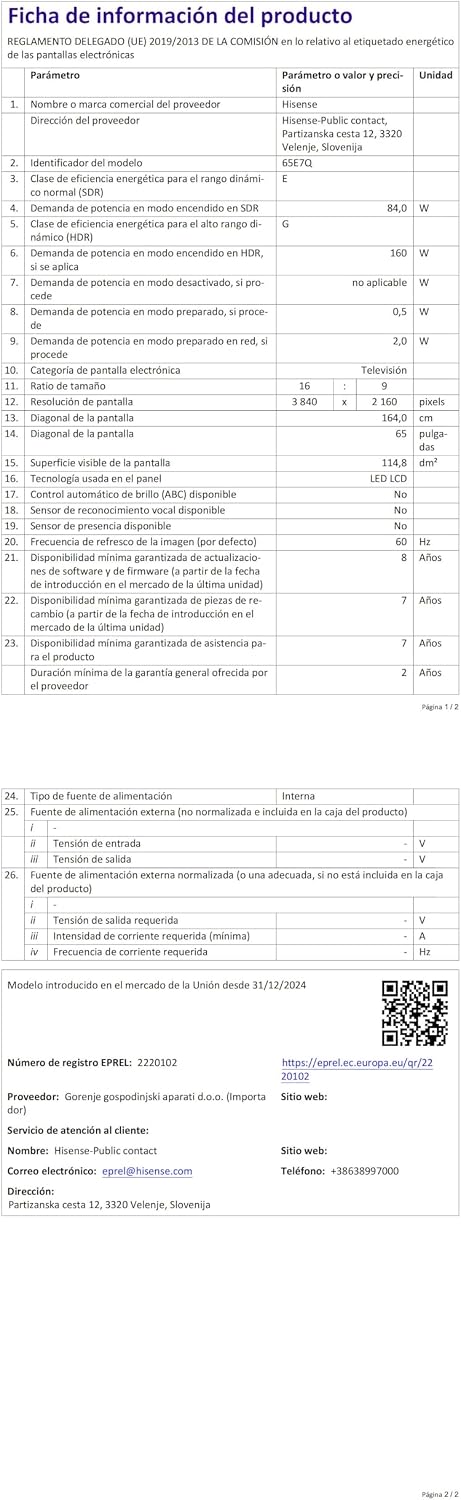
Energy label for the Hisense 65E7Q TV.
Para obter informações mais detalhadas sobre o produto, consulte o banco de dados EPREL: https://eprel.ec.europa.eu/qr/2220102
9. Garantia e Suporte
9.1 Garantia do Produto
This Hisense TV comes with a Garantia do produto de 3 anosGuarde seu comprovante de compra para eventuais solicitações de garantia.
9.2 Disponibilidade de peças de reposição
Spare parts for this model are guaranteed to be available in the EU for a duration of 10 anos from the product's market introduction.
9.3 Suporte ao cliente
For technical assistance, troubleshooting, or warranty service, please contact Hisense customer support. Refer to the contact information provided in your warranty card or visit the official Hisense website da sua região.