
1. Introdução
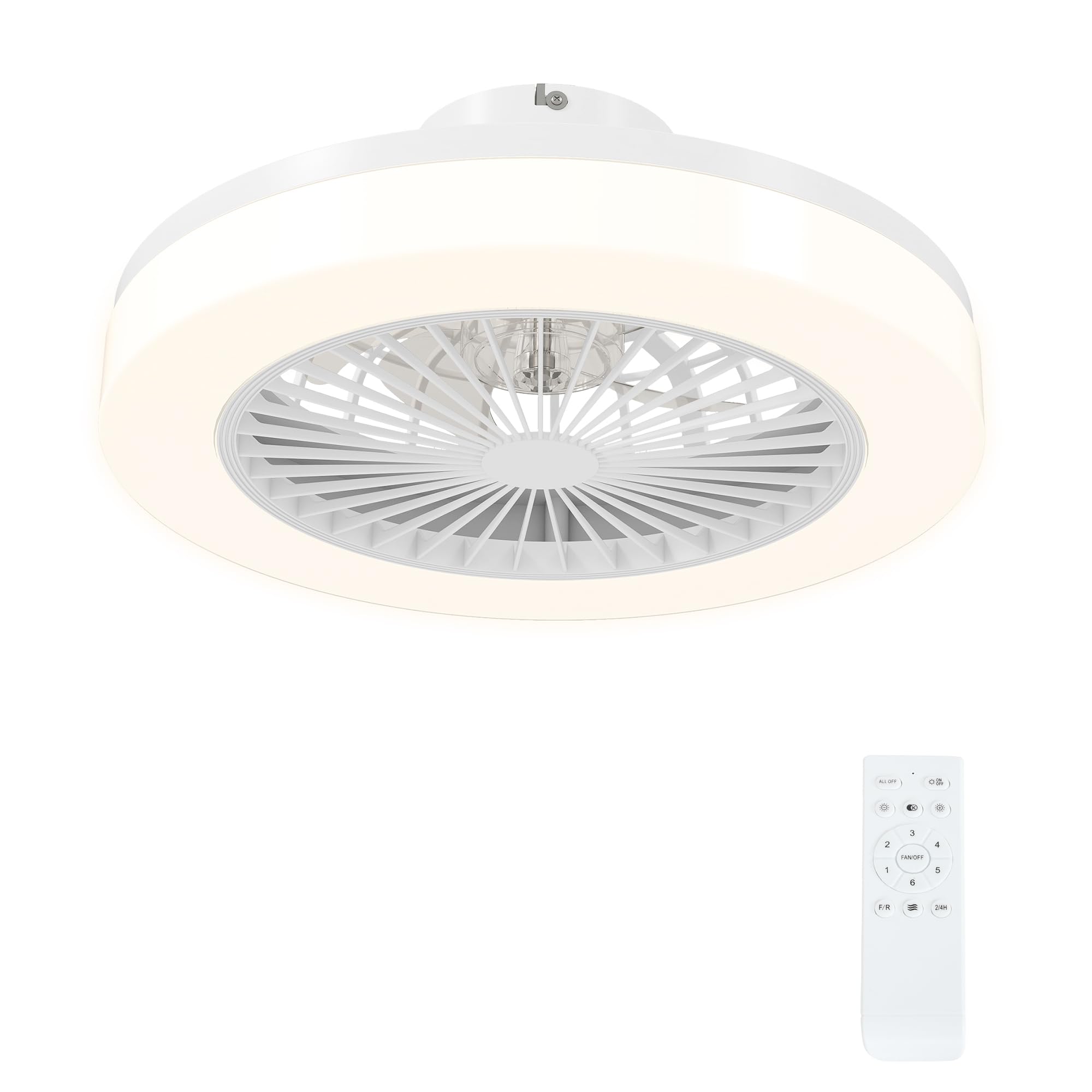
Thank you for choosing the HOMCOM Ceiling Fan with LED Light. This product combines efficient air circulation with versatile lighting, designed to enhance comfort in your living space. Featuring a quiet DC motor, multiple speed settings, and adjustable light color and brightness, this ceiling fan is controlled conveniently via a remote. Please read this manual thoroughly before installation and use to ensure safe and optimal performance.
2. Instruções de segurança
Para reduzir o risco de choque elétrico, incêndio ou ferimentos, siga sempre estas precauções básicas de segurança:
- Instalação profissional: Installation and electrical connections must be performed by a qualified electrician in accordance with all local and national electrical codes.
- Desconexão de energia: Desligue sempre a energia no disjuntor principal antes de tentar qualquer instalação, manutenção ou reparo.
- Montagem: Ensure the mounting structure can support the weight of the fan (approximately 1.7 kg) and is securely fastened.
- Folga da lâmina: Não introduza objetos no caminho das pás do ventilador enquanto este estiver em funcionamento.
- Baterias de controle remoto: Use only the specified battery type (2 AAA) for the remote control. Ensure correct polarity. Keep batteries out of reach of children.
- Somente para uso interno: This product is designed for indoor use in dry locations. Do not expose to water or high humidity.
- Limpeza: Limpe apenas com um pano seco e macio. Não utilize produtos de limpeza abrasivos ou solventes.
3. Conteúdo da embalagem
Verifique se todos os componentes estão presentes e sem danos antes de prosseguir com a instalação:
- Ceiling Fan Unit with Integrated LED Light
- Controle remoto (requer 2 pilhas AAA, não incluídas)
- Hardware de montagem (parafusos, âncoras, etc.)
- Manual do usuário
4. Recursos do Produto
The HOMCOM Ceiling Fan with LED Light offers a range of features for optimal comfort and convenience:
- Iluminação LED personalizável: Choose between cool white (6000K), neutral white (4000K), or warm white (3000K) light. Brightness is adjustable from 0-100%. The LED technology provides approximately 25,000 hours of durability, reducing energy consumption and maintenance costs.
- Quiet and Efficient Fan: Equipped with a 40W DC copper motor, the fan operates quietly while providing powerful airflow. It features six speed settings and a natural breeze mode that simulates gentle wind.
- All-Season Comfort: The reversible motor allows you to change the direction of the fan blades. In summer, it creates a cooling downdraft. In winter, it circulates warm air trapped near the ceiling, improving heat distribution.
- Controle remoto conveniente: The included remote control has a range of up to 10 meters, allowing you to adjust fan speeds, light settings, and the timer independently.
- Função do temporizador: Set the fan to turn off automatically after 2 or 4 hours.


5. Configuração e instalação
Importante: Installation of this ceiling fan requires professional expertise. It involves electrical wiring and secure ceiling mounting. Consult a qualified electrician for installation to ensure safety and compliance with local regulations.
Verificações de pré-instalação:
- Certifique-se de que a alimentação elétrica da área de instalação esteja desligada no disjuntor.
- Verify that the ceiling structure is capable of supporting the fan's weight.
- Desembale todos os componentes e verifique se há danos.
Installation Steps (Summary - Refer to detailed instructions from your electrician):
- Mount the ceiling bracket securely to the ceiling joist or a suitable support structure.
- Connect the electrical wiring from the ceiling to the fan unit, ensuring correct polarity and grounding.
- Attach the fan unit to the ceiling bracket.
- Install the fan blades and light cover.
- Insert 2 AAA batteries into the remote control, observing correct polarity.
- Restaure a energia no disjuntor e teste o funcionamento do ventilador e da lâmpada.

6. Instruções de operação
The HOMCOM Ceiling Fan is operated using the included remote control.

Funções do controle remoto:
- Ventilador ligado/desligado: Pressione o botão com o ícone do ventilador para ligá-lo ou desligá-lo.
- Velocidade do ventilador: Use the speed buttons (usually indicated by numbers or fan blade icons) to cycle through 6 fan speeds.
- Modo Brisa: Activate the breeze mode (often indicated by a wave icon) for a natural, fluctuating airflow.
- Função reversível (F/R): Press the F/R button to switch between summer (downdraft) and winter (updraft) modes.
- Luz LIGADA/DESLIGADA: Press the light bulb icon button to turn the LED light on or off.
- Color Temperature Change (K): Press the 'K' button to cycle through cool white, neutral white, and warm white light settings.
- Ajuste de brilho: Use the dimming buttons (often indicated by sun icons or +/-) to adjust the light brightness from 0% to 100%.
- Timer (2/4H): Press the timer button to set the fan to automatically turn off after 2 or 4 hours.
7. Manutenção
A manutenção regular garante a longevidade e o desempenho ideal do seu ventilador de teto.
Limpeza:
- Always ensure the power is off before cleaning.
- Wipe the fan and light housing with a soft, dry cloth.
- Do not use water, harsh chemicals, or abrasive cleaners, as these can damage the finish or electrical components.
Substituição da fonte de luz:
- The integrated LED light source is replaceable. If replacement is needed, contact a qualified technician or HOMCOM customer support for guidance.
Substituição da bateria do controle remoto:
- When the remote control's range decreases or it stops responding, replace the 2 AAA batteries.
- Ao inserir baterias novas, certifique-se de respeitar a polaridade correta.
8. Solução De Problemas
Se você tiver problemas com o seu ventilador de teto, consulte os problemas e soluções comuns a seguir:
| Problema | Possível causa | Solução |
|---|---|---|
| Ventilador não inicia | No power supply; Remote control batteries are dead or incorrectly inserted; Wiring issue. | Check circuit breaker; Replace remote batteries; Consult an electrician to check wiring. |
| A luz não acende | No power supply; Light source issue; Remote control batteries are dead. | Check circuit breaker; If light source is replaceable, check it; Replace remote batteries. |
| Controle remoto não funciona | Dead or incorrectly inserted batteries; Out of range; Interference. | Replace batteries, ensure correct polarity; Move closer to the fan (within 10m); Remove potential sources of interference. |
| O ventilador está barulhento | Loose mounting screws; Unbalanced blades; Obstruction. | Ensure all mounting screws are tight; Check for any obstructions; Contact support if noise persists. |
Se o problema persistir após tentar essas soluções, entre em contato com o suporte ao cliente da HOMCOM para obter mais assistência.
9. Especificações
| Recurso | Especificação |
|---|---|
| Número do modelo | B31-513V00WT |
| Dimensões (Diâmetro x Altura) | Ø46cm x 16cm |
| Peso | 1.7 kg |
| Potência (Ventilador) | 40 W |
| Volumetage | 220 V |
| Tipo de luz | LED integrado |
| Fluxo Luminoso | 2700 lm |
| Temperatura de cor | Adjustable (3000K Warm, 4000K Neutral, 6000K Cool) |
| Brilho | Ajustável (0-100%) |
| Velocidades do ventilador | 6 speeds + Breeze Mode |
| Função de temporizador | 2/4 horas |
| Método de controle | Controle remoto (infravermelho) |
| Alcance do controle remoto | Até 10 metros |
| Pilhas para controle remoto | 2 x AAA (não incluído) |
| Material | Acrílico, Plástico |
| Tipo de montagem | Montagem no teto |
| Conformidade | CE, RoHS |
| Uso interno/externo | Interior |
10. Garantia e Suporte
This HOMCOM product comes with a limited warranty. For specific warranty terms and conditions, please refer to the documentation provided at the time of purchase or contact HOMCOM customer service.
For technical support, troubleshooting assistance, or to inquire about replacement parts, please contact HOMCOM customer support through their official website or the retailer where the product was purchased. Please have your model number (B31-513V00WT) and purchase information ready when contacting support.