Introdução
This manual provides detailed instructions for the setup, operation, and maintenance of your Lotus Smartwatch 50050/4. Please read this manual thoroughly before using your device to ensure proper functionality and to maximize its features.
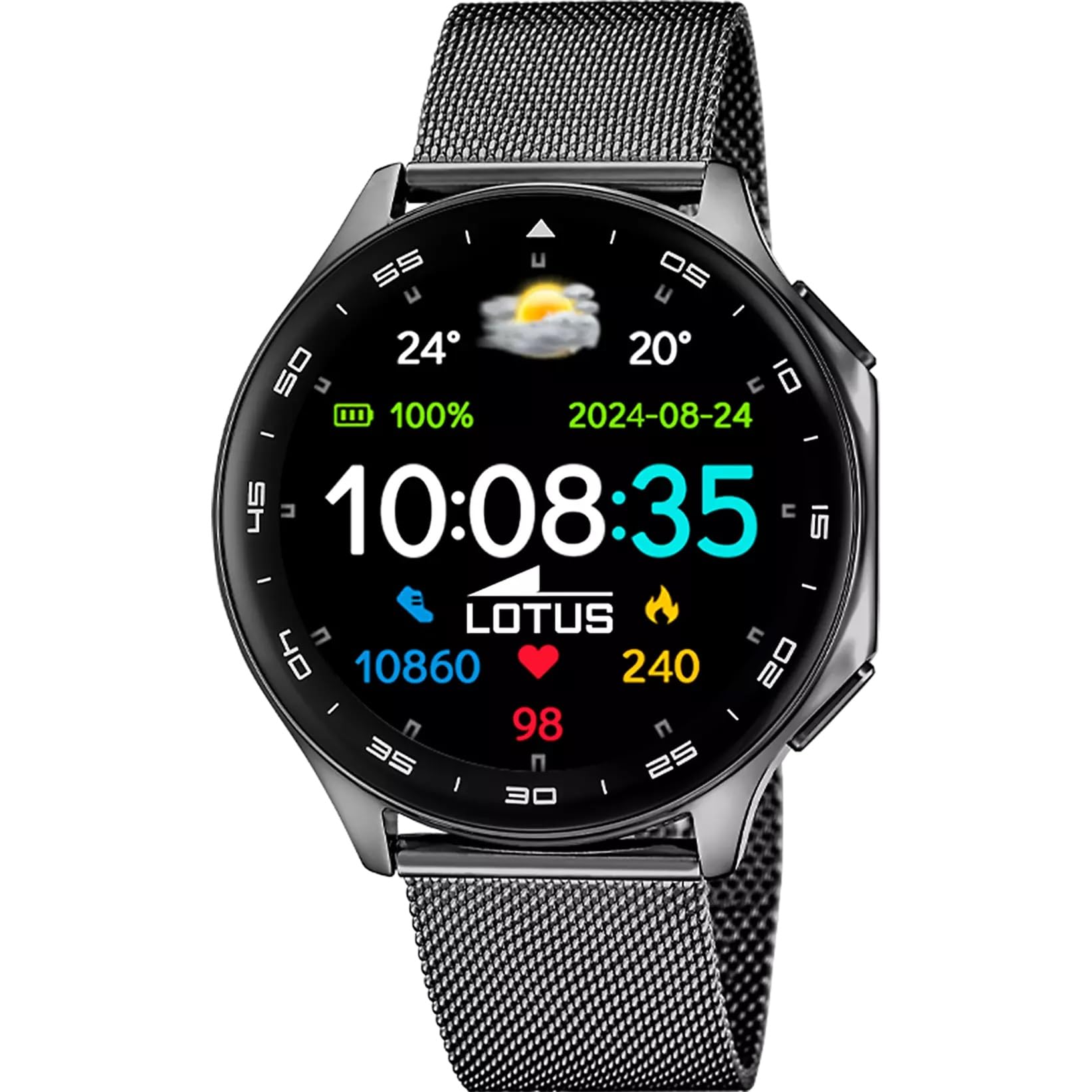
The Lotus Smartwatch 50050/4 is an outdoor sports watch designed for active lifestyles. It features a durable zinc alloy case, a black Milanese steel mesh strap, and a digital display. The watch offers a range of functions including sports tracking, health monitoring, and smart notifications.
O que está na caixa
- Lotus Smartwatch 50050/4
- Cabo de carregamento
- Manual do usuário (este documento)
- Alça Adicional
Configurar
1. Carregando o smartwatch
Before initial use, fully charge your smartwatch. Connect the charging cable to the charging port on the back of the watch and plug the other end into a USB power adapter (not included) or a computer's USB port. The watch display will indicate charging status.
Observação: Use a standard 5V/1A USB charger. Overcharging or using incompatible chargers may damage the device.
2. Ligar / desligar
- Para ligar: Press and hold the side button for a few seconds until the Lotus logo appears.
- Para desligar: Pressione e mantenha pressionado o botão lateral e, em seguida, selecione "Desligar" na tela.
3. Instalação e pareamento do aplicativo
To unlock the full potential of your smartwatch, download the official Lotus Smartwatch application on your smartphone. The app is compatible with Android devices.
- Procurar the "Lotus Smartwatch" app in your smartphone's app store (Google Play Store for Android).
- Instale o aplicativo.
- Abra o aplicativo e siga as instruções na tela para criar uma conta ou fazer login.
- Ative o Bluetooth no seu smartphone.
- In the app, navigate to the device pairing section and select your Lotus Smartwatch 50050/4 from the list of available devices.
- Confirme o pedido de emparelhamento tanto no seu smartphone quanto no smartwatch.
Após o emparelhamento, o relógio sincronizará a hora, a data e outras configurações com o seu smartphone.
Instruções de operação
Navegação básica
- Tela sensível ao toque: Deslize para a esquerda, direita, para cima ou para baixo para navegar pelos menus e funções. Toque para selecionar um item.
- Botão lateral: Press to return to the previous screen or to the watch face. Press and hold for power options.
Principais funções
- Modos esportivos: Access various sports modes (e.g., running, walking, cycling) to track your activity, including steps, calories burned, and distance.
- Monitoramento de saúde:
- Frequência cardíaca: Monitor your heart rate in real-time.
- Oxigênio no sangue: Meça seus níveis de oxigênio no sangue.
- Monitoramento do sono: Analyze your sleep patterns (deep sleep, light sleep, awake time).
- Exercícios de respiração: Exercícios de respiração guiada para relaxamento.
- Notificações: Receive notifications for incoming calls, SMS messages, and app alerts directly on your watch. You can reject calls from the watch.
- Controle de música: Controle a reprodução de música no seu smartphone conectado (reproduzir, pausar, pular faixas).
- Clima: View Condições meteorológicas atuais e previsões.
- Alarmes e temporizadores: Set alarms, use the stopwatch, or set a countdown timer.
- Câmera remota: Use seu relógio como um disparador remoto para a câmera do seu smartphone.
- Video Calculator: Access a video calculator function.
- AI Voice Calculator: Utilize an AI voice-activated calculator.
- Localizador de telefone: Localize seu smartphone emparelhado fazendo-o tocar.
- Lanterna: Activate the screen as a flashlight.
- Dial Customization: Change the watch face (dial) through the watch settings or the companion app.
- Atualização de Firmware: Update the watch's software via the companion app to ensure optimal performance and access new features.
- Language, Time, and Date: Adjust these settings through the watch or the companion app.
Manutenção
Limpeza e Cuidados
- Wipe the watch screen and body with a soft, dry, lint-free cloth.
- Para manchas teimosas, dampMolhe o pano com água. Não utilize produtos químicos agressivos ou materiais abrasivos.
- Certifique-se de que os contatos de carregamento estejam limpos e secos antes de carregar.
Resistência à água (IP65)
The Lotus Smartwatch 50050/4 has an IP65 rating, meaning it is protected against dust ingress and low-pressure water jets from any direction. This rating indicates resistance to splashes and light rain. It is not suitable for swimming, showering, or submersion in water. Exposure to high-pressure water or prolonged submersion may cause damage.
Substituição da cinta
The watch comes with an additional strap. To replace the strap, locate the quick-release pins on the underside of the strap where it connects to the watch case. Slide the pin to detach the strap, then align the new strap and slide the pin back into place to secure it.
Solução de problemas
Relógio não liga
- Certifique-se de que o relógio esteja totalmente carregado. Conecte-o ao carregador por pelo menos 30 minutos.
- Tente pressionar e segurar o botão lateral por 10 a 15 segundos para forçar uma reinicialização.
Não é possível emparelhar com o smartphone.
- Certifique-se de que o Bluetooth esteja habilitado no seu smartphone.
- Ensure the watch is within range of your smartphone (typically 10 meters).
- Reinicie o smartphone e o smartwatch.
- Clear the Bluetooth cache on your smartphone (if applicable) and try pairing again.
- Ensure the Lotus Smartwatch app is updated to the latest version.
Dados de saúde imprecisos
- Certifique-se de que o relógio esteja ajustado ao seu pulso, mas não muito apertado.
- Mantenha o sensor na parte traseira do relógio limpo e livre de detritos.
- Fatores ambientais e a fisiologia individual podem afetar a precisão do sensor.
Redefinição de fábrica
If you experience persistent issues, a factory reset may resolve them. This will erase all data on the watch and restore it to its original settings. Consult the watch's settings menu or the companion app for the factory reset option.
Especificações
| Número do modelo | 50050/4 |
| Marca | Lótus |
| Tamanho da tela | 46.7 milímetros |
| Forma | Redondo |
| Material da caixa | Liga de zinco |
| Material da alça | Milanese Steel Mesh |
| Resistência à água | IP65 (Resistente a respingos e poeira) |
| Conectividade | Bluetooth |
| SO compatível | Android (for companion app) |
| GPS | Não |
| Características especiais | Advanced sport and health functions |
Garantia e Suporte
The Lotus Smartwatch 50050/4 comes with a Garantia de 3 ano from the date of purchase. This warranty covers manufacturing defects. It does not cover damage caused by misuse, accidents, unauthorized modifications, or failure to follow the instructions in this manual, including water damage beyond the specified IP65 rating.
For warranty claims or technical support, please contact your authorized Lotus retailer or visit the official Lotus webSite com informações de atendimento ao cliente.
Política de devolução: If purchased from Amazon, the product is subject to a 30-day return policy for refund or replacement, as per Amazon's terms.
Imagem do produto