
1. Introdução
Thank you for choosing the Leapwell Portable Bluetooth Desktop CD Player, Model L-CD202B. This device offers versatile audio playback options, including CD, Bluetooth, FM Radio, USB, AUX, AB Repeat, and Optical modes. Designed for both home and portable use, it features integrated speakers and a rechargeable battery. This manual provides essential information for safe and effective operation of your new CD player.
2. Informações de segurança
- Leia todas as instruções antes de usar e guarde para referência futura.
- Não exponha o dispositivo à chuva, umidade ou temperaturas extremas.
- Evite colocar o dispositivo perto de fontes de calor, como radiadores, registros de calor, fogões ou outros aparelhos que produzam calor.
- Utilize somente acessórios/anexos especificados pelo fabricante.
- Limpe apenas com um pano seco.
- Não bloqueie nenhuma abertura de ventilação.
- Proteja o cabo de alimentação para que não seja pisado ou comprimido.
- Desligue o dispositivo durante tempestades com raios ou quando não for utilizado por longos períodos.
- Deixe toda a manutenção a cargo de pessoal qualificado.
3. O que está na caixa
Ao desembalar, verifique se todos os itens estão presentes e em boas condições:
- Leapwell Portable CD Player
- Controle remoto
- Cabo de carregamento USB-C
- Cabo AUX 3.5mm
- Manual de instruções
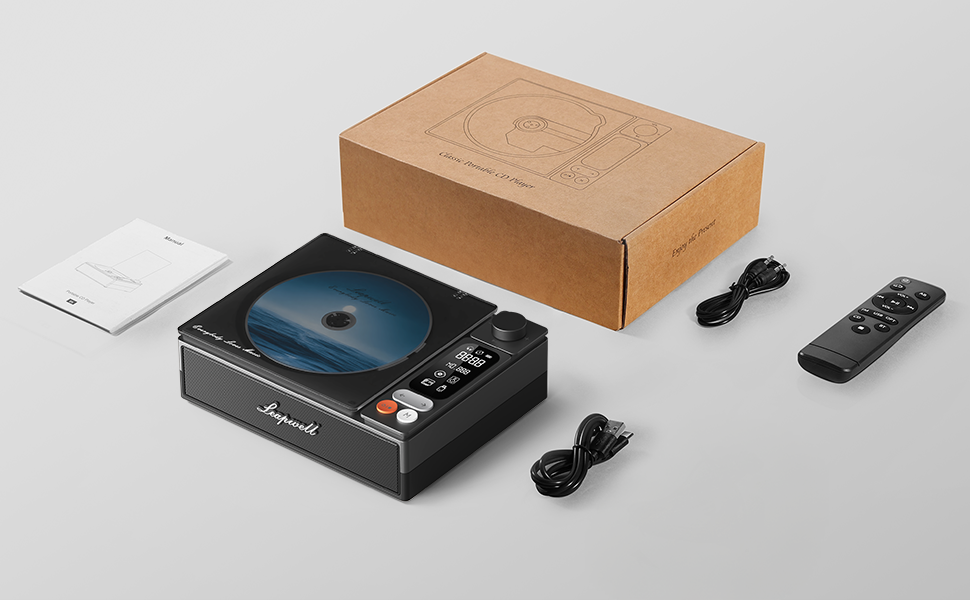
Image: All components included in the Leapwell CD Player package, including the player, remote, cables, and manual.
4. Produto acabadoview
The Leapwell L-CD202B is a compact and versatile audio device designed for various listening preferences.

Imagem: Frente view of the Leapwell Portable Bluetooth Desktop CD Player with a CD inserted and the dust cover open.
Principais características:
- 7-in-1 Playback Modes: Supports CD Play, Bluetooth (Receive & Transmit), FM Radio, USB, AUX, AB Repeat, and Optical Mode.
- HiFi Speaker System: Features an independent sound cavity design and inner magnetic speaker unit for enhanced sound detail and bass.
- Bluetooth 5.1: Allows seamless connection to mobile phones, tablets, and external Bluetooth speakers or headphones.
- Bateria recarregável: Built-in USB-C fast-charging battery provides 4-5 hours of playback.
- Design Clássico: Retro square design with a translucent CD dust cover, volume knob, and a 2.4-inch LCD display.
- Saída óptica: For connecting to external decoders for lossless audio.
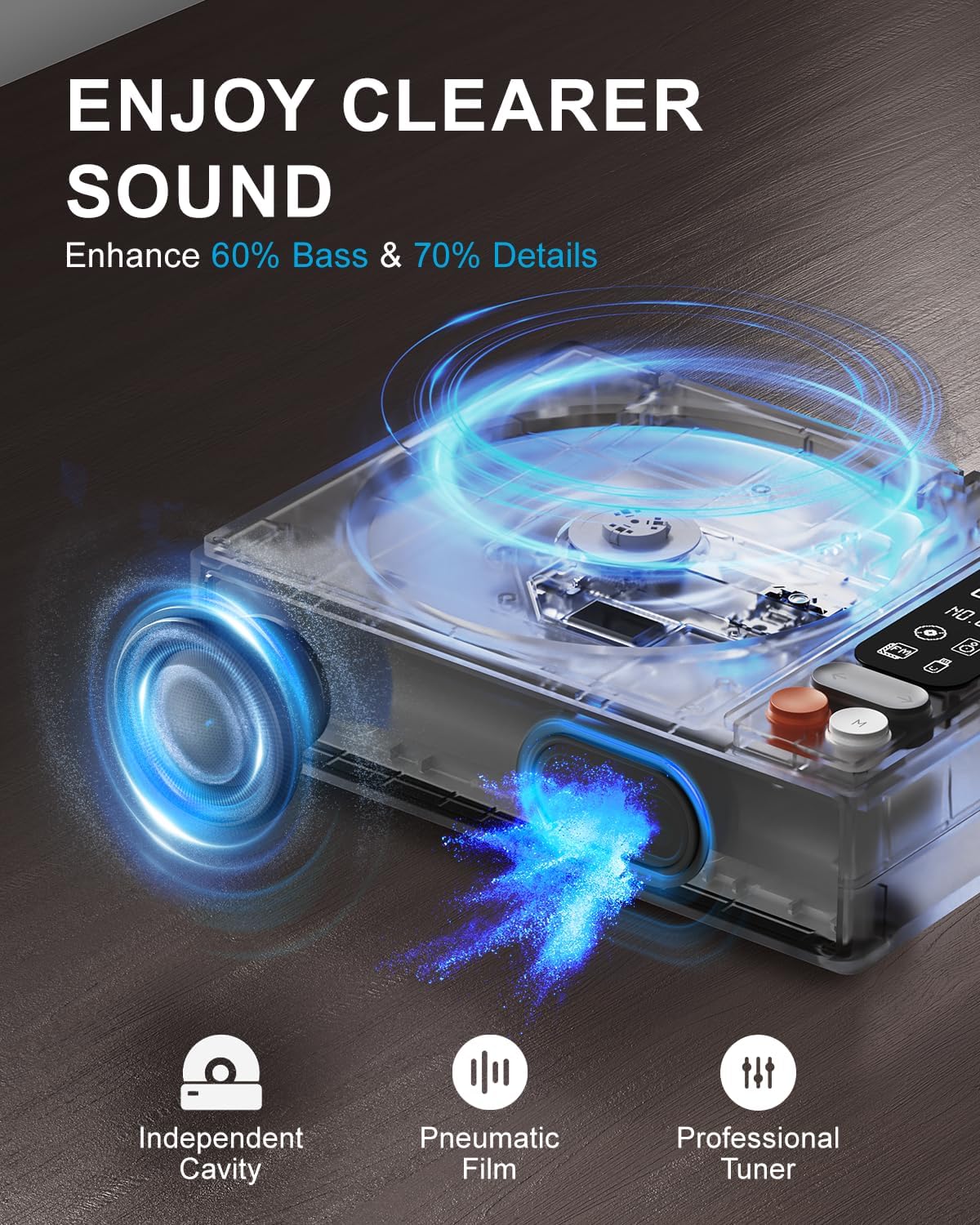
Image: Diagram illustrating the internal speaker design with independent cavity and pneumatic film for enhanced bass and sound detail.

Imagem: Close-up view of the Leapwell CD Player highlighting its classic design, volume knob, and digital display.
5. Configuração
5.1 Carregando o dispositivo
Before first use, fully charge the CD player using the provided USB-C cable. Connect the USB-C end to the player's charging port and the other end to a 5V-2A USB power adapter (not included) or a computer's USB port. Charging via a computer's USB port will be slower.

Image: The Leapwell CD Player shown outdoors with battery indicators, emphasizing its portability and rechargeable battery.
5.2 Ligar/Desligar
To power on the device, press and hold the power button. To power off, press and hold the power button again.
5.3 Carregando um CD
- Gently lift the translucent dust cover.
- Place a CD onto the spindle, ensuring it is centered and flat.
- Close the dust cover. The player will begin reading the CD automatically or after selecting CD mode.
Video: Demonstration of loading a CD into the Leapwell CD Player and initiating playback. The video also shows the Bluetooth pairing process.
6. Modos de operação
The Leapwell CD Player supports multiple audio playback modes. Use the 'M' (Mode) button on the device or remote control to switch between modes.
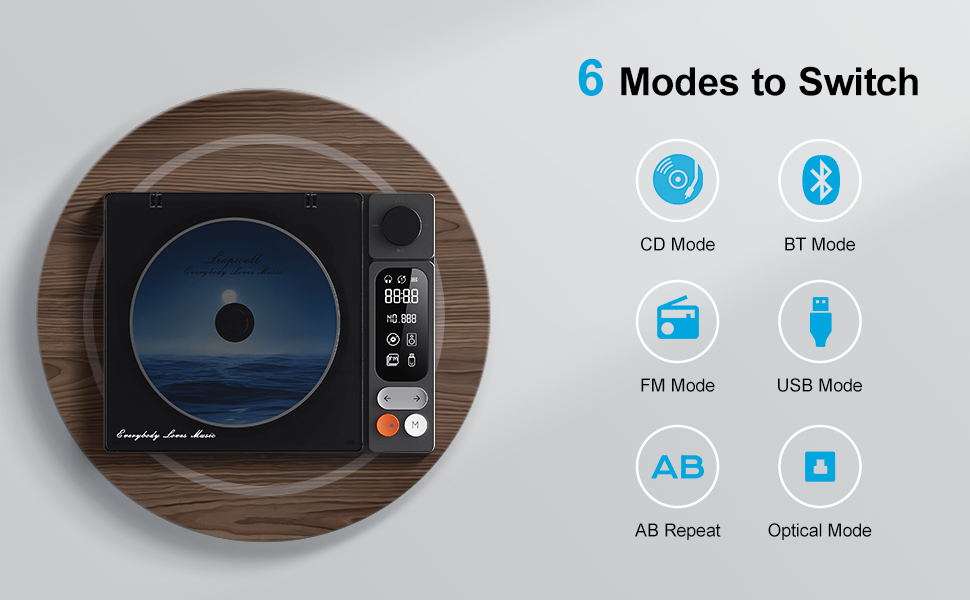
Image: Visual representation of the six main operating modes: CD, Bluetooth, FM, USB, AB Repeat, and Optical.
6.1 CD Play Mode
After loading a CD, the player will typically detect it and begin playback. Use the play/pause, next/previous track buttons, and the volume knob to control playback.
6.2 Modo Bluetooth
The device supports both Bluetooth Receive and Transmit modes.
- Modo de recepção: Allows you to connect your mobile phone or tablet to the CD player and use its built-in speakers for audio output. Activate Bluetooth mode on the CD player, then search for 'CD player' on your external device's Bluetooth settings and pair.
- Modo de transmissão: Enables the CD player to connect to external Bluetooth speakers or headphones. Activate Bluetooth mode on the CD player, then put your external Bluetooth device into pairing mode. The CD player will search and connect.

Image: A smartphone wirelessly connected to the Leapwell CD Player via Bluetooth, demonstrating the receive mode functionality.

Image: A woman enjoying music through Bluetooth headphones connected to the Leapwell CD Player, illustrating the transmit mode.
6.3 Modo Rádio FM
Switch to FM Radio mode. Use the next/previous track buttons to scan for radio stations. The display will show the current frequency.
6.4 Modo USB
Insira uma unidade flash USB contendo áudio files into the USB port. The player will automatically switch to USB mode and begin playback. Use the track control buttons to navigate.
6.5 Modo AUX
Connect an external audio device (e.g., smartphone, MP3 player) to the CD player's AUX input using the provided 3.5mm AUX cable. Switch to AUX mode to play audio from the connected device through the CD player's speakers.
6.6 AB Repeat Mode
This mode allows you to repeat a specific section of audio. During playback, press the AB Repeat button once to set point A, and press it again to set point B. The player will continuously repeat the section between A and B. Press a third time to cancel.
6.7 Optical Mode
Connect the CD player to an external decoder or amplifier via an optical fiber cable (not included) using the optical output port. Switch to Optical mode to transmit digital audio for enhanced sound quality.

Image: The Leapwell CD Player connected to an external audio amplifier using an optical cable, demonstrating the optical output feature.
7. Controles
The CD player features intuitive controls for easy operation:
- Botão de volume: Gire para ajustar o nível de volume.
- Botão Reproduzir/Pausar: Inicia ou pausa a reprodução.
- Botões de faixa seguinte/anterior: Avança para a faixa/estação seguinte ou anterior.
- Botão Modo (M): Alterna entre diferentes modos de reprodução.
- Tela LCD: Displays track information, mode, time, and battery status.
- Controle remoto: Provides convenient access to all functions from a distance of up to 15 feet.
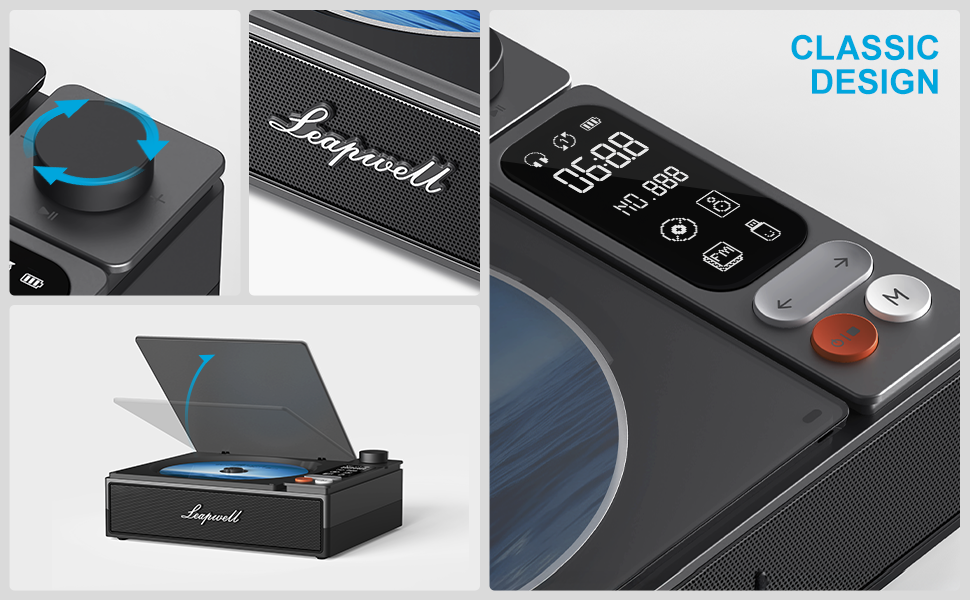
Imagem: Detalhada view of the control panel, including the volume knob, playback buttons, mode button, and LCD display.
8. Manutenção
8.1 Limpando o Dispositivo
Wipe the exterior of the CD player with a soft, dry cloth. Do not use liquid cleaners or abrasive materials. Keep the CD compartment free of dust and debris. Avoid touching the optical lens.
8.2 Cuidados com o CD
Handle CDs by their edges. Store them in their cases to prevent scratches and dust accumulation. Clean dirty CDs with a soft, lint-free cloth, wiping from the center outwards.
9. Solução De Problemas
If you encounter issues with your Leapwell CD Player, refer to the following common problems and solutions:
- Sem energia: Certifique-se de que o dispositivo esteja carregado ou conectado a uma fonte de alimentação.
- CD não está tocando: Check if the CD is inserted correctly and is clean. Ensure the device is in CD Play mode.
- Sem som: Adjust the volume. Check if external speakers/headphones are properly connected or paired via Bluetooth. Ensure the correct mode is selected.
- Problemas de conexão Bluetooth: Ensure the CD player is in Bluetooth mode and your external device's Bluetooth is enabled and in pairing mode. Try restarting both devices.
- Pode ser usado durante o carregamento? Yes, it can. Please unplug the power when not in use for a long time.
- Can it connect to Bluetooth headphones? Yes, it can. It can also connect to a mobile phone and play music.
- Can it be charged via a computer's USB port? Yes, it can. However, charging will be very slow. It is recommended to use a 5V-2A adapter for charging.
10. Especificações
| Dimensões do produto | 7.3 x 5.7 x 2.5 polegadas |
| Peso do item | 1.4 libras |
| Nome do modelo | L-CD202B |
| Cor | Preto |
| Tecnologia de Conectividade | Auxiliar, Bluetooth, Óptico, USB |
| Características especiais | Anti-Skip Protection, Auto Power-Off, Bluetooth, Portable, Rechargeable |
| Baterias | 1 bateria de íon de lítio (incluída) |
11. Garantia e Suporte
Leapwell CD Players come with lifelong technical support and 24/7 professional customer service. For any inquiries or assistance, please contact Leapwell customer support through the official channels provided at the time of purchase or on the Leapwell website.