
1. Introdução
Thank you for choosing the Camtro M6 Outdoor Security Camera. This battery-powered wireless camera is designed to provide reliable outdoor surveillance with features such as 1080p video resolution, color night vision, two-way audio, and smart AI motion detection. This manual provides essential information for setting up, operating, and maintaining your camera to ensure optimal performance.
2. Conteúdo da embalagem
Por favor, verifique se todos os itens estão presentes em sua embalagem:
- Camtro M6 Outdoor Security Camera
- Manual de instruções
- Parafusos de montagem
3. Produto acabadoview
Familiarize yourself with the components of your Camtro M6 camera.

Figura 3.1: Frente view of the Camtro M6 Outdoor Security Camera, showing the lens, light, and motion sensor.
The Camtro M6 features a durable, weather-resistant design suitable for outdoor use. Key components include:
- Lente da câmera: Captures 1080p high-definition video.
- Infrared LED / Spotlight: Provides illumination for night vision and color night vision.
- Sensor de movimento: Detects movement for smart alerts.
- Microfone: Para comunicação de áudio bidirecional.
- Palestrante: Para comunicação de áudio bidirecional e alertas.
- Base de montagem: For secure installation on walls or other surfaces.

Figura 3.2: Sobreview of Camtro M6 features including AI Human Detection, Color Night Vision, Two-way Talk, and Cloud Storage.
4. Configuração
Follow these steps to set up your Camtro M6 camera:
- Carregue a câmera: Before initial use, fully charge the camera battery using the provided charging cable. A full charge ensures optimal battery life.
- Baixe o aplicativo: Procurar the official Camtro security camera app on your smartphone's app store (iOS or Android) and install it.
- Criar uma conta: Abra o aplicativo e siga as instruções na tela para criar uma nova conta de usuário.
- Adicionar dispositivo: In the app, select the option to add a new device. Follow the prompts to connect your camera to your Rede Wi-Fi de 2.4 GHz. Ensure your phone is connected to a 2.4GHz network during setup. 5GHz Wi-Fi is not supported.
- Monte a câmera: Choose a suitable outdoor location for mounting. Use the included mounting screws to securely attach the camera to a wall or other stable surface. Ensure the camera has a clear field of view and is within range of your Wi-Fi signal.
5. Instruções de operação
Once set up, you can access and control your camera through the mobile app.
5.1 Ao vivo View
Abra o aplicativo e selecione sua câmera para view the live feed. This allows you to monitor your property in real-time from anywhere.
Áudio bidirecional 5.2

Figura 5.1: Illustration of the two-way audio function, allowing communication through the camera.
Toque no ícone do microfone na transmissão ao vivo. view to enable two-way audio. You can speak through your phone, and your voice will be projected through the camera's speaker. Similarly, you can hear audio from the camera's location.
5.3 Detecção de Movimento Inteligente por IA

Figura 5.2: The camera's AI Human Detection feature distinguishing between human movement and other objects.
The camera features AI-powered motion detection that can distinguish between humans, animals, and other moving objects. This reduces false alarms. You will receive push notifications on your smartphone when motion is detected. Adjust sensitivity settings within the app.
Visão noturna colorida de 5.4 polegadas
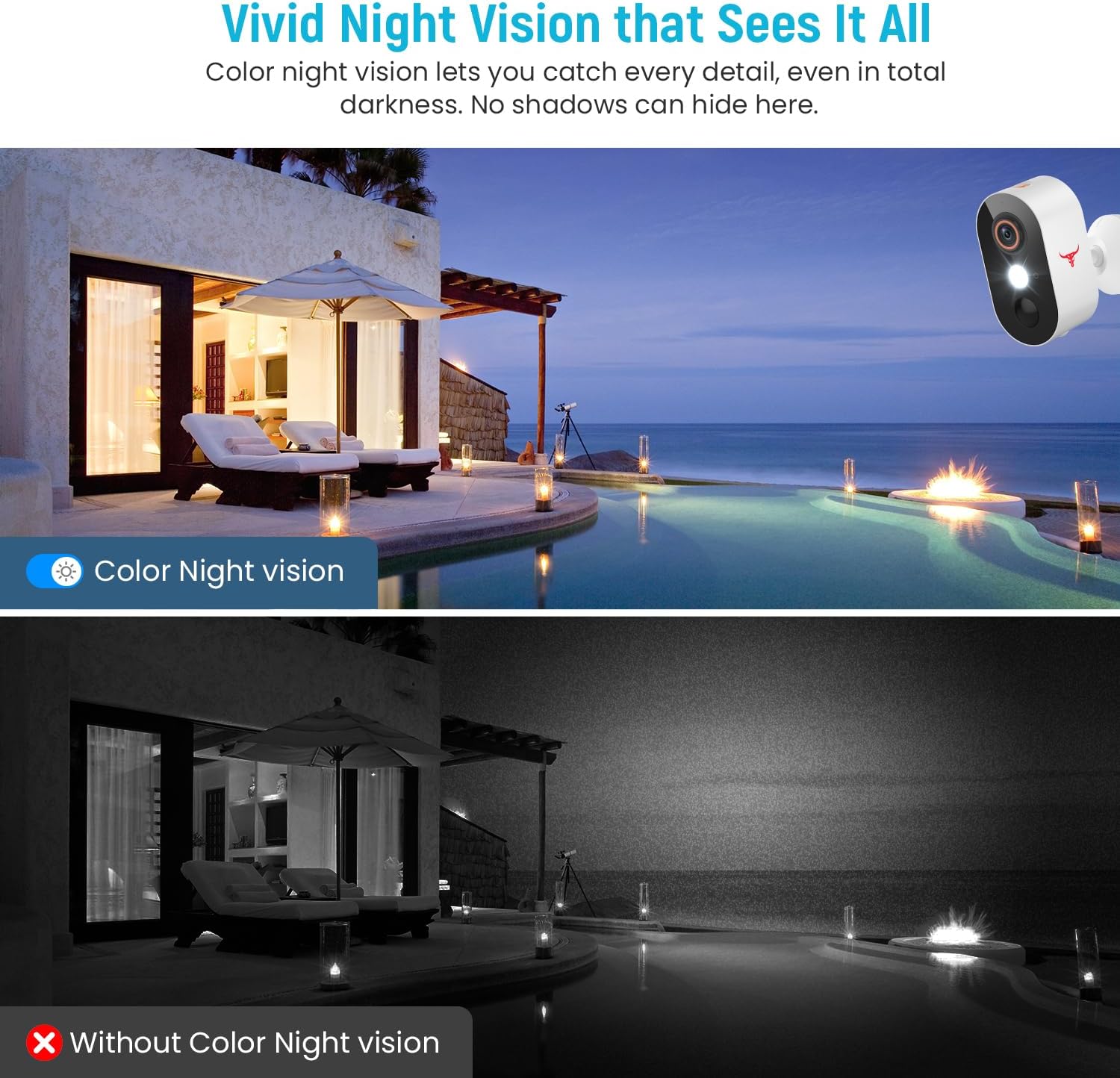
Figura 5.3: Comparison of color night vision and standard black and white night vision.
The Camtro M6 provides vivid color night vision, allowing you to see details in low-light conditions. The camera automatically switches to night vision mode when ambient light is insufficient.
5.5 Armazenamento em Nuvem

Figura 5.4: Visual representation of cloud storage for recorded video events.
The camera supports cloud storage for recording and reviewing video events. A subscription is required to access recorded footage. Please refer to the app for subscription options and details.
6. Manutenção
A manutenção regular garante a longevidade e o desempenho ideal da sua câmera.
- Carregamento da bateria: The camera is battery-powered. Monitor the battery level in the app and recharge the camera as needed. Battery life can vary based on usage and environmental factors.
- Limpeza: Limpe periodicamente a lente e o corpo da câmera com um pano macio e seco.amp Use um pano para remover poeira e detritos. Não utilize produtos químicos agressivos.
- Atualizações de firmware: Keep the camera's firmware updated through the app to access new features and improvements.

Figura 6.1: The Camtro M6 camera demonstrating its weather resistance against shine, rain, snow, and dust.
The camera is designed to withstand various weather conditions, operating effectively in temperatures ranging from 14°F to 140°F.
7. Solução De Problemas
If you encounter issues with your Camtro M6 camera, refer to the following common problems and solutions:
| Problema | Possível causa | Solução |
|---|---|---|
| Câmera não conecta ao Wi-Fi | Incorrect Wi-Fi password, 5GHz Wi-Fi network, weak signal | Ensure correct 2.4GHz Wi-Fi password. Confirm your router is broadcasting a 2.4GHz network. Move camera closer to the router. |
| Má qualidade de vídeo | Sinal Wi-Fi fraco, lente suja | Melhore a intensidade do sinal Wi-Fi. Limpe a lente da câmera. |
| A detecção de movimento não está funcionando ou há muitos alarmes falsos. | Incorrect sensitivity settings, camera placement | Adjust motion detection sensitivity in the app. Ensure camera is positioned to avoid unnecessary triggers (e.g., swaying branches). |
| A bateria descarrega rapidamente | Frequent motion events, continuous live view, low temperature | Reduce motion detection sensitivity. Limit continuous live viewing. Ensure camera is fully charged. |
| Áudio bidirecional pouco nítido | Weak Wi-Fi signal, microphone/speaker obstruction | Check Wi-Fi connection. Ensure microphone and speaker are clear of obstructions. |
8. Especificações
Detailed technical specifications for the Camtro M6 Outdoor Security Camera:
- Modelo: M6
- Uso interno/externo: Ar livre
- Dispositivos compatíveis: Smartphone (iOS, Android)
- Fonte de energia: Alimentado por bateria
- Protocolo de conectividade: Wi-Fi (somente 2.4 GHz)
- Tipo de montagem: Montagem na parede
- Resolução de captura de vídeo: 1080p
- Dimensões do item (C x L x A): 2.8 x 1.7 x 3.4 polegadas
- Peso do item: 6.6 onças (0.41 libras)
- Baterias: 2 bateria não padrão (incluída)
- Formato de captura de vídeo: MP4
- Recurso especial: Motion Sensor, Color Night Vision, 2-Way Audio
- Usos recomendados para o produto: Segurança ao ar livre
9. Garantia e Suporte
For warranty information and technical support, please refer to the contact details provided with your purchase or visit the official Camtro webNossa equipe de atendimento ao cliente está disponível para ajudar com quaisquer dúvidas ou problemas que você possa encontrar.