
Instruções importantes de segurança
Leia e compreenda todas as instruções de segurança antes de usar este produto. Guarde este manual para futuras consultas.
- Ventilação: Assegure uma ventilação adequada. Não obstrua nenhuma abertura de ventilação.
- Água e Umidade: Não exponha este aparelho à chuva ou umidade. Não coloque objetos contendo líquidos, como vasos, sobre o aparelho.
- Fontes de calor: Não instale perto de fontes de calor, como radiadores, registros de calor, fogões ou outros aparelhos (incluindo amplificadores) que produzem calor.
- Fontes de energia: Use only power supplies specified by the manufacturer. Ensure the power cord is protected from being walked on or pinched.
- Limpeza: Limpe apenas com um pano seco.
- Manutenção: Não tente consertar este produto sozinho. Encaminhe todos os serviços de manutenção para pessoal de serviço qualificado.
Conteúdo da embalagem
Verifique se todos os itens listados abaixo estão incluídos em seu pacote:
- Kuephom CD-X2A Boombox
- Cabo de alimentação CA
- Manual do usuário (este documento)
- Controle remoto
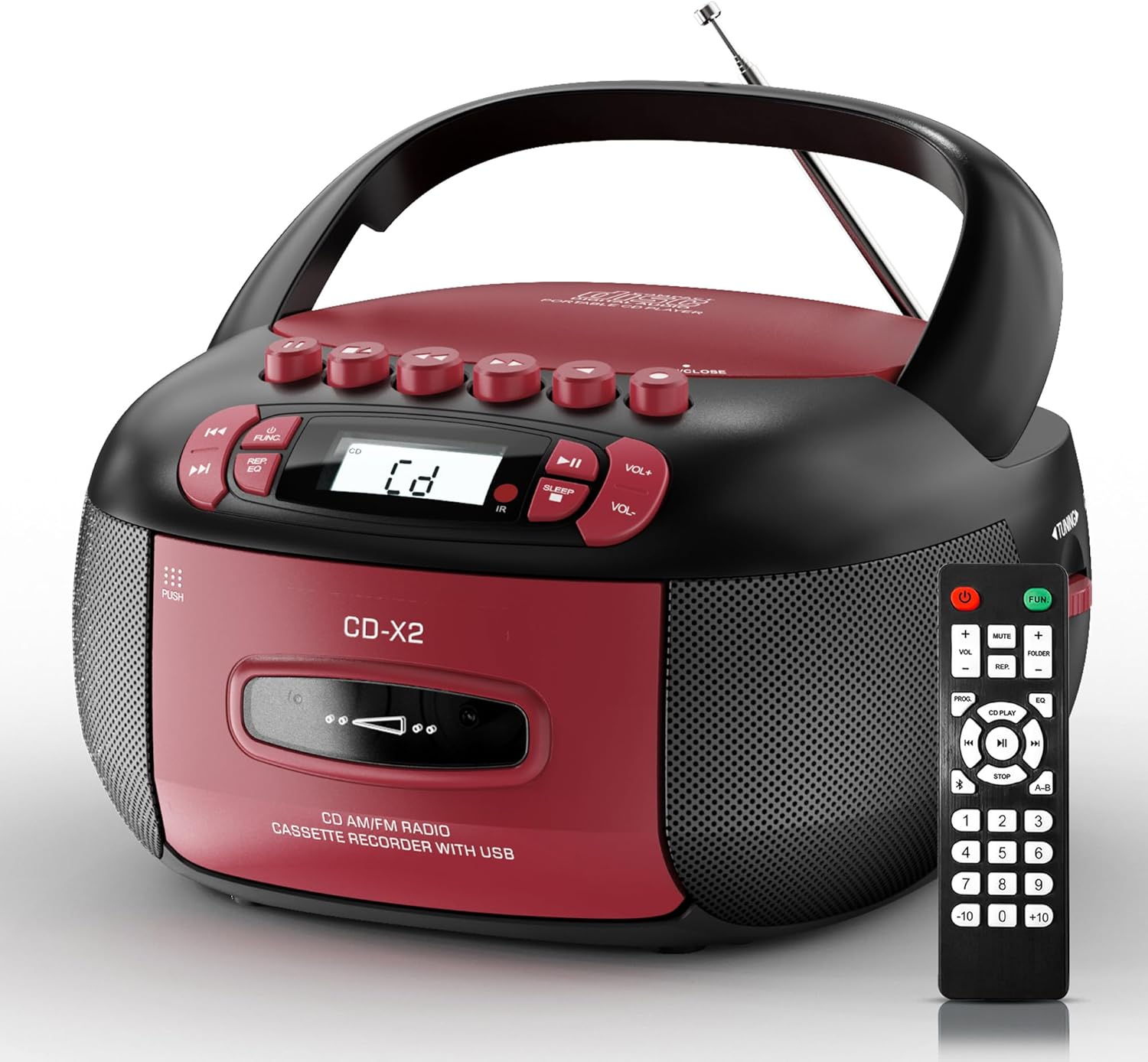
Image: The Kuephom CD-X2A Boombox with its included remote control, showcasing its compact design and red/black color scheme.
Produto acimaview
Familiarize yourself with the various components and controls of your Kuephom CD-X2A Boombox.
Controles do painel frontal
- Botão de energia/função: Press and hold to power on/off. Press to cycle through modes (CD, USB, Bluetooth, Radio, AUX, Tape).
- Botões de volume +/-: Ajuste o volume da reprodução.
- Botão Reproduzir/Pausar: Start or pause playback for CD, USB, Bluetooth, or Tape.
- Botão de parada: Pare a reprodução.
- Botões de pular/pesquisar: Navigate between tracks on CD/USB or fast forward/rewind on tape.
- Botão EQ: Selecione as predefinições do equalizador.
- Botão do Temporizador: Defina o temporizador para dormir.
Controles do painel lateral
- Botão de sintonia: Manually tune AM/FM radio stations.
- Plug do fone de ouvido: Conecte fones de ouvido para ouvir com privacidade.
- Porta de entrada AUX: Conecte dispositivos de áudio externos.
- Porta USB: Insert USB drives for MP3/WMA playback.
Recursos do painel superior
- Compartimento para CD: Top-loading compartment for CDs.
- Compartimento para cassete: Compartimento frontal para carregamento de fitas cassete.
- Antena Telescópica: Extend for improved radio reception.

Image: The boombox highlighting its multiple functions including CD/MP3, Bluetooth, Type I/II tape, USB, FM/AM Radios, Sleep timer, Remote, Phone jack, AUX, and Tape recording.

Imagem: Close-up views of the boombox's phone jack, top-loading CD player, telescopic antenna, and tape play/record buttons.
Configurar
Ligando o Boombox
Energia CA
- Connect the supplied AC power cord to the AC IN jack on the back of the boombox.
- Plug the other end of the power cord into a standard AC wall outlet (120V~60Hz).
Energia da bateria
- Open the battery compartment cover located on the bottom of the boombox.
- Insert 6 x 'C' size batteries (not included), ensuring correct polarity (+/-).
- Feche bem a tampa do compartimento da bateria.
- When operating on battery power, disconnect the AC power cord.

Image: The boombox demonstrating both AC power connection and the use of 6 C-size batteries for portable operation.
Controle remoto
- Insert 2 x 'AAA' batteries (not included) into the remote control, observing polarity.
- Point the remote control towards the boombox's IR sensor for optimal operation.

Image: An individual comfortably operating the boombox using the remote control from a distance.
Instruções de operação
Operação geral
- Ligar/desligar: Press and hold the Power/Function button to turn the unit on or off.
- Seleção de função: Press the Power/Function button repeatedly to switch between CD, USB, Bluetooth, Radio (AM/FM), AUX, and Tape modes.
Reprodução de CD
- Abra a tampa do compartimento do CD.
- Place a CD (CD, CD-R, MP3, WMA compatible) onto the spindle with the label side facing up.
- Feche a tampa do compartimento do CD.
- Press the Power/Function button to select 'CD' mode.
- Pressione o botão Reproduzir/Pausar para iniciar a reprodução.
- Use the Skip/Search buttons to navigate tracks.
- Press the Repeat button to repeat a single track, folder, or all tracks.
- Press the Program button to program a custom playback sequence.

Image: The boombox's display showing 'CD' mode, with icons indicating compatibility with CD, CD-R, CD-RW, WMA, and MP3 formats, along with single cycle, repeat folder, repeat all, random play, and play in order options.
Reprodução e gravação de cassetes
- Press the 'OPEN/CLOSE' button on the cassette compartment to open it.
- Insira uma fita cassete.
- Feche o compartimento da cassete.
- Press the Power/Function button to select 'TAPE' mode.
- Pressione o botão Play para iniciar a reprodução.
- Use the Fast Forward/Rewind buttons to navigate the tape.
- Gravação: In TAPE mode, select the desired source (CD, Bluetooth, USB, or AM/FM radio). Press the Record button to begin recording onto the cassette. The unit features an auto-stop function when the tape reaches its end.

Image: A hand inserting a cassette tape into the boombox's front-loading compartment, with controls for tape operation visible.
Rádio AM/FM
- Press the Power/Function button to select 'RADIO' mode. Press again to switch between AM and FM bands.
- Extend the telescopic antenna for better FM reception. For AM, rotate the unit for best reception.
- Use the Tuning knob on the side to manually tune to your desired station. The frequency will be displayed on the screen.

Image: A man relaxing on a couch with the boombox, which displays various FM/AM radio frequencies, indicating good reception.
Conectividade Bluetooth
- Press the Power/Function button to select 'BT' (Bluetooth) mode. The display will show 'BT' and flash, indicating it's in pairing mode.
- On your mobile device, enable Bluetooth and search for 'CD-X2A'.
- Select 'CD-X2A' to pair. Once paired, the 'BT' indicator will stop flashing.
- You can now stream audio wirelessly from your device to the boombox.

Image: A woman in a living room wirelessly streaming audio from her smartphone to the boombox via Bluetooth 5.1, indicating a stable connection.
Reprodução USB
- Insert a USB flash drive into the USB port on the side of the boombox.
- Press the Power/Function button to select 'USB' mode.
- The boombox will automatically detect and play compatible MP3/WMA files.
- Use os botões Reproduzir/Pausar, Parar e Avançar/Pesquisar para controlar a reprodução.
Entrada AUX
- Connect an external audio device (e.g., smartphone, MP3 player) to the AUX-in port using a 3.5mm audio cable (not included).
- Press the Power/Function button to select 'AUX' mode.
- Controle a reprodução diretamente do seu dispositivo externo conectado.
Temporizador de sono
- While the unit is playing, press the Sleep Timer button.
- Repeatedly press the button to cycle through available sleep timer durations (e.g., 15, 30, 60, 90 minutes).
- The unit will automatically power off after the selected time.

Image: A man sleeping in bed with the boombox on his nightstand, illustrating the sleep timer feature which allows the device to turn off automatically.
Manutenção
- Limpeza: Use um pano macio e seco para limpar a parte externa do aparelho de som. Não use produtos de limpeza abrasivos ou solventes.
- Cuidados com o CD: Manuseie os CDs pelas bordas. Limpe os CDs sujos com um pano macio e sem fiapos, limpando do centro para as bordas.
- Cuidados com a fita cassete: Keep cassette tapes away from direct sunlight and heat. Periodically clean the tape heads with a specialized cassette head cleaner.
- Armazenar: When not in use for extended periods, disconnect the power cord and remove batteries. Store the unit in a cool, dry place.
Solução de problemas
Caso encontre algum problema, consulte a tabela abaixo para obter informações sobre problemas comuns e suas soluções.
| Problema | Possível causa | Solução |
|---|---|---|
| Sem energia | Cabo de alimentação CA não conectado; Pilhas descarregadas ou inseridas incorretamente. | Check AC connection; Replace or correctly insert batteries. |
| Sem som | Volume muito baixo; Modo de função incorreto selecionado; Fones de ouvido conectados. | Aumente o volume; Selecione o modo correto; Desconecte os fones de ouvido. |
| O CD pula faixas ou não toca. | CD dirty or scratched; CD inserted incorrectly; Incompatible CD format. | Clean or replace CD; Insert CD correctly; Ensure CD is compatible (CD, CD-R, MP3, WMA). |
| Estática no rádio/recepção ruim | Antena não estendida/posicionada; sinal fraco. | Extend and adjust telescopic antenna; Try repositioning the unit. |
| Bluetooth não está pareando | Boombox not in pairing mode; Device Bluetooth off; Device too far. | Ensure boombox is in 'BT' mode and flashing; Enable Bluetooth on device; Move device closer. |
| A fita cassete não está reproduzindo/gravando. | Tape inserted incorrectly; Tape heads dirty; Auto-stop engaged. | Insert tape correctly; Clean tape heads; Check tape end. |
Especificações
| Recurso | Detalhe |
|---|---|
| Número do modelo | CD-X2A |
| Dimensões do produto (C x L x A) | 8.39 x 4.8 x 8.54 polegadas |
| Peso do item | 3.45 libras |
| Fonte de energia | AC 120V~60Hz or 6 x 'C' size batteries |
| Tecnologia de Conectividade | Entradas auxiliares, Bluetooth e USB. |
| Tipo de alto-falante | Stereo (2W+2W output) |
| Formatos de disco suportados | CD, CD-R, MP3, WMA |
| Supported Tape Types | Type I/II Cassette |
| Bandas de rádio | AM/FM |
| Características especiais | Tape Recording, Sleep Timer, Earphone Jack, Remote Control |
Garantia e Suporte
Kuephom products are designed for reliability and performance. This product comes with a standard manufacturer's warranty against defects in materials and workmanship under normal use.
For warranty claims, technical assistance, or any questions regarding your Kuephom CD-X2A Boombox, please contact Kuephom customer support. Refer to the contact information provided with your purchase documentation or visit the official Kuephom website para detalhes de suporte.
We are committed to providing lifetime service support and 7/24 customer assistance for our products.