
1. Terminadoview
This manual provides detailed instructions for the assembly, operation, and maintenance of your NEEWER X12 14" Aluminum Alloy Teleprompter. Designed for use with iPhone, iPad, DSLR cameras, phones, and tablets, this teleprompter facilitates smooth and professional video recording for online teaching, streaming, and other content creation needs. Please read this manual thoroughly before using the product to ensure optimal performance and safety.
2. O que está na caixa
Verifique se todos os componentes estão presentes ao abrir a caixa:
- 1 x X12 Teleprompter
- 1 x Remote Control (RT-110)
- 1 x estojo de transporte
- 1 x Pano de limpeza
- Various mounting accessories (screws, adapters)
3. Principais características
- Tela de alta definição: Features a premium beam splitter glass with 75% light transmittance, ensuring clear text reflection for reading up to 10 feet (3 meters) away. The adjustable hood further enhances readability.
Note: Not compatible with wide-angle lenses. Camera lens focal length must be more than 28mm. - Controle inteligente: Control the teleprompter via the included RT-110 remote control or the dedicated NEEWER teleprompter app (iOS/Android). Functions include pausing, speeding up, slowing down, and turning pages.
- Design dobrável: The support frame is foldable for quick setup, compact storage, and easy transport. The cloth hood uses touch fasteners for simple assembly and removal. Constructed from lightweight yet sturdy aluminum alloy.
- Ampla compatibilidade: Accommodates smartphones and tablets up to 9.84" x 8.68" (25cm x 22cm), including iPhone, iPad, iPad Air, and iPad Pro 11". The lens hood is adjustable for various camera and mobile phone lens sizes.
Note: Not compatible with iPad Pro 12". The NEEWER teleprompter app requires iOS 11.0 or later / Android 6.0 or later. - Multiple Accessory Mounts: Equipped with dual 1/4"-20 threads and dual cold shoe mounts for attaching accessories such as video lights, microphones, LED ring lights, and magic arms.

Image: The teleprompter's high-definition display and light transmittance specifications.

Image: The teleprompter's collapsible design for portability and camera mounting.

Image: The teleprompter's convenient carry case for storage and transport.

Image: The teleprompter's accessory mounting options, including 1/4" threads and cold shoe mounts.
4. Configuração e instalação
Follow these steps to assemble and set up your NEEWER X12 Teleprompter:
- Install on Tripod/Light Stand: Securely mount the teleprompter onto a compatible tripod or light stand using the 1/4"-20 thread at its base.
- Adjust Adapter: Loosen the screw and remove the adapter plate from the teleprompter frame.
- Posicione o vidro: Raise the beam splitter glass and position it at a 45-degree angle within the frame.
- Attach Hood: Zip the cloth hood onto the teleprompter frame. Ensure the zipper is not pulled down completely to prevent the hood from falling off. Secure the hood on all four sides using the touch fasteners.
- Montar câmera: Attach your DSLR camera to the camera mounting plate using the provided screw. Adjust the position of the camera on the plate and tighten the knob to secure it. Ensure the camera lens is centered with the teleprompter glass.
- Insert Tablet/Phone: Place your smartphone or tablet into the adjustable tray at the bottom of the teleprompter. Ensure it is securely held.
- Ajustes Finais: Make any necessary adjustments to the height and position of the camera and tablet to achieve optimal alignment and viewindo.

Image: Detailed step-by-step visual guide for assembling the NEEWER X12 Teleprompter.
5. Instruções de operação
Once assembled, operate the teleprompter using the NEEWER app and remote control:
- Prepare Script: Load your script into the NEEWER teleprompter app on your smartphone or tablet.
- Mirror Text: Within the app, activate the mirror/flip function so the text appears correctly when reflected by the teleprompter glass.
- Conectar remotamente: Pair the RT-110 remote control with your smartphone/tablet via Bluetooth within the NEEWER teleprompter app. Do not attempt to pair directly through your device's Bluetooth settings.
- Controle de reprodução: Use the remote control to manage script playback.
- Reproduzir/Pausar: Start or stop the script scrolling.
- Ajuste de velocidade: Increase or decrease scrolling speed.
- Página para cima/para baixo: Navigate through the script.
- Ampliar/Reduzir: Adjust text size.
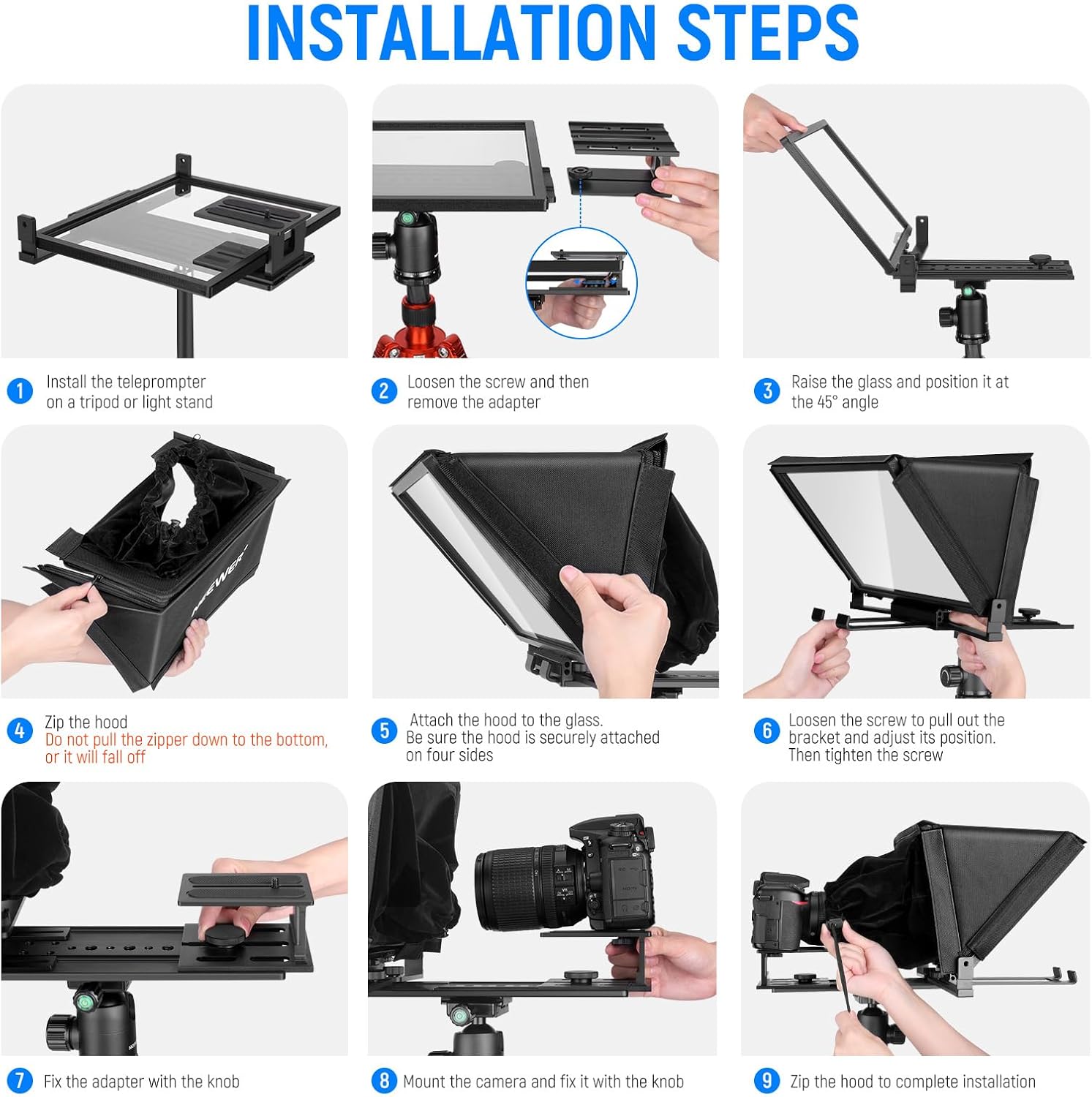
Image: Illustration of the remote control and its functions for easy operation.
6. NEEWER Teleprompter App Control
The NEEWER Teleprompter App provides advanced control over your script. It is compatible with iOS 11.0 or later and Android 6.0 or later.
- Gerenciamento de roteiros: Write and edit scripts directly within the app.
- Import Scripts: Upload pre-prepared scripts from your device or receive text filevia Wi-Fi.
- Personalização: Adjust playback speed, text size, background color, and document alignment for optimal readability.
- Modo Espelho: Essential for teleprompter use, this function reverses the text on your device screen so it appears correctly in the teleprompter's reflective glass.
Baixe o aplicativo:

Image: Visual representation of the NEEWER Teleprompter App's features and download options.
7. Compatibilidade
The NEEWER X12 Teleprompter offers broad compatibility with various devices:
- Tablets & Smartphones: Fits devices up to 9.84" x 8.68" (25cm x 22cm). Compatible with iPhone, iPad, iPad Air, iPad Pro 11", and various Android phones/tablets (e.g., Samsung, Huawei).
- Câmeras: Designed for use with DSLR cameras. Ensure your camera lens focal length is more than 28mm.
- Acessórios: Dual 1/4"-20 threads and cold shoe mounts support external accessories like microphones, video lights, and LED ring lights.
Nota importante: This teleprompter is NOT compatible with iPad Pro 12" or wide-angle camera lenses.

Image: Visual guide to device compatibility for the teleprompter.
8. Especificações
| Recurso | Detalhe |
|---|---|
| Número do modelo | X12 |
| Marca | MAIS NOVO |
| Material | Liga de alumínio |
| Beam Splitter Glass Light Transmittance | 75% |
| Distância de leitura | Up to 10’ / 3m |
| Max Tablet/Phone Size | 9.84" x 8.68" (25 cm x 22 cm) |
| Conectividade | Bluetooth (para controle remoto) |
| Suportes de acessórios | Dual 1/4"-20 threads, Dual Cold Shoe Mounts |
| Peso do item | 6.53 libras |
| Dimensões da embalagem | 15.63 x 13.86 x 3.98 polegadas |
9. Manutenção
Proper maintenance ensures the longevity and performance of your teleprompter:
- Limpando o vidro: Use the provided cleaning cloth or a soft, lint-free microfiber cloth with a specialized glass cleaning solution (if necessary) to gently wipe the beam splitter glass. Avoid abrasive materials or harsh chemicals.
- Limpeza geral: Wipe down the aluminum alloy frame and plastic components with a dry or slightly damp pano macio.
- Armazenar: When not in use, store the teleprompter in its carry case to protect it from dust, moisture, and physical damage.
- Manuseie com cuidado: Avoid dropping the teleprompter or subjecting it to strong impacts, especially the glass component.
10. Solução De Problemas
Caso encontre algum problema, consulte as seguintes soluções comuns:
- Text Appears Backwards: Ensure the mirror/flip function is activated within the NEEWER teleprompter app. This reverses the text on your device so it appears correctly in the teleprompter's reflective glass.
- O controle remoto não está conectando:
- Certifique-se de que o controle remoto tenha pilhas novas.
- Pair the RT-110 remote control directly within the NEEWER teleprompter app, not through your smartphone or tablet's general Bluetooth settings.
- Restart both the app and the remote control, then attempt pairing again.
- Texto ilegível/não claro:
- Adjust the brightness of your smartphone/tablet screen to maximum.
- Ensure the teleprompter's hood is properly installed to block ambient light.
- Verify that your camera lens focal length is greater than 28mm, as wide-angle lenses are not compatible.
- Clean the beam splitter glass using the provided cleaning cloth.
- Câmera não encaixa: Ensure your camera is properly mounted on the adjustable plate. Adjust the height and position as needed.
- Tablet/Phone Not Fitting: Verify that your device's dimensions are within the maximum supported size of 9.84" x 8.68" (25cm x 22cm). Note that iPad Pro 12" is not compatible.
For further assistance, please contact NEEWER customer support.
11. Garantia e suporte
NEEWER products are designed for reliability and performance. For information regarding warranty coverage, product registration, or technical support, please visit the official NEEWER webou entre em contato com o departamento de atendimento ao cliente. Guarde o comprovante de compra como prova para eventuais solicitações de garantia.
Você também pode considerar a compraasing extended protection plans for your product, if available, to cover potential issues beyond the standard warranty period.