
Dyurwa Smart Watch T60 User Manual
Modelo: T60
1. Introdução
Thank you for choosing the Dyurwa Smart Watch T60. This manual provides essential information for setting up, operating, and maintaining your new smartwatch. Please read it thoroughly to ensure proper use and to maximize your device's potential.
2. O que está na caixa
Upon opening your Dyurwa Smart Watch T60 package, you should find the following items:
- Dyurwa Smart Watch T60
- Cabo de carregamento
- Manual do usuário (este documento)

Image: Package contents showing the Dyurwa Smart Watch T60, an extra strap, a charging cable, and the user manual.
3. Configuração
3.1 Instalação do aplicativo
- Scan the QR code provided in the quick start guide or search for the "GloryFit" app in your smartphone's app store (Apple App Store for iOS, Google Play Store for Android).
- Download and install the "GloryFit" app.
- Open the app and follow the on-screen instructions to create an account and set up your personal profile.
3.2 Device Pairing (Bluetooth Connection)
To connect your Dyurwa Smart Watch T60 to your smartphone:
- Certifique-se de que o Bluetooth do seu smartphone esteja ativado.
- Open the "GloryFit" app.
- In the app, navigate to the device section and select "Add Device" or "Procurar Device."
- O aplicativo buscará dispositivos disponíveis. Selecione "T60" na lista para iniciar o emparelhamento.
- Confirme o pedido de emparelhamento tanto no seu smartphone quanto no smartwatch, caso seja solicitado.
For iOS 13.0 and above, and Android 5.0 and above, a single connection through the GloryFit app is usually sufficient for all functions. For older iOS versions (13.0 and below), an additional Bluetooth connection for audio functions (answer/make calls) may be required:
- After successful binding in the GloryFit app, go to your phone's Bluetooth settings.
- Find "T60" in the list of available devices and tap to connect.
- Once connected, you can use the watch to answer and make calls.

Image: Visual guide for connecting the smartwatch to your phone, showing app download, Bluetooth activation, device search, and binding confirmation.
4. Instruções de operação
4.1 Display and Dials
The Dyurwa Smart Watch T60 features a 1.91-inch HD full touch screen. You can customize your watch face:
- Alterar mostradores do relógio: Access over 200 designs through the "GloryFit" app.
- Mostradores personalizados: Upload your favorite picture via the app to set it as your watch face.
- Ajuste de brilho: Manually adjust the screen brightness through the watch settings (4 levels available) for optimal visibility in various lighting conditions.

Imagem: O smartwatch mostraasing its large 1.91-inch HD display and several customizable watch face options, including data like steps, heart rate, and weather.

Image: A user customizing their watch face with a personal photo through the companion app, demonstrating the DIY dial feature.
4.2 Calling and Messaging
With Bluetooth 5.3, the watch offers stable connectivity for communication features:
- Chamadas Bluetooth: Make and receive calls directly from your watch using the built-in microphone and Hi-Fi speaker.
- Notificações de mensagem: Receive alerts for text messages and notifications from social media applications (e.g., Facebook, WhatsApp, Twitter) directly on your watch.

Image: The smartwatch displaying its Bluetooth call features, including a dial pad, contact list, incoming call screen, and call history.

Image: The smartwatch displaying notifications from various social media platforms and other apps, indicating its smart notification capabilities.
4.3 Monitoramento de Saúde
The Dyurwa Smart Watch T60 provides comprehensive health tracking features:
- Monitor de frequência cardíaca: Continuously monitors your heart rate 24/7. Data is for reference only and not for medical diagnosis.
- Rastreador de sono: Automatically measures your sleep patterns, including awake, light, and deep sleep stages, to help you understand and improve your sleep habits.
- Monitoramento de oxigênio no sangue: Mede seus níveis de oxigênio no sangue.
- Acompanhamento da saúde feminina: Manage and track menstrual cycles and predict fertile periods through the app.
- Exercícios de respiração: Guided breathing sessions to help with relaxation.

Image: A split image showing the smartwatch's sleep monitoring function with sleep duration, and heart rate and blood oxygen monitoring displays.

Image: A woman exercising while wearing the smartwatch, with a close-up of the watch displaying heart rate data and a corresponding app screen.

Image: Demonstrates breathing exercises and blood oxygen monitoring features of the smartwatch, showing users engaging with these functions.
4.4 Modos Esportivos
The watch supports over 110 built-in sports modes. During exercise, it records data such as steps, calories burned, distance, and heart rate.

Image: A cyclist wearing the smartwatch, with an overlay showing various sports icons and the watch displaying real-time exercise data like calories, steps, distance, and heart rate.

Image: A collage of people participating in various sports like running, cycling, yoga, and tennis, illustrating the wide range of supported sport modes.
4.5 Outras funções
The Dyurwa Smart Watch T60 includes several practical features:
- Assistente de voz: Acesse o assistente de voz do seu telefone diretamente do relógio.
- Controle de música: Controle a reprodução de música no seu smartphone.
- Controle da câmera: Acione remotamente o obturador da câmera do seu smartphone.
- Previsão do tempo: View Condições meteorológicas atuais e previsões.
- Despertador e temporizador: Configure alarmes e utilize a função de temporizador.
- Cronômetro: Para cronometrar atividades.
- Encontre seu telefone: Localize seu smartphone perdido fazendo-o tocar.
- Calculadora: Funções básicas de cálculo.
- Lanterna: Uses the screen as a light source.

Image: A comprehensive display of the smartwatch's various utility features, including calendar, stopwatch, camera remote, weather, alarm, timer, flashlight, calculator, breathing exercises, phone finder, voice assistant, and music control.
5. Bateria e carregamento
The Dyurwa Smart Watch T60 is equipped with a large capacity battery, offering extended usage times:
- Tempo de carregamento: Aproximadamente 2 horas para uma carga completa.
- Uso regular: Até 7-10 dias.
- Tempo de espera: Até 30 dias.
Use the provided magnetic charging cable to charge your device. Connect the magnetic end to the charging points on the back of the watch and the USB end to a standard USB power adapter (not included).
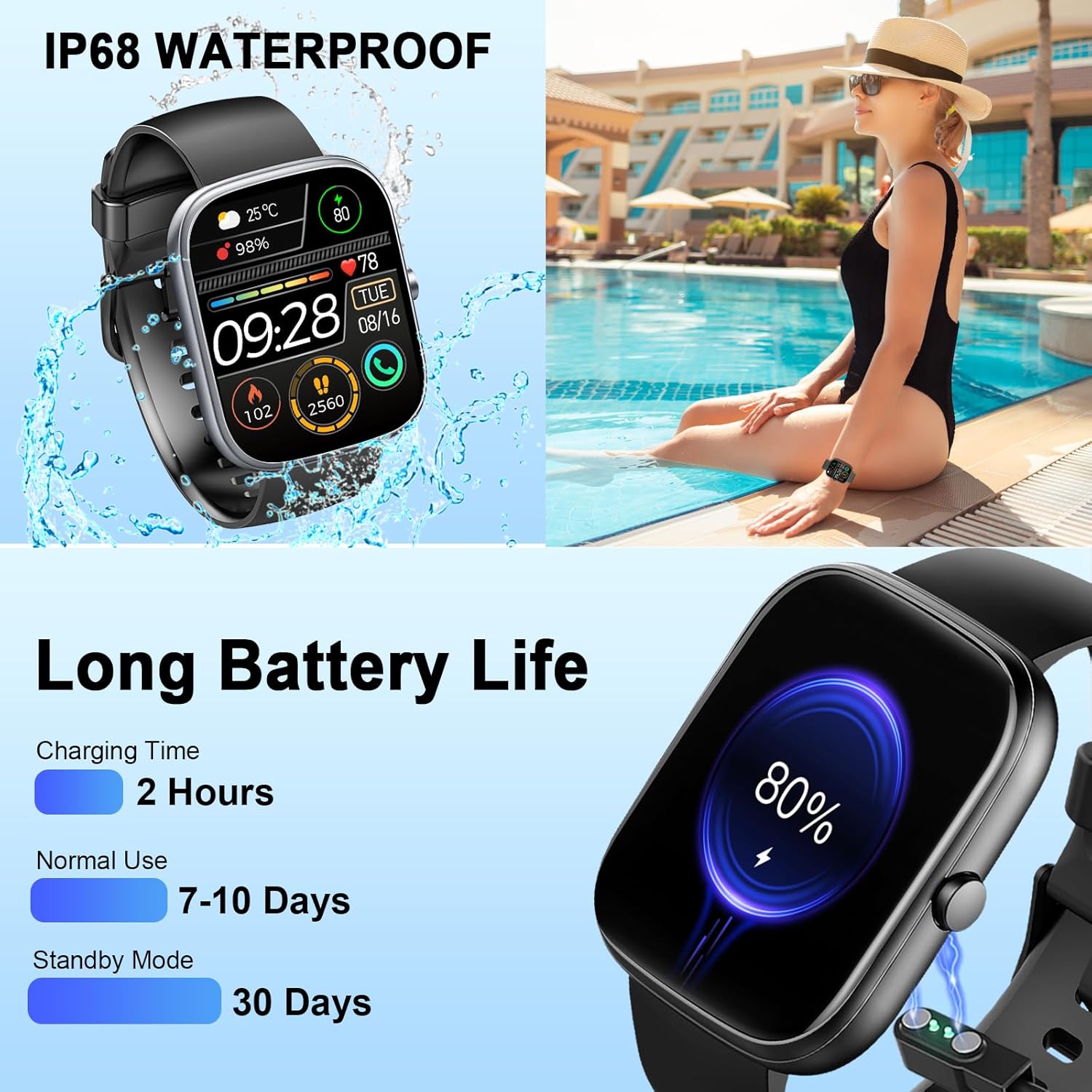
Image: The smartwatch connected to its magnetic charging cable, illustrating the charging process and highlighting its long battery life specifications.

Image: The smartwatch on its magnetic charger, with text indicating a daily use time of 7 days and a standby time of 30 days.
6. Informações sobre impermeabilidade
The Dyurwa Smart Watch T60 is IP68 waterproof. This means it is resistant to dust and can withstand immersion in water up to 1.5 meters for up to 30 minutes. It is suitable for daily use, such as hand washing, bathing, and swimming.
Observação:
- Not suitable for hot water, saunas, or diving.
- Avoid exposure to high humidity or corrosive liquids.
- A resistência à água pode diminuir com o tempo devido ao desgaste normal.

Image: The smartwatch being splashed with water, accompanied by icons indicating its IP68 waterproof rating for activities like bathing and swimming.
7. Manutenção
- Limpeza: Limpe o relógio e a pulseira regularmente com um pano macio e seco. Se necessário, use um pano levemente umedecido.amp pano e seque bem.
- Evite produtos químicos: Não utilize produtos químicos agressivos, solventes de limpeza ou detergentes fortes, pois estes podem danificar o acabamento e as vedações do relógio.
- Contatos de carregamento: Mantenha os contatos de carregamento na parte traseira do relógio limpos e livres de detritos para garantir um carregamento adequado.
- Armazenar: Guarde o relógio em local fresco e seco quando não estiver em uso.
8. Solução De Problemas
| Problema | Solução possível |
|---|---|
| O relógio não liga | Certifique-se de que o relógio esteja totalmente carregado. Conecte-o ao carregador por pelo menos 10 minutos. |
| Não é possível emparelhar com o smartphone. | 1. Certifique-se de que o Bluetooth esteja ativado no seu telefone. 2. Certifique-se de que o relógio esteja dentro do alcance do seu telefone. 3. Reinicie o relógio e o telefone. 4. Try unpairing and re-pairing the device through the GloryFit app and phone's Bluetooth settings. |
| Dados imprecisos de frequência cardíaca/sono | Ensure the watch is worn snugly on your wrist, not too tight or too loose. Clean the sensor on the back of the watch. Note that data is for reference and not medical use. |
| Notificações não recebidas | 1. Check app permissions for GloryFit on your phone (notifications, background activity). 2. Ensure Bluetooth connection is stable. 3. Verify notification settings within the GloryFit app. |
| Bateria de curta duração | Reduce screen brightness, limit continuous heart rate monitoring, and disable unnecessary notifications. Ensure proper charging. |
9. Especificações
| Recurso | Especificação |
|---|---|
| Modelo | T60 |
| Tamanho da tela | 1.91 inches (4.85 cm) HD Full Touch Screen |
| Conectividade | Bluetooth 5.3 |
| Sistema operacional | Android Wear 1.0 (compatível com iOS 9.0+ e Android 4.0+) |
| Classificação à prova d'água | IP68 |
| Tipo de Bateria | Lithium Ion (1 A battery included) |
| Tempo de carregamento | Aproximadamente 2 horas |
| Tempo de utilização típico | 7-10 dias |
| Tempo de espera | Até 30 dias |
| Peso do item | 3.2 onças |
| GPS | Sem GPS |
10. Garantia e Suporte
For warranty information and customer support, please refer to the documentation included with your purchase or contact Dyurwa customer service directly. Details for contacting support are typically available on the product packaging or the official Dyurwa website.