
OMOTON B0FCMD15TF
OMOTON Foldable Bluetooth Keyboard with Touchpad (QWERTZ Layout)
Model: B0FCMD15TF
Marca: OMOTON
1. Introdução
Thank you for choosing the OMOTON Foldable Bluetooth Keyboard with Touchpad. This portable QWERTZ keyboard is designed for convenience and efficiency, offering multi-device connectivity and an integrated touchpad. This manual provides detailed instructions for setup, operation, and maintenance to ensure optimal performance.
2. Conteúdo da embalagem
Por favor, verifique se a embalagem contém os seguintes itens:
- OMOTON Foldable Bluetooth Keyboard
- Carrinho de Celular
- Cabo de carregamento tipo C
- Estojo de transporte
- Manual do usuário
3. Produto acabadoview
The OMOTON Foldable Bluetooth Keyboard features a compact QWERTZ layout with 78 full-size keys and a multi-touch touchpad. It supports connection to up to three devices simultaneously across iOS, Android, and Windows operating systems. Its magnetic folding design makes it highly portable.
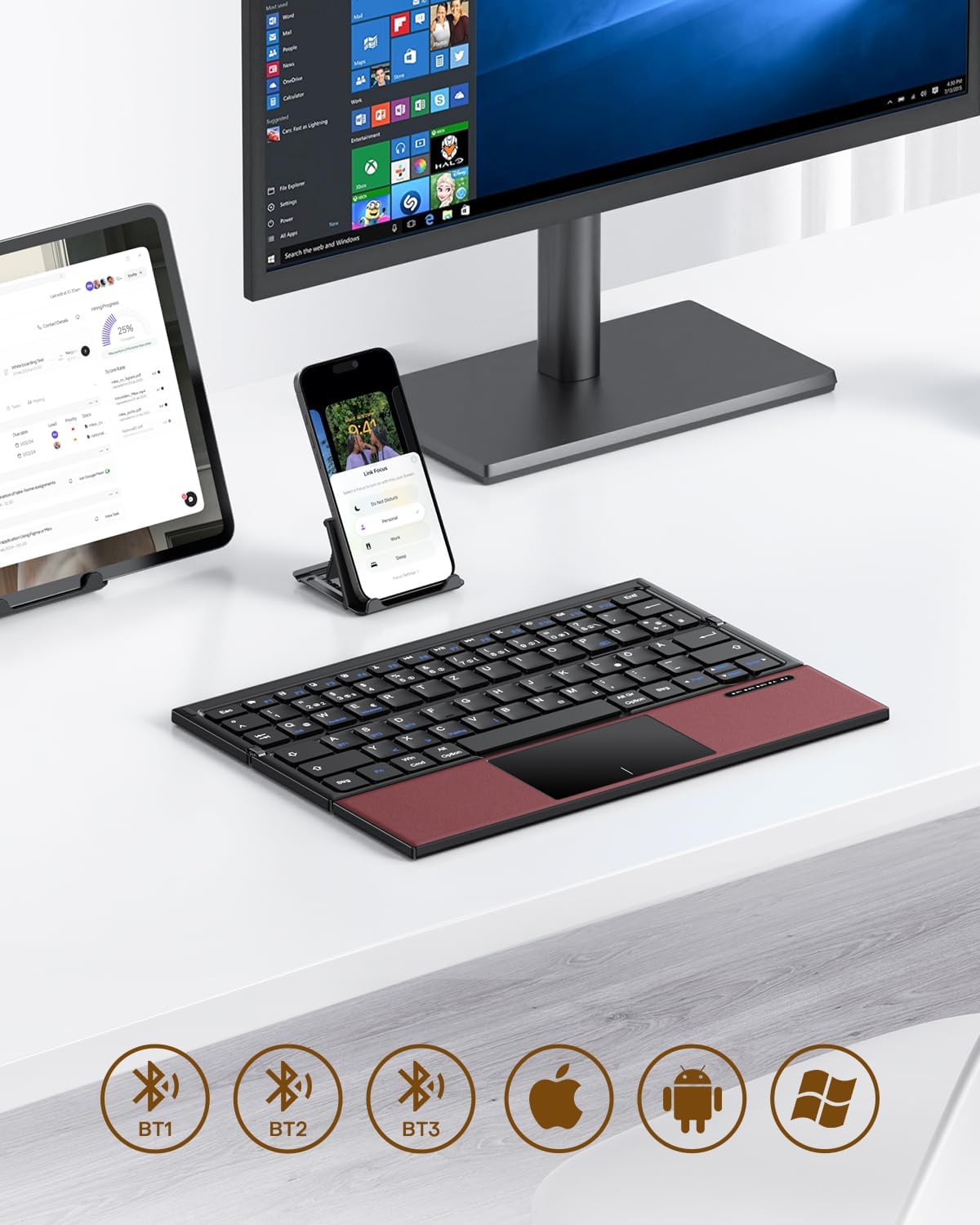
Image 3.1: The OMOTON Foldable Bluetooth Keyboard in use with a tablet, smartphone, and monitor, demonstrating multi-device connectivity via BT1, BT2, and BT3 channels.
Principais características:
- Design triplo: Compact and portable for travel.
- Touchpad integrado: Multi-touch functionality for navigation without an external mouse.
- Conectividade multidispositivo: Connects to up to three Bluetooth-enabled devices (BT1, BT2, BT3).
- Layout QWERTZ: Standard German keyboard layout with 78 full-size keys.
- Bateria recarregável: Built-in 180mAh battery with Type-C charging.

Image 3.2: Close-up details of the keyboard, highlighting its magnetic closure, indicator lights, silent scissor keys, elegant PU leather finish, and durable metal hinge.
Portabilidade:
The keyboard's compact, tri-fold design makes it ideal for travel and on-the-go use. It easily fits into bags and pockets, making it a convenient companion for various environments.

Image 3.3: The keyboard in use in a cafe, on an airplane, and in a meeting room, demonstrating its versatility for different work and travel scenarios.

Image 3.4: The folded keyboard being placed into a carrying case inside a bag and slipped into a jacket pocket, illustrating its compact size and ease of transport.
4. Configuração
4.1 Carregando o teclado
Before first use, fully charge the keyboard. Use the included Type-C charging cable to connect the keyboard to a power source (e.g., computer USB port, USB wall adapter).
- The power indicator light will show charging status.
- Uma carga completa normalmente leva de 2 a 3 horas.
- The keyboard offers up to 60 hours of operating time and 90 days of standby time on a full charge.

Image 4.1: The keyboard connected via its Type-C port for charging, with icons indicating charging time, working time, and standby time.
4.2 Emparelhamento com um dispositivo
The keyboard supports up to three Bluetooth connections (BT1, BT2, BT3). Follow these steps to pair your keyboard with a device:
- Ligar: Unfold the keyboard to automatically power it on. The indicator light will flash.
- Selecione o canal: Pressione o Fn + BT1, Fn + BT2, ou Fn + BT3 keys simultaneously to select a Bluetooth channel. The corresponding indicator light will flash slowly.
- Entrar no modo de emparelhamento: Imprensa Fn+C (or the Bluetooth icon key) to enter pairing mode. The selected channel indicator light will flash rapidly.
- Ative o Bluetooth no dispositivo: No seu dispositivo (smartphone, tablet, laptop), acesse as configurações de Bluetooth e ative o Bluetooth.
- Selecione o teclado: Procurar "OMOTON Keyboard" (or similar) in the list of available devices and select it to connect.
- Confirmar conexão: Once connected, the indicator light on the keyboard will stop flashing and remain solid for a few seconds before turning off.
Note: The Type-C cable is for charging only and does not support wired connectivity.
4.3 Alternando entre dispositivos
Para alternar entre dispositivos emparelhados, basta pressionar Fn + BT1, Fn + BT2, ou Fn + BT3 to select the desired channel. The keyboard will automatically connect to the last paired device on that channel.
5. Instruções de operação
5.1 Keyboard Layout and Special Keys
The keyboard features a QWERTZ layout with 78 standard keys and 12 multimedia shortcuts. Familiarize yourself with the layout for efficient typing.

Image 5.1: The keyboard displaying its full-size keys and integrated multi-touch touchpad, designed for a laptop-like typing experience.
5.2 Utilizando o touchpad
The multi-touch touchpad supports various gestures for navigation. This eliminates the need for an external mouse.
- Toque com um dedo: Clique esquerdo.
- Toque com dois dedos: Clique com o botão direito do mouse (menu de contexto).
- Rolagem com dois dedos: Deslize para cima/baixo ou para a esquerda/direita.
- Aperte para ampliar: Zoom in/out (supported on some devices/apps).
- Gestos de deslizar: Specific gestures may vary by operating system (Windows, Android, iOS).
Note for iPad users: You may need to enable "AssistiveTouch" in your iPad settings for full touchpad functionality. Some gestures may vary between applications. Scrolling direction can be adjusted in your device settings.
5.3 Modo de economia de energia
To conserve battery, the keyboard will automatically enter sleep mode after 30 minutes of inactivity. To wake it up, press any key.
5.4 Uso ergonômico
For comfortable and ergonomic typing, ensure your screen is positioned correctly to maintain a healthy posture.

Image 5.2: A visual guide showing the recommended ergonomic posture for using the keyboard with a screen, emphasizing proper neck and back alignment.
6. Manutenção
- Limpeza: Use um pano macio e seco para limpar a superfície do teclado. Para sujeira mais persistente, umedeça levemente o teclado.ampLimpe o pano com água ou uma solução de limpeza suave. Evite o excesso de umidade.
- Armazenar: When not in use, fold the keyboard and store it in the provided carrying case to protect it from dust and scratches.
- Cuidados com a bateria: Avoid fully discharging the battery frequently. Charge the keyboard regularly, especially if it will be stored for an extended period.
- Evite condições extremas: Não exponha o teclado a temperaturas extremas, luz solar direta ou alta umidade.
7. Solução De Problemas
7.1 Teclado não conecta
- Ensure the keyboard is powered on (unfolded).
- Certifique-se de que o Bluetooth esteja ativado no seu dispositivo.
- Check if the keyboard is in pairing mode (indicator light flashing rapidly after pressing Fn+C).
- Ensure you have selected the correct Bluetooth channel (BT1, BT2, or BT3).
- Tente desemparelhar e emparelhar novamente o teclado nas configurações de Bluetooth do seu dispositivo.
- Certifique-se de que a bateria do teclado esteja carregada.
7.2 Touchpad não responde
- Certifique-se de que o teclado esteja conectado corretamente via Bluetooth.
- For iPad users, verify that "AssistiveTouch" is enabled in your iPad settings.
- Reinicie o teclado e o seu dispositivo.
- Limpe a superfície do touchpad para remover qualquer sujeira ou resíduo.
7.3 Incorrect Key Output (QWERTZ vs. QWERTY)
- This keyboard has a QWERTZ layout. Ensure your device's software keyboard setting is also set to QWERTZ (German layout) for correct character output.
- If your device is set to QWERTY, some keys (e.g., Y/Z, special characters) will not match the physical keyboard. Adjust your device's input language/keyboard layout settings.
7.4 Duração curta da bateria
- Certifique-se de que o teclado esteja totalmente carregado antes de usá-lo.
- The keyboard automatically enters sleep mode after 30 minutes of inactivity to save power.
- Avoid leaving the keyboard unfolded and powered on when not in use for extended periods.
8. Especificações
| Marca | ÔMOTO |
| Modelo | B0FCMD15TF |
| Tecnologia de Conectividade | Bluetooth |
| Dispositivos compatíveis | iPadOS, iOS, Android, Windows (Laptops, PCs, Tablets, Smartphones) |
| Layout do teclado | QWERTZ (Layout Alemão) |
| Número de Chaves | 78 |
| Características especiais | Foldable, Portable, Rechargeable, Integrated Multi-touch Touchpad |
| Material | Plástico, Poliuretano (PU) |
| Capacidade da bateria | 180 mAh íon de lítio |
| Porta de carregamento | Tipo C |
| Tempo de carregamento | Aproximadamente 2-3 horas |
| Tempo de operação | Até 60 horas |
| Tempo de espera | Até 90 dias |
| Dimensões dobradas | 25.3 x 6 x 2.1 cm |

Image 8.1: Visual representation of the keyboard's dimensions when unfolded and folded, alongside a tablet and smartphone for scale.
9. Garantia e suporte
OMOTON products come with a standard warranty. For detailed warranty information, please refer to the warranty card included in your package or visit the official OMOTON website.
If you encounter any issues or have questions regarding your OMOTON Foldable Bluetooth Keyboard, please contact OMOTON Customer Support:
- Website: OMOTON Official Store on Amazon
Please have your model number (B0FCMD15TF) and purchase details ready when contacting support.
Ask a question about this manual
Ask about setup, troubleshooting, compatibility, parts, safety, or missing instructions. Manuals+ will review the question and use this page’s manual context to help answer it.