
Introdução
This manual provides essential information for the safe and effective operation of your WORKPRO Portable Tire Inflator Model W125218A. Please read this manual thoroughly before use and retain it for future reference.
The WORKPRO Portable Tire Inflator is a versatile device designed for inflating tires on cars, motorcycles, bicycles, and various sports balls. It features a digital display, automatic shut-off, multiple inflation modes, and an integrated LED light for convenience and safety.
Instruções de segurança
- Leia todas as instruções: Before operating the inflator, read and understand all safety warnings and instructions in this manual.
- Proteção para os olhos: Always wear safety glasses when operating the inflator to protect against potential debris.
- Proteção auditiva: The inflator can be loud during operation. Use hearing protection, especially during prolonged use.
- Mantenha longe das crianças: Este dispositivo não é um brinquedo. Mantenha-o fora do alcance de crianças.
- Uso adequado: Use the inflator only for its intended purpose. Do not attempt to inflate objects beyond their recommended pressure limits.
- Superaquecimento: The inflator may become hot during extended use. Allow it to cool down between inflation cycles to prevent damage and burns. The air hose and chuck can become very hot.
- Segurança da bateria: Do not expose the inflator to extreme temperatures or direct sunlight. Do not disassemble or modify the battery pack.
- Carregamento: Use only the provided charging cable and a compatible power adapter. Do not charge in damp condições.
- Armazenar: Store the inflator in a dry, cool place away from flammable materials.
- Check Tire Pressure Manually: While the inflator has a digital display, it is recommended to verify tire pressure with a separate, calibrated gauge for critical applications.
Conteúdo da embalagem
Verifique se todos os itens estão presentes na embalagem:
- WORKPRO Portable Tire Inflator
- Air Hose with Schrader Valve Connector
- Adaptador de válvula Presta
- Adaptador de agulha de bola
- Nozzle Adapter for Inflatables
- Cabo de carregamento USB (tipo C)
- Bolsa de armazenamento
- Manual do usuário
Produto acimaview
Familiarize yourself with the components of your WORKPRO Portable Tire Inflator.

Imagem: Frente view of the WORKPRO Portable Tire Inflator, showing the digital display, control buttons, and air hose connection point.

Imagem: Diagram illustrating the 7500 mAh large battery capacity of the WORKPRO Portable Tire Inflator, capable of inflating multiple car tires on a single charge.
- Tela digital: Shows real-time pressure, preset pressure, battery level, and mode.
- Botões de controle: Power, Mode selection, Increase/Decrease pressure.
- Conexão da mangueira de ar: Point where the inflation hose attaches.
- Luz LED: Para iluminação em condições de pouca luz.
- Porta de carregamento USB-C: Para recarregar a bateria interna.
- Porta de saída USB-A: Funciona como um carregador portátil para dispositivos externos.
Configurar
1. Charging the Inflator
Before first use, fully charge the inflator. The device is powered by three 2500mAh rechargeable batteries.
- Connect the provided USB-C charging cable to the inflator's charging port.
- Connect the other end of the cable to a suitable USB power adapter (not included) or a USB port.
- The digital display will indicate the charging status. A full charge typically takes 3 to 5 hours.
- Depois de totalmente carregado, desconecte o cabo de carregamento.
2. Conectando a mangueira de ar
Screw the air hose firmly onto the inflator's air outlet port. Ensure it is tight to prevent air leakage during operation.
Instruções de operação
1. Ligar / desligar
- Ligar: Pressione e segure o botão Liga/Desliga (□) for 3 seconds. The digital display will illuminate.
- Desligar: Pressione e segure o botão Liga/Desliga (□) for 3 seconds. The display will turn off. The device will also automatically power off after a period of inactivity.
2. Selecting Inflation Mode and Pressure Unit

Imagem: Digital display of the inflator showing different preset inflation modes for car, motorcycle, bicycle, and balls, along with a manual mode.
- Seleção de modo: Pressione rapidamente o botão Mode (M) to cycle through the 5 available inflation modes: Car, Motorcycle, Bicycle, Ball, and Manual. Each mode has a preset default pressure value.
- Unidade de pressão: While in any mode, long press the Mode button (M) to switch between pressure units: PSI, BAR, and KPA.
3. Setting Target Pressure
- After selecting a mode, the preset pressure will be displayed.
- Use the Increase (+) and Decrease (-) buttons to adjust the target pressure to your desired value. The maximum adjustable pressure is 150 PSI.
- The display will flash while adjusting and then stabilize, indicating the set target pressure.
4. Connecting to the Item to be Inflated
- For car/motorcycle/bicycle tires: Screw the Schrader valve connector of the air hose onto the tire valve stem. Ensure a secure, airtight connection.
- For Presta valves (bicycles): Attach the Presta valve adapter to the tire valve, then connect the Schrader valve connector to the adapter.
- For balls/inflatables: Select the appropriate adapter (ball needle or nozzle adapter) and attach it to the Schrader valve connector, then insert into the item.
- Once connected, the digital display will show the current real-time pressure of the item.
5. Como iniciar e interromper a inflação

Imagem: The WORKPRO Portable Tire Inflator connected to a car tire, demonstrating fast inflation capabilities, showing inflation times for different pressure ranges.
- Inflação inicial: Pressione o botão Iniciar/Parar (▶) to begin inflation. The display will show the increasing real-time pressure.
- Desligamento automático: The inflator will automatically stop when the preset target pressure is reached.
- Parada manual: You can manually stop inflation at any time by pressing the Start/Stop button (▶) de novo.
- Indicadores de pressão: After connecting, the inflator uses three-color indicators:
- Vermelho: Pressure exceeds 110% of the preset value.
- Verde: Pressure is between 90% and 110% of the preset value.
- Amarelo: Pressure is below 90% of the preset value.

Imagem: Close-up of the inflator's digital display highlighting the three-color LED indicators for real-time pressure status (Red, Yellow, Green) and the automatic inflation stop feature.
6. Utilizando a luz LED
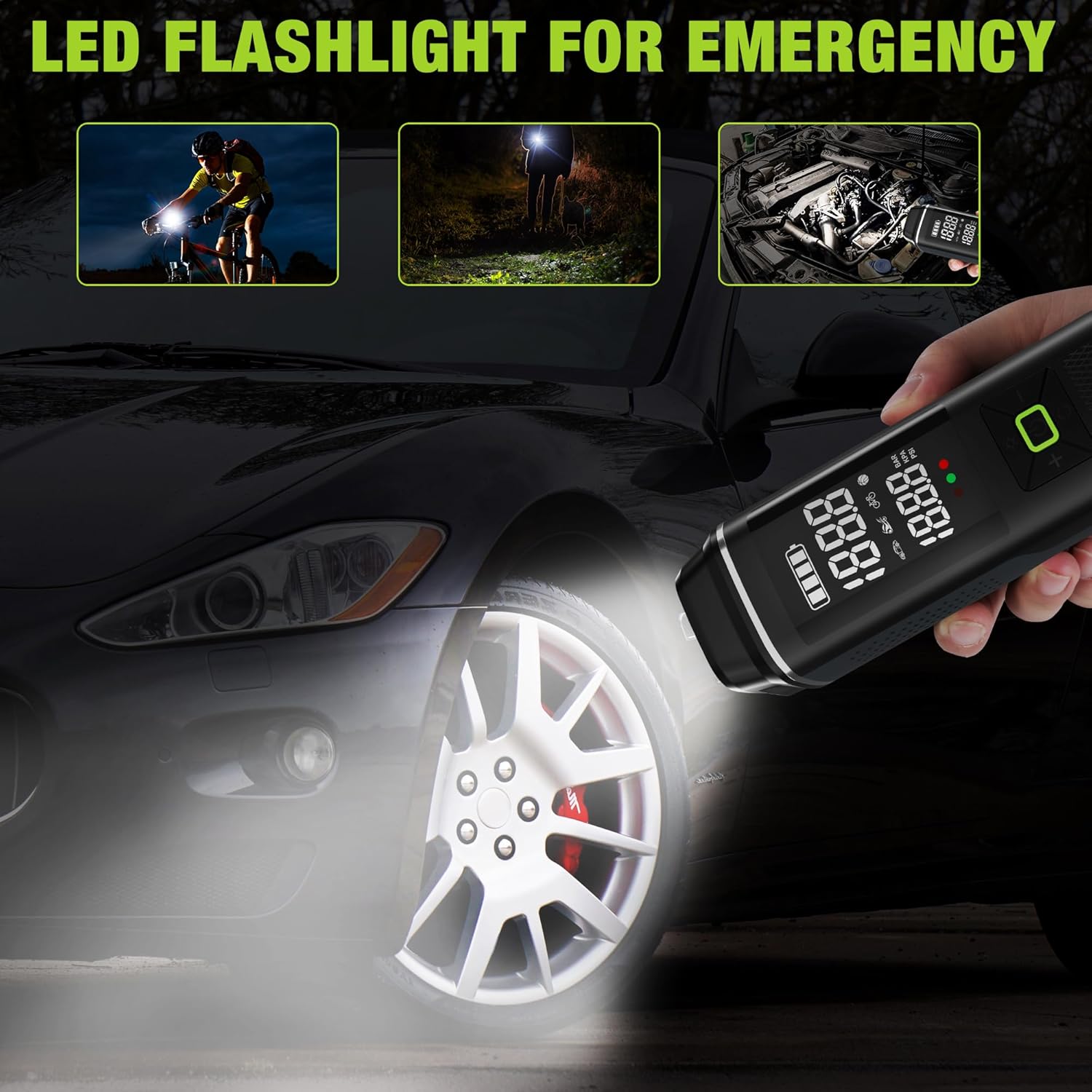
Imagem: The WORKPRO Portable Tire Inflator being used as an LED flashlight in various scenarios, including illuminating a bicycle path, a dark area, and a car engine bay.
- Pressione rapidamente o botão de luz (☀) to turn on the LED light.
- Press again to cycle through different light modes (e.g., steady light, flashing, SOS).
- Pressione uma terceira vez para desligar a luz LED.
7. Usando como um banco de energia portátil

Imagem: The WORKPRO Portable Tire Inflator connected via USB to a smartphone, demonstrating its function as a portable power bank for charging electronic devices.
- The inflator can serve as a backup power bank for your electronic devices.
- Connect your device's USB charging cable to the USB-A output port on the inflator.
- O carregamento começará automaticamente.
Manutenção
- Limpeza: Limpe o exterior do inflador com um pano macio e seco.amp pano. Não use produtos químicos agressivos ou produtos de limpeza abrasivos.
- Armazenar: Store the inflator and its accessories in the provided storage bag in a cool, dry place when not in use.
- Cuidados com a bateria: To prolong battery life, charge the inflator at least once every three months, even if not in regular use. Avoid fully discharging the battery frequently.
- Inspecione a mangueira e os adaptadores: Regularly check the air hose and adapters for any signs of wear, cracks, or damage. Replace if necessary.
Solução de problemas
| Problema | Possível causa | Solução |
|---|---|---|
| O inflador não liga. | A bateria está esgotada. | Carregue o inflador completamente. |
| Inflator does not start inflating. | Target pressure not set; Air hose not securely connected; Battery too low. | Set target pressure; Ensure air hose is tightly screwed on; Charge the inflator. |
| Vazamentos de ar durante o enchimento. | Air hose not securely connected; Damaged air hose/adapter. | Tighten air hose connection; Inspect and replace damaged components. |
| O inflador para prematuramente. | Target pressure reached (auto shut-off); Overheating; Battery low. | Check target pressure; Allow unit to cool down; Charge the inflator. |
| Leitura de pressão imprecisa. | Conexão solta; Problema no sensor. | Ensure secure connection; Compare with a known accurate gauge. If persistent, contact support. |
Especificações
| Nome do modelo | Inflador de pneus |
| Número do modelo | W125218A |
| Marca | TRABALHO PROFISSIONAL |
| Volumetage | 12 Volts |
| Fonte de energia | Alimentação elétrica com fio (para carregar), alimentação por bateria (para funcionamento) |
| Recurso especial | Portable, Digital Display, Auto Shut-Off, LED Light, Power Bank Function |
| Material | Plástico, Alumínio |
| Pressão Máxima | 150 PSI |
| Capacidade da bateria | 3 x 2500mAh (7500mAh no total) |
| Tempo de carregamento | 3-5 horas |
| Peso do item | 930 g |
| Dimensões da embalagem | 28.3 x 13.11 x 8 cm |

Imagem: The WORKPRO Portable Tire Inflator displayed with its various adapters, illustrating its wide range of applications for inflating car, motorcycle, bicycle tires, balls, and swimming rings.
Garantia e Suporte
WORKPRO products are manufactured to high-quality standards. For warranty information, technical support, or service inquiries, please refer to the warranty card included with your product or visit the official WORKPRO website.
Guarde o comprovante de compra para reclamações de garantia.