
1. Introdução
This manual provides essential information for setting up, operating, maintaining, and troubleshooting your realme Note 70T smartphone. Please read this guide thoroughly to ensure optimal performance and longevity of your device.
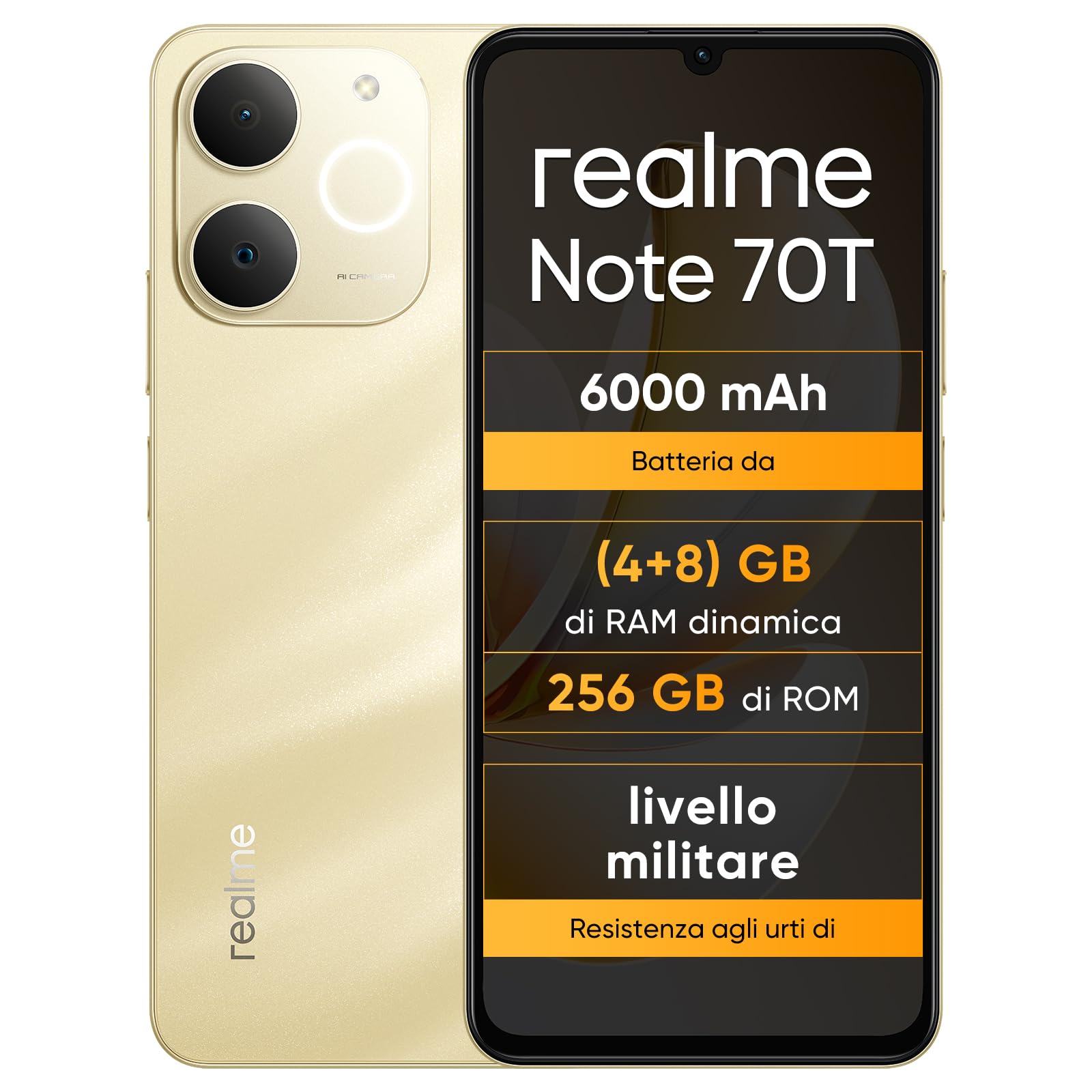
Imagem: Frente e verso view of the realme Note 70T smartphone.
2. Guia de configuração
2.1 Conteúdo da embalagem
Verifique se seu pacote contém os seguintes itens:
- realme Note 70T Smartphone
- Cabo USB
- Capa de telefone
- Película protetora
2.2 Inserindo o cartão SIM e ligando o aparelho
- Locate the SIM card tray on the side of the device. Use the provided SIM ejector tool to open the tray.
- Carefully place your Nano-SIM card(s) and/or microSD card into the tray, ensuring correct orientation. The realme Note 70T supports Dual SIM.
- Empurre cuidadosamente a bandeja de volta para o compartimento até que fique nivelada com o corpo do telefone.
- Press and hold the Power button (located on the right side) until the realme logo appears on the screen.

Imagem: Lado view of the realme Note 70T, illustrating the location of the SIM card tray.
2.3 Carregamento Inicial
Before first use, it is recommended to fully charge your device. Connect the USB cable to the phone's USB-C port and the other end to a compatible power adapter (not included) or a computer's USB port.

Imagem: Parte inferior view of the realme Note 70T, highlighting the USB-C charging port.
3. Instruções de operação
3.1 Funções Básicas
- Ligar/desligar: Pressione e mantenha pressionado o botão Liga/Desliga. Selecione 'Desligar' ou 'Reiniciar'.
- Controle de volume: Utilize os botões de aumentar e diminuir o volume na lateral do dispositivo.
- Bloqueio/desbloqueio de tela: Pressione rapidamente o botão Liga/Desliga para bloquear ou desbloquear a tela.
- Reconhecimento facial: Configure facial recognition in Settings for quick and secure unlocking.

Imagem: Lado view of the realme Note 70T, showing the power and volume buttons.
3.2 Recursos de exibição
The realme Note 70T features a 6.75-inch Eye Comfort Display with a 90Hz refresh rate. This provides smooth visuals and reduces eye strain. The display offers vivid clarity and comfortable viewindo.

Image: The realme Note 70T display showcasing its 90Hz refresh rate and eye comfort features with a vibrant beach scene.
3.3 Funções da câmera
Capture every moment with the 13MP rear camera and 5MP front camera. The device includes advanced AI features to enhance your photography:
- AI Clear Face: Improves blurry portraits for sharper results.
- Apagador de IA: Removes unwanted elements from photos.
- AI Image Matting: Allows you to easily remove subjects from backgrounds.

Image: Demonstration of the AI Clear Face feature, showing a blurry portrait before and after AI enhancement.

Image: Demonstration of the AI Eraser feature, showing an object removed from a photo.

Image: Demonstration of the AI Image Matting feature, showing a person isolated from the background.
3.4 Gerenciamento de bateria
The 6000mAh battery provides up to two days of usage on a single charge. It supports extended standby and includes 38 levels of charging protection for long-term battery health.

Image: Illustration of the realme Note 70T's 6000mAh battery capacity and estimated usage times for various activities.
3.5 Performance and Audio
Powered by an octa-core chipset with speeds up to 1.8 GHz, the realme Note 70T ensures smooth performance for gaming and applications. It supports fast app launch times and keeps up to 16 apps active in the background.
Experience enhanced audio with 300% ultra volume and AI Call 2.0, which provides intelligent noise reduction for clear calls.

Image: Visual representation of the realme Note 70T's octa-core processor.

Image: Illustration of the AI Call 2.0 feature, demonstrating noise reduction during calls.
4. Manutenção
4.1 Resistência à água e poeira (IP54)
The realme Note 70T is rated IP54 for water and dust resistance, protecting against splashes and dust ingress. The speaker vibrates at a specific frequency to expel accumulated water. This feature ensures the device remains functional in various daily situations.

Image: The realme Note 70T being splashed with water, demonstrating its IP54 water resistance.
4.2 ArmorShell Protection
The device features ArmorShell protection, having passed the MIL-STD 810H military-grade shock resistance test. This includes multi-angle drop tests and high-intensity impact tests, ensuring durability against accidental drops from up to 1.8 meters.

Image: The realme Note 70T being dropped onto a rocky surface, illustrating its military-grade resistance.
4.3 Cuidados Gerais
- Keep the device clean using a soft, dry cloth. Avoid abrasive materials.
- Evite expor o telefone a temperaturas extremas ou à luz solar direta por períodos prolongados.
- Do not attempt to disassemble or repair the device yourself, as this may void the warranty and cause damage.
5. Solução De Problemas
5.1 Problemas e soluções comuns
- Dispositivo não liga: Verifique se a bateria está carregada. Conecte-a a um carregador e tente novamente.
- Tela não responde: Restart the device by holding the Power button for an extended period (usually 10-15 seconds).
- Aplicativos travando ou apresentando lentidão: Close background applications. Utilize the AI Optimization feature to improve app smoothness.

Image: Screenshot of the AI Optimization feature on the realme Note 70T, showing options to improve app smoothness.
5.2 Redefinição de fábrica
Se os problemas persistirem, você pode considerar restaurar as configurações de fábrica. Aviso: This will erase all data on your device. Back up important information before proceeding. Navigate to Configurações > Sistema > Opções de redefinição > Apagar todos os dados (redefinição de fábrica).
6. Especificações
| Recurso | Especificação |
|---|---|
| Marca | eu de verdade |
| Nome do modelo | realme Note 70T |
| Sistema operacional | Androide 15 |
| Tamanho da RAM | 4 GB |
| Capacidade de armazenamento | 256 GB |
| Tamanho da tela | 6.75 polegadas |
| Resolução | 720 x 1600 |
| Taxa de atualização | 90 Hz |
| Tecnologia Celular | 4G |
| Tecnologia de Conectividade | Bluetooth |
| Cor | Ouro arenoso |
| Number of SIM Card Slots | Dual SIM |
| Tipo de porta de carregamento | USB-C |
| Biometric Identification Features | Reconhecimento facial |
| Nível de resistência à água | Resistente à água (IP54) |
| Entrada para fone de ouvido | No 3.5 mm Jack |
| Maximum Supported Flash Memory Size | 256 GB |
| Front Camera Sensor Resolution | 5 MP |
| Rear Camera Sensor Resolution | 13 MP |
| Number of Rear Cameras | 1 |
| Number of Front Cameras | 1 |
| Potência máxima da bateria | 6000 Miliamper-hour (mAh) |
| Dimensões do item | 15.7 x 7.4 x 0.9 cm |
| Duração média da bateria | 2 dias |
| Resolução de captura de vídeo | 1080p |
| Taxa de quadros | 30 qps |
| GPS and Georeferencing Features | Verdadeiro |
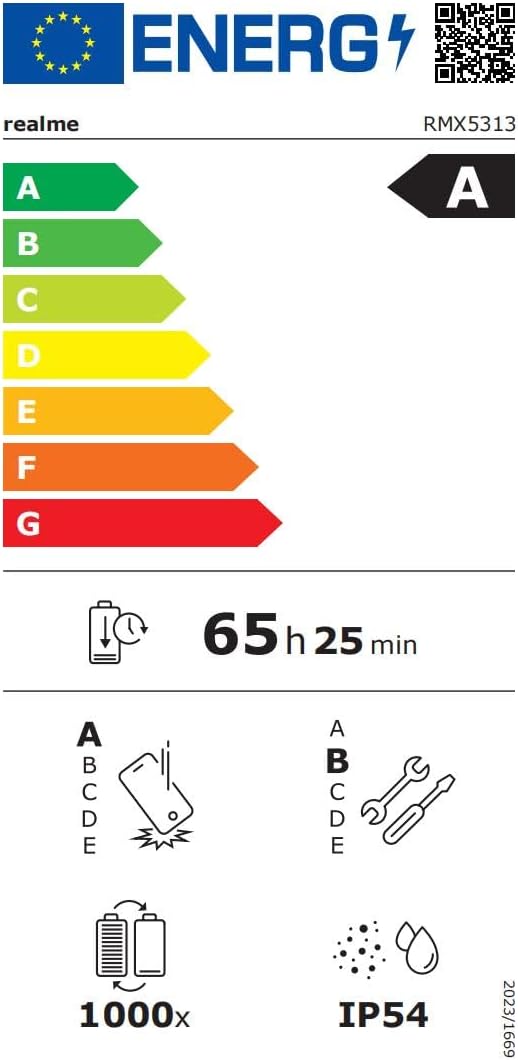
Image: EU Energy Label for realme Note 70T, showing energy efficiency, battery life, and IP54 rating. For more details, visit eprel.ec.europa.eu/qr/2361473.
7. Informações de garantia
Your realme Note 70T smartphone comes with a limited manufacturer's warranty. Please refer to the warranty card included in your package or visit the official realme webConsulte o site para obter os termos e condições detalhados referentes à cobertura da garantia, duração e procedimentos de serviço.
8. Suporte ao cliente
Para obter mais assistência, suporte técnico ou informações sobre serviços, entre em contato com o suporte ao cliente da realme através do site oficial. website or the contact information provided in your product documentation. You can also find FAQs and troubleshooting tips on the realme support portal.
Additional resources, including a Data Transparency Declaration, can be found aqui.