
1. Introdução
Thank you for choosing the HTC GT-288 Electric Shaver. This manual provides essential information for the safe and effective operation, maintenance, and care of your new shaver. Please read these instructions thoroughly before first use and retain them for future reference.
2. Informações de segurança
Para reduzir o risco de choque elétrico, ferimentos ou danos, siga sempre estas precauções básicas de segurança:
- Do not immerse the charging cable or power adapter in water or other liquids.
- Mantenha o aparelho longe das crianças.
- Ensure the shaver is fully dry before connecting it to the charging cable.
- Do not use the shaver if the blade or foil is damaged, as this may cause injury.
- Use apenas o cabo de carregamento USB fornecido.
- This appliance is designed for personal use only.
3. Conteúdo da embalagem
Por favor, verifique se a embalagem contém os seguintes itens:
- 1 x HTC GT-288 Electric Shaver
- 1 x cabo de carregamento USB
- 3 x Precision Combs (1mm, 3mm, 5mm)
- 1 x Escova de limpeza
- 1 x Óleo Lubrificante
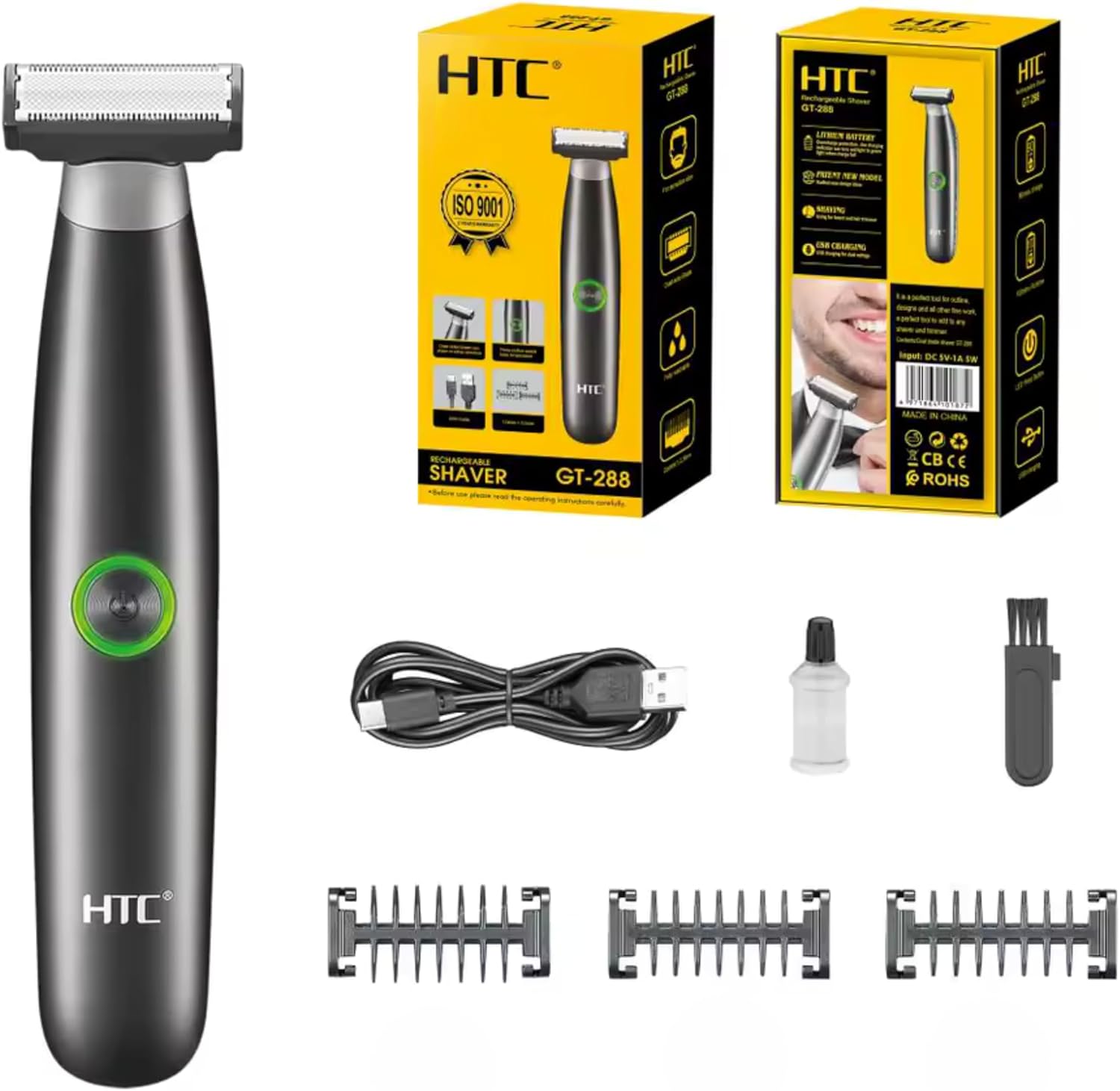
Image 3.1: Contents of the HTC GT-288 Electric Shaver package, including the shaver, USB cable, three precision combs, cleaning brush, and lubricating oil.
4. Produto acabadoview
The HTC GT-288 Electric Shaver features a sleek design with a dual-sided blade for efficient trimming and shaving. It includes an easy-to-operate press-button switch and is fully washable for convenient cleaning.
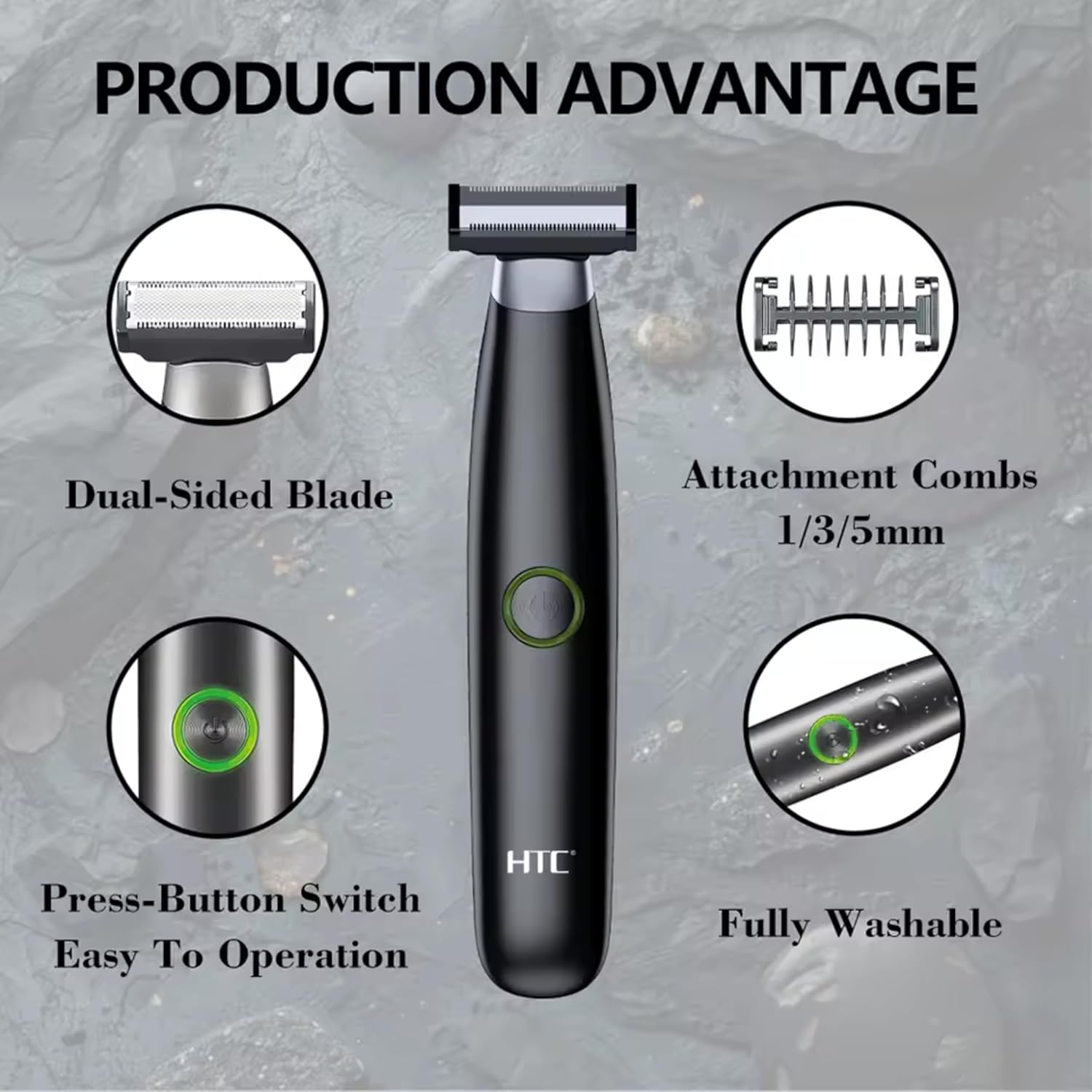
Imagem 4.1: Terminadoview of the HTC GT-288 Electric Shaver's key features, highlighting the dual-sided blade, attachment combs (1/3/5mm), press-button switch, and fully washable design.

Image 4.2: Detail of the LED press button, which serves as the on/off switch for easy operation.
5. Configuração
- Descompacte: Remova cuidadosamente todos os componentes da embalagem.
- Carga inicial: Before first use, fully charge the shaver. Refer to Section 6 for charging instructions.
- Pente para acoplar (opcional): If desired, select one of the three precision combs (1mm, 3mm, or 5mm) and slide it onto the shaver head until it clicks into place. Ensure it is securely attached.
6. Carregamento
The HTC GT-288 Electric Shaver is equipped with a rechargeable battery for cordless operation.
- Certifique-se de que o barbeador esteja desligado.
- Connect the small end of the USB charging cable to the charging port on the shaver.
- Connect the larger end of the USB cable to a compatible USB power source (e.g., computer, USB wall adapter).
- The LED indicator on the shaver will illuminate to show that it is charging.
- Allow the shaver to charge completely before its first use. A full charge typically takes several hours.
- Após a carga completa, desconecte o cabo USB.
7. Instruções de operação
The HTC GT-288 shaver can be used for both wet and dry shaving.
- Ligar: Press the LED button to turn on the shaver.
- Barbear a seco: For dry shaving, ensure your skin is clean and dry. Gently press the shaver against your skin and move it in slow, even strokes against the direction of hair growth.
- Barbear úmido: For wet shaving, apply shaving foam or gel to your skin. The shaver is waterproof, allowing for use in the shower or with water. Move the shaver in gentle, even strokes.
- Using Precision Combs: Attach the desired 1mm, 3mm, or 5mm comb for trimming beards, sideburns, or other facial hair to a specific length. Move the shaver with the comb attached against the direction of hair growth for an even trim.
- Desligar: Press the LED button again to turn off the shaver after use.
8. Manutenção e Limpeza
A limpeza regular garante o desempenho ideal e prolonga a vida útil do seu barbeador.
- Desligar: Desligue sempre o barbeador antes de limpá-lo.
- Enxágue a cabeça: The shaver is fully washable (IPX6 rated). You can rinse the shaver head directly under running water to remove hair clippings.
- Use escova de limpeza: For more thorough cleaning, use the provided cleaning brush to remove stubborn hair particles from the blade and comb attachments.
- Lubrifique as lâminas: After cleaning and drying, apply a small drop of the provided lubricating oil to the blades. Turn on the shaver for a few seconds to distribute the oil evenly. This helps maintain blade performance.
- Seco: Allow the shaver to air dry completely before storing or recharging.

Image 8.1: The HTC GT-288 Electric Shaver being rinsed under a faucet, illustrating its IPX6 fully washable design for easy cleaning.
9. Solução De Problemas
| Problema | Possível causa | Solução |
|---|---|---|
| A máquina de barbear não liga. | A bateria está esgotada. | Carregue totalmente o barbeador. |
| Shaver does not cut effectively. | As lâminas estão entupidas com cabelo ou cegas. | Clean the shaver head thoroughly. Apply lubricating oil. If problem persists, blades may need replacement. |
| A máquina de barbear puxa os pelos. | Battery is low or blades are clogged. | Charge the shaver. Clean the shaver head. |
| O barbeador para durante o uso. | A bateria está esgotada. | Recarregue o barbeador. |
10. Especificações
- Marca: HTC
- Nome do modelo: GT-288
- Fonte de energia: Recarregável USB
- Características especiais: USB Cable, Adjustable Combs, Rechargeable, Water Resistant, Wet & Dry Use
- Usos recomendados: Facial Shaving, Beard Trimming, Daily Use, Travel
- Componentes incluídos: Electric Shaver, USB Cable, 3 Precision Combs, Cleaning Brush, Lubricating Oil
- Peso do produto: 250 gramas
- Cor: Preto
- Material da lâmina: Aço inoxidável
- Tipo de cabeça: Aparador de precisão
11. Garantia e Suporte
This product is manufactured by HTC. For any questions, technical support, or warranty claims, please contact the seller or manufacturer directly through your purchase platform. Please retain your proof of purchase for warranty purposes.