
1. Introdução
Thank you for choosing the THOMSON WS902DUO Cosy Bookshelf Speakers. These active stereo speakers deliver a powerful 150W audio experience with deep bass from two 10 cm woofers. They offer versatile connectivity options including Bluetooth 5.3, Optical, HDMI (ARC), RCA, and USB playback. The included remote control and side panel adjustments provide precise control over your audio. Please read this manual carefully before use to ensure proper operation and to maximize your listening experience.

Image 1.1: THOMSON WS902DUO Bookshelf Speakers in a living space, showcasing their elegant wood finish.
2. Instruções importantes de segurança
- Leia atentamente estas instruções antes de utilizar o produto.
- Guarde estas instruções para referência futura.
- Preste atenção a todos os avisos no produto e nas instruções de operação.
- Siga todas as instruções.
- Não utilize este aparelho perto de água.
- Limpe apenas com um pano seco.
- Não obstrua as aberturas de ventilação. Instale de acordo com as instruções do fabricante.
- Não instale perto de fontes de calor, como radiadores, registros de calor, fogões ou outros aparelhos (incluindo amplificadores) que produzem calor.
- Não anule o propósito de segurança do plugue polarizado ou do tipo aterramento. Um plugue polarizado tem duas lâminas, uma mais larga que a outra. Um plugue do tipo aterramento tem duas lâminas e um terceiro pino de aterramento. A lâmina larga ou o terceiro pino são fornecidos para sua segurança. Se o plugue fornecido não se encaixar na sua tomada, consulte um eletricista para substituir a tomada obsoleta.
- Proteja o cabo de alimentação para que não seja pisado ou comprimido, principalmente nos plugues, nas tomadas de conveniência e no ponto de saída do aparelho.
- Utilize somente acessórios/anexos especificados pelo fabricante.
- Use somente com o carrinho, suporte, tripé, suporte ou mesa especificados pelo fabricante ou vendidos com o aparelho. Quando um carrinho for usado, tenha cuidado ao mover a combinação carrinho/aparelho para evitar ferimentos por tombamento.
- Desligue este aparelho durante tempestades com raios ou quando não for utilizado por longos períodos de tempo.
- Entregue todos os serviços de manutenção a pessoal de serviço qualificado. O serviço é necessário quando o aparelho foi danificado de alguma forma, como cabo de alimentação ou plugue danificado, líquido foi derramado ou objetos caíram no aparelho, o aparelho foi exposto à chuva ou umidade, não opera normalmente ou foi derrubado.
3. Conteúdo da embalagem
Por favor, verifique se todos os itens listados abaixo estão incluídos em seu pacote:
- THOMSON WS902DUO Bookshelf Speakers (2 units)
- Controle remoto
- Cabo de energia
- Cabo de conexão do alto-falante
- 3.5mm Jack to RCA Adapter Cable
- Manual do usuário (este documento)

Image 3.1: Packaging of the THOMSON WS902DUO Bookshelf Speakers.
4. Produto acabadoview
4.1. Side Control Panel (Active Speaker)
The active speaker features a side control panel for easy access to essential functions.

Image 4.1: Side control panel.
- Controle de graves: Ajusta a saída de baixa frequência.
- Controle de agudos: Ajusta a saída de alta frequência.
- Controle de volume: Ajusta o volume geral do som.
- Interruptor de alimentação: Liga ou desliga as caixas de som.
- Indicador LED: Shows the current status or selected input.
4.2. Painel Traseiro (Alto-falante Ativo)
The rear panel of the active speaker provides all necessary input and output connections.
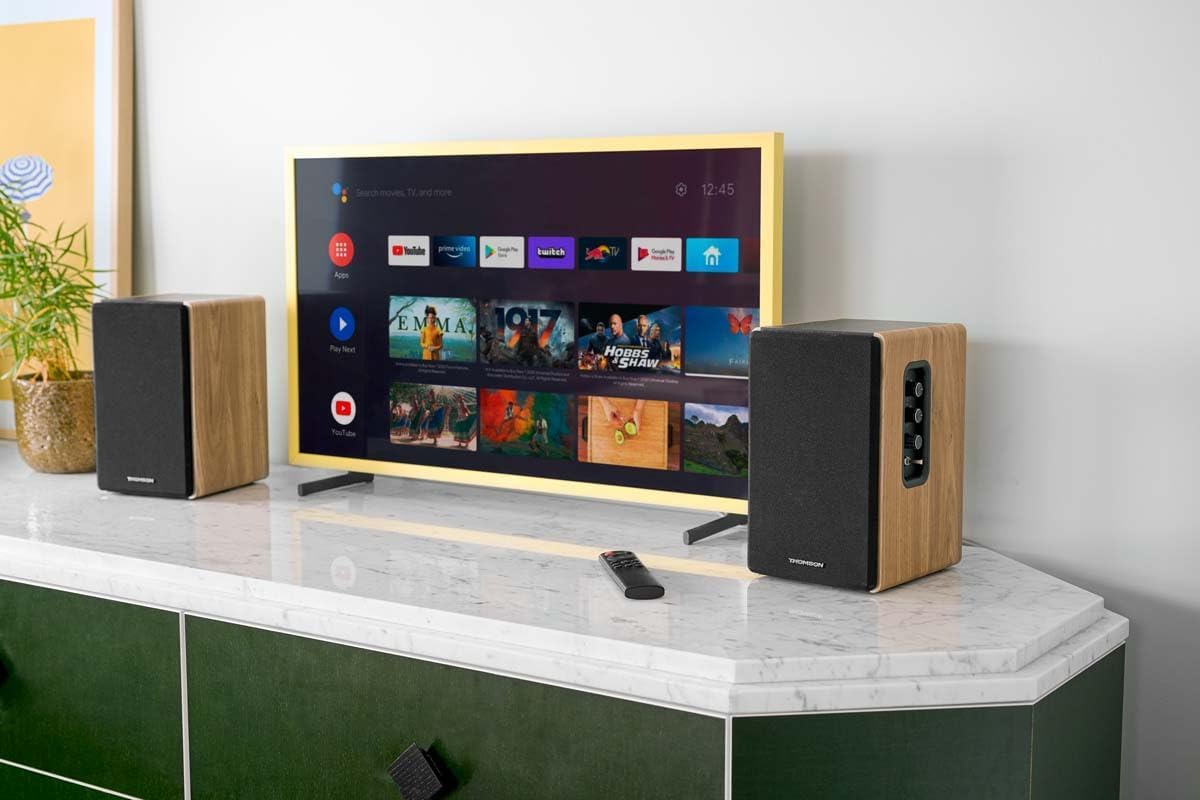
Imagem 4.2: Conexões do painel traseiro.
- Entrada óptica: For connecting digital audio sources like TVs, game consoles, or Blu-ray players.
- Entrada auxiliar (RCA): For connecting analog audio sources such as turntables, CD players, or PCs. A 3.5mm jack adapter is provided.
- TV Audio (HDMI ARC): For connecting to a TV's HDMI ARC port, allowing TV remote control of the speaker volume.
- Reprodução USB: Para reproduzir MP3 files diretamente de uma unidade flash USB.
- Saída secundária: For connecting an external active subwoofer for enhanced bass.
- Saída do alto-falante: Conecta-se à caixa de som passiva.
- Entrada de energia: Conecta-se à fonte de alimentação principal.
4.3. Controle remoto
The remote control provides convenient access to all speaker functions from a distance.

Image 4.3: Remote control.
- Botão de energia: Turns the speakers on/off.
- Botão Mudo: Silencia/ativa o som.
- Volume +/-: Ajusta o nível de volume.
- Controles de reprodução (Reproduzir/Pausar, Avançar): Para reprodução via USB.
- Source Selection Buttons (OPT, BT, ARC, USB, LINE): Seleciona a fonte de entrada de áudio.
- EQ Mode Buttons (MOVIE, MUSIC, DIALOG): Selects preset equalization modes.
5. Configuração
5.1. Posicionamento do alto-falante
Place the speakers on a stable, flat surface such as a bookshelf, desk, or speaker stands. For optimal stereo imaging, position the speakers equidistant from your listening position and at ear level. Ensure there is adequate space around the speakers for ventilation.
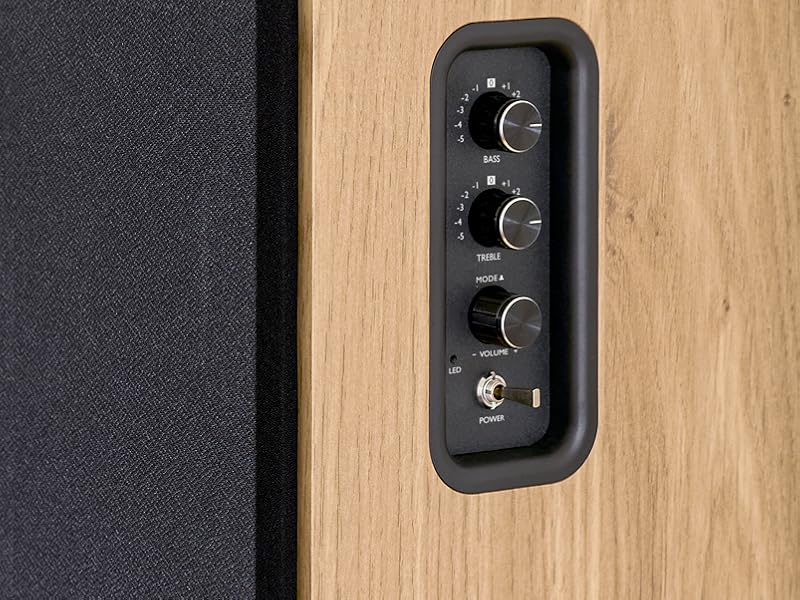
Image 5.1: Recommended speaker placement on a desk.
5.2. Conectando os alto-falantes
- Identify the active speaker (with controls and inputs) and the passive speaker.
- Connect the included speaker cable from the speaker output terminals on the active speaker to the input terminals on the passive speaker. Ensure correct polarity (+ to + and - to -).
5.3. Conectando fontes de áudio
Connect your desired audio sources to the active speaker using the appropriate cables.
- Entrada óptica: Use an optical cable to connect your TV, game console, or Blu-ray player to the OPTICAL IN port.
- Entrada HDMI (ARC): Use an HDMI cable to connect your TV's HDMI ARC port to the TV AUDIO (HDMI) port on the speaker. This allows your TV remote to control the speaker volume.
- Entrada RCA (AUX): Use an RCA cable (or the provided 3.5mm jack to RCA adapter) to connect devices like a turntable, CD player, or PC to the AUX IN (RCA) ports.
- Entrada USB: Insira uma unidade flash USB contendo MP3 files into the USB PLAY port.

Image 5.2: Speakers connected to a television via HDMI ARC.
5.4. Emparelhamento Bluetooth
- Certifique-se de que as caixas de som estejam ligadas.
- Press the 'BT' button on the remote control or the side panel to select Bluetooth input. The LED indicator will flash, indicating pairing mode.
- No seu smartphone, tablet ou computador, ative o Bluetooth e procure por dispositivos disponíveis.
- Select "THOMSON WS902DUO" from the list of devices.
- Once paired, the LED indicator will stop flashing and remain solid. You can now stream audio wirelessly.
5.5. Conexão para subwoofer (opcional)
If you wish to enhance bass further, connect an active subwoofer to the 'Sub Out' port on the rear panel of the active speaker using an RCA cable.
6. Instruções de operação
6.1. Ligar/desligar
Use the power switch on the side control panel or the power button on the remote control to turn the speakers on or off.
6.2. Seleção da fonte
Press the corresponding source button on the remote control (OPT, BT, ARC, USB, LINE) to switch between connected audio inputs. The LED indicator will change to reflect the selected source.
6.3. Controle de volume
Adjust the volume using the 'Volume' knob on the side control panel or the 'VOL+/-' buttons on the remote control.
6.4. Ajustes de áudio
Fine-tune the sound to your preference:
- Graves/Agudos: Use the 'Bass' and 'Treble' knobs on the side control panel to adjust the low and high frequencies.
- Modos de equalização: Press the 'MOVIE', 'MUSIC', or 'DIALOG' buttons on the remote control to select preset equalization settings optimized for different content types.
6.5. Reprodução USB
When a USB flash drive with MP3 files is inserted and USB source is selected, the speakers will automatically begin playing. Use the playback control buttons on the remote control (Play/Pause, Skip) to manage your music.
6.6. Operação Bluetooth
After successful pairing (see Section 5.4), you can stream audio from your Bluetooth device. Use your device's controls or the speaker's remote control for playback and volume adjustments.
7. Manutenção
A manutenção adequada garante a longevidade e o bom desempenho de suas caixas de som.
- Limpeza: Wipe the speaker surfaces with a soft, dry cloth. Do not use liquid cleaners or abrasive materials.
- Ventilação: Certifique-se de que as aberturas de ventilação não estejam bloqueadas para evitar superaquecimento.
- Armazenar: If storing the speakers for an extended period, unplug them from the power outlet and store them in a cool, dry place.
- Evite umidade: Keep the speakers away from water and high humidity.
8. Solução De Problemas
Se você encontrar algum problema, consulte o seguinte guia de solução de problemas:
| Problema | Possível causa | Solução |
|---|---|---|
| Sem energia | Power cable not connected; Power switch off; Wall outlet not working. | Ensure power cable is securely connected. Turn on the power switch. Test the wall outlet with another device. |
| Sem som | Incorrect input source selected; Volume too low; Mute function active; Audio cable not connected properly. | Select the correct input source. Increase volume. Press Mute button on remote. Check all audio cable connections. |
| Falha no pareamento Bluetooth | Speakers not in pairing mode; Device too far; Bluetooth disabled on source device. | Ensure speakers are in Bluetooth pairing mode (flashing LED). Move device closer to speakers. Enable Bluetooth on your source device. |
| A reprodução USB não está funcionando | USB drive not formatted correctly; Files not MP3; USB drive not inserted properly. | Ensure USB drive is FAT32 formatted. Verify files are in MP3 format. Re-insert USB drive firmly. |
| Distorção sonora | Volume too high; Source audio quality poor; Bass/Treble settings too extreme. | Lower the volume. Test with a different audio source. Adjust Bass and Treble controls. |
9. Especificações
| Recurso | Especificação |
|---|---|
| Marca | THOMSON |
| Número do modelo | WS902DUO |
| Potência máxima de saída do alto-falante | 150 Watts |
| Resposta de frequência | 60 Hz |
| Tecnologia de Conectividade | Bluetooth, HDMI (ARC), Optical, RCA, USB |
| Versão Bluetooth | 5.3 |
| Modo de saída de áudio | Stereo (2.0 channels) |
| Vol de entradatage | 230 Volts (CA) |
| Tipo de montagem | Suporte de prateleira |
| Tipo de alto-falante | Multimedia Bookshelf |
| Características especiais | Stereo Pairing, USB Port, Sub-Out, Remote Control, EQ Modes |
| Usos recomendados | Smartphone, Tablet, PC, TV, Game Console, DVD Player, Turntable |
| Cor | Acabamento em madeira natural |
| Método de controle | Remote Control, Side Panel Knobs |
| Tamanho do woofer | 10 centímetros |
| Dimensões (A x L x P) | 28 cm x 24 cm x 47 cm (aproximadamente, por alto-falante) |
| Peso | 5048 Grams (total for pair) |
| Número de itens | 2 |
| País de origem | China |
10. Informações de garantia
This THOMSON WS902DUO product comes with a Garantia limitada de 1 ano A garantia é válida a partir da data da compra. Esta garantia cobre defeitos de fabricação e mão de obra em condições normais de uso. Não cobre danos causados por uso indevido, acidentes, modificações não autorizadas ou desgaste normal. Guarde seu comprovante de compra para eventuais solicitações de garantia.
11. Suporte ao cliente
For technical assistance, warranty claims, or any questions regarding your THOMSON WS902DUO speakers, please contact your retailer or visit the official THOMSON support website. Please have your model number (WS902DUO) and proof of purchase ready when contacting support.
Suporte online: www.thomsonconsumer.com (Consulte os contatos de suporte regionais)