
1. Instruções importantes de segurança
Leia atentamente todas as instruções antes de usar este aparelho e guarde-as para futuras consultas. O não cumprimento destas instruções pode resultar em choque elétrico, incêndio ou ferimentos graves.
- Certifique-se de que a fonte de alimentação voltage corresponde à etiqueta de classificação do aparelho.
- Não utilize o ventilador com um cabo ou ficha danificados. Se o cabo estiver danificado, deve ser substituído pelo fabricante, pelo seu agente de assistência técnica ou por pessoal qualificado para evitar riscos.
- Desligue sempre o ventilador da tomada antes de o limpar, realizar manutenção ou mover.
- Não introduza os dedos ou quaisquer objetos na grelha da ventoinha enquanto esta estiver em funcionamento.
- Keep the fan away from water or other liquids. Do not use it in wet or damp ambientes.
- Este aparelho é apenas para uso interno. Não use ao ar livre.
- Do not place the fan near heat sources such as radiators, heat registers, stoves, or other appliances that produce heat.
- Supervisione as crianças para garantir que não brinquem com o aparelho.
- Não utilize o ventilador em áreas onde sejam armazenados gasolina, tinta ou líquidos inflamáveis.
2. Produto acabadoview
The Altus AL 40 TFB is a sleek and efficient tower air cooler designed for indoor use. It features a compact design, multiple speed settings, and easy-to-use push-button controls.
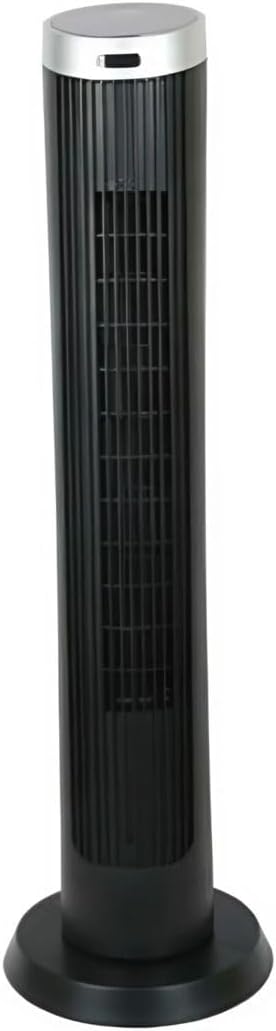
Figura 2.1: Frente view of the Altus AL 40 TFB Tower Air Cooler. This image shows the tall, slender black body of the fan with its air outlet grille and a stable round base.
Componentes:
- Painel de controle: Located on the top of the unit for easy access to all functions.
- Grelha de saída de ar: Vertical grille on the front for air dispersion.
- Base: Stable round base for secure placement.
- Cabo de alimentação: Localizado na parte traseira da unidade.

Figura 2.2: Detalhado view of the control panel on top of the Altus AL 40 TFB Tower Air Cooler. The panel features a digital display showing '28' and several push buttons for various functions.
3. Configuração
Follow these steps to set up your Altus AL 40 TFB Tower Air Cooler:
- Descompacte: Carefully remove the fan from its packaging. Retain the packaging for future storage or transport.
- Montagem da base (se necessário): Some models may require minor base assembly. If your unit's base is detached, align the base sections and secure them according to the diagrams in the packaging. Ensure it is firmly attached.
- Colocação: Place the fan on a firm, level surface. Ensure there is adequate space around the fan for proper airflow, at least 30 cm (12 inches) from walls or furniture. This appliance is designed for indoor use only.
- Conexão de energia: Plug the power cord into a standard electrical outlet. Ensure the outlet meets the voltage requisitos especificados no rótulo do produto.
4. Instruções de operação
Your Altus AL 40 TFB Tower Air Cooler is equipped with user-friendly push-button controls on the top panel.
Funções do painel de controle:
- Botão de energia (⏻): Press once to turn the fan ON, press again to turn it OFF.
- Botão de velocidade (💨): Press repeatedly to cycle through the 3 available fan speeds: Low, Medium, and High. The current speed setting may be indicated on the digital display.
- Botão de modo (M): If available, press to select different operating modes (e.g., Normal, Natural, Sleep). Refer to the digital display for the active mode.
- Botão de oscilação (↔): Press to activate or deactivate the oscillation function, which allows the fan to rotate from side to side to distribute air over a wider area.
- Botão do temporizador (🕒): If available, press to set an automatic shut-off timer. Each press typically increases the timer duration by a set increment (e.g., 1 hour).
Operação geral:
- Conecte o ventilador a uma tomada adequada.
- Pressione o botão liga/desliga (⏻) to turn on the fan.
- Select your desired fan speed using the Speed Button (💨).
- Activate oscillation if desired by pressing the Oscillation Button (↔).
- To turn off the fan, press the Power Button (⏻) de novo.
5. Manutenção
Regular maintenance ensures optimal performance and extends the lifespan of your Altus AL 40 TFB Tower Air Cooler.
Limpeza:
- Sempre desligue o ventilador antes de limpá-lo.
- Limpeza externa: Limpe as superfícies externas do ventilador com um pano macio e seco.amp cloth. Do not use abrasive cleaners, waxes, or polishes as they may damage the finish.
- Grelhas de entrada/saída de ar: Use a vacuum cleaner with a brush attachment to gently remove dust and debris from the air inlet and outlet grilles. Do not attempt to disassemble the fan for cleaning.
- Certifique-se de que o ventilador esteja completamente seco antes de ligá-lo novamente na tomada e utilizá-lo.
Armazenar:
When not in use for extended periods, store the fan in a cool, dry place. It is recommended to store it in its original packaging to protect it from dust and damage.
6. Solução De Problemas
If you encounter any issues with your Altus AL 40 TFB Tower Air Cooler, please refer to the following common problems and solutions:
- O ventilador não liga:
- Verifique se o cabo de alimentação está firmemente conectado a uma tomada elétrica em funcionamento.
- Certifique-se de que o botão liga/desliga no painel de controle foi pressionado.
- Verify that the household circuit breaker or fuse has not tripped.
- Fluxo de ar fraco:
- Check if the fan speed is set to a higher setting.
- Ensure the air inlet and outlet grilles are not blocked by dust or obstructions. Clean them if necessary.
- Ruído incomum:
- Certifique-se de que o ventilador esteja colocado em uma superfície estável e nivelada.
- Check for any foreign objects that might have fallen into the fan grilles.
- Se o ruído persistir, interrompa o uso e entre em contato com o suporte ao cliente.
If the problem cannot be resolved using the above steps, please contact Altus customer support.
7. Especificações
Detailed technical specifications for the Altus AL 40 TFB Tower Air Cooler:
| Recurso | Especificação |
|---|---|
| Marca | Alto |
| Nome do modelo | AL 40 TFB |
| Cor | Preto |
| Projeto de ventilador elétrico | Floor Fan (Tower Type) |
| Fonte de energia | Elétrico com fio |
| Dimensões do produto (P x L x A) | 29 cm de profundidade x 29 cm de largura x 101 cm de altura |
| Tipo de montagem | Montagem no chão |
| Tipo de acabamento | Pintado |
| Uso interno/externo | Interior |
| Método de controle | Botão de pressão |
| Número de níveis de potência | 3 |
| Sem fio | Não |
8. Garantia e Suporte
Altus provides comprehensive support for its products. For any assistance or warranty-related inquiries, please contact our customer service.

Figura 8.1: Altus customer service and warranty information. The image displays the Altus logo, a message about service availability, and a contact number for support.
Our services are always available for your Altus products. You can benefit from our door-to-door service by calling our support line for any assistance you may need.
Arçelik Service Warranty: For products under warranty, our home product pickup service is provided free of charge.
Customer Support Line: 0850 210 0 888
Please have your product model number (AL 40 TFB) and purchase details ready when contacting support.