
1. Introdução
This manual provides instructions for the installation, operation, and maintenance of your Zyxel NWA90BE PRO WiFi 7 BE6500 Wireless Access Point. Please read this manual thoroughly before using the device to ensure proper setup and performance.
O que está na caixa
- BE6500 4-Stream WiFi 7 Dual-Radio NebulaFlex Access Point
- Adaptador de energia
- Placa de Montagem
- Parafusos de montagem
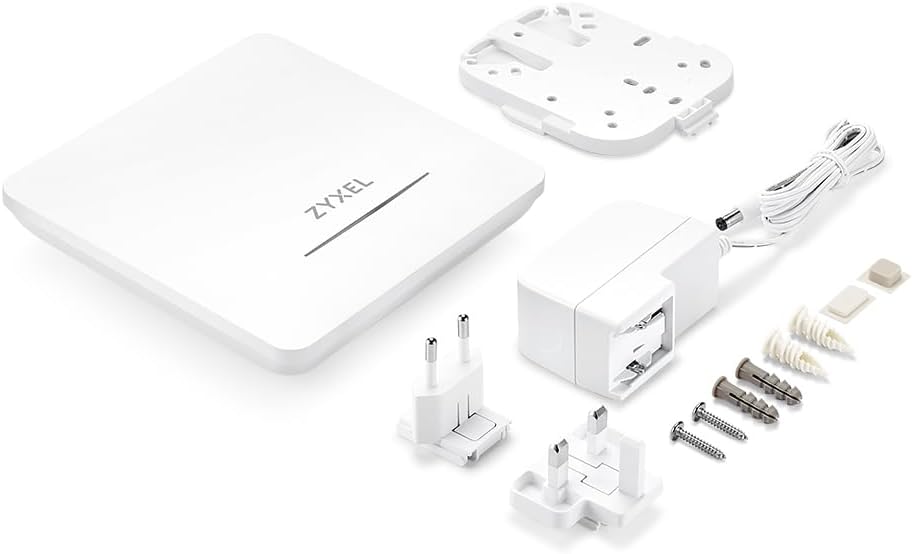
Figure 1.1: Zyxel NWA90BE PRO Access Point and its included accessories, including the main unit, power adapter, mount plate, and mounting screws.
Principais características
- WiFi 7 Performance: Qualcomm quad-core CPU powers BE6500 dual-radio speeds up to 6.5Gbps across 2.4GHz (688 Mbps), 5GHz (4324 Mbps), and 6GHz (5764 Mbps), with MU-MIMO and MLO for lower latency and higher throughput.
- BandFlex Technology: Configure your radio for either 5GHz or 6GHz to fit seamlessly into existing networks today while staying ready for full 6GHz deployment when your devices support it.
- Smart Mesh MLO: Dual-radio Smart Mesh MLO eliminates cable runs and complex backhaul setups, delivering higher bandwidth and stronger interference resistance than single-radio mesh systems.
- Gestão flexível: NebulaFlex allows you to run fully standalone via local GUI with no cloud account required, or switch to Nebula Cloud management anytime without additional cost or reconfiguration.
- Enterprise Security: Captive portal, IEEE 802.1X/RADIUS authentication, WPA3 encryption, rogue AP detection, and L2 isolation deliver small-business-grade network protection.
2. Configuração
Instalação Física
The NWA90BE PRO can be mounted on a wall or ceiling using the included mount plate and screws. Ensure the mounting location provides optimal signal coverage and is near a power source or a Power over Ethernet (PoE+) enabled switch.
Conectando o dispositivo
- Conexão de energia: The NWA90BE PRO can be powered in two ways:
- Usando o adaptador de energia: Connect the included power adapter to the DC Jack on the access point and plug it into a power outlet.
- Utilizando PoE+: Connect an Ethernet cable from a PoE+ enabled switch or injector to the 2.5GbE uplink port on the access point. This provides both power and data connectivity.
- Conexão de rede: Connect an Ethernet cable from your network router or switch to the 2.5GbE uplink port on the access point.
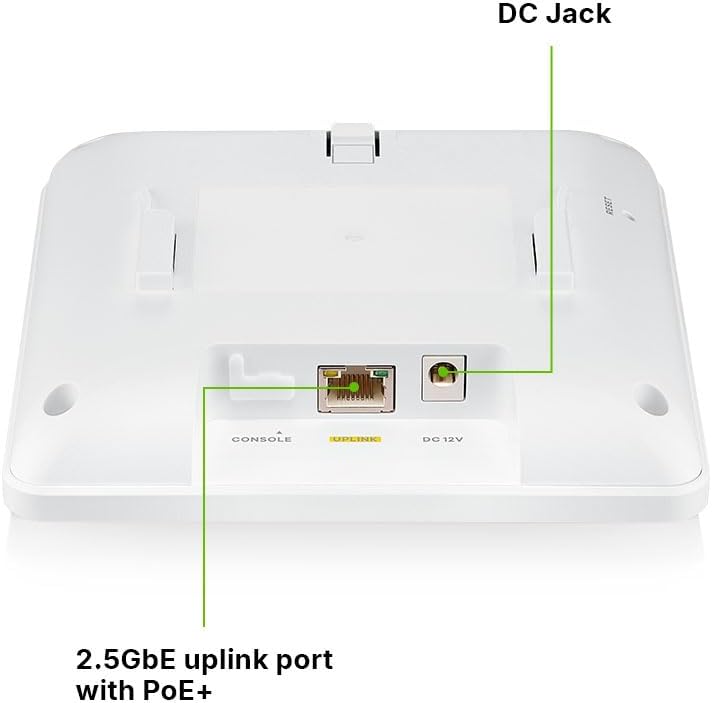
Figura 2.1: Traseira view of the NWA90BE PRO, highlighting the DC Jack for power adapter connection and the 2.5GbE uplink port which supports PoE+.

Figure 2.2: Illustration of the flexible powering options for the NWA90BE PRO, showing it can be powered by either PoE+ or the included power adapter.
Configuração inicial
The NWA90BE PRO supports two management modes: Standalone (local GUI) or Nebula Cloud management.
- Modo autônomo: Access the device's local web interface by connecting a computer directly to the access point or to the same network segment. Refer to the quick start guide for default IP address and login credentials.
- Gerenciamento da Nuvem Nebula: For centralized management, register your device with the Zyxel Nebula Cloud platform. This allows for remote configuration and monitoring.
3. Operando o dispositivo
NebulaFlex Management
The NWA90BE PRO features NebulaFlex, allowing seamless switching between standalone operation and cloud management. This flexibility ensures that your network can adapt to changing needs without requiring new hardware or complex reconfigurations.

Figure 3.1: The Nebula Cloud Management interface displayed across various devices, illustrating its comprehensive monitoring and reporting capabilities.
BandFlex Technology
Utilize BandFlex technology to configure the access point's radio for either 5GHz or 6GHz operation. This feature allows for integration into existing 5GHz networks while providing a future-ready path for 6GHz deployment as your devices evolve.

Figure 3.2: Conceptual image illustrating the flexible BandFlex radio design, which supports configuration for either 5GHz or 6GHz operation.
Smart Mesh MLO
The Smart Mesh MLO feature creates dynamic wireless links, reducing the need for extensive cabling. This dual-radio backhaul boosts bandwidth, minimizes interference, and ensures high-performance, low-latency WiFi across your coverage area.

Figure 3.3: Diagram showing how Smart Mesh MLO boosts bandwidth and reduces interference by creating dynamic wireless links between access points.
Recursos de segurança
The NWA90BE PRO incorporates enterprise-grade security protocols to safeguard your network:
- Portal Cativo: Provides a customizable login page for guest access, enhancing branding and control.
- IEEE 802.1X/RADIUS Authentication: Offers robust user authentication for secure network access.
- Criptografia WPA3: The latest standard in WiFi security, providing stronger encryption and protection against attacks.
- Rogue AP Detection and L2 Isolation: Helps prevent unauthorized access points and isolates client traffic for enhanced security.

Figure 3.4: Visual representation of secure authentication features, including captive portal and 802.1X/RADIUS support, designed to protect business networks.
4. Manutenção
To ensure optimal performance and longevity of your Zyxel NWA90BE PRO, follow these maintenance guidelines:
- Limpeza regular: Mantenha o dispositivo livre de poeira e detritos. Use um pano macio e seco para a limpeza. Não utilize produtos de limpeza líquidos.
- Atualizações de firmware: Regularly check for and apply firmware updates. If using Nebula Cloud management, updates can often be managed centrally. Firmware updates provide security enhancements, bug fixes, and new features.
- Condições ambientais: Ensure the device operates within its specified temperature and humidity ranges to prevent overheating or damage.
- Gerenciamento de cabos: Certifique-se de que todos os cabos estejam firmemente conectados e não estejam sob tensão.
5. Solução De Problemas
If you encounter issues with your NWA90BE PRO, refer to the following common troubleshooting steps:
| Problema | Possível causa | Solução |
|---|---|---|
| O dispositivo não liga | No power, faulty adapter/PoE, loose connection | Check power adapter connection or PoE source. Ensure power outlet is functional. Try a different power source if available. |
| Sem conectividade de rede | Ethernet cable issue, incorrect configuration, upstream network problem | Verify Ethernet cable is securely connected. Check router/switch status. Review network configuration settings (IP address, VLANs). |
| Poor WiFi signal or speed | Interference, improper placement, outdated firmware, channel congestion | Relocate the AP for better coverage. Check for sources of interference. Update firmware. Adjust WiFi channels in settings. |
| Cannot access local GUI | Incorrect IP address, network settings, firewall | Ensure your computer is on the same network segment. Verify the AP's IP address. Temporarily disable computer firewall. |
Redefinição de fábrica
If issues persist, a factory reset may be necessary. To perform a factory reset, locate the RESET button on the device. With the device powered on, press and hold the RESET button for approximately 5-10 seconds until the LED indicators change, then release. The device will reboot with factory default settings.
6. Especificações
| Recurso | Detalhe |
|---|---|
| Marca | ZYXEL |
| Número do modelo | NWA90BE PRO |
| Padrão de comunicação sem fio | 802.11be (Wi-Fi 7) |
| Classe de Banda de Frequência | Dual-Band (2.4GHz, 5GHz, 6GHz configurable) |
| Taxa de transferência de dados | Até 6.5 gigabits por segundo |
| Largura de banda da porta LAN | 2500 Mbps (2.5GbE) |
| Protocolo de Segurança | WPA2, WPA3 |
| Gerenciamento | NebulaFlex (Cloud/Standalone) |
| Dispositivos compatíveis | Personal Computer, Security Camera, Smartphone, Tablet |
| Componentes incluídos | BE6500 4-Stream WiFi 7 Dual-Radio NebulaFlex Access Point, Mount Plate, Mounting Screws, Power Adapter |
| Peso do item | 2 libras |
| UPC | 760559131968 |
7. Informações de garantia
Warranty information for the Zyxel NWA90BE PRO is not explicitly detailed in the provided product data. Please refer to the official Zyxel website or contact Zyxel customer support for the most current and complete warranty terms and conditions applicable to your region.
8. Suporte
For further assistance, technical support, or to access additional resources, please visit the official Zyxel support website. You can also find documentation, FAQs, and community forums there. If you are using Nebula Cloud management, the Nebula portal provides integrated support and diagnostic tools.