
1. Introdução
This manual provides essential information for the safe and efficient use of your XIAOMI Redmi 15 5G Smartphone. Please read it carefully before using the device and keep it for future reference.
2. Conteúdo da embalagem
Verifique se seu pacote contém os seguintes itens:
- Smartphone Xiaomi Redmi 15 5G
- Estojo protetor
- Cabo USB-C
- Ferramenta Ejetora SIM
Observação: A power adapter is not included in the package. Please use a compatible 33W fast charger for optimal charging performance.
3. Layout do dispositivo
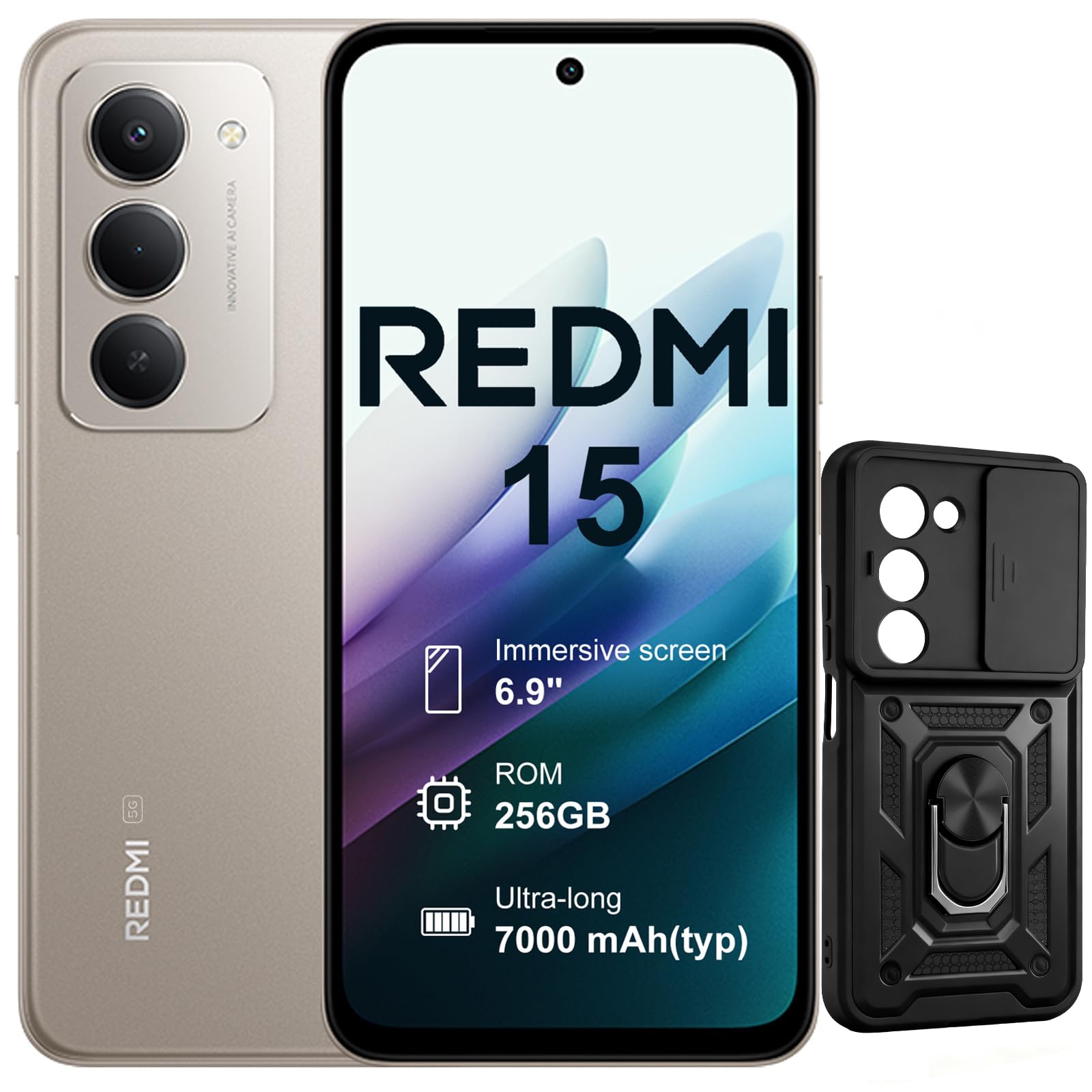
Imagem: Frente e verso view of the XIAOMI Redmi 15 5G Smartphone. The device features a large display on the front and a triple camera setup on the rear.
Familiarize-se com os componentes físicos do seu smartphone:
- Botão de energia: Located on the side, used to power on/off or wake/sleep the device. Also integrates the fingerprint sensor.
- Botões de volume: Localizado na lateral, usado para ajustar o volume de mídia e de chamadas.
- Porta USB-C: Localizado na parte inferior, para carregamento e transferência de dados.
- Tomada de fone de ouvido de 3.5 mm: Located on the top/bottom, for connecting wired headphones.
- Bandeja do cartão SIM: Located on the side, for inserting Nano SIM cards.
- Câmera frontal: Located on the display, for selfies and video calls.
- Câmeras traseiras: Multiple lenses on the back for high-quality photography and video recording.
4. Configuração
4.1. Inserindo cartões SIM
- Localize a bandeja do cartão SIM na lateral do seu dispositivo.
- Insira a ferramenta ejetora do SIM no pequeno orifício ao lado da bandeja e pressione firmemente até que a bandeja saia.
- Place your Nano SIM card(s) into the designated slots on the tray. This device supports Dual SIM.
- Reinsira cuidadosamente a bandeja no telefone.
4.2. Inicialização e configuração
- Mantenha pressionado o botão Liga/Desliga até que o logotipo da XIAOMI apareça.
- Siga as instruções na tela para selecionar seu idioma, conectar-se a uma rede Wi-Fi e configurar sua conta do Google.
- Configure security features such as fingerprint recognition (integrated into the power button) and screen lock.
5. Operando seu smartphone
5.1. Exibição e interação
The Redmi 15 features an immersive 6.9-inch FHD+ display with a 144Hz refresh rate for smooth visuals. It also includes an all-day eye-care display for comfortable viewindo.

Imagem: Uma pessoa viewing the smartphone screen in a dimly lit room, demonstrating the all-day eye-care display feature for reduced eye strain.
The device incorporates Wet Touch Technology 2.0, ensuring accurate touch response even when your fingers are wet or covered with oil or foam.

Image: A person interacting with the smartphone while at the beach, illustrating the Wet Touch Technology 2.0 which allows for accurate touch input even with wet fingers.
5.2. Recursos da câmera
The Redmi 15 5G is equipped with a 50MP AI dual camera system, offering features like Super Resolution mode and dynamic shots. Video recording is stabilized in 4K.
5.3. Conectividade e Desempenho
Powered by the Snapdragon 6 Gen 3 processor with integrated 5G modem, the device provides ultra-fast downloads and smooth gaming. It ensures powerful and fluid multitasking even with demanding applications.

Image: A graphic representation of the Snapdragon 6s Gen 3 processor, highlighting its 5G capabilities and support for up to 16GB RAM with memory extension.
5.4. Características especiais
Círculo para pesquisar com o Google: This feature allows you to instantly search for anything you see on your phone by circling, scribbling, or tapping to pinpoint items without needing screenshots.

Image: A smartphone screen demonstrating the "Circle to Search with Google" feature, where a user circles an item in an image to perform a search and view related results.
6. Maintenance and Battery Management
6.1. Battery Charging and Longevity
The device is equipped with a 7000mAh battery, providing up to 2 days of typical use. It supports 33W turbo charging for quick power-ups.

Image: A smartphone screen displaying a charging animation with "86.11%" and "MI TURBO CHARGE", alongside text highlighting the benefits of 33W turbo charging.
The battery is designed for durability, maintaining at least 80% of its original capacity after 1600 full charging cycles. Even at 1% battery level, the phone can remain in standby mode for up to 7.5 hours or allow up to 59 minutes of calls.

Image: A graphic illustrating "1% power endurance" with call and standby times, and "1600 charge cycles, capacity still ≥80%", emphasizing battery longevity.
The device also supports 18W reverse charging, allowing it to function as a portable power bank for other devices.

Image: Two smartphones connected via a cable, demonstrating the 18W reverse charging feature where one phone charges another, effectively acting as a power bank.
6.2. Environmental Resilience
The Redmi 15 5G is designed for reliable performance even in low temperatures, with enhanced battery performance at -20°C. It is also water-resistant.

Image: A smartphone with frost on its edges, illustrating its reliable performance and battery endurance at -20°C, with specific video playback and call times.
7. Solução De Problemas
Se você encontrar problemas com seu dispositivo, tente as seguintes etapas básicas de solução de problemas:
- Dispositivo não responde: Pressione e mantenha pressionado o botão Liga/Desliga por cerca de 10 a 15 segundos para forçar a reinicialização.
- Problemas de rede: Check if your SIM card is properly inserted. Try toggling Airplane Mode on and off. Verify your mobile data settings.
- Problemas de carregamento: Ensure the USB-C cable is securely connected to both the phone and the power adapter (not included). Try a different cable or power source.
- Mau funcionamento do aplicativo: Feche e abra o aplicativo novamente. Se o problema persistir, limpe o cache do aplicativo ou reinstale-o.
- Sensor de impressão digital não funciona: Ensure your finger is clean and dry. Re-register your fingerprints if necessary.
For more advanced troubleshooting, please refer to the official XIAOMI support resources.
8. Especificações
| Recurso | Especificação |
|---|---|
| Marca | XIAOMI |
| Nome do modelo | Redmi 15 |
| Sistema operacional | Androide 15 |
| BATER | 8 GB |
| Capacidade de armazenamento | 256 GB |
| Tamanho da tela | 6.9 polegadas |
| Resolução | 2460 x 1080 |
| Taxa de atualização | 144 Hz |
| Tecnologia Celular | 5G |
| Slots de cartão SIM | Dual SIM |
| Identificação biométrica | Reconhecimento de impressão digital |
| Nível de resistência à água | Resistente à água |
| Entrada para fone de ouvido | 3.5 milímetros |
| Resolução da câmera frontal | 8 MP |
| Resolução da câmera traseira | 50 MP |
| Capacidade da bateria | 7000 mAh |
| Duração média da bateria | 2 dias |
| Dimensões | 16.9 x 8 x 0.8 cm |
| Porta de carregamento | USB-C |
9. Informações de garantia
Your XIAOMI Redmi 15 5G Smartphone comes with a Garantia do fabricante de 2 anosEsta garantia cobre defeitos de materiais e de fabricação sob uso normal. Guarde seu comprovante de compra para eventuais solicitações de garantia.
For detailed warranty terms and conditions, please visit the official XIAOMI website ou entre em contato com o suporte ao cliente.
10. Suporte
For further assistance, technical support, or service inquiries, please contact XIAOMI customer support through their official channels. You can also visit the official XIAOMI store for more information and resources: