
Kinglucky A20
Kinglucky ClipFree A20 Open-Ear Earbuds Instruction Manual
Modelo: A20
Introdução
Welcome to the Kinglucky ClipFree A20 Open-Ear Earbuds. These earbuds are designed for comfort and style, featuring an open-ear design and detachable crystal earrings. This manual provides essential information for setting up, operating, maintaining, and troubleshooting your new earbuds.
O que está na caixa
Upon opening your Kinglucky ClipFree A20 package, you should find the following items:
- Kinglucky ClipFree A20 Open-Ear Earbuds
- Estojo de carregamento
- Detachable Crystal Butterfly Earrings (if included with your model)
- Cabo de carregamento USB-C
- Manual do usuário (este documento)

Image: The Kinglucky A20 earbuds, charging case, detachable butterfly earrings, and USB-C charging cable as packaged.
Configurar
1. Carregando os fones de ouvido e o estojo
Before first use, fully charge your Kinglucky A20 earbuds and charging case. Connect the provided USB-C cable to the charging port on the case and a power source. The digital display on the case will show the battery level. A full charge provides up to 8 hours of playtime for the earbuds, with the case extending total playtime to approximately 50 hours.
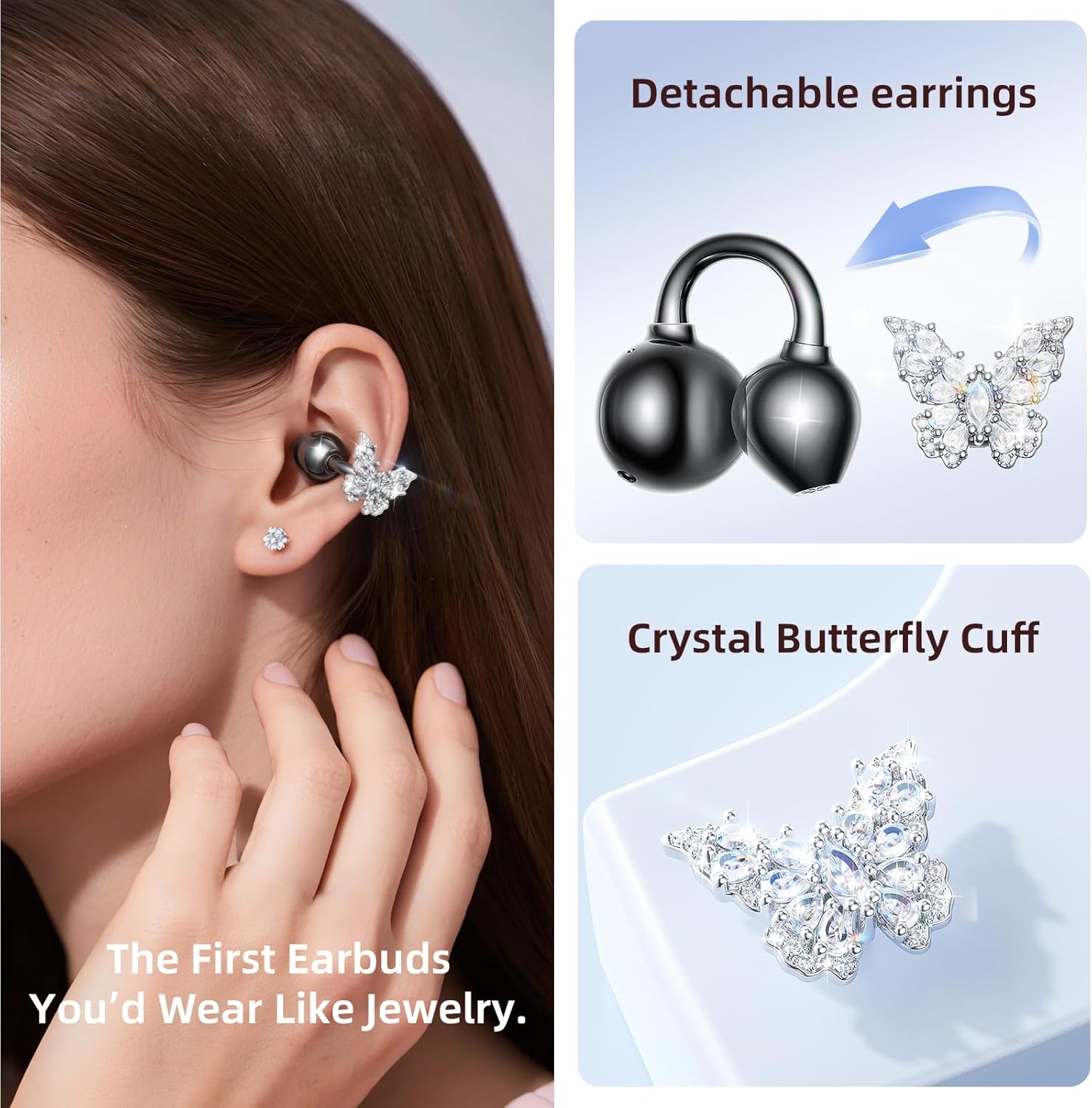
Image: The Kinglucky A20 earbuds resting in their charging case, displaying the battery percentage on the front.
2. Emparelhamento Bluetooth
- Abra o estojo de carregamento. Os fones de ouvido entrarão automaticamente no modo de emparelhamento.
- No seu dispositivo (smartphone, tablet, etc.), acesse as configurações de Bluetooth.
- Selecione "Kinglucky A20" na lista de dispositivos disponíveis.
- Após a conexão, você ouvirá um aviso sonoro e a luz indicadora nos fones de ouvido mudará.
The Kinglucky A20 supports Bluetooth 5.4 for a stable connection and multipoint pairing, allowing connection to two devices simultaneously.
3. Usando os fones de ouvido
The A20 earbuds feature an open-ear clip design for comfort and stability. They do not enter the ear canal, resting gently on the ear.
- Gently open the ear cuff of the earbud.
- Position the earbud over your ear, ensuring the speaker is aligned with your ear canal for optimal sound.
- Adjust for a secure and comfortable fit.
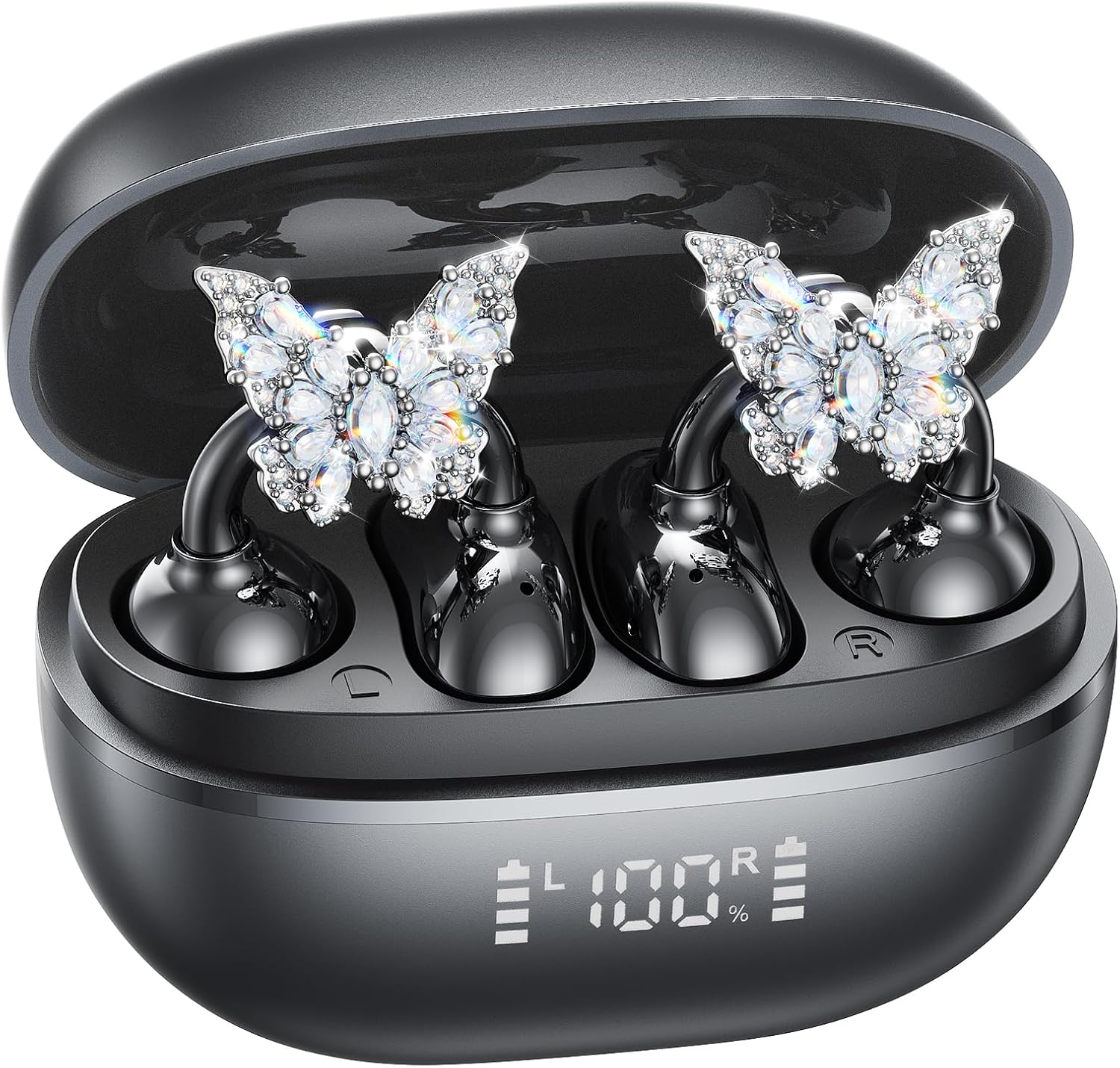
Image: A woman wearing the Kinglucky A20 earbuds with the detachable butterfly earrings, demonstrating the clip-on fit.
4. Attaching/Detaching Crystal Earrings
The crystal butterfly earrings are detachable. To attach, gently clip them onto the earphone stem. To detach, carefully unclip them. Remove the decorative earrings before storing the earbuds in the charging case to prevent damage.

Image: A visual guide illustrating the process of attaching the crystal butterfly accessory to the earbud stem.
Instruções de operação
Controles de toque
The Kinglucky A20 earbuds feature intuitive touch controls on the outer surface of each earbud.
- Reproduzir/Pausar Música: Toque duas vezes em qualquer fone de ouvido.
- Atender/encerrar chamada: Toque duas vezes em qualquer um dos fones de ouvido durante uma chamada recebida ou em andamento.
- Rejeitar chamada: Durante uma chamada recebida, mantenha pressionado qualquer um dos fones de ouvido por 2 segundos.
- Ative o Voice Assistant: Pressione e segure um dos fones de ouvido por 3 segundos.

Image: A visual representation of the touch control functions for music playback and call management on the earbuds.
Sound Quality and Call Clarity
The A20 earbuds are engineered to deliver clear and balanced sound for various audio content, from podcasts to music. They feature AI-powered call clarity with 2 beamforming microphones and advanced noise-canceling technology for crisp conversations.

Image: An exploded diagram showing the internal components of the Kinglucky A20 earbud, highlighting its sound engineering.
Manutenção
- Limpeza: Use a soft, dry cloth to wipe the earbuds and charging case. Avoid using harsh chemicals or abrasive materials.
- Armazenar: Quando não estiverem em uso, guarde os fones de ouvido no estojo de carregamento para protegê-los e garantir que permaneçam carregados.
- Resistência à água: The earbuds are IP56 water-resistant, meaning they can withstand sweat and light rain. Do not submerge them in water.
Solução de problemas
| Problema | Solução |
|---|---|
| Fones de ouvido não emparelham | Ensure earbuds are charged. Turn off and on Bluetooth on your device. Forget "Kinglucky A20" in your device's Bluetooth settings and re-pair. |
| Sem som de um fone de ouvido | Place both earbuds back in the charging case, close the lid, wait a few seconds, then open and try again. Check device audio balance settings. |
| O estojo de carregamento não carrega | Verifique se o cabo USB-C está firmemente conectado tanto ao gabinete quanto à fonte de alimentação. Tente usar um cabo ou adaptador de energia diferente. |
| Má qualidade de chamada | Ensure earbuds are properly seated on your ears. Move closer to your connected device to avoid interference. |
Especificações
- Nome do modelo: A20
- Conectividade: Sem fio, Bluetooth 5.4
- Colocação da orelha: Ouvido aberto
- Duração da bateria: Up to 8 hours (earbuds), up to 50 hours total with charging case
- Resistência à água: IP56
- Peso: Aproximadamente 4.0g por fone de ouvido.
- Componentes incluídos: Earbuds, Charging Case, USB-C Cable, User Manual, Detachable Crystal Earrings
Garantia e Suporte
Kinglucky products are manufactured to high standards and undergo rigorous quality checks. For warranty information, technical support, or customer service inquiries, please refer to the contact details provided on the Kinglucky official website ou sua documentação de compra. Guarde seu comprovante de compra para solicitações de garantia.
Para obter mais assistência, você pode visitar o Kinglucky Store on Amazon.
Ask a question about this manual
Ask about setup, troubleshooting, compatibility, parts, safety, or missing instructions. Manuals+ will review the question and use this page’s manual context to help answer it.