
Introdução
This manual provides detailed instructions for the WESEARY WG1 Wireless Gaming Headset. Please read this guide thoroughly to ensure proper setup, operation, and maintenance of your device. The WG1 headset offers dual wireless connectivity (2.4GHz USB/Type-C and Bluetooth), 3D stereo sound, and an omnidirectional noise-canceling microphone for an enhanced gaming experience across multiple platforms.
O que está na caixa
Verifique se todos os itens estão presentes na embalagem:
- Wireless Gaming Headset (1 unit)
- Cabo de carregamento (1 unidade)
- 2.4GHz USB & Type-C Dongle (1 unit)
- Manual do usuário (este documento)
Características do produto
Qualidade de áudio
The WG1 headset is equipped with 50mm dynamic drivers designed to deliver rich, spatial audio. This allows for precise sound localization, enabling users to identify in-game audio cues such as footsteps and gunshots with clarity. The drivers produce profound bass and clear high frequencies for an immersive auditory experience.

Image: The WESEARY WG1 headset illustrating its 3D Stereo Surround Sound feature, showing sound waves emanating from the headset to enhance gaming immersion.
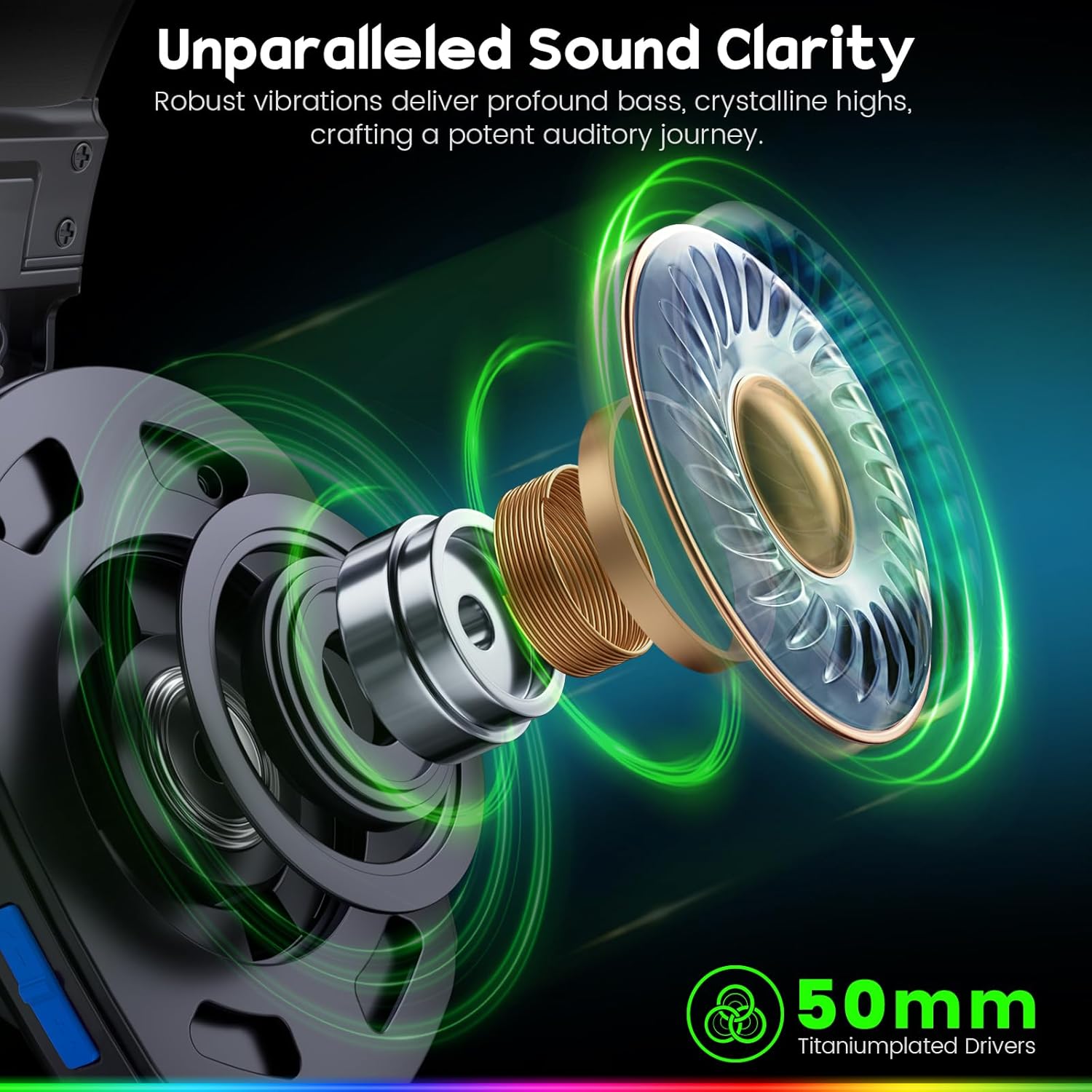
Image: An exploded diagram of the WESEARY WG1 headset's earcup, highlighting the 50mm titanium-plated drivers responsible for sound clarity and powerful bass.
Dual-Mode Connectivity
The headset supports two wireless modes: 2.4GHz and Bluetooth. The 2.4GHz mode is compatible with PS5, PS4, PC, Phone, Laptop, and Switch (audio only). The Bluetooth mode is compatible with PC, Mac, Switch (audio only), Mobile, Laptops, and Tablets. Note that the 2.4GHz USB and Type-C dongles must be used together for PS5/PS4/PC/Laptop/Mac. Neither mode is compatible with Xbox consoles. The microphone is not compatible with Nintendo Switch, and Bluetooth mode is not compatible with PS5/PS4.

Image: The WESEARY WG1 headset highlighting its dual wireless capabilities, featuring both USB-A and Type-C dongles for broad device compatibility.
Latência ultrabaixa
For competitive gaming, the 2.4GHz dongle mode provides an audio latency of ≤20ms, ensuring real-time audio synchronization. Bluetooth mode maintains a latency of less than 48ms, offering smooth and responsive audio for general use.

Image: A close-up of the WESEARY WG1 headset and its 2.4GHz dongle, emphasizing the ultra-low latency feature (≤20ms) for swift connectivity.
Conforto e Design
The headset is designed for extended wear with soft, breathable earcups and an adjustable headband. This ergonomic design aims to provide a pressure-free fit for various head sizes, ensuring comfort during long gaming sessions.

Image: The WESEARY WG1 headset in a cosmic setting, highlighting its lightweight, breathable earcups and adjustable headband for comfortable wear.
Duração da bateria
The WG1 features a 1200mAh battery, providing up to 50 hours of playtime without LED lighting, or up to 35 hours with dynamic LED lighting activated. A full charge via USB-C takes approximately 2.5 hours.
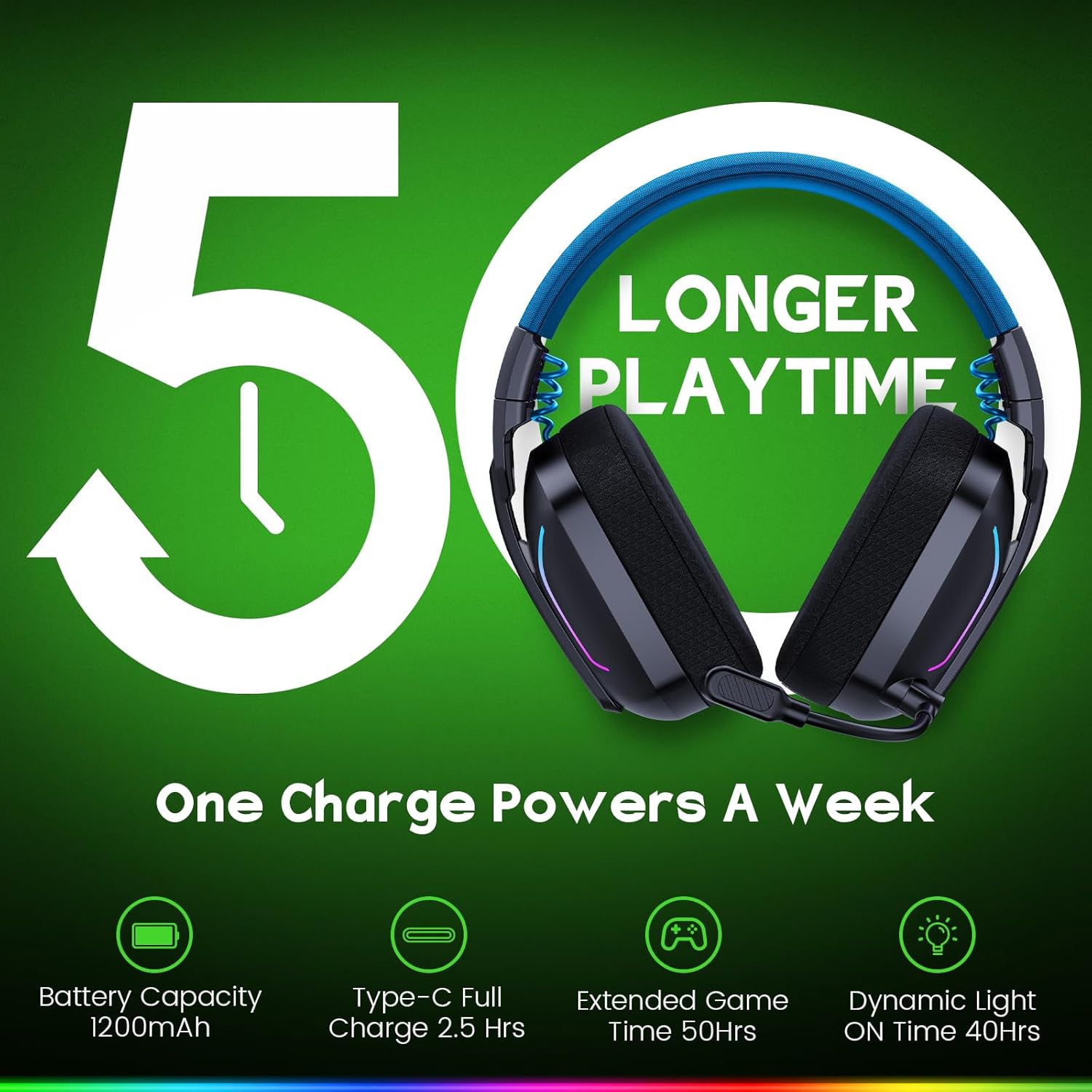
Image: The WESEARY WG1 headset with an overlay indicating its 1200mAh battery capacity and up to 50 hours of extended playtime on a single charge.
Iluminação LED dinâmica
The headset includes dynamic, color-shifting LED lights that can be activated with a single button press. This feature allows users to customize their gaming setup's aesthetic.
Omnidirectional Microphone with ENC
The integrated 360° omnidirectional microphone is designed for clear communication. Advanced Environmental Noise Cancellation (ENC) technology suppresses up to 95% of background noise, ensuring your voice is heard clearly by teammates. The microphone can be muted with a single click.

Image: The WESEARY WG1 headset's microphone, demonstrating its crystal-clear voice call capability with 95% background noise suppression. A note indicates microphone incompatibility with Nintendo Switch.
Configurar
Carregando o fone de ouvido
Before first use, fully charge the headset. Connect the provided USB-C charging cable to the headset's charging port and to a compatible USB power source. The LED indicator will show charging status. A full charge takes approximately 2.5 hours.
2.4GHz Wireless Connection (for PS5, PS4, PC, Laptop, Mac)
- Insert the 2.4GHz USB dongle into an available USB-A port on your device.
- If your device only has Type-C ports, use the provided Type-C adapter with the USB dongle.
- Ligue o fone de ouvido pressionando e segurando o botão liga/desliga por 3 segundos.
- The headset will automatically connect to the dongle. The LED indicator on the headset will show a stable light once connected.
- On your device's audio settings, ensure the WESEARY WG1 headset is selected as the input and output audio device.
Bluetooth Connection (for PC, Mac, Mobile, Laptops, Tablets)
- Verifique se o fone de ouvido está desligado.
- Long-press the power button for 3 seconds to turn on the headset.
- Long-press the microphone button for 2 seconds to toggle to Bluetooth mode. The LED indicator will flash, indicating pairing mode.
- No seu dispositivo, acesse as configurações de Bluetooth e pesquise os dispositivos disponíveis.
- Select "WESEARY WG1" from the list to pair. The LED indicator on the headset will show a stable light once connected.
Notas importantes sobre compatibilidade:
- Both 2.4GHz and Bluetooth modes are NOT compatible with Xbox consoles.
- O microfone NÃO é compatível com o Nintendo Switch em nenhum dos modos.
- Bluetooth mode is NOT compatible with PS5 or PS4 consoles.
Instruções de operação

Imagem: Uma imagem detalhada view of the WESEARY WG1 headset's left earcup, illustrating the location and function of its various control buttons and ports.
Power and Playback Controls (Button 1)
- Ligar / desligar: Pressione longamente por 3 segundos.
- Reproduzir / Pausar: Single click.
- Atender chamada: Single click.
- Desligar chamada: Single click.
- Rejeitar chamada: Pressione longamente por 2 segundos.
- Traceback (Redial last number): Duplo click.
Volume Down / Previous Track (Button 2)
- Volume baixo: Single click.
- Faixa anterior: Pressione longamente por 2 segundos.
Volume Up / Next Track (Button 3)
- Aumentar o volume: Single click.
- Próxima faixa: Pressione longamente por 2 segundos.
- Clear all devices (Reset pairing): Press Volume Up and Volume Down together for 6 seconds.
Microphone and Mode Toggle (Button 4)
- Mic on / off: Single click.
- Bluetooth mode ↔ Dongle mode: Long press for 2 seconds to switch between 2.4GHz and Bluetooth modes.
LED Control and Game/Music Mode (Button 5)
- LED Turn on / off: Single click.
- Modo de jogo/modo de música: Duplo click.
- Re-pairing (BT mode): Long press for 3 seconds (when in Bluetooth mode).
Manutenção
- Limpe os fones de ouvido regularmente com um pano macio e seco. Evite usar produtos químicos agressivos ou materiais abrasivos.
- Não exponha os fones de ouvido a temperaturas extremas, umidade ou luz solar direta.
- Guarde o fone de ouvido em local fresco e seco quando não estiver em uso.
- Evite deixar o fone de ouvido cair ou submetê-lo a impactos fortes.
Solução de problemas
Sem som / baixo volume
- Certifique-se de que o fone de ouvido esteja ligado e totalmente carregado.
- Verifique os níveis de volume tanto no fone de ouvido quanto no dispositivo conectado.
- Verify that the headset is correctly connected via 2.4GHz dongle or Bluetooth.
- For 2.4GHz, ensure the dongle is properly inserted and recognized by the device.
- For Bluetooth, ensure the headset is paired and selected as the audio output device in your device's settings.
- Try clearing all paired devices (Volume Up + Volume Down for 6 seconds) and re-pairing.
Microfone não funciona
- Ensure the microphone is not muted (single click on Button 4).
- Check the microphone input settings on your connected device to ensure the WESEARY WG1 is selected.
- Confirm compatibility: The microphone is NOT compatible with Nintendo Switch.
- Ensure the headset is in the correct mode (2.4GHz for PS5/PS4/PC/Laptop/Mac, Bluetooth for PC/Mac/Mobile/Laptops/Tablets).
Problemas de conexão
- Ensure the headset is within the operating range of your device.
- Minimize a interferência de outros dispositivos sem fio.
- Emparelhe novamente o fone de ouvido com seu dispositivo.
- For 2.4GHz, ensure both USB and Type-C dongles are used if required by your device (e.g., PS5/PS4/PC/Laptop/Mac).
Especificações
| Recurso | Detalhe |
|---|---|
| Nome do modelo | Grupo de Trabalho 1 |
| Tecnologia de Conectividade | Sem fio (2.4 GHz, Bluetooth) |
| Tecnologia de comunicação sem fio | 2.4 GHz sem fio, Bluetooth |
| Tipo de driver de áudio | Driver dinâmico (50 mm) |
| Controle de Ruído | Sound Isolation, Noise Cancellation (ENC Mic) |
| Duração da bateria | Up to 50 Hours (without LED), Up to 35 Hours (with LED) |
| Capacidade da bateria | 1200mAh |
| Tempo de carregamento | 2.5 horas (USB-C) |
| Material | Composite, Plastic |
| Peso do item | 11.7 onças |
| Dispositivos compatíveis | PC, Mac, Laptop, Mobile, Nintendo Switch (Audio only, Mic invalid). Not compatible with Xbox series. Bluetooth mode not compatible with PS5/PS4. |
Vídeo oficial do produto
Vídeo: Um oficial sobreview of the WESEARY WG1 Wireless Gaming Headset, showcasinsuas principais características e design.
Garantia e Suporte
For warranty information and technical support, please refer to the contact details provided on the product packaging or visit the official WESEARY webGuarde o comprovante de compra como prova para eventuais solicitações de garantia.