
1. Introdução
This manual provides essential instructions for the installation, operation, and maintenance of your Real HD DS-2CD1083G2-LIUF 4K 8MP Smart Hybrid Light IP Bullet PoE Camera. Please read this manual thoroughly before using the product to ensure proper and safe operation. This camera is designed for outdoor security surveillance, offering 4K resolution, advanced AI detection, and robust weather protection.
2. Informações de segurança
- Ensure the power supply (12V DC or PoE) meets the camera's requirements.
- Não exponha a câmera a temperaturas extremas, umidade ou ambientes corrosivos.
- Evite apontar a lente diretamente para fontes de luz intensa por períodos prolongados.
- Installation should be performed by qualified personnel and comply with local electrical codes.
- Desligue a energia antes de realizar qualquer manutenção ou limpeza.
3. Conteúdo da embalagem
Verifique se todos os itens estão presentes na embalagem:
- Real HD DS-2CD1083G2-LIUF IP Bullet PoE Camera (1 unit)
- Parafusos de montagem e buchas de parede
- Conector à prova d'água para cabo Ethernet
- Guia de Início Rápido (se incluído)
Note: SD card and power adapter are not included.
4. Produto acabadoview
The DS-2CD1083G2-LIUF is an 8MP 4K IP bullet camera featuring a 2.8mm wide-angle lens, Smart Hybrid Light technology, and advanced human and vehicle detection capabilities. It is designed for outdoor use with an IP67 weatherproof rating.

Figura 4.1: The camera provides 4K Ultra HD resolution for clear surveillance footage.
Principais características:
- Resolução 4K 8MP: Captures detailed video at 3840 × 2160 pixels.
- Lente fixa de 2.8 mm: Provides a wide 112° horizontal field of view.
- Smart Hybrid Light: Combines IR and white light for clear night vision, including color images in low light.
- Human and Vehicle Detection: AI-powered analytics reduce false alarms.
- Compressão H.265+: Efficient video encoding saves storage and bandwidth.
- Microfone embutido: Para monitoramento de áudio.
- Slot para cartão SD: Suporta até 512 GB de armazenamento local (cartão SD não incluído).
- IP67 à prova de intempéries: Durable design for outdoor environments.
- PoE (Energia sobre Ethernet): Simplifies installation with single cable for power and data.
5. Configuração e instalação
5.1 Instalação Física
A câmera foi projetada para montagem na parede. Escolha um local adequado que proporcione a visibilidade desejada. viewing angle and is within reach of your network cable.
- Local de montagem: Select a sturdy wall or surface. Ensure the camera's field of view está desobstruído.
- Furos de perfuração: Use the provided mounting template (if available) or the camera base to mark and drill pilot holes for screws.
- Câmera segura: Attach the camera base to the wall using the supplied screws and wall plugs.
- Ajustar ângulo: Loosen the adjustment screws to position the camera lens for optimal coverage, then tighten them to secure the angle.

Figura 5.1: The IP67 weatherproof design ensures reliable outdoor performance.
5.2 Network Connection (PoE)
The camera supports Power over Ethernet (PoE), allowing a single Ethernet cable to provide both power and data connection.
- Conecte o cabo Ethernet: Connect one end of an Ethernet cable to the camera's RJ45 port. Use the waterproof connector to protect the connection if installing outdoors.
- Conectar ao dispositivo PoE: Connect the other end of the Ethernet cable to a PoE-enabled NVR, PoE switch, or PoE injector.
- Alternative Power (12V DC): If not using PoE, connect a 12V DC power adapter (not included) to the camera's power input and an Ethernet cable to a standard network switch/router.
5.3 Configuração Inicial
After connecting the camera to your network, you will need to activate and configure it.
- Descubra a câmera: Use the manufacturer's SADP tool or your NVR's device search function to find the camera's IP address on your network.
- Ativar câmera: The camera will likely be inactive upon first use. Set a strong password for the camera.
- Acesso Web Interface: Abra um web browser (e.g., Chrome, Firefox) and enter the camera's IP address. Log in with the newly set password.
- Configurações de rede: Configure network settings (e.g., static IP, DNS) if necessary.
- Configurações de tempo: Set the correct date and time for accurate recording timestamps.
6. Instruções de operação
6.1 Acessando o Live View e reprodução
You can access the camera's live view e gravou footage via its web interface or a compatible NVR/client software.
- Web Navegador: Log into the camera's web interface. Navigate to the "Live View" section to see real-time footage. For playback, go to the "Playback" section and select the desired date and time.
- NVR: If connected to an NVR, access the camera's feed and recordings through the NVR's interface. Refer to your NVR's manual for specific instructions.
6.2 Gerenciamento de Gravação
The camera supports various recording methods.
- Armazenamento em cartão SD: Insert a microSD/SDHC/SDXC card (up to 512GB, not included) into the camera's card slot. Format the card via the web interface. Configure recording schedules and event-triggered recording.
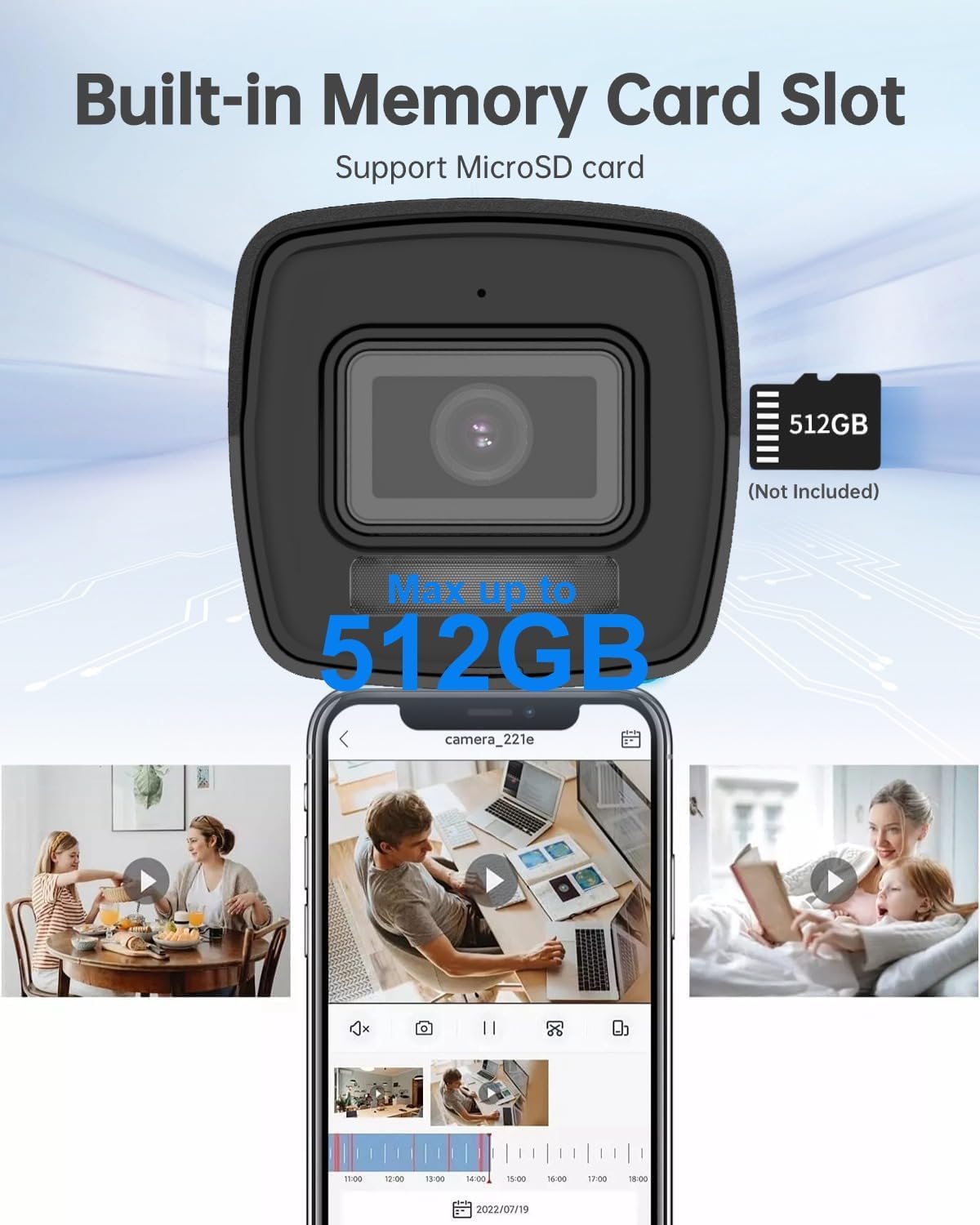
Figura 6.1: The camera features a built-in memory card slot supporting up to 512GB for local storage.
- NAS Storage: Configure Network Attached Storage (NFS, SMB/CIFS) for remote recording.
- Compressão H.265+: The camera utilizes H.265+ video compression to optimize storage space and bandwidth without compromising video quality.

Figura 6.2: H.265+ compression reduces data usage by up to 80% compared to H.264.
6.3 Smart Features (AI Detection)
The camera's advanced AI capabilities provide intelligent detection and reduce false alarms.
- Human and Vehicle Detection: Configure detection zones and sensitivity in the camera's web interface. The system can differentiate between humans, vehicles, and other moving objects like raindrops or leaves.
- Detecção de cruzamento de linha: Set up virtual lines, and the camera will trigger an alarm when an object crosses them in a specified direction.
- Detecção de intruso: Define virtual regions, and the camera will alert you if an object enters and loiters within that area.
- Unattended Baggage/Object Removal: Configure specific areas for detecting objects left behind or removed.

Figura 6.3: Smart AI detection accurately identifies humans and vehicles, reducing false alarms.
Monitoramento de áudio 6.4
The built-in microphone allows for real-time audio monitoring. Enable and adjust audio settings via the camera's web interface.
6.5 Night Vision and Smart Hybrid Light
The camera features advanced infrared technology and Smart Hybrid Light for clear imaging in various lighting conditions.
- Modo IR: Provides black and white video in complete darkness with a range of up to 98 feet.
- Smart Hybrid Light: In low-light conditions, the camera can automatically switch to a mode that uses supplemental white light to provide full-color images. This can be configured in the camera settings.

Figura 6.4: Advanced Infrared Technology (EXIR 2.0) enhances night vision clarity.
7. Manutenção
7.1 Limpeza
- Limpe suavemente a lente e o corpo da câmera com um pano macio e seco.amp pano.
- Não use produtos químicos fortes ou produtos de limpeza abrasivos.
- Ensure no moisture enters the camera body.
7.2 atualizações de firmware
Verifique periodicamente as instruções do fabricante. website for firmware updates. Updating firmware can improve performance, add new features, and enhance security. Follow the instructions provided with the firmware update package carefully.
7.3 Gerenciamento de armazenamento
Re regularmenteview e gerenciar foo gravadotage. If using an SD card, ensure it is functioning correctly and has sufficient space. Consider backing up important footage to an NVR or NAS.
8. Solução De Problemas
| Problema | Possível causa | Solução |
|---|---|---|
| Sem feed de imagens/vídeos | No power; Network cable disconnected; Incorrect IP address; Camera not activated. | Check power supply (PoE or 12V DC); Verify Ethernet cable connection; Ensure correct IP address and network settings; Activate camera and set password. |
| Baixa qualidade de imagem | Dirty lens; Insufficient lighting; Incorrect video settings. | Clean the lens; Ensure adequate lighting or enable Smart Hybrid Light; Adjust image settings (brightness, contrast, sharpness) in the web interface. |
| False alarms from detection | Sensibilidade muito alta; Zonas de detecção muito amplas; Fatores ambientais (ex.: galhos em movimento). | Adjust detection sensitivity; Refine detection zones to exclude irrelevant areas; Utilize human/vehicle detection to filter out non-human/vehicle movements. |
| Cannot record to SD card | SD card not inserted; SD card not formatted; SD card full or faulty. | Insert SD card correctly; Format SD card via web interface; Replace SD card if faulty. |
9. Especificações
| Recurso | Detalhe |
|---|---|
| Nome do modelo | DS-2CD1083G2-LIUF |
| Sensor de imagem | CMOS de varredura progressiva de 1/2.7" |
| Resolução Estática Efetiva | 8MP (3840×2160) |
| Iluminação mínima | 0.01 Lux @ (F2.0, AGC ON), 0 Lux with Light |
| Lente | Lente fixa 2.8mm |
| Viewângulo de engate | Horizontal FOV 112°, Vertical FOV 61°, Diagonal FOV 134° |
| Dia e Noite | Auto |
| Redução de ruído digital | 3D DNR |
| Compressão de vídeo | Português H.265+/H.265/H.264+/H.264/MJPEG |
| Resolução Máxima da Imagem | 3840 × 2160 a 15 fps |
| Melhoria de imagem | BLC/3D DNR/HLC/ROI |
| Armazenamento em rede | microSD/SDHC/SDXC card (512GB max), NAS (NFS, SMB/CIFS), ANR |
| Interface de comunicação | 1 RJ45 10M / 100M Ethernet interface |
| Análise do comportamento | Detecção de cruzamento de linha, detecção de intrusão, detecção de bagagem desacompanhada, detecção de remoção de objeto |
| Fonte de energia | 12 VDC ± 25%, PoE (802.3af, classe 3) |
| Consumo de energia | Máx. 10 watts |
| À prova de intempéries | IP67 |
| Alcance de visão noturna | 98 pés |
| Uso interno/externo | Ar livre |
| Material | Metal, Plástico |
| Dimensões | 6.7 x 6.7 x 6 polegadas (aproximadamente) |
10. Garantia e Suporte
For warranty information, technical support, or service inquiries, please contact the Real HD Store or your authorized dealer. Keep your purchase receipt as proof of purchase.
Você pode visitar o Real HD Store on Amazon para obter mais informações e recursos de suporte.