
1. Introdução
Thank you for choosing the OMOTON WK209 Wireless Keyboard and Mouse Set. This manual provides detailed instructions for setting up, operating, and maintaining your new wireless peripheral set. Please read this manual carefully before use to ensure optimal performance and longevity of your product.
2. Conteúdo da embalagem
The OMOTON WK209 Wireless Keyboard and Mouse Set package includes the following items:
- 1 x OMOTON WK209 Wireless Keyboard
- 1 x OMOTON Wireless Mouse
- 1 x USB 2.4 GHz Receiver
Note: AAA batteries are required for operation but are not included in the package.
3. Guia de configuração
3.1. Instalando baterias
Before using the keyboard and mouse, you need to install batteries.
- Localize o compartimento da bateria na parte inferior do teclado e do mouse.
- Abra as tampas das baterias.
- Insert two AAA batteries into the keyboard and one AAA battery into the mouse, ensuring correct polarity (+/-).
- Feche bem as tampas das baterias.

This image displays the battery compartments for the OMOTON WK209 keyboard and mouse. The keyboard requires two AAA batteries, and the mouse requires one AAA battery. Please note that batteries are not included with the product.
3.2. Conectando o receptor USB
The OMOTON WK209 set uses a single USB receiver for both the keyboard and mouse.
- Locate the USB 2.4 GHz receiver, usually stored in the mouse's battery compartment or packaging.
- Plug the USB receiver into an available USB port on your computer (laptop or desktop PC).
- The system will automatically detect and install the necessary drivers. This is a Plug & Play process and typically requires no manual installation.
- Turn on the mouse using the ON/OFF switch located on its underside. The keyboard does not have a separate power switch; it activates when keys are pressed.

This image illustrates the 2.4 GHz wireless connection of the OMOTON WK209 keyboard and mouse set. It highlights features such as Plug & Play functionality, a stable 2.4G connection, and a wireless range of up to 10 meters (33 feet).
3.3. Compatibilidade
The OMOTON WK209 set is compatible with a wide range of Windows operating systems.
- Sistemas operacionais: Windows 11, Windows 10, Windows 8, Windows 7, Windows XP.
- Dispositivos: Laptop, Desktop PC.

This image demonstrates the broad compatibility of the OMOTON WK209 set with different Windows operating systems, including Windows 7, 8, 10, and 11, across desktop PCs and laptops.
4. Instruções de operação
4.1. Uso do teclado
The WK209 keyboard features a full-size QWERTZ layout with multimedia keys for enhanced productivity. Simply begin typing after successful connection.
- Chaves multimídia: Access functions like volume control, play/pause, and more directly from the keyboard.
- Layout QWERTZ: Standard German keyboard layout for familiar typing experience.
- Inclinação de 8°: The keyboard is designed with a natural 8-degree tilt for ergonomic comfort during extended use.

This image provides the physical dimensions of the OMOTON WK209 full-size QWERTZ keyboard (43.8 cm x 12.4 cm) and mouse (10.3 cm x 6.6 cm x 3.6 cm). It also notes the keyboard's natural 8-degree tilt for comfortable typing.
4.2. Utilização do mouse
The WK209 mouse offers precise control and several functional buttons.
- Clique esquerdo: Seleção e ativação padrão.
- Clique com o botão direito: Acessa os menus de contexto.
- Rodinha do mouse: Para rolagem vertical e funcionalidade de clique do meio.
- Botão Voltar: Navega de volta para web navegadores ou file exploradores.
- Botão Avançar: Navega para a frente em web navegadores ou file exploradores.
- Desktop Show/Hide Button: Quickly minimizes all open windows to show the desktop, and restores them with another press.

This image highlights the features of the OMOTON WK209 wireless mouse, including the scroll wheel, left-click button, right-click button, back button, forward button, and a button for showing/hiding the desktop. It also emphasizes its ergonomic design and quiet click functionality.
5. Características
- Conexão sem fio de 2.4 GHz: Provides a stable and reliable connection with a range of up to 10 meters (33 feet).
- Plug & Play: Easy setup without the need for additional software or drivers.
- Full-size QWERTZ Layout: Comfortable and familiar typing experience.
- Chaves multimídia: Convenient access to media controls.
- Design ergonômico: The mouse is shaped for comfortable use, and the keyboard features a natural 8-degree tilt.
- Operação silenciosa: Both the keyboard and mouse are designed for silent clicks and keystrokes, ideal for quiet environments.
- Indicador de bateria fraca: The keyboard features an indicator light to alert you when batteries are running low.

This image illustrates the quiet operation of the OMOTON WK209 keyboard and mouse, highlighting its silent keys and noiseless mouse clicks, suitable for quiet environments.
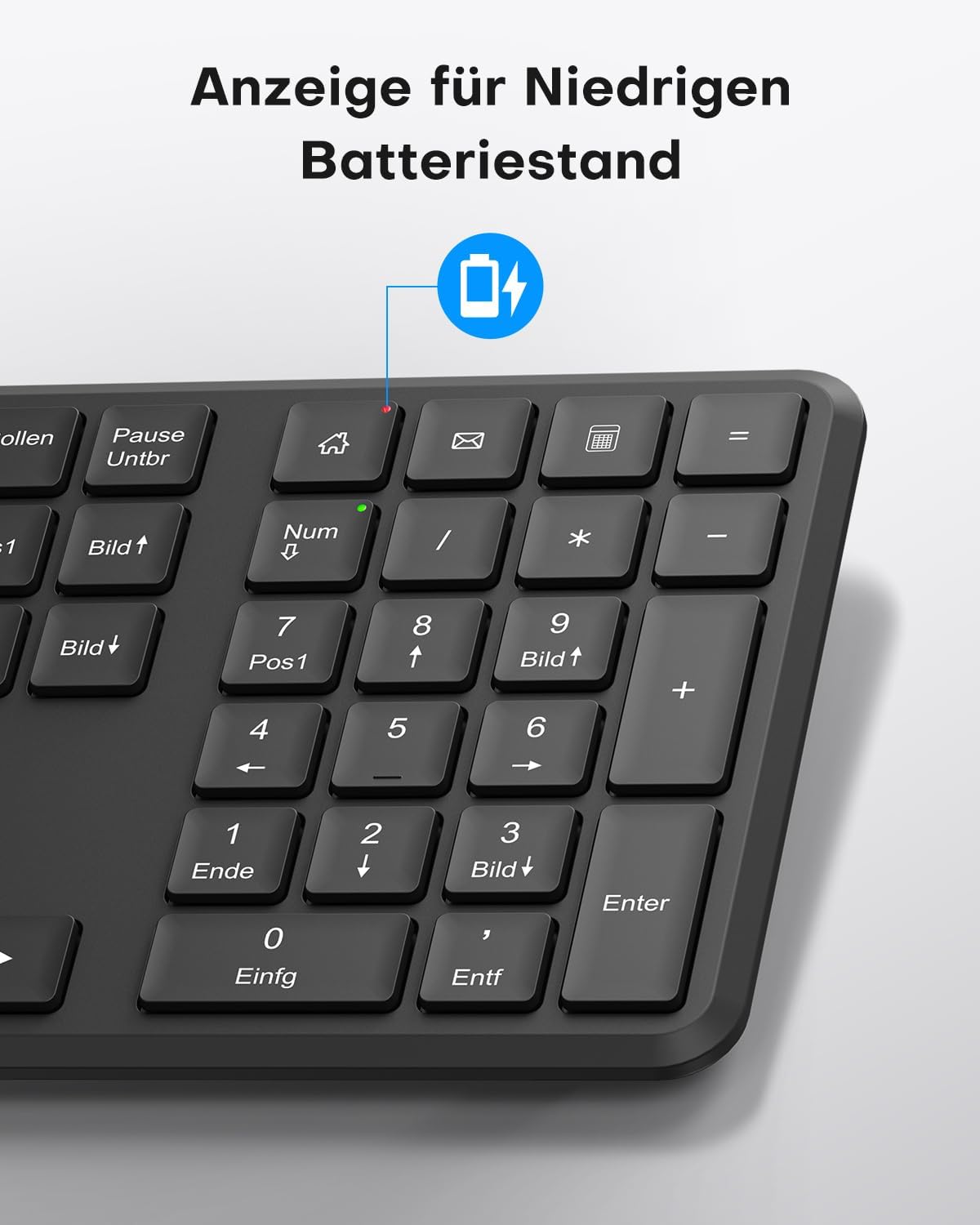
This image points out the low battery indicator on the OMOTON WK209 keyboard, which illuminates to alert the user when batteries need to be replaced.
6. Manutenção
To ensure the longevity and optimal performance of your OMOTON WK209 set, follow these maintenance guidelines:
- Limpeza: Use um pano macio e seco para limpar as superfícies do teclado e do mouse. Para sujeira mais resistente, use um pano levemente umedecido.amp Pode-se usar um pano, mas certifique-se de que não entre umidade nos dispositivos.
- Substituição da bateria: Replace batteries promptly when the low battery indicator appears or when performance degrades. Always use fresh, high-quality AAA batteries.
- Armazenar: When not in use for extended periods, remove the batteries to prevent leakage. Store the devices in a cool, dry place.
- Evite líquidos: Keep the keyboard and mouse away from liquids to prevent damage.
7. Solução De Problemas
If you encounter issues with your OMOTON WK209 set, try the following troubleshooting steps:
- Sem resposta do teclado/mouse:
- Ensure batteries are correctly installed and not depleted. Replace them if necessary.
- Make sure the mouse's ON/OFF switch is in the 'ON' position.
- Verifique se o receptor USB está conectado firmemente a uma porta USB funcional do seu computador. Tente usar uma porta USB diferente.
- Reinicie o seu computador.
- Conexão lenta ou intermitente:
- Aproxime o teclado e o mouse do receptor USB.
- Ensure there are no large metal objects or other wireless devices (e.g., Wi-Fi routers, cordless phones) interfering with the 2.4 GHz signal.
- Try plugging the USB receiver into a front USB port or using a USB extension cable to bring it closer to the devices.
- Keys Not Working Correctly:
- Verifique se há algum detrito sob as teclas.
- Ensure the keyboard layout setting on your computer matches the QWERTZ layout.
- O cursor do mouse salta ou está impreciso:
- Limpe o sensor óptico na parte inferior do mouse.
- Utilize o mouse em uma superfície limpa e não refletora ou em um mousepad.
8. Especificações
| Recurso | Detalhe |
|---|---|
| Marca | ÔMOTO |
| Modelo | WK209 |
| Cor | Preto |
| Tecnologia de Conectividade | 2.4 GHz sem fio |
| Layout do teclado | Full-size QWERTZ (German Layout) |
| Características especiais | 2.4 GHz, Full-size, QWERTZ-layout, Battery-operated, Multimedia keys |
| Dispositivos compatíveis | Portátil, PC |
| Sistemas operacionais compatíveis | Windows 11/10/8/7/XP |
| Fonte de energia | Battery-Powered (2x AAA for keyboard, 1x AAA for mouse - not included) |
| Peso do item (aprox.) | 514 Grams (total set, including packaging) |
| Dimensões da embalagem | 44.79 x 13.9 x 5.3 cm |
| ASIN | B0FQNS3FFB |
9. Garantia e Suporte
OMOTON products are designed for reliability and performance. For warranty information and customer support, please refer to the warranty card included with your purchase or visit the official OMOTON website. If you experience any issues that cannot be resolved using the troubleshooting guide, please contact OMOTON customer service for assistance.