
Introdução
Thank you for choosing the Digitus DA-70919 USB-C 8K 12-Port Docking Station. This device is designed to expand the connectivity of your USB-C enabled laptop or computer, providing a comprehensive solution for video output, data transfer, network access, and power delivery. Please read this manual carefully to ensure proper installation and operation.
Produto acimaview
The Digitus DA-70919 docking station offers 12 essential ports to enhance your workspace. It supports high-resolution video output, fast data transfer, and efficient power delivery to your host device.

Figura 1: Detailed diagram of the Digitus DA-70919 docking station ports and their functions. This diagram labels each of the 12 ports on the docking station, including Audio Jack, USB-A, USB-C, USB-C PD, DisplayPort, HDMI, RJ45 Gigabit Ethernet, and SD/MicroSD card slots, along with anti-theft protection.

Figura 2: Frente view of the Digitus DA-70919 docking station showing all accessible ports. A clear view of the docking station's front panel, displaying the various input and output ports including USB-A, USB-C, HDMI, DisplayPort, Ethernet, and card readers.
Principais características:
- Saída de vídeo: 2x HDMI, 1x DisplayPort (DP) supporting up to 8K/30Hz for single display, or multi-display configurations.
- Portas de dados USB: 2x USB-A 3.2 Gen 2 (10Gbps), 1x USB-A 3.2 Gen 1 (5Gbps), 1x USB-C 3.2 Gen 2 (10Gbps).
- Fornecimento de energia (PD): USB-C PD 3.0 port for charging your host laptop (up to 85W output).
- Rede: Gigabit Ethernet (RJ45) for stable wired internet connection.
- Leitores de cartão: SD and MicroSD card slots with 104 MBps transfer speed.
- Áudio: Entrada de áudio de 3.5 mm para fones de ouvido ou alto-falantes.
Instruções de configuração
Follow these steps to set up your Digitus DA-70919 docking station:
- Check Host USB-C Port Compatibility: Ensure your laptop's USB-C port supports DisplayPort Alternate Mode (DP Alt Mode) for video output and Power Delivery for charging. Without DP Alt Mode, video output will not function.

Figura 3: Guide to USB-C port compatibility for DisplayPort Alternate Mode. This graphic explains which types of USB-C ports on your laptop support the full functionality of the docking station, specifically highlighting the requirement for DisplayPort Alternate Mode (DP Alt Mode) for video output.
- Conectar ao dispositivo host: Connect the integrated USB-C cable from the docking station to the USB-C port on your laptop.
- Conecte o adaptador de energia (opcional, mas recomendado): If you wish to charge your laptop via the docking station or power high-demand peripherals, connect a USB-C Power Delivery adapter (not included, up to 100W recommended) to the USB-C PD input port on the docking station.
- Conectar monitores externos: Conecte seus monitores às saídas HDMI e/ou DisplayPort da estação de acoplamento usando os cabos apropriados.
- Conecte periféricos: Plug in your USB devices (keyboard, mouse, external drives), Ethernet cable, SD/MicroSD cards, and audio devices to the corresponding ports on the docking station.
- Instalação do driver: In most cases, the docking station is plug-and-play and does not require additional drivers. If prompted, allow your operating system to install any necessary drivers automatically.
Instruções de operação
Modos de exibição
A estação de acoplamento suporta várias configurações de tela:
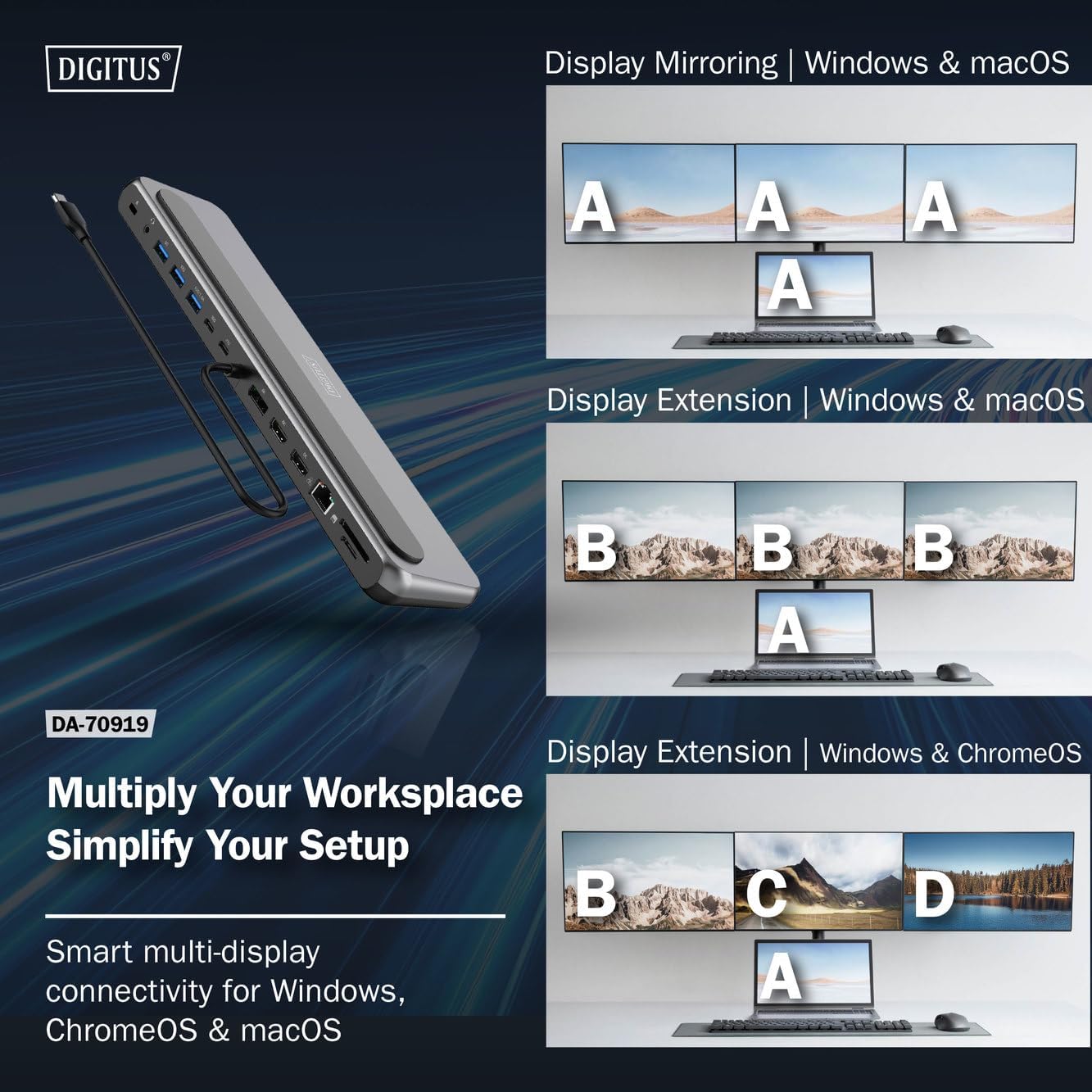
Figura 4: Diagram showing display mirroring and extension modes for Windows, macOS, and ChromeOS. This image illustrates the various display configurations supported by the docking station, including mirroring your screen or extending it across multiple external monitors on Windows, macOS, and ChromeOS.
- Modo Espelho: Duplicates your laptop's display onto the external monitors.
- Extend Mode (Windows/ChromeOS): Extends your desktop across multiple external monitors, allowing for a multi-tasking environment. Supports dual monitors (2x 4K/60Hz) and triple monitors (1x 4K/60Hz + 2x 4K/30Hz) in MST (Multi Stream Transport) mode.
- Extend Mode (macOS): macOS typically supports extended desktop to one external monitor, with other external monitors mirroring each other.
To configure display settings, access your operating system's display settings (e.g., Windows Display Settings, macOS System Preferences > Displays).
Transferência de dados
Utilize the USB-A and USB-C data ports for connecting external storage devices, keyboards, mice, and other USB peripherals. The USB 3.2 Gen 2 ports offer speeds up to 10Gbps, while the USB 3.2 Gen 1 port offers speeds up to 5Gbps.
Fornecimento de energia
When a compatible USB-C PD power adapter is connected to the docking station's PD input port, the docking station can deliver up to 85W of power to charge your connected laptop. This allows you to power your laptop and peripherals through a single USB-C connection.
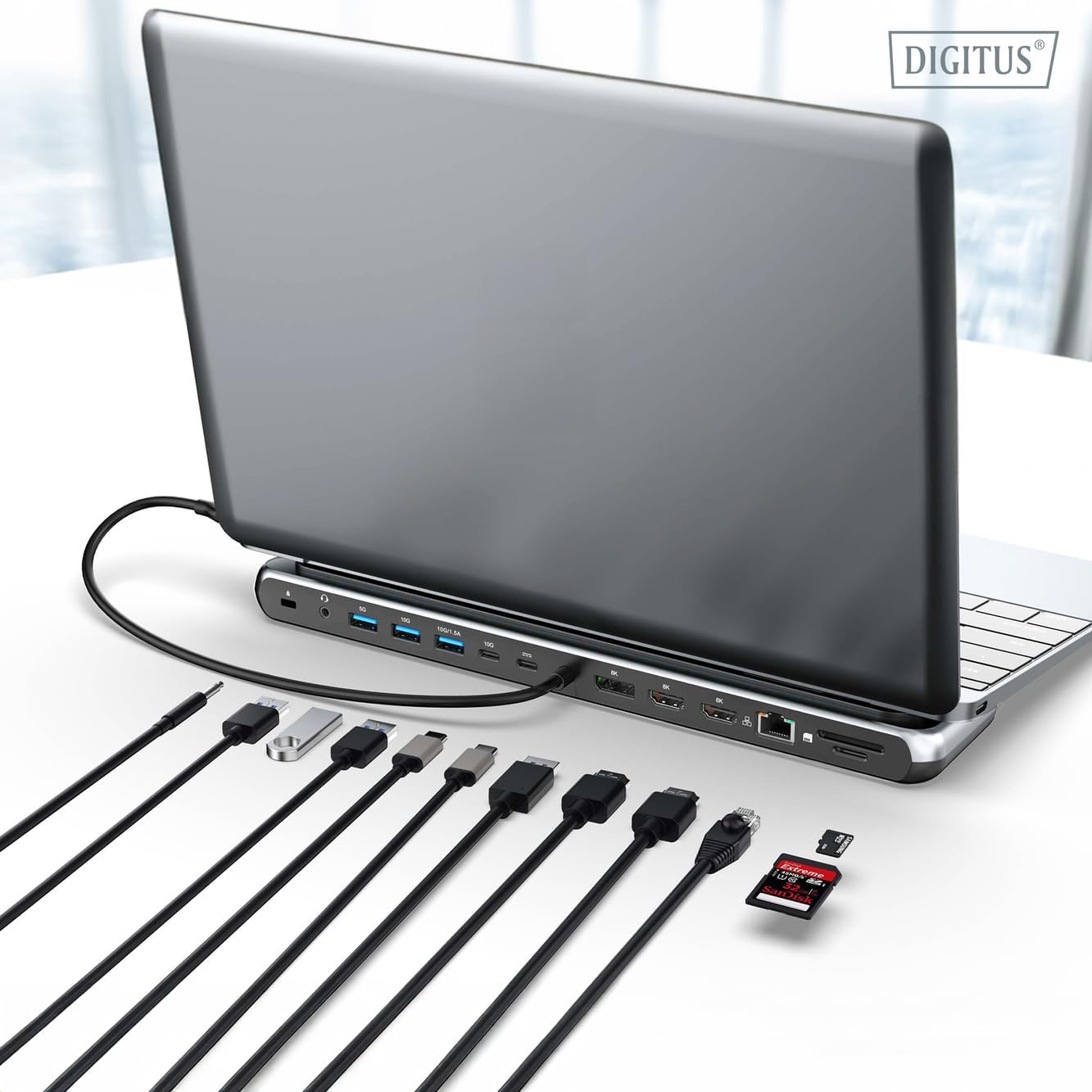
Figura 5: Illustration of the docking station's fast charging capability via USB-C Power Delivery. This image demonstrates the Power Delivery function, showing a 100W input to the docking station and an 85W output to charge the connected laptop.
Conexão de rede
Connect an Ethernet cable to the RJ45 port for a stable and high-speed wired network connection (10/100/1000 Mbps Gigabit Ethernet).
Leitores de cartão
Insert SD or MicroSD cards into the dedicated slots for quick access to photos, videos, and other files. The card readers support transfer speeds up to 104 MBps.
Saída de áudio
Connect your headphones or speakers to the 3.5mm audio jack for audio output.
Manutenção
- Limpeza: Use a soft, dry cloth to clean the surface of the docking station. Avoid using liquid cleaners or solvents.
- Armazenar: Guarde a estação de acoplamento em local fresco e seco, longe da luz solar direta e de temperaturas extremas.
- Manuseio: Avoid dropping or subjecting the device to strong impacts. Do not attempt to disassemble the docking station.
Solução de problemas
Se você encontrar problemas com sua estação de acoplamento, consulte as seguintes soluções comuns:
- Sem saída de vídeo:
- Verifique se a porta USB-C do seu laptop é compatível com o Modo Alternativo DisplayPort.
- Check all video cables (HDMI/DP) are securely connected to both the docking station and the monitor.
- Verify that the monitor is powered on and set to the correct input source.
- Tente conectar um monitor de cada vez para isolar o problema.
- Atualize os drivers gráficos do seu laptop.
- Sem fornecimento de energia para o laptop:
- Ensure a compatible USB-C PD power adapter (up to 100W) is connected to the docking station's PD input port.
- Verifique se a porta USB-C do seu laptop é compatível com Power Delivery.
- Verifique se o adaptador de energia e o cabo estão danificados.
- Dispositivos USB não reconhecidos:
- Reconecte o dispositivo USB a uma porta diferente na estação de acoplamento.
- Ensure the docking station is properly connected to the host laptop.
- If using a high-power USB device, ensure the docking station is connected to an external power adapter.
- Problemas de conexão Ethernet:
- Verifique a conexão do cabo Ethernet tanto na estação de acoplamento quanto no seu roteador/modem.
- Verifique as configurações de rede no seu laptop.
- Reinicie o roteador/modem e o laptop.
- Card Reader Not Working:
- Ensure the SD/MicroSD card is inserted correctly and fully.
- Test the card with another device to confirm it is not damaged.
Especificações
| Recurso | Especificação |
|---|---|
| Modelo | DA-70919 |
| Conexão de host | USB-C (cabo integrado) |
| Saída de vídeo | 2x HDMI, 1x DisplayPort (DP) |
| Max. Single Display Resolution | 8K (7680x4320) a 30Hz |
| Max. Dual Display Resolution (MST) | 2x 4K (3840x2160) @ 60Hz |
| Max. Triple Display Resolution (MST) | 1x 4K@60Hz + 2x 4K@30Hz |
| Portas de dados USB-A | 2x USB 3.2 Gen 2 (10Gbps), 1x USB 3.2 Gen 1 (5Gbps) |
| Porta de dados USB-C | 1x USB 3.2 Gen 2 (10 Gbps) |
| Power Delivery (PD) Input | USB-C PD 3.0 (up to 100W) |
| Power Delivery (PD) Output to Host | Até 85W |
| Ethernet | RJ45 Gigabit (10/100/1000 Mbps) |
| Leitores de cartão | SD, MicroSD (104 MBps) |
| Áudio | 1x conector de áudio de 3.5 mm |
| Compatibilidade | Windows, macOS, ChromeOS |
| Temperatura de operação | 0°C a 45°C (32°F a 113°F) |
| Temperatura de armazenamento | -10°C a 70°C (14°F a 158°F) |
Garantia e Suporte
The Digitus DA-70919 USB-C 8K 12-Port Docking Station comes with a Garantia de 2 ano a partir da data da compra. Esta garantia cobre defeitos de fabricação e assegura que o produto funciona conforme descrito em condições normais de uso.
For technical support, warranty claims, or further assistance, please contact your retailer or visit the official Digitus website for contact information. Please have your product model number (DA-70919) and proof of purchase ready when seeking support.