
1. Introdução
This manual provides essential information for the safe and efficient operation of your Generic ES585B Electronic Clock/Timer Controller. Please read this manual thoroughly before installation and use, and retain it for future reference. This controller is designed for precise electronic timing and temperature management in compatible appliances.
1.1 Informações de segurança
- Risco elétrico: Installation and servicing should only be performed by qualified personnel. Disconnect power before servicing.
- Manipulação de componentes: Electronic components are sensitive to electrostatic discharge. Handle with care and use appropriate ESD precautions.
- Compatibilidade: Ensure this controller is compatible with your appliance model before installation. Refer to your appliance's service manual.
- Condições ambientais: Do not expose the controller to excessive moisture, dust, or extreme temperatures.
2. Descrição do produto
The Generic ES585B is an electronic control board featuring a clock and timer function, designed to manage various operations within an appliance. It integrates control logic for functions such as timed operations, delay starts, and potentially specific cooking modes like convection bake, broil, roast, and more, as indicated by its display interface.

Figura 2.1: Frente view of the ES585B Electronic Controller, displaying the digital clock/timer and various function indicators such as TIMED, DELAY, TIMER, DOOR LOCKED, CLEAN, CONV BAKE, BROIL, ROAST, CAKES, and BREADS.
The controller typically consists of a main circuit board with relays, connectors, and a user interface panel. The interface panel includes a digital display for time and status, along with indicators for active functions.

Figura 2.2: Visão de cima para baixo view of the ES585B Controller's internal circuit board, showing the arrangement of relays, capacitors, and other electronic components.
3. Configuração e instalação
Installation of the ES585B controller requires technical expertise and should be performed by a qualified service technician. Incorrect installation can lead to appliance malfunction, damage, or personal injury.
3.1 Etapas de pré-instalação
- Desconecte a energia: Always disconnect the appliance from its power source before beginning any installation or repair work.
- Painel de acesso: Carefully remove the appliance's control panel or access cover to expose the existing controller.
- Documentação: Take photographs or make detailed diagrams of the existing wiring connections before disconnecting them.
3.2 Procedimento de instalação
- Remover o controlador antigo: Disconnect all wiring from the old controller and carefully remove it from its mounting.
- Instalar novo controlador: Position the new ES585B controller in the same location and secure it using the original mounting hardware.
- Conectar a fiação: Reconnect all wiring to the new controller according to your documentation. Ensure all connections are secure and correctly matched.
- Verifique as conexões: Double-check all wiring connections for accuracy and tightness.
- Remontar: Replace the control panel or access cover.

Figura 3.1: Lateral view of the ES585B Controller, illustrating the various wiring harnesses and connectors for integration into an appliance.
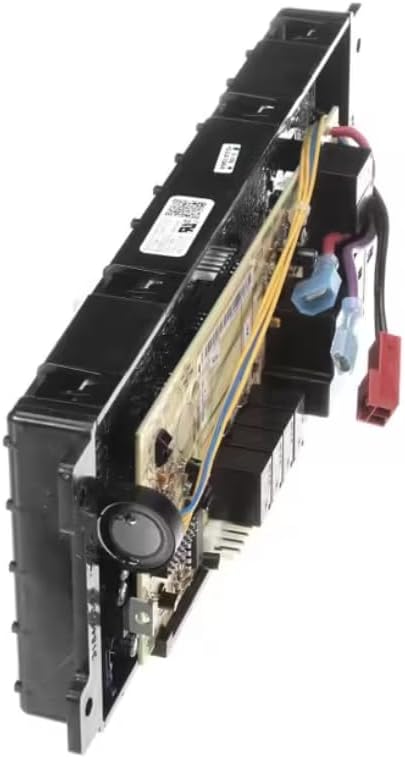
Figura 3.2: Lado alternativo view of the ES585B Controller, providing a different perspective on its physical structure and component placement.
3.3 Verificação pós-instalação
After installation, restore power to the appliance and perform a functional test to ensure the controller operates correctly. Check the display, clock, and all relevant functions.
4. Instruções de operação
The ES585B controller provides an intuitive interface for setting time and managing appliance functions. Specific button labels and sequences will vary by appliance model, but the core functions are generally consistent.
4.1 Ajustando o Relógio
- Locate the 'Clock' or 'Time Set' button. Press it once.
- Use the '+' or '-' buttons (or numerical keypad) to adjust the hour.
- Press the 'Clock' or 'Time Set' button again to move to minute adjustment.
- Use os botões '+' ou '-' para ajustar os minutos.
- Press 'Start' or 'Clock' again to confirm the time.
4.2 Utilizando a função Temporizador
The timer function acts as a kitchen timer and does not control the appliance's operation directly.
- Pressione o botão 'Temporizador'.
- Enter the desired time using the '+' or '-' buttons or numerical keypad.
- Press 'Start' or 'Timer' again to begin the countdown.
- An audible alert will sound when the timer expires. Press 'Timer' to clear the alert.
4.3 Timed Operations (e.g., Timed Bake)
This function allows the appliance to operate for a set duration.
- Select the desired cooking mode (e.g., 'Bake', 'Roast').
- Press the 'Timed' or 'Cook Time' button.
- Enter the desired cooking duration.
- Press 'Start'. The appliance will operate for the set time and then turn off automatically.
4.4 Função de Início com Atraso
The delay start feature allows you to set the appliance to begin operation at a later time.
- Selecione o modo de cozimento e a temperatura desejados.
- Press the 'Delay Start' button.
- Enter the desired delay time (when you want the appliance to start).
- Press 'Start'. The appliance will wait for the set delay time before beginning the operation.
5. Manutenção
The ES585B controller is designed for minimal maintenance. Regular cleaning and proper handling will ensure its longevity.
5.1 Limpeza
- Desconecte a energia: Always disconnect power to the appliance before cleaning the control panel.
- Limpeza de superfícies: Use um pano macio e macioamp cloth with mild soap to wipe the surface of the control panel. Avoid abrasive cleaners, solvents, or excessive moisture.
- Evite líquidos: Do not spray cleaning liquids directly onto the control panel or allow liquids to seep into the gaps around buttons or the display.
5.2 Cuidados Gerais
- Avoid pressing buttons with sharp objects.
- Protect the controller from physical impact.
- Ensure proper ventilation around the appliance to prevent overheating of electronic components.
6. Solução De Problemas
If you encounter issues with your ES585B controller, refer to the following common troubleshooting steps. For complex problems, contact a qualified service technician.
| Problema | Possível causa | Solução |
|---|---|---|
| A tela está em branco ou com brilho reduzido. | No power, loose connection, display failure | Check power supply to the appliance. Verify wiring connections. If problem persists, controller may need replacement. |
| Botões que não respondem | Control panel locked, internal error, physical damage | Check for a 'Control Lock' feature and disable it. Disconnect power for 5 minutes and reconnect (reset). Inspect for physical damage. |
| Clock/Timer not keeping accurate time | Power interruption, internal component issue | Reset the clock. If the issue recurs frequently, professional service may be required. |
| Appliance functions not responding to controller | Incorrect wiring, faulty relays, internal circuit failure | Verify all wiring connections. This issue typically requires diagnosis and repair by a qualified technician. |
7. Especificações
| Recurso | Detalhe |
|---|---|
| Número do modelo | ES585B (Also known as AI3164627130D REV A, EHP-316462713D REV X40, SF5531-87073H REV E) |
| Dimensões do produto (C x L x A) | 11.8" x 7.7" x 4.4" |
| Peso do item | 1.19 libras |
| Componentes incluídos | Temperature Control (Integrated) |
| Funcionalidade | Electronic Clock, Timer, Timed Operations, Delay Start, Appliance Mode Control |
8. Garantia e Suporte
Specific warranty information for the Generic ES585B controller is not provided in this document. Please refer to the original purchase documentation or contact your retailer for details regarding warranty coverage.
For technical support or service inquiries, it is recommended to contact the appliance manufacturer or a certified service technician who specializes in your specific appliance model.