
1. Produto acabadoview
The Shutao 4-Channel 18650 Battery Capacity Tester is designed for comprehensive analysis of 18650 lithium batteries. It features four independent channels, allowing simultaneous charging, discharging, and capacity testing. This device also includes internal resistance measurement and automatic cycling functions to optimize battery performance and assess health.
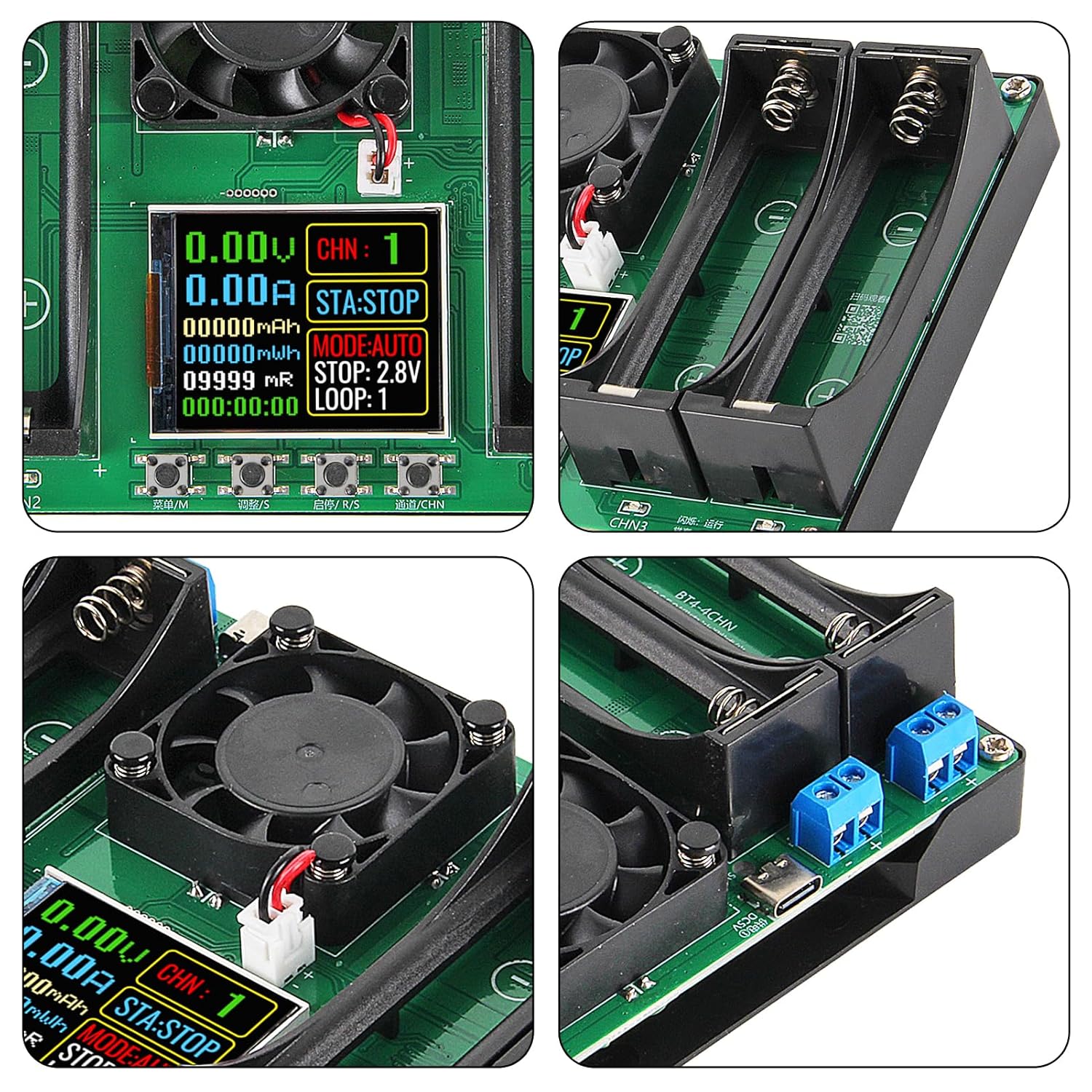
Figura 1: Sobreview of the Shutao 4-Channel 18650 Battery Capacity Tester. This image shows the device from an angled perspective, highlighting the four battery slots, the central cooling fan, and the display screen.
2. Conteúdo da embalagem
Verifique se todos os itens estão presentes no seu pacote:
- 1 x 18650 Lithium Battery Capacity Tester Module
3. Identificação do componente
Familiarize yourself with the various components and interfaces of the tester.

Figura 2: Labeled diagram of the tester's components. This image provides a top-down view of the device with numbered labels pointing to specific parts for easy identification.
- Type-C 5V Power Supply Interface (Input 1)
- Type-C 5V Power Supply Interface (Input 2)
- Channel 1 Battery Holder
- Channel 2 Battery Holder
- Channel 3 Battery Holder
- Channel 4 Battery Holder
- Channel 1 External Terminal
- Channel 2 External Terminal
- Channel 3 External Terminal
- Channel 4 External Terminal
- Ventilador do radiador
- Monitor de exibição
- Menu /M Key
- Adjust /S Key
- Start/Stop /R/S Button
- Channel /CHN Key
- CHN1/1 Channel Status Indicator
- CHN2/2 Channel Status Indicator
- CHN3/3 Channel Status Indicator
- CHN4/4 Channel Status Indicator
The display provides real-time information during operation:

Figura 3: Display interface explanation. This image shows a close-up of the tester's screen, with numbered labels indicating what each displayed value represents.
- Volume em tempo realtage
- Corrente em tempo real
- Cumulative Capacity (mAh)
- Accumulated Energy (mWh)
- Battery Internal Resistance (mR)
- Cumulative Running Time
- Indicação de Canal
- Status Indicator (e.g., STA:STOP)
- Mode Menu (e.g., MODE:AUTO)
- Stop Discharge Voltage
- Cycles (LOOP)
4. Configuração
- Conexão de energia: Connect the tester to a 5V DC power source using one of the two Type-C interfaces. An adapter and cable are typically included.
- Inserção da bateria: Insert flat-top 18650 batteries into the designated battery holders (3, 4, 5, 6). Ensure correct polarity (+ and -). The tester supports flat-top 18650 batteries.
- Estabilização: After installing a battery, allow a few seconds for the voltage and internal resistance readings on the display to stabilize before proceeding with tests.
5. Instruções de operação
The tester allows for independent operation of its four channels.
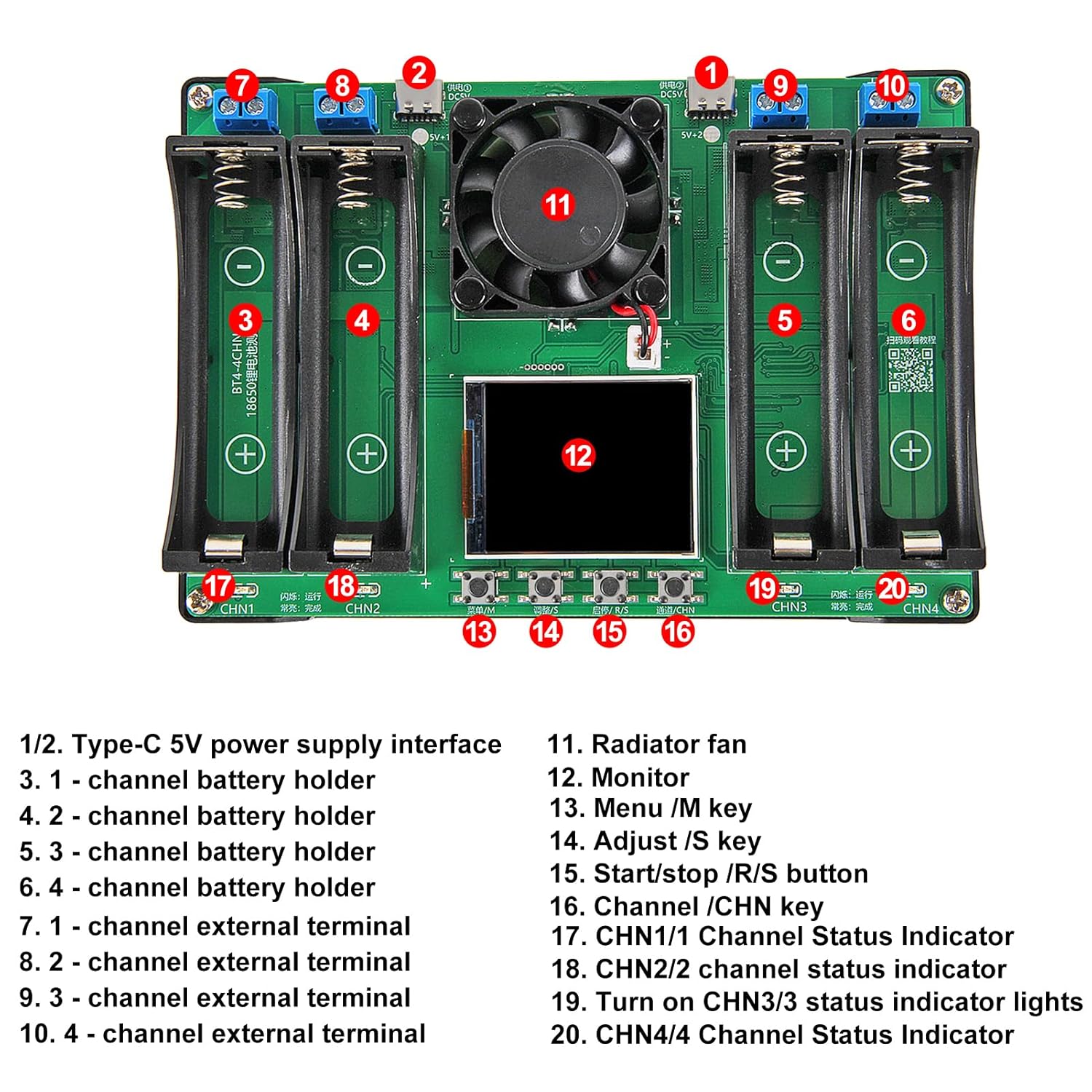
Figura 4: Display and control buttons. This image provides a detailed view of the tester's screen and the four control buttons located below it, used for navigation and operation.
5.1. Basic Navigation and Channel Selection
- Use o Channel /CHN Key (16) to switch between the four independent channels (CHN 1 to CHN 4).
- O Menu /M Key (13) is used to enter or exit menu settings.
- O Adjust /S Key (14) is used to change values or select options within a menu.
- O Start/Stop /R/S Button (15) initiates or terminates a test cycle.
5.2. Automatic Charge and Discharge Cycles
The tester supports fully automatic charging and discharging cycles (1-9 cycles adjustable in auto mode).
- Selecione o canal desejado usando o Channel /CHN Key.
- Pressione o Menu /M Key para entrar na seleção de modo.
- Use o Adjust /S Key to select 'AUTO' mode.
- Adjust the number of cycles (LOOP: 1-9) using the Adjust /S Key se necessário.
- Pressione o Start/Stop /R/S Button to begin the automatic cycle. The charging process automatically stops when the battery is full.
5.3. Internal Resistance Measurement
The device utilizes the DC two-wire method to provide reference internal resistance values.
- For the most accurate reading, measure internal resistance when the battery is fully charged.
- The internal resistance value is displayed as 'mR' on the screen (5).
5.4. Setting Stop Discharge Voltage
You can choose from 11 stop-discharge voltage levels (2.5V to 3.5V).
- Selecione o canal desejado.
- Enter the menu using the Menu /M Key.
- Navigate to the 'STOP' voltage configuração.
- Use o Adjust /S Key to select the desired stop discharge voltage (2.5V, 2.6V, ..., 3.5V).
- Confirme a configuração e saia do menu.
5.5. Notas importantes sobre o uso
- Discharge current is fixed at a maximum of approximately 1A (non-adjustable, non-constant current).
- Vol. De cargatage é fixado em 4.2V.
- This tester is não compatível with LiFePO4 batteries.
6. Informações de segurança
The device incorporates several safety features to ensure safe operation:
- Proteção contra superaquecimento: The integrated radiator fan (11) and internal sensors help prevent the device from overheating during operation.
- Desligamento automático: Settings are automatically saved in case of power loss.
- Charge Cutoff: Automatic charge cutoff prevents overcharging of batteries.
- Parada de descarga: Configurable stop discharge voltage prevents over-discharging.
Always ensure correct battery polarity when inserting batteries to prevent damage to the device or batteries.
7. Manutenção
- Mantenha o dispositivo limpo e livre de poeira. Use um pano macio e seco para a limpeza.
- Avoid exposing the tester to moisture or extreme temperatures.
- Ensure the cooling fan (11) is not obstructed to maintain proper airflow.
- Guarde o dispositivo em local seco e fresco quando não estiver em uso.
8. Solução De Problemas
- Internal Resistance Readings Appear High at Low Voltagé: If internal resistance readings seem unusually high, reinstall the battery. This can often provide a more accurate measurement.
- Dispositivo não liga: Ensure the Type-C power cable is securely connected to a functional 5V DC power source. Try a different cable or adapter if necessary.
- Battery Not Detected: Verify that the battery is correctly inserted with the correct polarity and that it is a compatible 18650 flat-top lithium battery.
9. Especificações
| Recurso | Especificação |
|---|---|
| Marca | Shutao |
| Modelo | B0FSZYNBRH |
| Compatibilidade da bateria | 18650 Flat-Top Lithium Batteries (Not compatible with LiFePO4) |
| Canais | 4 canais independentes |
| Entrada de energia | Dual Type-C, DC 5V |
| Vol de cargatage | Fixo 4.2V |
| Corrente de descarga | Max ~1A (Fixed, non-adjustable, non-constant current) |
| Stop Discharge Voltage | Adjustable (2.5V to 3.5V, 11 levels) |
| Ciclos Automáticos | 1-9 cycles (Adjustable in AUTO mode) |
| Teste de Resistência Interna | DC Two-Wire Method |
| Componentes incluídos | Battery capacity tester module |
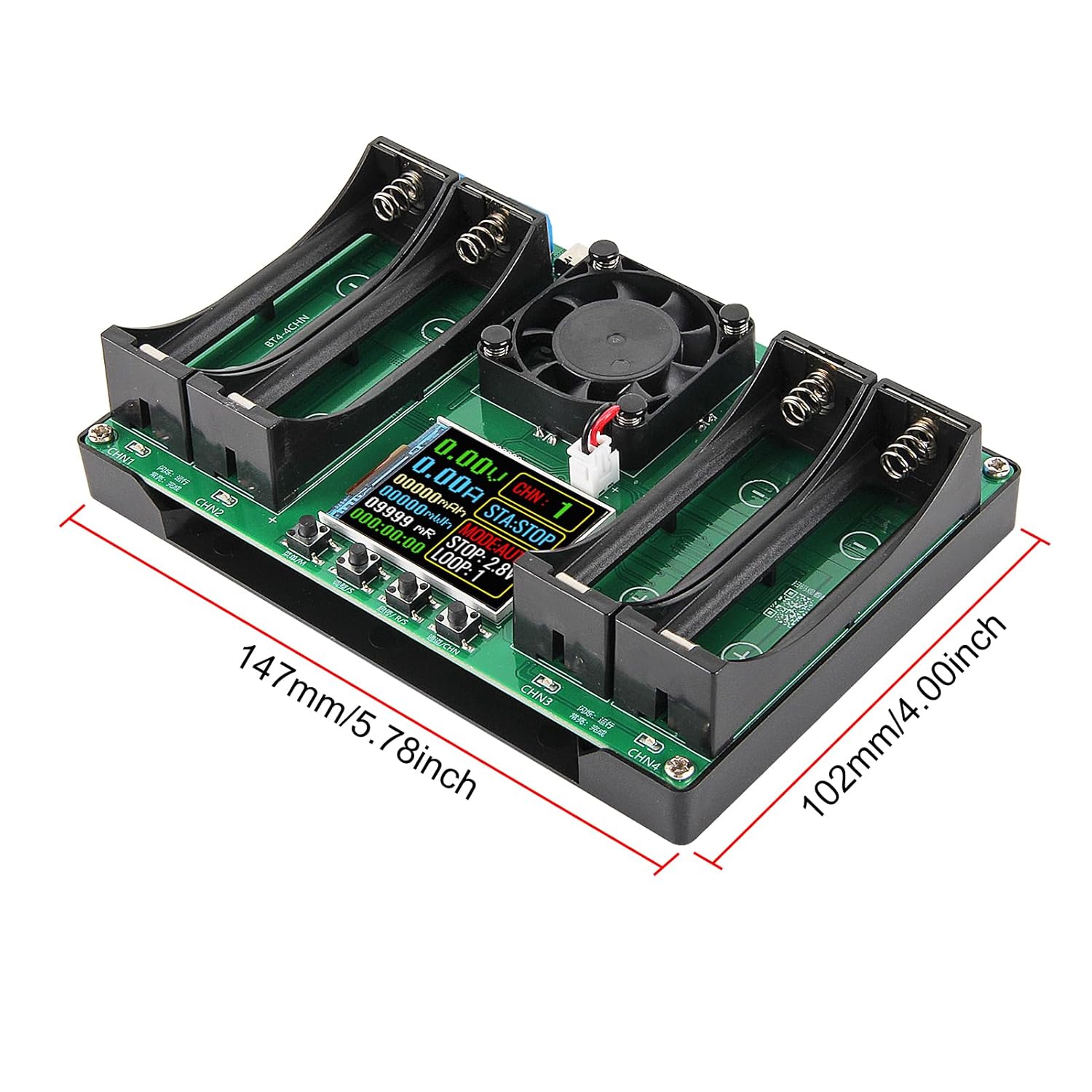
Figura 5: Device dimensions. This image shows the length and width of the tester, indicating measurements of 147mm (5.78 inches) and 102mm (4.00 inches).
10. Garantia e Suporte
For warranty information and technical support, please refer to the seller's policies or contact the manufacturer directly. Specific warranty details are not provided in this manual.