
Introdução
This manual provides essential information for the safe and effective operation of your Radioddity FS-T8 FRS Two-Way Radio. Please read this manual thoroughly before using the device and retain it for future reference. The Radioddity FS-T8 is a Family Radio Service (FRS) device designed for clear, long-range communication, suitable for various outdoor activities and family use.
Conteúdo da embalagem
Upon unpacking, please ensure all items listed below are present and in good condition. If any items are missing or damaged, please contact Radioddity customer support.
- 4 x Radioddity FS-T8 Two-Way Radios
- 4 baterias recarregáveis (2000mAh)
- 4 x cabos de carregamento USB-C
- 4 x Belt Clips
- 4 x Cordões
- 4 x Compasses
- 4 x Badges
- Sticker Sheets
- Manual do usuário
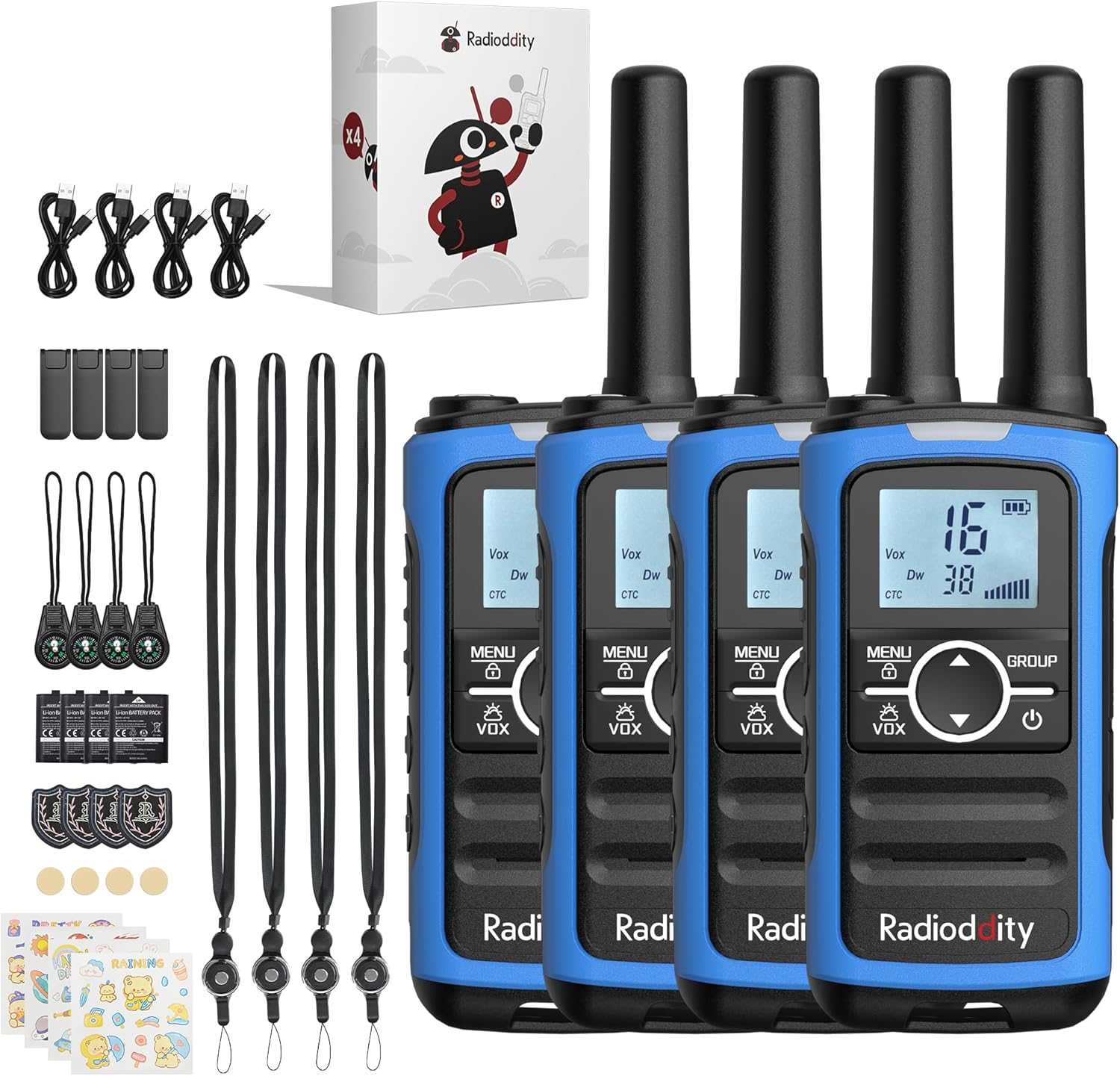
Image: A complete set of Radioddity FS-T8 walkie talkies and their accessories, laid out on a surface.
Produto acimaview
The Radioddity FS-T8 features a compact design with an easy-to-read backlit digital display. It includes essential functions for reliable communication and safety.

Image: A close-up of the Radioddity FS-T8 walkie talkie, highlighting its digital display and main control buttons.
Configurar
Instalação e carregamento da bateria
The FS-T8 radios come with 2000mAh rechargeable batteries. They are also compatible with 3xAA batteries (not included) for backup power.
- To install the rechargeable battery, remove the battery compartment cover on the back of the radio.
- Insert the 2000mAh rechargeable battery pack, ensuring correct polarity.
- Recoloque a tampa do compartimento da bateria.
- To charge, connect the USB-C charging cable to the radio's USB-C port and a compatible 5V USB power adapter (not included). A full charge takes approximately 2 hours and provides up to 48 hours of continuous talk time.
- For AA battery use, open the compartment and insert 3xAA batteries, observing polarity.

Image: An illustration showing the USB-C charging port on the Radioddity FS-T8 and the option for both rechargeable and AA batteries.
Anexando acessórios
Each radio includes a belt clip and a lanyard for convenient carrying. The lanyard can be attached to either the top or bottom loop on the radio.
- Fivela do cinto: Slide the belt clip into the slot on the back of the radio until it clicks into place.
- Corda: Thread the lanyard loop through the desired attachment point (top or bottom) on the radio and secure it.
- Bússola: The included compass can be attached to the lanyard. Avoid attaching the compass directly to the radio's magnetic areas, as this may affect its accuracy.
Instruções de operação
Ligar/Desligar
To power on or off the radio, press and hold the Poder button (usually marked with a power symbol) until the display lights up or turns off.
Seleção de canais
The FS-T8 features 22 FRS channels. To select a channel:
- Pressione o MENU Pressione o botão uma vez. O número do canal piscará.
- Use o Up or Abaixo Use as setas para selecionar o canal desejado.
- Pressione o MENU button again to confirm your selection, or wait a few seconds for it to auto-confirm.
Group Call Function
The One-Key Group Call feature allows instant communication with all other FS-T8 radios within range, regardless of their current channel setting. This is ideal for ensuring everyone hears important messages.
- To initiate a group call, press and hold the GRUPO botão.
- Fale claramente no microfone.
- Solte o GRUPO botão para ouvir.

Image: A visual representation of the group call feature, demonstrating its ease of use in an outdoor family setting.
VOX (Transmissão Operada por Voz)
The VOX function allows for hands-free communication. When activated, the radio will transmit automatically when it detects your voice.
- To activate/deactivate VOX, press the MENU button multiple times until the VOX icon flashes.
- Use o Up or Abaixo arrow buttons to select a VOX sensitivity level (1-3, with 3 being most sensitive) or 'OFF'.
- Imprensa MENU para confirmar.
Bloqueio do teclado
Para evitar alterações acidentais nas configurações, você pode bloquear o teclado.
- Para bloquear o teclado, pressione e segure o MENU botão até que o ícone de cadeado apareça no display.
- Para desbloquear, pressione e segure o MENU Pressione o botão novamente até que o ícone de cadeado desapareça.
Canais meteorológicos NOAA
Stay informed about hazardous weather conditions with the integrated NOAA weather channels.
- To access NOAA weather channels, press the MENU button until the NOAA icon appears.
- Use o Up or Abaixo arrow buttons to scan through the 11 available NOAA channels. The radio will automatically select the strongest signal.
- Imprensa MENU to exit NOAA mode.

Image: The Radioddity FS-T8 showing its NOAA weather channel feature, providing critical weather alerts.
Flashlight and SOS Alert
The FS-T8 includes a built-in flashlight and an SOS alert function for emergencies.
- To turn on/off the flashlight, press the dedicated Lanterna button on the side of the radio.
- To activate the SOS alert, press and hold the SOS button (often combined with the flashlight button or a separate dedicated button). The flashlight will flash in an SOS pattern, and an audible alert may sound.
Desempenho de alcance
The effective communication range varies based on terrain and obstructions:
- Up to 3 miles in open areas with minimal obstructions.
- Approximately 1 mile in semi-obstructed zones (e.g., light foliage, scattered buildings).
- Up to 547 yards in heavily obstructed urban environments.

Image: A graphic illustrating the varying communication ranges of the FS-T8 in different types of terrain.
Manutenção
Limpeza
To maintain your radio's performance and appearance:
- Limpe o rádio com um pano macio, damp pano.
- Não use produtos químicos fortes ou produtos de limpeza abrasivos.
- Certifique-se de que todas as portas estejam secas antes de carregar.
Cuidados com a bateria
- Carregue as baterias completamente antes da primeira utilização.
- Avoid overcharging or completely draining the rechargeable batteries.
- Se estiver usando pilhas AA, remova-as caso o rádio não seja usado por um longo período para evitar vazamentos.
Solução de problemas
| Problema | Possível causa | Solução |
|---|---|---|
| Sem energia | Bateria fraca ou mal instalada. | Charge the rechargeable battery or replace AA batteries. Ensure batteries are installed with correct polarity. |
| Não consigo me comunicar com outros rádios. | Canais diferentes ou códigos de privacidade. Fora do alcance. | Ensure all radios are on the same channel and privacy code. Use the Group Call function. Move closer to other radios. |
| Má qualidade de áudio | Weak signal. Obstructions. | Move to an area with fewer obstructions. Check battery level. |
| Teclado sem resposta | O teclado está bloqueado. | Desbloqueie o teclado pressionando e mantendo pressionado o botão MENU. |
Especificações
| Recurso | Detalhe |
|---|---|
| Marca | Radiodade |
| Número do modelo | FS-T8 (QYWRFTB01) |
| Faixa de frequência | FRS |
| Número de canais | 22 |
| Alcance máximo de fala | 3 milhas (sem obstruções) |
| Tipo de Bateria | 2000mAh Rechargeable (included), 3xAA (not included) |
| Vida média da bateria | Até 48 horas |
| Carregando | USB-C (5V only) |
| Características especiais | Integrated Flashlight, NOAA Weather Channels, One-Key Group Call, SOS Alarm, VOX (Voice Operated Transmission), Keypad Lock, 131 Privacy Codes |
| Nível de resistência à água | Não resistente à água |
| Dimensões do produto | 1.18"P x 1.9"L x 5.9"A |
| Peso do item | 0.3 libras |
| Identificação da FCC | 2AN62-T8 |
Garantia
The Radioddity FS-T8 FRS Two-Way Radio comes with a 19-month warranty from the date of purchase. This warranty covers manufacturing defects and malfunctions under normal use. Please retain your proof of purchase for warranty claims. For detailed warranty terms and conditions, please visit the official Radioddity website ou entre em contato com o suporte ao cliente.
Apoiar
For further assistance, technical support, or to inquire about replacement parts, please contact Radioddity customer service through the following channels:
- On-line: Visit the official Radioddity webSite com perguntas frequentes, artigos de suporte e formulários de contato.
- E-mail: Consulte a embalagem do produto ou o manual oficial. website para o endereço de e-mail de suporte ao cliente.
Please have your model number (FS-T8) and purchase information ready when contacting support.