
1. Introdução
The KAPBOM KAPX330B WiFi Signal Repeater is designed to extend the coverage of your wireless network. This device eliminates dead zones and ensures a stable connection throughout your home or office. With simple and intuitive installation, the KAPX330B allows you to enjoy a stronger and more consistent connection in areas where the main router's signal is weak. It is suitable for multi-story residences or commercial environments, helping to keep your devices connected efficiently. The KAPBOM KAPX330B model is compatible with most routers, offering a versatile solution to improve your browsing experience. Expand your WiFi network range and eliminate areas without coverage with this practical and efficient signal repeater.

Imagem 1.1: The KAPBOM KAPX330B WiFi Repeater helps extend network coverage, allowing multiple devices to stay connected throughout your space.
2. Recursos do Produto
- Ampla cobertura: The KAPBOM KAPX330B WiFi Amplifier extends internet signal to areas with weak or no coverage in your residence.
- Instalação simples: Easily configure the repeater through its intuitive interface, without requiring advanced technical knowledge.
- Compatibilidade Universal: Works with any WiFi router and internet provider, allowing connection with multiple devices simultaneously.
- Velocidade otimizada: Improves connection speed and stability in areas previously with weak or non-existent signal.
- Design compacto: Discreet and practical form factor that plugs directly into an outlet, without occupying additional space.
3. Conteúdo da embalagem
Por favor, verifique se a embalagem contém os seguintes itens:
- KAPBOM KAPX330B WiFi Repeater Unit
- Cabo Ethernet
- Manual do usuário (este documento)
4. Guia de configuração
Follow these steps to set up your KAPBOM KAPX330B WiFi Signal Repeater:
- Plug In the Repeater: Plug the KAPBOM KAPX330B directly into a power outlet in an area with a good signal from your main router, but also close enough to the area where you need extended coverage.
- Wait for Power On: Wait for the Power LED indicator on the repeater to light up, indicating it has successfully powered on.
- Connect to the Repeater's WiFi: On your computer or smartphone, search for available WiFi networks. Connect to the network named "Wireless-N" or similar (check the label on your device for the default SSID). No password is required for the initial connection.
- Acesse o Web Interface: Abra um web navegador (por exemplo, Chrome, Firefox) e insira o endereço IP padrão. 192.168.10.1 na barra de endereço. Pressione Enter.
- Conecte-se: Quando solicitado, insira o nome de usuário e a senha padrão, que normalmente são administrador para ambos.
- Selecione o modo repetidor: Once logged in, navigate to the "Repeater Mode" or "Wireless Repeater Wizard" section.
- Procurar redes: The repeater will scan for available WiFi networks. Select your main home or office WiFi network from the list.
- Enter Main WiFi Password: Enter the password (security key) for your main WiFi network.
- Configure Extended Network (Optional): You can choose to keep the same network name (SSID) as your main router or create a new one for the extended network (e.g., "MyHome_EXT").
- Apply Settings and Restart: Save the settings and allow the repeater to restart. This process may take a few minutes.
- Verifique a conexão: Once the repeater has restarted, disconnect from its default WiFi and connect to your main or extended WiFi network. Check if you have internet access in the previously weak signal areas.
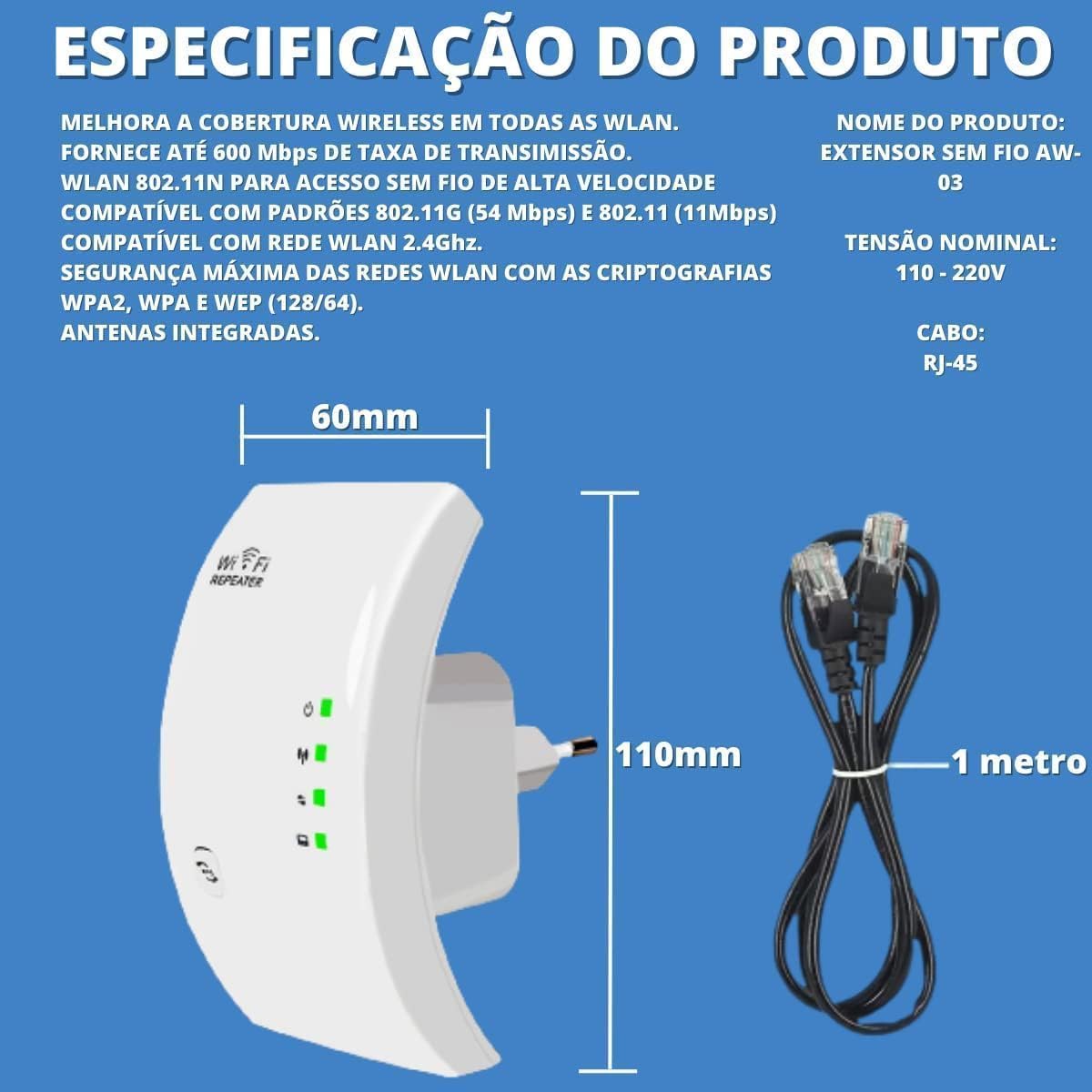
Imagem 4.1: The KAPBOM KAPX330B WiFi Repeater connected to power and an Ethernet cable, illustrating its compact design and connectivity options.
4.1 vídeo: Um fimview of a WiFi Repeater, demonstrating its physical features and basic connectivity. This video is provided by a seller and shows a similar device in action.
5. Modos de operação
The KAPBOM KAPX330B typically supports multiple operating modes to suit various network requirements:
- Repeater Mode (Default): Extends the coverage of an existing wireless network. It receives the wireless signal from your main router and re-transmits it, effectively doubling the coverage area. This is the primary function for eliminating WiFi dead zones.
- Modo AP (Ponto de Acesso): Converts a wired network connection into a wireless one. If you have an Ethernet port available, you can connect the repeater via an Ethernet cable, and it will create a new wireless network for your devices.
- Modo roteador: Functions as a basic router, creating a private network from a DSL or cable modem connection. This mode is less common for compact repeaters but may be available for certain models.
Consulte o manual do dispositivo. web interface for specific instructions on how to switch between these modes.
6. Indicadores LED
The KAPBOM KAPX330B features several LED indicators to show its status:
- Power LED (⑁):
- Verde sólido: O dispositivo está ligado e funcionando normalmente.
- Desligado: O dispositivo está desligado.
- WiFi/Signal LED (📶):
- Verde sólido: Connected to the main WiFi network with a good signal.
- Piscando: Attempting to connect or signal is weak.
- Desligado: Not connected to a WiFi network.
- WPS LED (WPS):
- Piscando: Conexão WPS em andamento.
- Verde sólido: WPS connection successful.
- Desligado: WPS not active or failed.
- LAN LED (💻):
- Verde sólido: An Ethernet cable is connected and active.
- Piscando: Data is being transmitted via the Ethernet port.
- Desligado: No Ethernet cable connected or no activity.
7. Solução De Problemas
If you encounter issues with your KAPBOM KAPX330B WiFi Signal Repeater, please refer to the following common solutions:
- Sem acesso à internet após a configuração:
- Certifique-se de que o repetidor esteja dentro do alcance do seu roteador principal.
- Verify that the password entered for your main WiFi network during setup is correct.
- Restart both your main router and the repeater.
- Try resetting the repeater to factory defaults (using the reset button) and re-configure it.
- Weak Signal from Repeater:
- Relocate the repeater to a position halfway between your main router and the area with weak signal. Avoid placing it near large metal objects, concrete walls, or other electronic devices that may cause interference.
- Ensure the main router's signal is strong where the repeater is placed.
- Não é possível acessar Web Management Page (192.168.10.1):
- Ensure your device is connected to the repeater's WiFi network (default SSID like "Wireless-N").
- Limpe o cache e os cookies do seu navegador ou tente usar um navegador diferente.
- Desative temporariamente qualquer software de VPN ou firewall em seu computador.
- Verify the IP address is typed correctly.
- WPS Connection Fails:
- Ensure your main router supports WPS and that it is enabled.
- Press the WPS button on your router, then immediately press the WPS button on the repeater within two minutes.
- Se o WPS continuar falhando, use o web interface method for setup.
8. Especificações
| Recurso | Detalhe |
|---|---|
| Modelo | KAPX330B |
| Marca | KAPBOM |
| padrão sem fio | 802.11bgn |
| Taxa de transferência de dados | Até 300 Mbps |
| Banda de frequência | 2.4 GHz (Banda Única) |
| Fonte de energia | Electric Current (Plug-in) |
| Dispositivos compatíveis | Personal Computer, Laptops, Smart TVs, Smartphones, Tablets |
| Dimensões (C x L x A) | 6 x 8.5 x 14 cm |
| Peso | 200 g |
| Segurança | WPA2, WPA, WEP (128/64) |
| Integrated Antennas | Sim |
Imagem 8.1: A visual representation of the KAPBOM KAPX330B WiFi Repeater, highlighting its dimensions and key features.
9. Garantia e Suporte
The KAPBOM KAPX330B WiFi Signal Repeater comes with a manufacturer's warranty. Please refer to the product packaging or the official KAPBOM website para obter termos e condições detalhados da garantia.
For technical support or further assistance, please contact your retailer or the manufacturer's customer service as indicated on the product packaging or official website.